Godot: Pls set contact monitoring in rigibodies to 1 by default
Hi, I'm a new godot user and I always forget a lot to set contact monitoring to on and to at least 1 contact monitoring everytime I make a new rigidbody.
Is very frustrating to not know what to do, specially if you're a new user.
 ca3games
All 10 comments
Isn't it a performance problem if it's on by default and a lot of people would forget about it, making their games slower by default? I'm not sure, correct me if I'm wrong.
 TomDobbelaere
on 4 Apr 2018
TomDobbelaere
on 4 Apr 2018
@TomDobbelaere seems to be right as the docs are quite clear about that:
By default, rigid bodies do not keep track of contacts, because this can require a huge amount of memory if many bodies are in the scene.
As far as I know settings that can have a huge impact on performance are deactivated by default (like CCD) and I really like this approach as long as these options are explained in the docs.
So it would be nice to know...
- ... if the memory requirements changed in the meantime (because of optimizations)
- ... if the approach of keeping things deactivated by deafult and pointing new users to the docs is still the way to go
_Disclaimer: I almost never use contact-monitoring for rigidbodies so I might be biased. I can see the benefits of activating it by default but I have less concerns about dealing with the current situation._
Rereading the issue title I get the feeling that maybe I misunderstood the proposal. @ca3games was your intention to set the contacts_reported member to 1 by default? This would make much sense.
 pwab
on 9 Apr 2018
pwab
on 9 Apr 2018
Now that I think, I guess a warning in the editor could be enough to remind you the collider wont detect collisions.
ca3games
on 6 May 2018
Please turn Contact Monitor on by default. Favor usability and intuitiveness over micro-optimizations. If someone needs that micro-optimization, they are probably at a state in their game where they can look to disable stuff like that. It's little stuff like this that turns away beginners.
I did a performance benchmark with over 1000 rigid bodies bouncing on top of themselves with contact monitor on and 10 contacts being reported versus no contact monitor and 0 contracts being reported and the performance difference was virtually non-existent.
Another example was when the set_process function became no longer necessary to get the _process function to work with the advent of version 3.0. Similarly, can't Godot check to see if there are any signals connected from the RigidBody, and automatically enable or disable Contact Monitor by default if the performance consideration is really something we're worried about?
 Oranjoose
on 18 Dec 2018
Oranjoose
on 18 Dec 2018
Hey @Oranjoose could you please provide your performance benchmark so I am able to confirm your observations with my hardware? If the impact is really that minimal it could be activated by default.
pwab
on 7 Jan 2019
@pwab I created an isolated project with the performance benchmark and actually there is quite a difference in performance between contact_monitor being on or off. I think what happened in the old benchmark was that I have code that automatically turns on contact_monitor if there is a signal attached, so I think I was inadvertently turning it on in that case. Anyways, I attached the performance benchmark if you want to try it. contacts_reporting_performance_test.zip
Even so, why can't Godot check if the body_entered signal is connected on the RigidBody, and automatically enable contact_monitor if so, similar to how set_process became unnecessary with Godot 3.0? It seems there are predictable times when the dev would always want contact_monitor on and always want contact_monitor off.
Oranjoose
on 7 Jan 2019
why can't Godot check if the body_entered signal is connected on the RigidBody, and automatically enable contact_monitor
Because you can also trigger contact_monitor by using get_colliding_bodies(), in which case it would have to return an empty array the first time it is hit, and that would be pretty jarring.
 bojidar-bg
on 7 Jan 2019
bojidar-bg
on 7 Jan 2019
Here is a profiler graph of the performance benchmark:
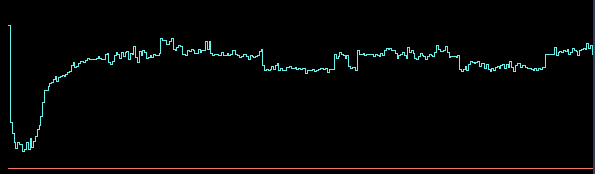
Can you spot where I toggled contact monitor on/off by pressing "Enter"? I seem to have done it around 5 times during the benchmark.
On my machine, the difference is on the order of 0.02 seconds per 1024 bodies, so around 0.019 ms per body. I think this might be low enough as to enable it by default.
bojidar-bg
on 7 Jan 2019
If we enable this by default in 4.0, should we also remove the contact monitoring property entirely? The maximum number of contacts could be set to 0 when you need to disable it.
 Calinou
on 21 Dec 2019
Calinou
on 21 Dec 2019
Feature and improvement proposals for the Godot Engine are now being discussed and reviewed in a dedicated Godot Improvement Proposals (GIP) (godotengine/godot-proposals) issue tracker. The GIP tracker has a detailed issue template designed so that proposals include all the relevant information to start a productive discussion and help the community assess the validity of the proposal for the engine.
The main (godotengine/godot) tracker is now solely dedicated to bug reports and Pull Requests, enabling contributors to have a better focus on bug fixing work. Therefore, we are now closing all older feature proposals on the main issue tracker.
If you are interested in this feature proposal, please open a new proposal on the GIP tracker following the given issue template (after checking that it doesn't exist already). Be sure to reference this closed issue if it includes any relevant discussion (which you are also encouraged to summarize in the new proposal). Thanks in advance!
 madmiraal
on 7 Jun 2020
madmiraal
on 7 Jun 2020
Related issues
 timoschwarzer
·
3Comments
timoschwarzer
·
3Comments
 testman42
·
3Comments
testman42
·
3Comments
 blurymind
·
3Comments
blurymind
·
3Comments
 SleepProgger
·
3Comments
SleepProgger
·
3Comments
 RayKoopa
·
3Comments
RayKoopa
·
3Comments
Most helpful comment
Here is a profiler graph of the performance benchmark:

Can you spot where I toggled contact monitor on/off by pressing "Enter"? I seem to have done it around 5 times during the benchmark.
On my machine, the difference is on the order of 0.02 seconds per 1024 bodies, so around 0.019 ms per body. I think this might be low enough as to enable it by default.