Godot: Imported 3D model vertex positions suffer increasing distortion the further they are from the origin.
Godot version:
3.0.2
OS/device including version:
Manjaro Linux 17.1.6
Issue description:
A model imported in to Godot that has vertices with floating point positions will shift slightly, 0.433 ends up being 0.4329.
I am using 3D tiles and so this ends up causing small visible seams or cracks in the terrain. I can currently fix this by either rounding the vertex positions or by iterating through all the vertices and snapping them.
I have tried exporting the models from Blender using Better Callada, OBJ, and glTF with the same result. Checking the OBJ file and it contains the correct/exact vertex positions.
Steps to reproduce:
Import a model in to Godot that contains vertices with a floating point value such as 0.433.
Check the vertex positions of the imported mesh and you will find they have shifted slightly.
UPDATE
This issue is worse than I had thought, the further a meshes vertex is from it's origin the worse it suffers position distortion, see new comment below. I also updated the title.
 K9Kraken
All 3 comments
This is not limited to imported tiles - I am seeing the same minuscule cracks with geometry generated in editor. @K9Kraken thanks for making the issue, I wondered why they would happen and now I know!
 Zireael07
on 28 Mar 2018
Zireael07
on 28 Mar 2018
Did a few more tests and this issue is defiantly related to the SurfaceTool bug here: https://github.com/godotengine/godot/issues/17307
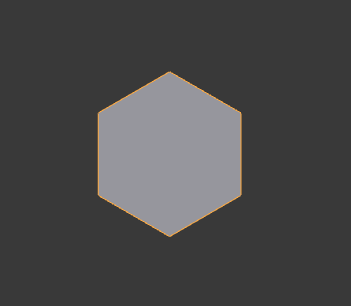
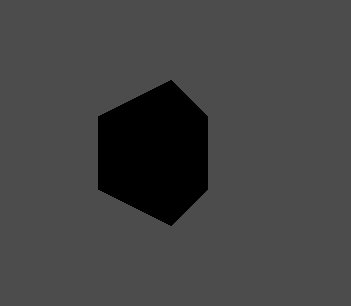
The further a vertex is from the origin the worse the distortion gets, this happens for imported models and models created with SurfaceTool; Geometry drawn with ImmediateGeometry does not suffer from this bug.
I created a hexagon in blender with the vertices 500 units from the origin on the x axis.
Here are the vertices in the exported obj file (They match the vertices in Blender):
(500.000000, 0.000000, 0.500000)
(500.000000, 0.000000, -0.500000)
(499.566986, 0.000000, -0.250000)
(500.433014, 0.000000, -0.250000)
(500.000000, 0.000000, -0.000000)
(499.566986, 0.000000, 0.250000)
(500.433014, 0.000000, 0.250000)
Here is the vertex array of the model after it is imported in to Godot:
(500, 0, 0)
(499.5, 0, -0.25)
(500, 0, -0.5)
(499.5, 0, 0.25)
(500.25, 0, 0.25)
(500.25, 0, -0.25)
(500, 0, 0.5)
The order of the vertices does not matter, but you can see some values are slightly distorted while others are highly distorted; as the distance increases the distortion gets worse.
This is how the model looks in blender or drawn with ImmediateGeometry in Godot:
This is how the model looks when imported in to Godot or created with SurfaceTool:
K9Kraken
on 8 May 2018
this is now fixed, it had to do with default compression using 16 bits vertices. It was removed.
 reduz
on 7 Sep 2018
reduz
on 7 Sep 2018
Related issues
 blurymind
·
3Comments
blurymind
·
3Comments
 mefihl
·
3Comments
mefihl
·
3Comments
 EdwardAngeles
·
3Comments
EdwardAngeles
·
3Comments
 n-pigeon
·
3Comments
n-pigeon
·
3Comments
 RayKoopa
·
3Comments
RayKoopa
·
3Comments
Most helpful comment
This is not limited to imported tiles - I am seeing the same minuscule cracks with geometry generated in editor. @K9Kraken thanks for making the issue, I wondered why they would happen and now I know!