Godot: Add engine.js function to override file name extensions
**Godot version:2.14||3.0
**OS/device including version:html
Issue description:
Hi everyone, I am a godot developer
In my country (China)
Want to release a html5 game to the platform
The required suffix name format must be the following
htm,html,js,css,jpg,jpeg,gif,png,mp3,ogg,m4a,xml,csv,dat,atf,json,plist,wav,thm,fnt,exportjson,ttf,tmx,exml,datagz,jsgz,memgz。
However, godt 2.1 comes packaged with .pck and .mem
3.0 packaged with .pck and .wasm
I tried changing mem's suffix name to .dat and then loading .mem in index.js and index.html. I've changed it. But once I change .pck, it won't work.
Change .wasm to another extension such as .dat in index.js .wasm to .dat can also be run
But not pck
Is there any way to not use pck file or replace it
Steps to reproduce:
Minimal reproduction project:
 KylaCpper
All 6 comments
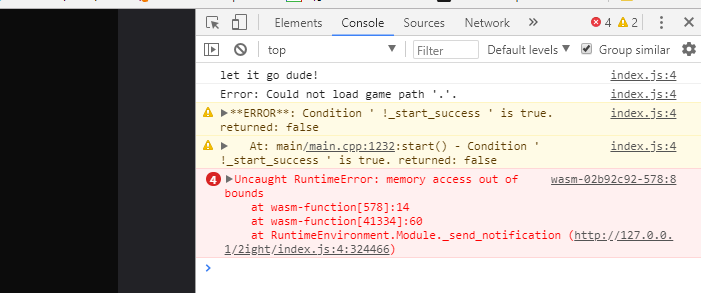
Pck file name changed after running, reported error(3.0)
KylaCpper
on 22 Mar 2018
First of all, some workarounds:
With 2.1.4 or earlier:
in
index.html, changeindex.memto e.g.index.mem.datand renameindex.memaccordingly.in
indexfs.js, change only the first occurrence ofdata.pckto e.g.data.pck.datand renamedata.pckaccordingly, e.g.:fetchRemotePackage('data.pck.dat', function(data) {
With 2.1.5 or newer, godotfs.js is gone, so:
in
index.html, (just like in 2.1.4,) changeindex.memto e.g.index.mem.datand renameindex.memaccordinglyalso in
index.html, change only the second occurrence ofdata.pckto e.g.data.pck.datand renamedata.pckaccordingly, e.g.:Module.FS.createPreloadedFile('/data.pck', null, 'data.pck.dat', true, true, null, null, false, true);
With 3.0:
in
index.js, change'.wasm'to the desired file name extension, e.g.:engineLoadPromise = loadPromise(basePath + '.wasm.dat').then(function(xhr) {
a custom
.pckcan be loaded using the standard API in the.htmlfile, change:engine.startGame(BASENAME + '.pck').then(() => {
to:
const MAIN_PACK = BASENAME + '.pck.dat';
Promise.all([Engine.load(BASENAME), engine.preloadFile(MAIN_PACK)]).then(() => {
engine.start('--main-pack', MAIN_PACK);
}).then(() => {
 leonkrause
on 24 Mar 2018
leonkrause
on 24 Mar 2018
I understand that .pck can be an issue since it's a custom Godot format. That's why I added a Promise-based JavaScript API in 3.0 to give more control, like in the example above where we manually load the file and specify it as the main pack per argv.
But .wasm is a standard format, web game portals need to add support for this. WebAssembly is quickly becoming the default target for web games. The WebAssembly.instantiateStreaming() function, used for fast start-up, in fact requires a correct MIME-type, so having a correct file name extension is vital.
Can you say what web game platform this is? Does it have a large user-base?
leonkrause
on 24 Mar 2018
@eska014
Thank you very much
I do as you say ,Succeeded
You solved my big problem
The platform I am talking about is 4399 (www.4399.com)and Don't know if you can access
This platform is mainly for small games ,It used to be a platform for flash games,Profit from advertising,
There are many Chinese people and the proportion of netizens is high,Income is good
Actually, I originally wanted to release steam,but steam to pay 100 US dollars
4399 is free
Sorry, my English is not good
KylaCpper
on 28 Mar 2018
Most of the people around me are using (u3d, cocos, etc.)
Almost nobody uses Godot, I hope more and more people will know Godot.
There are many users in China and the market is very large.
I used unity3d before and found that the godot works well
If you can come to China for publicity,
Absolute effect is very good
KylaCpper
on 28 Mar 2018
You're welcome, glad I could help.
This is a legitimate issue, so I'll add an API to override file name extensions, at least for 3.0
leonkrause
on 30 Mar 2018
Related issues
 EdwardAngeles
·
3Comments
EdwardAngeles
·
3Comments
 testman42
·
3Comments
testman42
·
3Comments
 Spooner
·
3Comments
Spooner
·
3Comments
 bojidar-bg
·
3Comments
bojidar-bg
·
3Comments
 n-pigeon
·
3Comments
n-pigeon
·
3Comments
Most helpful comment
First of all, some workarounds:
With 2.1.4 or earlier:
in
index.html, changeindex.memto e.g.index.mem.datand renameindex.memaccordingly.in
indexfs.js, change only the first occurrence ofdata.pckto e.g.data.pck.datand renamedata.pckaccordingly, e.g.:fetchRemotePackage('data.pck.dat', function(data) {
With 2.1.5 or newer,
godotfs.jsis gone, so:in
index.html, (just like in 2.1.4,) changeindex.memto e.g.index.mem.datand renameindex.memaccordinglyalso in
index.html, change only the second occurrence ofdata.pckto e.g.data.pck.datand renamedata.pckaccordingly, e.g.:Module.FS.createPreloadedFile('/data.pck', null, 'data.pck.dat', true, true, null, null, false, true);
With 3.0:
in
index.js, change'.wasm'to the desired file name extension, e.g.:engineLoadPromise = loadPromise(basePath + '.wasm.dat').then(function(xhr) {
a custom
.pckcan be loaded using the standard API in the.htmlfile, change:engine.startGame(BASENAME + '.pck').then(() => {
to:
const MAIN_PACK = BASENAME + '.pck.dat';
Promise.all([Engine.load(BASENAME), engine.preloadFile(MAIN_PACK)]).then(() => {
engine.start('--main-pack', MAIN_PACK);
}).then(() => {