Godot: Problems in User Interface (HBoxContainer/VBoxContainer)

OS/gpu not related
These container are not working properly.
I tried a structure like this:
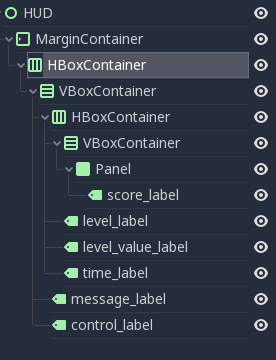
And I have difficulty to set-up all these. When I use menu "Layout->Full Rect", for example, In some containers it don't work.
To reproduce it is enough to have the tree as in picture and to try to apply "Full Rect" in all child.
When you try to apply "Full Rect" in some leaf you understand what i mean.
ps.: I tried other options from "Layout" menu and several of them show same problem.
Thank you.
 git2013vb
All 12 comments
It would be nice if you could describe what the actual issue is. Or at least provide a ready-to-test example with the above structure. Asking devs to reproduce exactly the node structure you post from a screenshot to maybe see if they notice a problem is not very efficient.
 akien-mga
on 21 Feb 2018
akien-mga
on 21 Feb 2018
I guess what @git2013vb tried to do.
I think we need tutorials about the Container nodes.
we do have one but outdated.
http://docs.godotengine.org/en/3.0/tutorials/gui/size_and_anchors.html
Tutorial of containers should describe anchor, margin, size flags and auto size and alignment with some of containers.
 volzhs
on 21 Feb 2018
volzhs
on 21 Feb 2018
We can disable or hide the anchor, size, and margin after refact the PropertyEditor in the roadmap.
Put real controls in the property editor, instead of actual Tree. Convert most editors to that format
 Geequlim
on 21 Feb 2018
Geequlim
on 21 Feb 2018
@volzhs Is a problem not a lack of documentation :) Even because If I apply "Full Rect" I expect same behavior in any node. Now his behavior ["Full Rect" and other commands from same menu] is erratic
here the tree:
HUD.zip
to try it is simple. Try to apply "Full Rect" to any node from the root until last leaf.
@akien-mga ps.: its more difficult to copy-paste here that make a new one in godot ;)
Thank you.
git2013vb
on 21 Feb 2018
@git2013vb I did what you did before with my personal project.
and I realized that some of containers (like HBox/VBoxContainer) resize children controls automatically.
so, I solved this with Size flags.
volzhs
on 21 Feb 2018
Containers are often designed to layout (aka resize and position) their child nodes automatically, so you must never count on anchors or fixed size for controls directly withing them, except maybe with minimum_size and size_flags like volzhs said.
 Zylann
on 21 Feb 2018
Zylann
on 21 Feb 2018
The layout menu impacts the anchors and margins values, which are not taken into account by a control node if it's a child of a container. You have to use the size flags instead.
 groud
on 21 Feb 2018
groud
on 21 Feb 2018
@groud thank you.
1 Question: is this behavior related with this bug? https://godotdevelopers.org/forum/discussion/19090/inner-container-more-big-than-outer-one?new=1
git2013vb
on 21 Feb 2018
Well, it's not really a bug, you can resize a control however you want in the editor, if it's a child of a container, this size will be overriden at runtime. Please read this to understand: http://docs.godotengine.org/en/3.0/getting_started/step_by_step/ui_introduction_to_the_ui_system.html#there-are-two-workflows-to-build-responsive-uis
The enhancement would be to disable margin & anchors edition when the node is a child of a container.
groud
on 21 Feb 2018
Thank you for your answer.
I read the documentation and I tried to use only Inspector to define size and position.
However for some reasons I cannot set any value in the Inspector. Seem that me parent container don't allow me to change the child dimension's item. I don't know how to make a video to explain my steps.
I try to describe here:
I start with this :
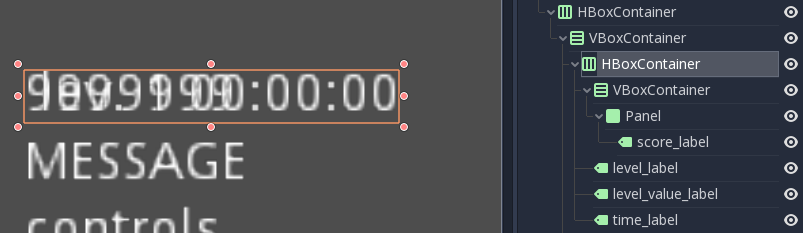
In current selection we have 1 HBox selected and inside a VBox and so on as u can see in picture...
if I select the child VBox I have this:
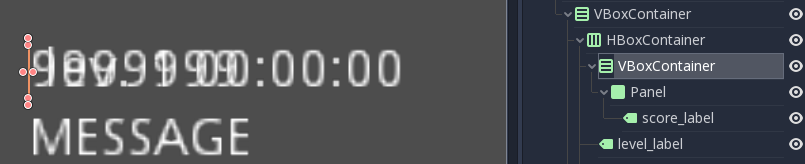
Now.. If I try to change x value from rect->size it don't accept my entry - like it is stuck.
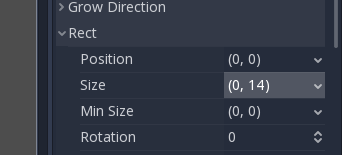
... Same result if I do this first:

It is a normal behavior and I miss something?
Thank you.
git2013vb
on 21 Feb 2018
Yes it's normal, size and position are helpers for anchors and margins.
You should set the minimum size parameter in the "size flags" category.
groud
on 21 Feb 2018
Sorry the "Rect" category, just under the "Size" parameter in fact.
groud
on 21 Feb 2018
Related issues
 EdwardAngeles
·
3Comments
EdwardAngeles
·
3Comments
 RayKoopa
·
3Comments
RayKoopa
·
3Comments
 nunodonato
·
3Comments
nunodonato
·
3Comments
 mooseyfaith
·
3Comments
Zylann
·
3Comments
mooseyfaith
·
3Comments
Zylann
·
3Comments