Godot: Changing the radius of a collision shape makes ALL the collision shapes change
Godot version:
3.0
OS/device including version:
Win10
Issue description:
Old-ish issue. Encountered it on my project and found this QA post that explains it and the workaround very well
Steps to reproduce:
Have multiple nodes use the same CollisionShape2D and CircleShape2D. Change radius in script, it impacts all the shapes.
 JarLowrey
All 6 comments
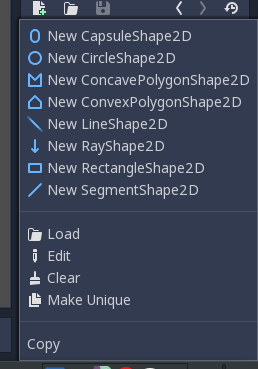
I think this is intended. You have to use "Make Unique" option.
 ghost
on 16 Feb 2018
ghost
on 16 Feb 2018
Indeed, this is a feature. Either use "Make Unique" from the editor as shown above, or duplicate the shape from script if you want to edit it only for one instance.
 akien-mga
on 16 Feb 2018
akien-mga
on 16 Feb 2018
Click Make Unique does not seem to solve the problem for me. All the collision shapes are still the same after doing this and changing their radius'es in a script. Setting a new shape in code does though:
#works!
    var shape = CircleShape2D.new()
    shape.set_radius(min(spriteShape.x,spriteShape.y)/2)
    $KinematicBody2D/CollisionShape2D.shape = shape
#doesnt work, even after setting "Make Unique" in the editor
    $KinematicBody2D/CollisionShape2D.shape.radius = min(spriteShape.x,spriteShape.y)/2
Did you click Make Unique after you duplicated a node, or before?
ghost
on 16 Feb 2018
I clicked "Make Unique" on the node in the editor. From the code I set the radius to different values, which does not work.
If I create a new node each time in the code, it works.
JarLowrey
on 16 Feb 2018
If you're using code to duplicate nodes, creating new shape is the right way. "Make Unique" is just creating new shape with the same property. If you duplicate nodes after you click "Make Unique", it will use the same shape.
ghost
on 16 Feb 2018
Related issues
 rgrams
·
3Comments
rgrams
·
3Comments
 blurymind
·
3Comments
blurymind
·
3Comments
 mefihl
·
3Comments
mefihl
·
3Comments
 ivanskodje
·
3Comments
ivanskodje
·
3Comments
 timoschwarzer
·
3Comments
timoschwarzer
·
3Comments
Most helpful comment
If you're using code to duplicate nodes, creating new shape is the right way. "Make Unique" is just creating new shape with the same property. If you duplicate nodes after you click "Make Unique", it will use the same shape.