Godot: Rotational gizmo should not render its backside
Godot version:
v3.0.stable.official
OS/device including version:
Windows10
Issue description:
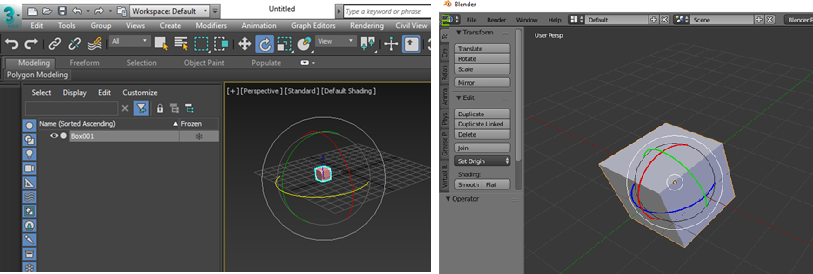
The rotational gizmo should be enough with the frontside rings to manipulate the rotation.
The backside ring is simply redundant to make the operation confused.
See the following images for the rotational gizmos from 3dsmax and Blender.
Steps to reproduce:
Select an entity then switch the gizmo for rotation
 jamad
jamad
All 12 comments
That's a great idea, it's a lot more readable
 groud
on 8 Feb 2018
groud
on 8 Feb 2018
And as it stands the different rings interfere with each other and in many instances its hard to actually select the one you want.
 Megalomaniak
on 9 Feb 2018
Megalomaniak
on 9 Feb 2018
I'm looking to tackle a couple issues for a software engineering class I'm in currently and am hoping to hit some of the posts on the recommended page.
Is this a feature that does have interest? I don't want to make changes without checking in, seeing as this was posted quite a while ago.
 elijahscherz
on 29 Mar 2020
elijahscherz
on 29 Mar 2020
@elijahscherz There still seems to be interest in this feature, so I think it's worth implementing it. It might not be trivial to implement though (see below). Main 3D gizmos are implemented in editor/plugins/node_3d_editor_plugin.cpp.
I think this can be achieved by replacing the current torus-based rotation gizmo with line strips that have their cull mode set to CULL_MODE_BACK instead of CULL_MODE_DISABLED.
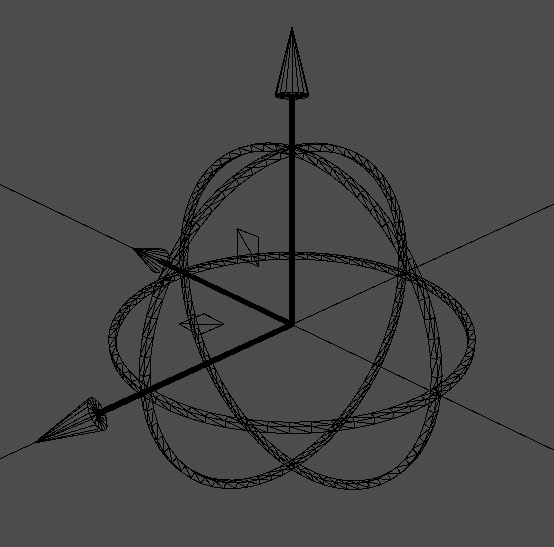
Tip: you can display everything in wireframe by opening the 3D viewport menu (click Perspective in the top-left corner) then choose Display Wireframe. For reference, the wireframe currently looks like this:
 Calinou
on 29 Mar 2020
Calinou
on 29 Mar 2020
@Calinou - excellent. Thanks for giving me a place to start! If I have any further questions or get stuck, I'll reach out.
elijahscherz
on 30 Mar 2020
@Calinou (or whoever is available) I checked into this further and found the following -
I was able to modify the material for the rotation portion of the gizmo, setting the CullMode to CULL_BACK, unfortunately it didn't produce the expected results. The gizmo didn't look visibly different, but I do know I was modifying the material for it, as I was able to change the color.
Ref<StandardMaterial3D> rot_mat = memnew(StandardMaterial3D);
...
rot_mat->set_cull_mode(StandardMaterial3D::CULL_BACK);
rot_gizmo_color[i] = rot_mat;

surftool->set_material(rot_mat);
surftool->commit(rotate_gizmo[i]);

Ref<StandardMaterial3D> rot_mat_hl = rot_mat->duplicate();
rot_mat_hl->set_albedo(Color(col.r, col.g, col.b, 1.0));
rot_gizmo_color_hl[i] = rot_mat_hl;
From what I can tell, maybe based on how the system draws / renders the polygons, they aren't considered back facing in the back of the gizmo because they are just made using circles (not a modified sphere).
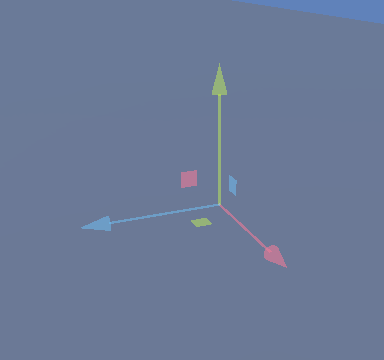
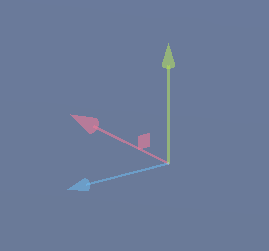
Additionally, I can see that this code which "commits" the material is only run three times (once for each axis I expect). The gizmo itself isn't re-rendered, shifted, or modified some way when the user moves the viewport. This could visual issues like if you use CULL_BACK on another part of the gizmo, somewhat solidifying that a culling mode change sadly won't accomplish what we want.
_Three scaling planes._
_Only one scaling plane rendered._
Like you said, potentially not trivial. Seems like maybe this would involve working on a more dynamic gizmo. I would be happy to work on this further, but might need a bit more direction / advice to get going. (If you think this is something that is doable, that is.)
elijahscherz
on 8 Apr 2020
@elijahscherz are you still working on this? If not I'm willing to pick it up
 SekoiaTree
on 25 Aug 2020
SekoiaTree
on 25 Aug 2020
@SekoiaTree feel free to take a look, I haven't done anything on it in a while because I didn't know where to continue next beyond my findings above. All yours.
elijahscherz
on 28 Aug 2020
well, I've made a bit of progress. I recreated the code in editor, so now I can tell what the issue is (I can send over the project if anybody wants it). Apparently, CULL_BACK actually does do something. If you move the inside the disk, you can see that culling is applied. I thought there wasn't an interior, looking at the wireframe, but I was wrong apparently. ¯\_(ツ)_/¯
Edit: Ohohoho, I see. Using some in-game wireframe of my recreation, I can see that it's actually 8 points! I guess it's the conversion to ArrayMesh that does that?
Edit2: I am an idiot. I didn't realize that there was a for loop for 4 times making the 4 faces. I actually got a basic version running by bringing the 4 to a 1...
SekoiaTree
on 3 Sep 2020
SekoiaTree
on 4 Sep 2020
There's a merged PR for this issue: https://github.com/godotengine/godot/pull/42094
I think it's safe to close it.
 alexpana
on 2 Oct 2020
alexpana
on 2 Oct 2020
You are right, thanks!
Solved by #42094
groud
on 2 Oct 2020
Related issues
 n-pigeon
·
3Comments
n-pigeon
·
3Comments
 kirilledelman
·
3Comments
kirilledelman
·
3Comments
 bojidar-bg
·
3Comments
bojidar-bg
·
3Comments
 ducdetronquito
·
3Comments
ducdetronquito
·
3Comments
 timoschwarzer
·
3Comments
timoschwarzer
·
3Comments
Most helpful comment
That's a great idea, it's a lot more readable