Godot: Extra Culling Margin Option has No Effect
Godot version: 3.0 RC3 (source build from a98e9496eb71554656c7c1eed9a69d20aed9886c)
OS/device including version: Gentoo Linux, Kernel 4.9.72, KDE 5, GTX 1080 w/NVidia drivers 387.22
Issue description:
I have an animated model that moves away from its origin in some animations.
Godot culls the meshes as if they were still at their origin (non-animated) positions. This has the effect that parts of the model start disappearing in plain view unless their origin position is also within the camera's view frustum.
As a workaround, I tried using the 'Extra Cull Margin' option to artificially enlarge the bounding boxes of the meshes involved, but this has no effect whatsoever.
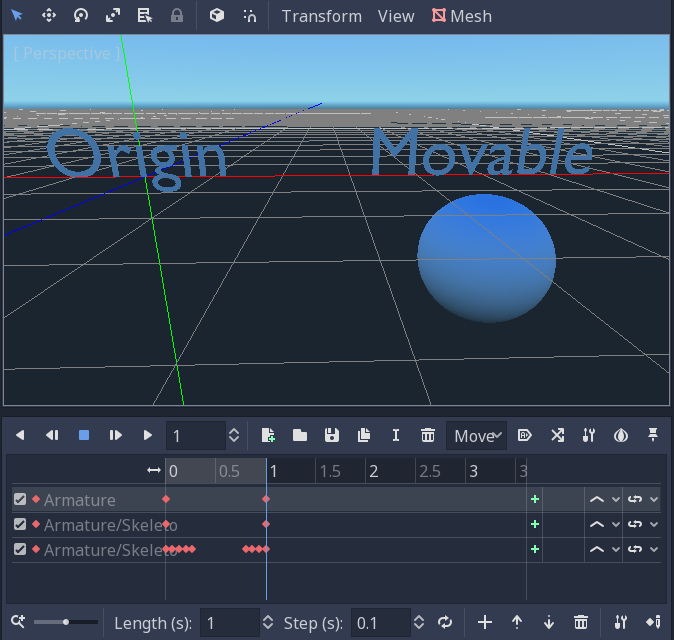
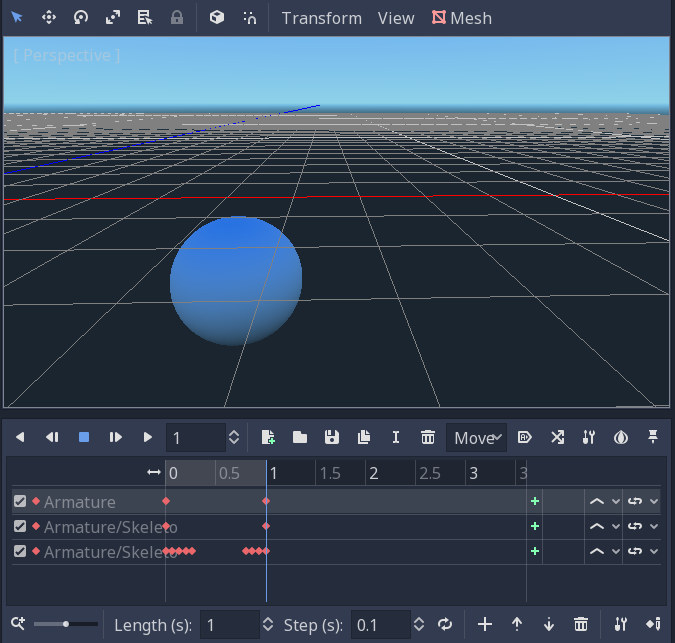
Steps to reproduce:
- Take any animated 3D model.
- Create an animation clip where the 3D model moves away from its root bone.
- Play the animation clip in Godot (just double-clicking the '.dae'. and scrubbing suffices as this also affects the in-editor view) and rotate the camera so that the model is on-screen, but the model's origin position goes off-screen.
Existing solutions:
- Unity calculates the required bounding boxes of meshes by sampling the maximum movement ranges of all bones in all animation clips and enlarging the bounding boxes by this amount.
This is suboptimal because not all animation clips may be known when importing the model and because it results in an oversized bounding box. Meshes still may disappear on-camera when playing animation clips that were not present in the origin model file.
- Unreal Engine uses the actual position of meshes (unknown method since meshes can not only be moved but also change shape with bone animation). Probably a dynamic extra culling margin that's pre-calculated for any imported animation track.
Minimal reproduction project:
CullingMarginIssue.zip
(In the repro project, open 'Repro.tscn', select the 'AnimationPlayer', scrub the animation timeline to the rightmost position (the word 'Movable' should fly to the right), then rotate or pan the viewport until the word 'Origin' is off-camera. the word 'Movable' will also disappear, even when it is still within the view).
 Cygon
Cygon
All 8 comments
A little grep on the Godot sources revealed this:
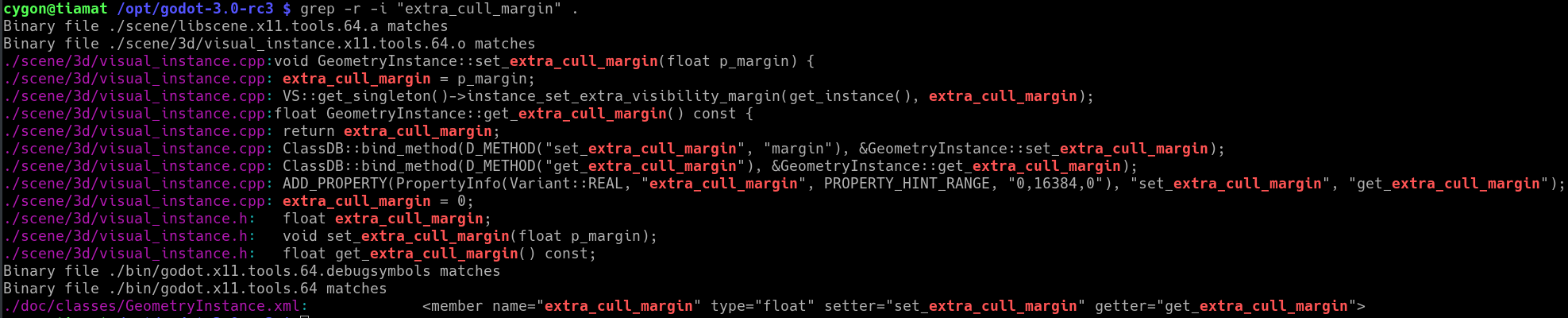
So the property is present but not accessed anywhere.
I tried looking for the spot where the rasterizer does the view frustum culling, but the closest I could get was RasterizerStorageGLES3::mesh_get_aabb(RID p_mesh, RID p_skeleton) const in drivers/gles3/rasterizer_storage_gles3.cpp.
Cygon
on 27 Jan 2018
Well your screenshot shows it being used as argument to VisualServer::instance_set_extra_visibility_margin.
 akien-mga
on 27 Jan 2018
akien-mga
on 27 Jan 2018
The issue is that function is empty:
 vnen
on 27 Jan 2018
vnen
on 27 Jan 2018
I tried my hands at fixing this.
diff --git a/servers/visual/visual_server_scene.cpp b/servers/visual/visual_server_scene.cpp
index 0920fa7..6ab6d0f 100644
--- a/servers/visual/visual_server_scene.cpp
+++ b/servers/visual/visual_server_scene.cpp
@@ -730,6 +730,10 @@ void VisualServerScene::instance_set_exterior(RID p_instance, bool p_enabled) {
 }

 void VisualServerScene::instance_set_extra_visibility_margin(RID p_instance, real_t p_margin) {
+       Instance *instance = instance_owner.get(p_instance);
+       ERR_FAIL_COND(!instance);
+
+       instance->extra_margin = p_margin;
 }

 Vector<ObjectID> VisualServerScene::instances_cull_aabb(const AABB &p_aabb, RID p_scenario) const {
@@ -902,6 +906,12 @@ void VisualServerScene::_update_instance(Instance *p_instance) {
        AABB new_aabb;

        new_aabb = p_instance->transform.xform(p_instance->aabb);
+       new_aabb.position.x -= p_instance->extra_margin;
+       new_aabb.position.y -= p_instance->extra_margin;
+       new_aabb.position.z -= p_instance->extra_margin;
+       new_aabb.size.x += p_instance->extra_margin * 2.0f;
+       new_aabb.size.y += p_instance->extra_margin * 2.0f;
+       new_aabb.size.z += p_instance->extra_margin * 2.0f;

        p_instance->transformed_aabb = new_aabb;
It works fine when I set the extra culling margin in a mesh in the inspector. I have not tested what would happen if one tried to change the extra culling margin at runtime on a frame-by-frame basis.
I do not know Godot's renderer design enough to tell when it will update its Octree (once per frame? or is there some dirty flag?). Maybe someone more knowledgeable can take a look at this :)
Cygon
on 3 Mar 2018
I figured out two things:
a) There _is_ a dirty flag for the AABB and an update queue. I need to call _instance_queue_update(instance, true, false);
b) There's a neater method, AABB::grow_by(), and it's already used here: https://github.com/godotengine/godot/blob/e619727e999ecd8e6883330f2c6950cd0624de99/servers/visual/visual_server_scene.cpp#L1014-L1015
I've submitted a pull request that should fix this issue.
Cygon
on 4 Mar 2018
Fixed by #17248.
vnen
on 28 Apr 2018
I'm sorry, but this looks broken again. Please reopen.
I can confirm it worked in 3.0.2-official and broke again in 3.0.3 (on or before e649ec71df1cdd06ea94151009447c894bc5af38). It is still broken in 3.0.7-devel (tested with 16ab5e091da41e950ab04895d60af7f3f4684010).
The reproduction project attached to the original report can be used to reproduce the issue as before.
I've added a comment on my PR #17248 indicating that the changes disappeared (not reverted, just never happened). Maybe some branching/merging accident. Could someone check this? @vnen
Cygon
on 3 Aug 2018
@Cygon Your PR was merged in the master branch. 3.0.x releases are made from the 3.0 branch, which never saw your commit.
I've marked #17248 for cherry-picking into the stable branch, @hpvb will look into it at some point.
akien-mga
on 13 Aug 2018
Related issues
 RebelliousX
·
3Comments
RebelliousX
·
3Comments
 blurymind
·
3Comments
blurymind
·
3Comments
 mefihl
·
3Comments
mefihl
·
3Comments
 EdwardAngeles
·
3Comments
EdwardAngeles
·
3Comments
 rgrams
·
3Comments
rgrams
·
3Comments
Most helpful comment
The issue is that function is empty:
https://github.com/godotengine/godot/blob/f12e8568d43de853e0b98588e7f132a61a92fc45/servers/visual/visual_server_scene.cpp#L732-L733