Issue description:
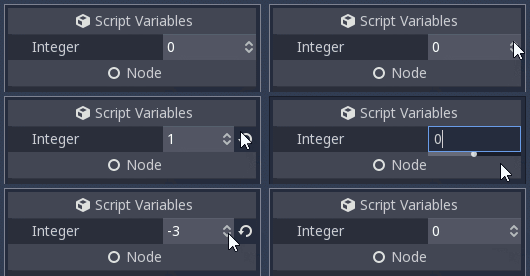
In the editor, when increasing or decreasing an exported integer or float variable from its original value, the revert button appears and gets in the way of the cursor. And when the variable is increased or decreased back to its original value, the revert button disappears and the increase/decrease arrows move away from the cursor, which selects the value unintentionally. The GIF below demonstrates these issues:
Proposed solution:
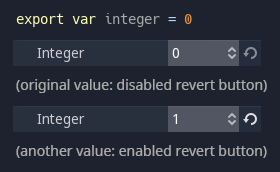
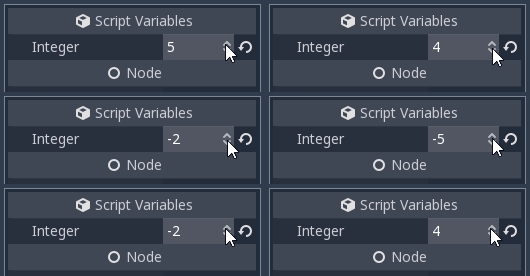
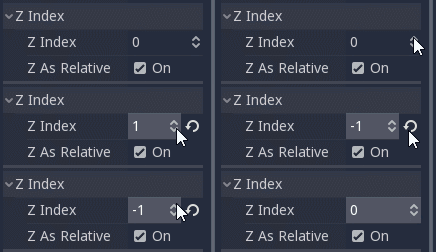
Making the revert button always visible (but disabled/greyed out at the variable's original value) would solve these small, yet inconvenient problems, as illustrated by the mockups bellow:
 nattanielgrape
All 14 comments
I would just make the icon appear at the left of the arrows. Else the icon takes room for no purpose.
 groud
on 24 Jan 2018
groud
on 24 Jan 2018
IMHO, might be worth experimenting putting it within the name column, so it won't take any of the space for the value.
Other than that, if it is going to be taking space all the time, we should probably consider making it smaller.
 bojidar-bg
on 24 Jan 2018
bojidar-bg
on 24 Jan 2018
I renamed the issue to welcome more solutions.
nattanielgrape
on 25 Jan 2018
I would just make the icon appear at the left of the arrows. Else the icon takes room for no purpose.
I think having a blank space reserved for the reset icon instead wouldn't be bothersome, and it would create some visual symmetry with the blank space just before the variable name. It would however draw attention to variables with non-default values (vs enabled/disabled icons), which I'm not sure is a good thing.
 ricmzn
on 26 Jan 2018
ricmzn
on 26 Jan 2018
No, in my opinion it should not. Color is not meaningful at all and double clicking on a label is unintuitive.
groud
on 26 Jan 2018
Embedded input boxes are a nice idea, but would have to wait for the property editor redo :)
bojidar-bg
on 26 Jan 2018
Is someone using this up and down arrow?
What do you think they're behaving the same way? It looks identical.
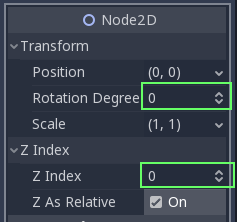
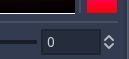
I never use it. To small, result is different and are hidden when you click in the field.
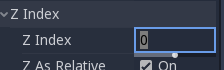
We could replace it with the place for reset button.
I also would like to have the opportunity to set property to its original value. sorry too far away from the current topic
From time to time I move a scene accidentally and like to reset the position to (0,0)
(Modulate to white, Scale to (1,1), etc.)
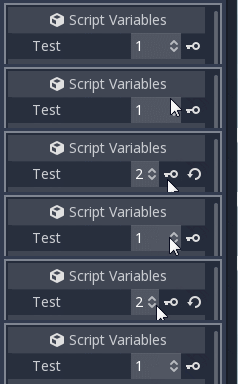
don't forget sometimes there is also a key in the way
 puppetmaster-
on 26 Jan 2018
puppetmaster-
on 26 Jan 2018
The keyframe button is being pushed to the left by the revert button, it's the same problem.
nattanielgrape
on 27 Jan 2018
I will work on rewriting the inspector at some point, but there are other priorities before. Regarding the revert button, it suppose it may be moved to the left?
 reduz
on 27 Jan 2018
reduz
on 27 Jan 2018
I made a mockup putting the revert button at the left of the exported variable's value box (within the name column, as proposed by @bojidar-bg):
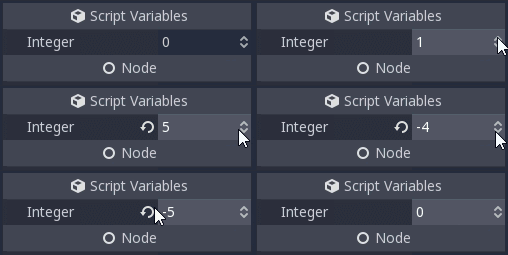
It has kind of a visual symmetry with the keyframe button:
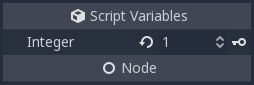
And it could also work with the proposed embedded value input box:
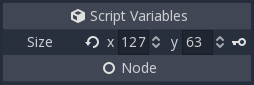
nattanielgrape
on 27 Jan 2018
And here's as proposed by @groud, with the revert button appearing at the left of the arrows:
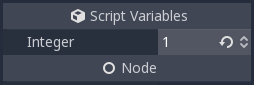
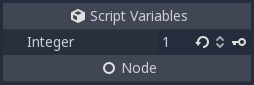
nattanielgrape
on 27 Jan 2018
These issues would also affect instanced nodes' properties, but the revert button doesn't seem to work for them, as reported on #7901 and #16068 (there's a cached version of it here):
(I changed the title again to better reflect the issues, as they are more general)
nattanielgrape
on 28 Jan 2018
The revert button now seems to be on the left on master. So this is no longer an issue.
 Piet-G
on 24 Sep 2018
Piet-G
on 24 Sep 2018
Indeed, closing.
 akien-mga
on 24 Sep 2018
akien-mga
on 24 Sep 2018
Related issues
 Spooner
·
3Comments
Spooner
·
3Comments
 ivanskodje
·
3Comments
ivanskodje
·
3Comments
 EdwardAngeles
·
3Comments
EdwardAngeles
·
3Comments
 ducdetronquito
·
3Comments
ducdetronquito
·
3Comments
 RebelliousX
·
3Comments
RebelliousX
·
3Comments
Most helpful comment
I made a mockup putting the revert button at the left of the exported variable's value box (within the name column, as proposed by @bojidar-bg):
It has kind of a visual symmetry with the keyframe button:
And it could also work with the proposed embedded value input box: