Godot: BaseButton's Shortcut system doesn't work with InputEventActions
Godot version:
f4d6743
Issue description:
Maybe I don't know how to set it properly, but I have asked others and I have yet to find someone who had made it work.
In my case, I'm trying to use it with an InputEventAction, but no reaction in-game whatsoever.
 YeldhamDev
All 12 comments
Do you have a sample project?
 vnen
on 23 Jan 2018
vnen
on 23 Jan 2018
@vnen Sorry for using a thirdparty site, put GitHub isn't accepting the zip for some reason:
https://www.file-upload.com/arm2g2b2wnsa
The button is set to print "Pressed" and its shortcut is set as "ui_accept", so pressing enter should trigger it, but it doesn't.
YeldhamDev
on 23 Jan 2018
Uploaded here to make it easier for others: test.zip
vnen
on 23 Jan 2018
It doesn't work with actions.
vnen
on 23 Jan 2018
@vnen Then why it's possible to use an InputEventAction?
YeldhamDev
on 23 Jan 2018
I don't know if it was supposed to work with actions or not, I was just saying that the current state is that it doesn't work.
vnen
on 23 Jan 2018
@vnen Oh, sorry.
Yeah, it seems that thing like InputEventKey works, changing the title to represent the issue better then.
YeldhamDev
on 24 Jan 2018
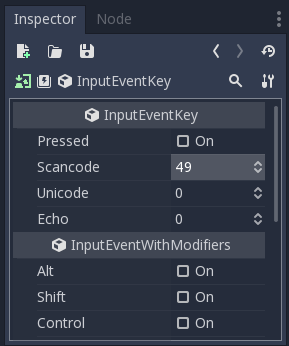
Since I've been here twice, for those using 3.0 and waiting for 3.1, here's a workaround, though it won't work with multiple keys with the same action:
- Create a
InputEventKeyinstead - Look up
@GlobalScopefind your key (Ctrl+Fand enterKEY_*)
Example:KEY_1is 49,KEY_2is 50 (above the Q key) and so on - Enter that code into the
Scancodeproperty - You're done!
 DleanJeans
on 18 Aug 2018
DleanJeans
on 18 Aug 2018
Hi guys, I set the shortcut with InputEventKey, even if it does the same action as the button has been pressed... why it doesn't activate the pressed texture on my Button?
 salvob41
on 21 Aug 2018
salvob41
on 21 Aug 2018
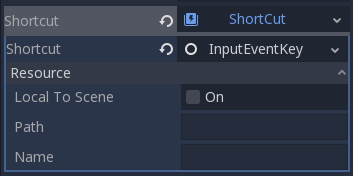
Why does it want a path? Does it want a filepath to a new .gd file? Why isn't it showing me Pressed, Scancode, Unicode, Echo, etc. like the above screenshot?
 vince94
on 15 May 2019
vince94
on 15 May 2019
@vince94 Click InputEventKey.
YeldhamDev
on 15 May 2019
At first it just opened this menu again -
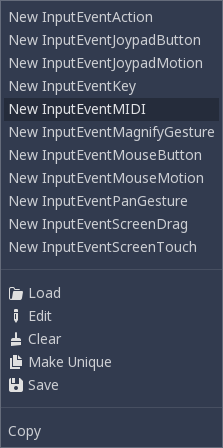
But I figured it out. I'm so used to vanilla WinForms that I never considered that clicking the dropdown arrow would have a different result than clicking the middle of the control :/
Is there documentation for what scancodes are?
vince94
on 15 May 2019
Related issues
 gonzo191
·
3Comments
gonzo191
·
3Comments
 RebelliousX
·
3Comments
RebelliousX
·
3Comments
 EdwardAngeles
·
3Comments
EdwardAngeles
·
3Comments
 mefihl
·
3Comments
mefihl
·
3Comments
 ivanskodje
·
3Comments
ivanskodje
·
3Comments
Most helpful comment
Since I've been here twice, for those using 3.0 and waiting for 3.1, here's a workaround, though it won't work with multiple keys with the same action:
InputEventKeyinstead@GlobalScopefind your key (Ctrl+Fand enterKEY_*)Example:
KEY_1is 49,KEY_2is 50 (above the Q key) and so onScancodeproperty