Godot: Transforms translate() applies scaling factor to offset
Godot version:
Godot 3.0 RC 1
OS:
Windows 10 64bit
Issue description:
When using Transforms translate(Vector3) method in GD script, the transform should be moved/translated by the vector passed to it.
It moves, yet the movement is multiplied by the scaling factor of each axis respectively.
BEFORE:
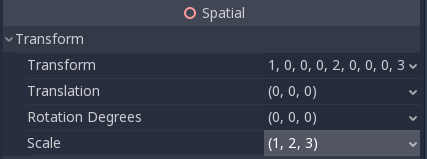
AFTER RUNNING TRANSLATE:
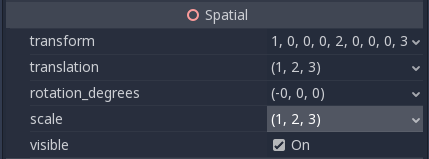
Steps to reproduce:
- Scale a child Spatial e.g. to (1, 2, 3)
- Move that Spatial with the following code:
var child = get_child(0)

# Expect transform to be moved along every axis by 1
child.transform = child.transform.translated(Vector3(1, 1, 1))
- Check the childs Translation with the remote debugging feature in the Editor
Minimal reproduction project:
TranslateBug.zip
 MrMinimal
All 17 comments
Confirmed on the current master branch (1968cc445).
 akien-mga
on 16 Jan 2018
akien-mga
on 16 Jan 2018
I don't know if this is a bug or a confussion about the expected result. I understand the result may be not expected at all, but technically I think it is the right one.
If you rotate the Spatial (0, 90, 0), the final translation will be (3, 2, -1) using scale (1, 2, 3), or (1, 1, -1) without it. Which, as we are manipulating transformation matrix, is expected.
If you chain transformations as we are doing using the use case you provided, any transformation must be affected by previous one. In this cases, you are applying a translation after a scale (and a rotation in my case), so you must expect it to be affected by them.
If the desired behaviour is reseting the transformation matrix to identity (ignoring any transformation of the object) before applying new transformations, the code shouldn't use child.transformation.translate.
As I said early, I don't know what is the desired behaviour, but from a computer graphics view, I think the actual behaviour is the expected one.
 robfram
on 16 Jan 2018
robfram
on 16 Jan 2018
@robfram is saying correctly, This function works correctly. If you just want to move the origin you should do this: child.transform.origin +=Vector3(1, 1, 1);
 AndreaCatania
on 16 Jan 2018
AndreaCatania
on 16 Jan 2018
Thanks for the explanations, that makes sense :)
Not a bug then.
akien-mga
on 16 Jan 2018
Thanks for all of the replies, especially @robfram. It depends on what you think is the most intuitive.
Granted, I now understand why it behaves the way it does in Godot, but I doubt it should be wanted behaviour. According to the documentation, it should move the transform (unless I misunderstand the term "to translate", English is not my first language).
The documentation states:

Unity3D example
I have replicated the same setup in Unity3D which also has a similar function which does not return a new Transform but applies it right away.
Code:
void Start () {
        Transform child = this.transform.GetChild(0);

        child.Translate(new Vector3(1, 1, 1));
}
In editor:

In game / after code execution:

Unity Project files:
TranslateBugUnity.zip
I think the bug/unintuitive behaviour comes from the fact that translation happens before scaling.
Will do a bit of digging...
@AndreaCatania Thank you for the input, I solved it that way as well. Just want to make sure this is fixed or documented for future people having the same problem.
MrMinimal
on 17 Jan 2018
Spatial's translate methods have the same behaviour (more similar in their way of operation to Unity3D's Transform.Translate(Vector3) ).
translate(Vector3)
translate_object_local(Vector3)
In godot in addition to 'translated' you can use 'translate' function that doesn't return new translation but instead apply it to current transform. Also this is the wanted and correct behaviour since you are managing a transformation and not a simple vector so you have to take in account the basis part that composes the transformation.
AndreaCatania
on 17 Jan 2018
Move the origin is something correct to do but it's not a translation
AndreaCatania
on 17 Jan 2018
Calling translated corresponds to a translation in the local coordinate system of the object itself (you can pass relativeTo = Space.Self in Unity). This is unlike rotated and scaled functions, which perform these operations in parent's local coordinate system (would have been Space.Parent if Unity had such a thing), so this is indeed a quirk and could be better documented.
Adding to origin corresponds to a translation in the local coordinate system of the parent.
For consistency across the board and avoid confusion, I'd make translated work in parent-local coordinate system, and add _local variants for rotate/scale/translate in Transform, similar to Basis now.
 tagcup
on 17 Jan 2018
tagcup
on 17 Jan 2018
One more thing, Godot doesn't do any ad-hoc renormalization when doing these transformations so if you have scale somewhere in the object tree, it will be there.
tagcup
on 17 Jan 2018
Thank you for your patience! I am enjoying this conversation a lot. Sorry for drawing this out...
Managed to break it down to a more simple example without a parent/child relationship. An empty scene with just one object.
Probably I am missing something...
Unity example
Before the translation is applied, the object is at the worlds origin with a scale of 3:
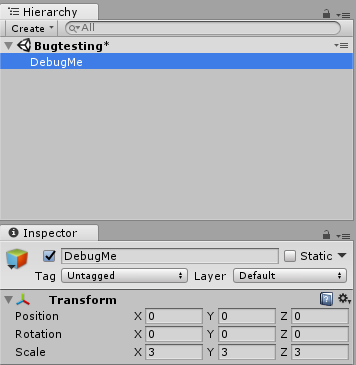
Running the following code is supposed to translate/move the transform:
```C#
this.transform.Translate(new Vector3(1, 0, 0), Space.Self);
// Same result with:
// this.transform.Translate(new Vector3(1, 0, 0), Space.World);
After running the code on the object:
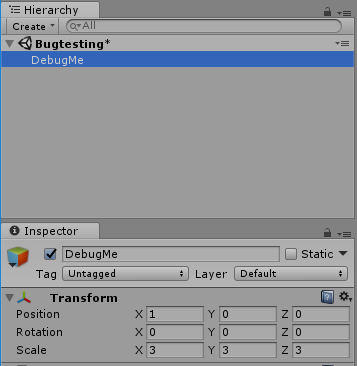
# Godot example
Same example, single object at the origin, empty scene and a scale of 3 on it.
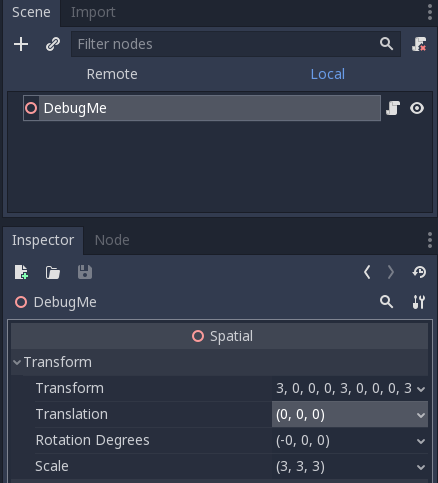
Running the following code on the single object:
```GDScript
self.translate(Vector3(1, 0, 0))
Yields a position which is multiplied by the scale of the object itself:
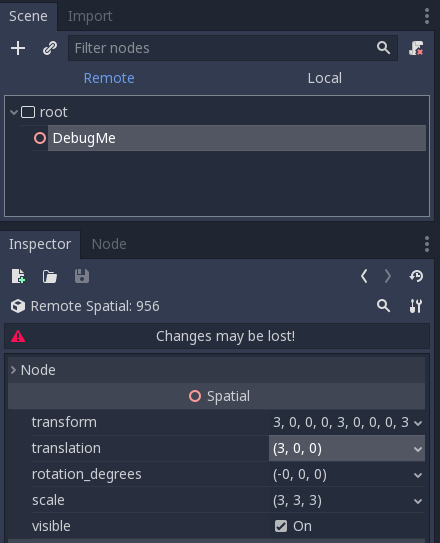
Isn't Godot supposed to produce the same result as Unity in that case? The description of the functions would suggest so.
@AndreaCatania I just checked, translated and translate lead to the same result. That is to be expected since translated actually uses (line 169) translate in its implementation.
@tagcup Thank you for the input but I don't think it is a problem with the coordinate systems. Unity yields the same results both in Space.Local and Space.World. Both are not concerned with the scale of the object itself.
MrMinimal
on 17 Jan 2018
I don't understand the problem here. When using translate, it works in local transform coordinates. If you want to translate in global coordinates, just add any value to the origin..
 reduz
on 17 Jan 2018
reduz
on 17 Jan 2018
@MrMinimal you have global_translate() in Godot to achieve what you want.
reduz
on 17 Jan 2018
@reduz Ahh right global_translate() really was the one.
It must be my transition from Unity making it harder for me.
Unity is not concerned with scale when translating, regardless which whether local or world is used.
Godot is. Got it!
Thank you so much! So no bug at all!
MrMinimal
on 17 Jan 2018
So the default translate() should be local_translate(). Naming confused me a lot there.
Thanks everyone involved for clarification!
MrMinimal
on 17 Jan 2018
Isn't Godot supposed to produce the same result as Unity in that case? The description of the functions would suggest so.
No, Unity orthonormalizes the basis and then it's columns as the object-local axes. As I mentioned above, Godot doesn't do this kind of ad-hoc renormalization. In Godot, when you perform a rotatation, it just multiplies the basis with the given rotation from the left. That's what rotation is mathematically.
Thinking in terms of basis vectors attached to object ("transform's local axes" in Unity docs) is nice, but it only works properly when all you have is rotation. You can take the columns of the basis, renormalize them, and use them as a basis vector but it is totally ad-hoc and can lead to wrong results when negative scalings are involved (your basis vectors can flip handedness while you functions remain the same). I don't remember if Unity corrects the handedness as well or not, but it's still ad-hoc.
Like @reduz mentioned, if what you need is a transformation that is relative to the global coordinate system, there are _global versions of the those functions.
Overall, in Godot, the transformations can be relative to: 1) parent 2) self/object 3) world.
So the default translate() should be local_translate()
Or translate_local, using the current naming convention for object-local transformations.
tagcup
on 18 Jan 2018
Hello I'm coming back to this, because this confused me also.
I was expecting the Transform::scale() not to multiply the origin also by the scaling, but looking at the code, this is exactly what it does.
Also in the documentation (https://docs.godotengine.org/en/3.2/classes/class_transform.html#class-transform-method-scaled), it currently says:
    Transform scaled ( Vector3 scale )

Scales the transform by the given scale factor, using matrix multiplication.
This does not mention anything about the origin being also multiplied by the scaling, as can be seen in the actual Transform class source code:
void Transform::scale(const Vector3 &p_scale) {

    basis.scale(p_scale);
    origin *= p_scale;
}

Transform Transform::scaled(const Vector3 &p_scale) const {

    Transform t = *this;
    t.scale(p_scale);
    return t;
}
Maybe this at least should be clarified in the documentation for the Transform ? And also mention to achieve scaling without the origin being affected, do this:
transform.basis.scale(Vector3(sx, sy, sz));
Took me some time to figure this out, would help newcomers maybe.
EDIT: Made a new issue to the documentation here: https://github.com/godotengine/godot-docs/issues/3293, suggesting this clarification.
 inDigiNeous
on 21 Mar 2020
inDigiNeous
on 21 Mar 2020
Related issues
 timoschwarzer
·
3Comments
timoschwarzer
·
3Comments
 SleepProgger
·
3Comments
SleepProgger
·
3Comments
 RayKoopa
·
3Comments
RayKoopa
·
3Comments
 ndee85
·
3Comments
ndee85
·
3Comments
 mooseyfaith
·
3Comments
mooseyfaith
·
3Comments
Most helpful comment
No, Unity orthonormalizes the basis and then it's columns as the object-local axes. As I mentioned above, Godot doesn't do this kind of ad-hoc renormalization. In Godot, when you perform a rotatation, it just multiplies the basis with the given rotation from the left. That's what rotation is mathematically.
Thinking in terms of basis vectors attached to object ("transform's local axes" in Unity docs) is nice, but it only works properly when all you have is rotation. You can take the columns of the basis, renormalize them, and use them as a basis vector but it is totally ad-hoc and can lead to wrong results when negative scalings are involved (your basis vectors can flip handedness while you functions remain the same). I don't remember if Unity corrects the handedness as well or not, but it's still ad-hoc.
Like @reduz mentioned, if what you need is a transformation that is relative to the global coordinate system, there are _global versions of the those functions.
Overall, in Godot, the transformations can be relative to: 1) parent 2) self/object 3) world.
Or
translate_local, using the current naming convention for object-local transformations.