Godot: request for a _draw() function method that draws the texture of a node with all effects applied to it(rotate,scale,flip...draw_texture can only modulate
This feature request comes from another request where I have been trying to implement a wraparound mode with gdscript:
https://github.com/godotengine/godot/issues/15359#issuecomment-356078897

Using this code, I was able to draw clones of an animated sprite using the draw_texture method:
func _draw():
    for node in ChidSprites():
        var spriteFTex = node.get_sprite_frames().get_frame(node.get_animation(),node.get_frame())#( String anim, int idx )
        #right
        draw_texture(spriteFTex,Vector2(node.get_pos().x+get_size().x-spriteFTex.get_width()/2,  node.get_pos().y-spriteFTex.get_height()/2))
        #left
        draw_texture(spriteFTex,Vector2(node.get_pos().x-get_size().x-spriteFTex.get_width()/2,  node.get_pos().y-spriteFTex.get_height()/2))
        #bottom
        draw_texture(spriteFTex,Vector2(node.get_pos().x-spriteFTex.get_width()/2,  node.get_pos().y+get_size().y-spriteFTex.get_height()/2))
        #top
        draw_texture(spriteFTex,Vector2(node.get_pos().x-spriteFTex.get_width()/2,  node.get_pos().y-get_size().y-spriteFTex.get_height()/2))
        #top left
        draw_texture(spriteFTex,Vector2(node.get_pos().x-get_size().x-spriteFTex.get_width()/2, node.get_pos().y-get_size().y-spriteFTex.get_height()/2))
        #bottom left
        draw_texture(spriteFTex,Vector2(node.get_pos().x-get_size().x-spriteFTex.get_width()/2, node.get_pos().y+get_size().y-spriteFTex.get_height()/2))
        #bottom right
        draw_texture(spriteFTex,Vector2(node.get_pos().x+get_size().x-spriteFTex.get_width()/2,  node.get_pos().y+get_size().y-spriteFTex.get_height()/2))
        #top right
        draw_texture(spriteFTex,Vector2(node.get_pos().x+get_size().x-spriteFTex.get_width()/2,  node.get_pos().y-get_size().y-spriteFTex.get_height()/2))
Unfortunately it is too limited and will not work for me because draw_texture can not do any operations on the texture that it is drawing :'((
draw_texture can only modulate color- it can not apply any of the effects that were applied on the origin sprite/node. There is no method to just get the pixels of the node with effects applied- with alpha preserved
My request is for such feature- a method that returns a Texture resource of a sprite or animatedsprite node , after effects have been applied to it - if the sprite has been rotated,scaled,mirrored,flipped or wtah have you.
Alternatively get more optional parameters in the draw_texture method, such as flip,scale,rotate
Alternatively create a new simple function that lets the user draw the pixels of any node with an offset in x and y
A key point to make is that we need to keep the alpha channel, so taking screenshots of the screen with no alpha channel or parts of the sprite that is not visible on the screen won't do
 blurymind
All 11 comments
You can set the transform of the following draw_* commands with draw_set_transform() http://docs.godotengine.org/en/latest/classes/class_canvasitem.html#class-canvasitem-draw-set-transform
 mrcdk
on 8 Jan 2018
mrcdk
on 8 Jan 2018
@mrcdk Thank you , but that only covers position,rotation and scale. What about the rest?
mirror and other effect etc?
What if the node has a shader attached to it?
Thank you btw, this will help me partially get what I want!
I guess I can flip by negating the scale and z_order could be done by re-ordering the draw array by the z-order of nodes in it
Wouldn't it be kind of much easier if we had a simple method to get all of this as a texture with an alpha channel preserved in a single method though? Look at how much specific to the node type boiler plate code needs to be written just to extract a correct copy of the pixels of a node :o
Even then it is not a correct copy in some cases
Having a method for this will simplify gdscript so much..it is a common use in games to make copies of a sprite - for trail effects for example, or reflections
blurymind
on 8 Jan 2018
@Dillybob1992 Do you mean creating copies of the sprite and updating their changes with the original on every frame? Can you share some example code where you do that?
Does godot have some way of creating clones of Sprite2d nodes that mimic all of the activity of the original at an offset?
@mrcdk I found some incorrect skewing problems when rotating a non-uniformly scaled node with draw_set_transform(). Might have to file another issue for that
blurymind
on 9 Jan 2018
@Dillybob1992 I thought about doing it that way, but ultimately decided to avoid writing tons of code for creating copies on runtime and updating them with script every frame. A simple draw method is much easier to keep track of - its for a graphical effect- not for game design. My request here is for something that will give us precise pixel copies to draw on the screen without the need to manually update variables of clones with code. We have to do it even now with draw_texture() and draw_set_transform().
Its kind of strange that actually creating more sprite nodes is cheaper on the cpu than just drawing their texture :o
It would be awesome if you can share a minimal example
blurymind
on 9 Jan 2018
It would be nice if the new method requested here also somehow copies and applies the z-order offset value of the node it took the pixels from.
A classic example of re-inventing the wheel in the workaround I am doing here (replicating how godot already works in gdscript) is in trying to write a function that puts the cloned draw textures in the right rendering order, depending on their z-value and child order in the editor - so their pixel copies also have the same z-order offset!
ChidSprites() in my example needs to return an array of the children sprites - sorted by both their child index and z-order offset
But not sure - how do you calculate the render order in godot?
Its not that simple
It seems the render ordering is:
if z is negative = use actual -z
if z is 0 = use child order index
if z>0 =use 0z node count (above all zeros)+ child order(above previous index nodes)+ z order(above lower value z nodes)
I have to run multiple for loops to get this array in the right order
blurymind
on 9 Jan 2018
@blurymind Is this issue still relevant in Godot 3.1? I noticed that your post contains get_pos() and IIRC all pos code was replaced with position in Godot 3.0.
 aaronfranke
on 20 Mar 2019
aaronfranke
on 20 Mar 2019
I dont think the feature has been implemented, just the gdscript syntax is now a bit different
blurymind
on 20 Mar 2019
Since you want it to do everything the normal node rendering will do, have you considered using a viewport to capture that into a texture and then draw that texture? Edit: Sorry just saw the time jump here.
 Kazetsukai
on 21 Mar 2019
Kazetsukai
on 21 Mar 2019
@Kazetsukai can you provide a minimal example? :)
Viewport capturing might make it hard to get the correct z-index of individual elements that are at the border.
The best approach I have atm is to just write some more draw code to take into consideration the applied effects on the originals
blurymind
on 21 Mar 2019
Here is a Polygon2D with a particle system on it, being viewport captured, and being rendered to the main view twice. Once by attaching a viewport texture to a sprite, and once by attaching it to a script and overriding draw.
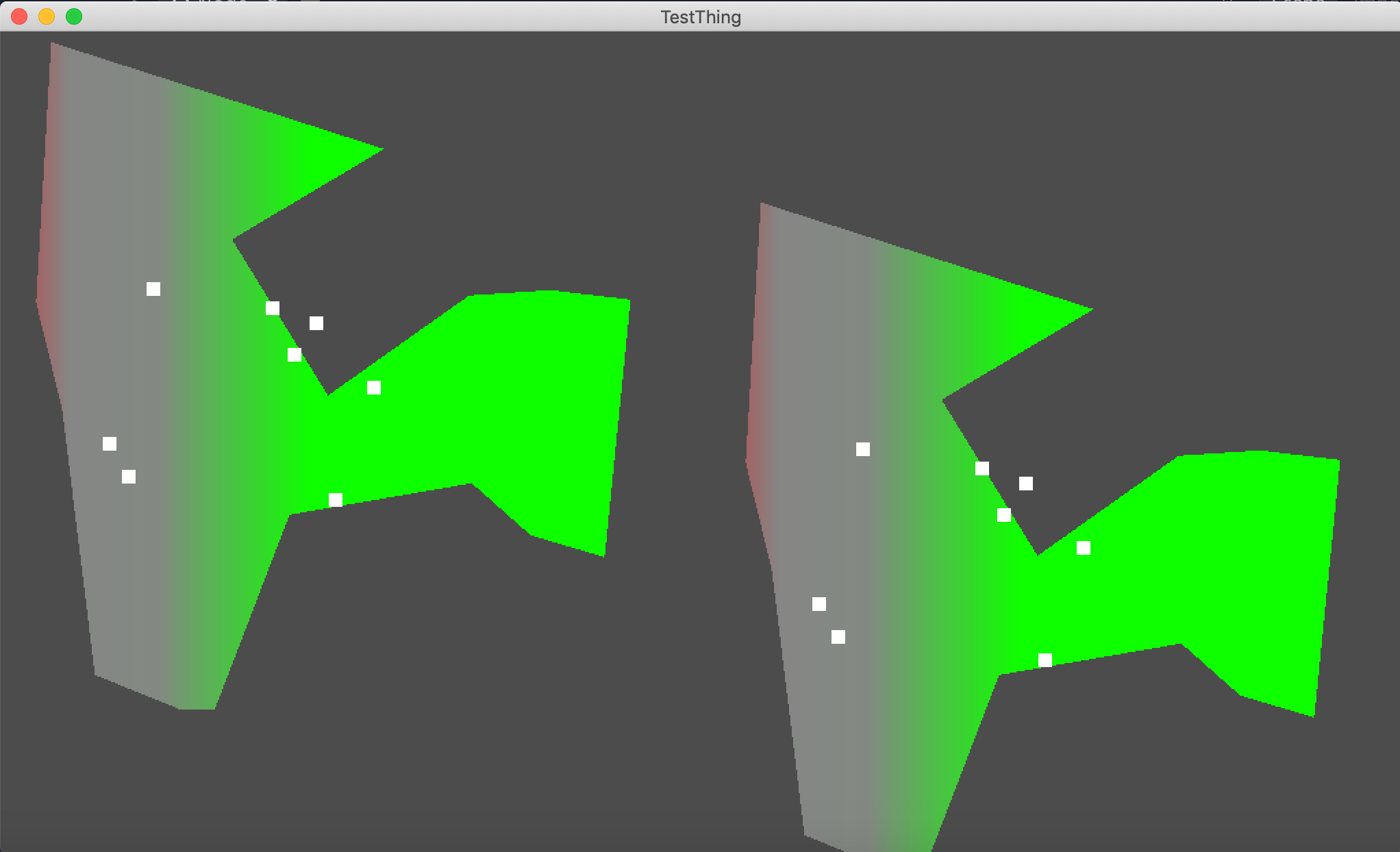
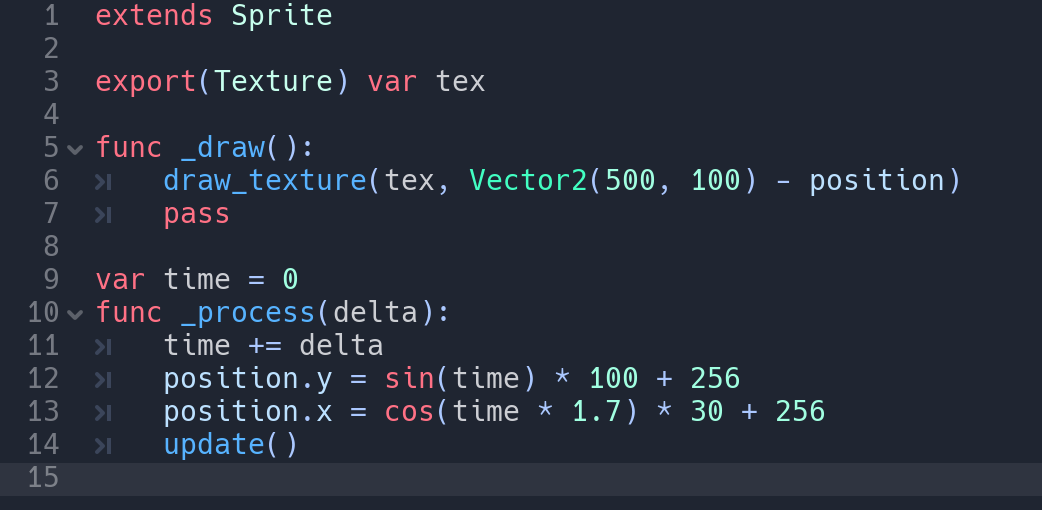
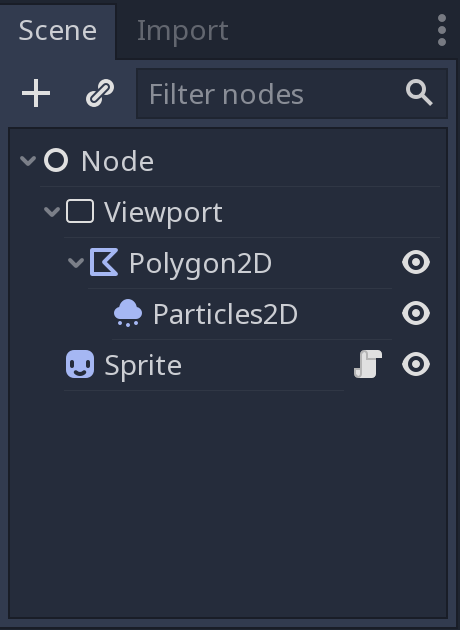
Everything I want to capture lives under the Viewport, the Sprite is how I give it a physical location in the main view. The things underneath the Viewport don't move around the scene, only the sprite that displays them does. Everything is captured in a render texture, so I can redraw that as many times as I like.
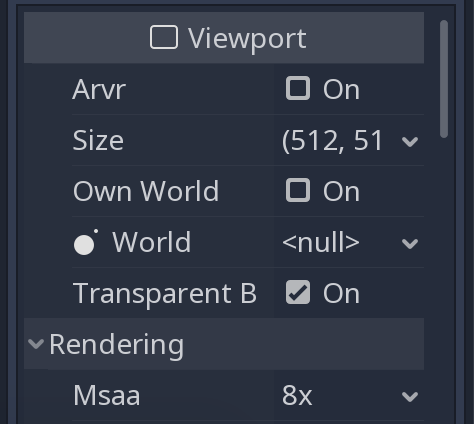
You need to choose appropriate settings for the size of the viewport, make it transparent, etc.
Kazetsukai
on 21 Mar 2019
Feature and improvement proposals for the Godot Engine are now being discussed and reviewed in a dedicated Godot Improvement Proposals (GIP) (godotengine/godot-proposals) issue tracker. The GIP tracker has a detailed issue template designed so that proposals include all the relevant information to start a productive discussion and help the community assess the validity of the proposal for the engine.
The main (godotengine/godot) tracker is now solely dedicated to bug reports and Pull Requests, enabling contributors to have a better focus on bug fixing work. Therefore, we are now closing all older feature proposals on the main issue tracker.
If you are interested in this feature proposal, please open a new proposal on the GIP tracker following the given issue template (after checking that it doesn't exist already). Be sure to reference this closed issue if it includes any relevant discussion (which you are also encouraged to summarize in the new proposal). Thanks in advance!
 Calinou
on 27 May 2020
Calinou
on 27 May 2020
Related issues
 n-pigeon
·
3Comments
n-pigeon
·
3Comments
 gonzo191
·
3Comments
gonzo191
·
3Comments
 testman42
·
3Comments
testman42
·
3Comments
 mooseyfaith
·
3Comments
mooseyfaith
·
3Comments
 rgrams
·
3Comments
rgrams
·
3Comments
Most helpful comment
You can set the transform of the following
draw_*commands withdraw_set_transform()http://docs.godotengine.org/en/latest/classes/class_canvasitem.html#class-canvasitem-draw-set-transform