Godot: Unable to launch exported iOS app via XCode - Godot 3.0 Beta 2
Godot version:
Godot 3.0 Beta 2
OS/device including version:
macOS 10.13
iOS 11.1
Xcode 9.2 (9C40b)
Issue description:
I created a bare-bone Godot project with just GDScript to show Sprite node, no related to GDNative or anything else. My goal is to run iOS build on iOS device.
As there is no Xcode project template for Godot 3.0 Beta 2, I use such template from 2.1 with 3.0 beta 2's export template for ios binaries (debug/release), and my godot project's exported .pck file. Then run project via Xcode, as a result I got the following error

Steps to reproduce:
- Download export template from Godot 3.0 beta 2 official
- Extract zip, inside extract iphone.zip, then you will get 3 files which are
data.pck, library fat for debug, and another for release (both are static library). - Use Xcode project template as used in 2.1. Replace
godot_debug.iphonewith our library fat for debug, andgodot_opt.iphonewith our library fat for release one. Rename it to be exactly the same. Note that I consider this case to be the same step as done in 2.1 because both set of binary files are in fact static library. If this is wrong, please advice. - Export Godot project into
.pckfile, then replace this result file withdata.pckas seen inside Xcode template project. - Open Xcode project and Run.
- Got the same result as shown on image above
- Extract zip, inside extract iphone.zip, then you will get 3 files which are
As I see both two sets of binary files (Godot 2.1 XCode project template, and Godot export template) are technically the same which are normally static library built for debug or release target. The approach above I did should produce the same result.
Minimal reproduction project:
Simple to create. Create a new project, then add a new root node and Sprite node as a child. Then export iOS.
- [x] I searched the existing GitHub issues for potential duplicates.
 haxpor
All 26 comments
I don't think you should be using a template from 2.1. I'm not sure how the current system works, @endragor could likely tell you.
 akien-mga
on 5 Jan 2018
akien-mga
on 5 Jan 2018
3.0 export template contains an Xcode project. After export is completed, the folder with .ipa file should contain Xcode project. I'm not sure what happens here, since a lot of redundant steps are performed, instead of just exporting normally.
 endragor
on 5 Jan 2018
endragor
on 5 Jan 2018
@endragor Thank you for your reply! I will test it out and report back here.
But first of all, I think most users will think .ipa is final submission file that I don't expect xcode project would be tagged along with it when I export. So I don't choose to do that. Might be it would be more clear if there are options for users to generate Xcode or even Android project.
haxpor
on 5 Jan 2018
I'll close this issue now with the reason
- I don't need to grab template from 2.1 in order to export or run iOS project. I can do it as per @endragor suggested.
- The final problem is exactly the same as #15058 but on macOS (I already commented on that thread).
TLDR: See #15058 for real problem
Thank you for your time!
haxpor
on 5 Jan 2018
@endragor The beta 2 templates file Godot_v3.0-beta2_export_templates.tpz contains no Xcode project.
There is only a "iphone.zip" file which contains the data.pck and two libgodot...fat.a files.
Do I misunderstand something to make a iOS project out from godot?
 DanEEStar
on 7 Jan 2018
DanEEStar
on 7 Jan 2018
@akien-mga there is a problem with official export template build scripts - they just zip the libs and data.pck as mentioned above, instead of the whole dist folder: https://github.com/godotengine/godot/tree/master/misc/dist/ios_xcode . That's where all the iOS export issues come from.
endragor
on 7 Jan 2018
Here's a fixed iphone template for 3.0 beta 2: http://downloads.tuxfamily.org/godotengine/3.0/beta2/iphone.zip
You can download it and put it manually in your Godot templates/3.0/beta folder.
akien-mga
on 7 Jan 2018
@akien-mga I got this opening with Xcode 9.2.
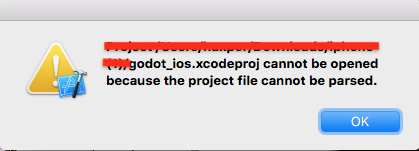
haxpor
on 7 Jan 2018
@haxpor did you unzip the template and open the project from there? Export your game, then open the generated project. The export template contains a project template.
endragor
on 7 Jan 2018
@endragor Yes, that's what I did. I can't successfully export the project from editor for iOS. I face with the following. So I try with the same approach I did in 2.1 as now in template, there is Xcode project inside.
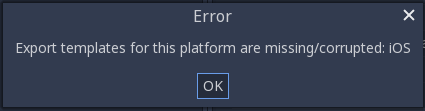
with the same error log from this comment.
haxpor
on 7 Jan 2018
Does it happen even if you replace the export template from Beta 2 with what @akien-mga provided above? It seems you are still using the incorrect template.
endragor
on 7 Jan 2018
I get the same error like @haxpor reported with Xcode 9.2 with the file that @akien-mga provided...
This happens when I try to open the "godot_ios.xcodeproj" directly. It also happens with the same file https://github.com/godotengine/godot/tree/master/misc/dist/ios_xcode/godot_ios.xcodeproj in the current master branch of the godot repo when I try to open the project file in Xcode.
DanEEStar
on 7 Jan 2018
@DanEEStar you should not open the project file from the archive. You should put the iphone.zip into the Godot templates folder, replacing the Beta 2 template with the same name. Then export the game normally, and the export folder will contain working Xcode project.
endragor
on 7 Jan 2018
@endragor Yes, that's exactly what I did replacing iphone.zip into template directory and trying to export from editor (although as well as trying to directly open xcode project file). I believe godot_ios.xcodeproj might be broken.
haxpor
on 7 Jan 2018
@endragor Thanks for the tip. I did now put the new iphone.zip file into the templates folder.
It fails now on my machine with the same error dialog as @haxpor reported:
"Error templates for this platform are missing/corrupted iOS"
and this error output:
 core/os/dir_access.cpp:304 - Condition ' err ' is true. returned: err
 platform/iphone/export/export.cpp:411 - Failed to export loading screen:
 editor/project_export.cpp:747 - Failed to export project
I can see now, that the export partially created some files, like a <export_name>.xcodeproj and other files.
DanEEStar
on 7 Jan 2018
@DanEEStar you should specify all the loading screens in the export template. I'll improve the error message.
@haxpor please paste the exact log that you get.
endragor
on 7 Jan 2018
@DanEEStar Actually it's not exactly the same error message, you can try to provide all launch screens, and required icons (as well put those assets inside project in order to let editor recognize them). At the end, I believe you will get the exact error like I did and others as seen here.
@endragor I got the same error as I told you previously, can be seen here.
I as well paste it down here.
exporting res://default_env.tres
exporting res://main.tscn
static library: libgodot.iphone.debug.fat.a
Unzipping...
READ: libgodot.iphone.debug.fat.a
ADDING: ios-export-najas.a size: 99614072
READ: data.pck
READ: libgodot.iphone.release.fat.a
Exporting additional assets
 core/vector.h:264 - Condition ' p_size < 0 ' is true. returned: ERR_INVALID_PARAMETER
 platform/iphone/export/export.cpp:901 - Can't write '/Volumes/Slave/Downloads/ios-export-najas.xcodeproj/project.pbxproj'.
 editor/project_export.cpp:747 - Failed to export project
@haxpor According to the log, it still uses the broken template. Double-check you've put the correct one into the correct folder (~/Library/Application Support/Godot/templates/3.0-beta/).
endragor
on 7 Jan 2018
@endragor whoa, editor won't read templates from ~/.godot/templates anymore? I'm trying now btw.
Edit: Quickly report here, it works now!
haxpor
on 7 Jan 2018
@endragor @haxpor When I set all the launch screens it worked for me now!
I can run the exported game on my iPad! The exported Xcode-project seems to be vaild!
Thanks for the help.
What I did is manually set the updated iphone.zip from akien-mga into the templates folder and create manually a new templates.zip file from this folder which I imported in Godot 3.
I was not able to find the folder with the templates. Do you know where it is?
DanEEStar
on 7 Jan 2018
@DanEEStar Before at least for Godot 2.1, templates are at ~/.godot/templates but now for Godot 3.0 beta 2, it seems to be changed to ~/Library/Application\ Support/Godot/templates/3.0-beta as per endragor suggested above.
haxpor
on 8 Jan 2018
So it seems to be "fixed" by the updated iphone.zip, will be fixed for real in the 3.0 RC1 templates.
akien-mga
on 8 Jan 2018
Why there is no default icons and launch screens provided for fast test?
All images one by one is time consuming.
 alexzheng
on 7 Mar 2018
alexzheng
on 7 Mar 2018
@akien-mga @endragor Got same problem with 3.0.6 export template.

How can I generate an iphone.zip from the source code ? Is there any documentation about that ?
 Geequlim
on 29 Jul 2018
Geequlim
on 29 Jul 2018
@Geequlim Here's how official templates are made: https://notabug.org/hp/godot-scripts/src/master/build-godot.sh#L310-L317 (with the binaries themselves built as https://notabug.org/hp/godot-scripts/src/master/build-godot-macosx.sh#L45-L53).
akien-mga
on 13 Aug 2018
Note that the issue you're having might be #15058 - it's mostly a usability issue, and if you're up to improving that it would be great :)
(#15058 hints that there might be further issues down the road, but the original usability flaw is still valid, this error message is completely misleading.)
akien-mga
on 13 Aug 2018
Related issues
 blurymind
·
3Comments
blurymind
·
3Comments
 gonzo191
·
3Comments
gonzo191
·
3Comments
 rgrams
·
3Comments
rgrams
·
3Comments
 RebelliousX
·
3Comments
RebelliousX
·
3Comments
 Zylann
·
3Comments
Zylann
·
3Comments
Most helpful comment
Why there is no default icons and launch screens provided for fast test?
All images one by one is time consuming.