Godot: export template for this platform are missing/corrupted: iOS (error message problem, team id is missing)
Godot version:
3.0 beta2
OS/device including version:
windows 8.1
Issue description:
when export to ios, a dialog with "export template for this platform are missing/corrupted: iOS" appear.
Steps to reproduce:
- use sample project in godot 3 docs (dodge)
 liuzhongshu
All 25 comments
Any error message in the console/Output panel?
 vnen
on 26 Dec 2017
vnen
on 26 Dec 2017
ok, I got the error message in console: App Store Team ID not specified.
after I set Team ID and Icon, I get this:
ERROR: Vector
: ERR_INVALID_PARAMETER
At: c:\projects\godot-builds\godot\core\vector.h:264
ERROR: EditorExportPlatformIOS::export_project: Can't write 'D:/dev/godot/games/
Godot3_dodge-1.3/dodge-1.3.xcodeproj/project.pbxproj'.
At: platform\iphone\export\export.cpp:901
ERROR: ProjectExportDialog::_export_project_to_path: Failed to export project
At: editor\project_export.cpp:747
liuzhongshu
on 26 Dec 2017
oh. can we export ios even on Windows or Linux with 3.0?
 volzhs
on 26 Dec 2017
volzhs
on 26 Dec 2017
I have the same error on macOS (latest) and it was present in beta 1 too.
Tried with all icons and launch screens
 Myran
on 28 Dec 2017
Myran
on 28 Dec 2017
I got the same error as reported by @liuzhongshu on macOS 10.13 with Godot 3 Beta 2.
With this to be able to reach such error, I have to specify
- Team ID
- All of launch screens
 haxpor
on 5 Jan 2018
haxpor
on 5 Jan 2018
From #15203 , now it works for me on macOS 10.13 for Godot 3.0 Beta 2 with xcode 9.2. Do the steps below.
- Download a fixed export template for iOS here. Thanks to @akien-mga
- Put that file into your
~/Library/Application\ Support/Godot/templates/3.0-beta/(it seems to change from~/.godot/templates). - Export iOS from editor again. You have to specify all launch screens, and required icons (put those files inside your project to let editor knows it and be able to export).
- Final result will give us xcode project.
haxpor
on 7 Jan 2018
Yeah I wrongly packed the template for 3.0 beta 2, use http://downloads.tuxfamily.org/godotengine/3.0/beta2/iphone.zip instead and/or wait for fixed templates in 3.0 RC 1.
 akien-mga
on 8 Jan 2018
akien-mga
on 8 Jan 2018
I get this error on 3.0.2 stable
 alexzheng
on 7 Mar 2018
alexzheng
on 7 Mar 2018
This issue is still present in 3.0.2 stable:
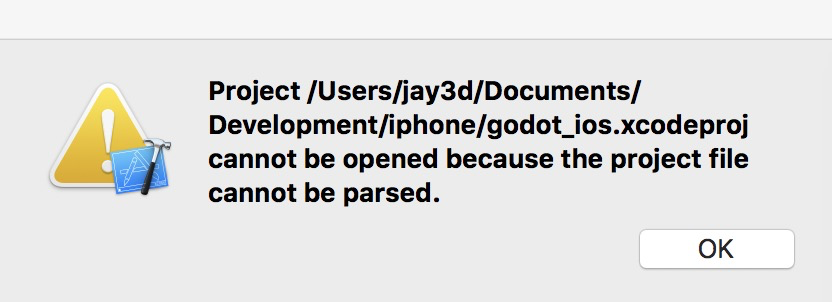
So what's going on?
 jay3d
on 13 Mar 2018
jay3d
on 13 Mar 2018
This issue is still present in 3.0.2 stable
Same. Please re-open this issue.
 jahd2602
on 26 Mar 2018
jahd2602
on 26 Mar 2018
I haven't changed anything in the iOS packaging since 3.0 and 3.0.1, so I'm not sure what would be wrong. CC @endragor
akien-mga
on 26 Mar 2018
Looks like this issue is present on 3.0 RC2 and 3.0.2, but has anyone tested 3.0.0 and 3.0.1?
 aaronfranke
on 28 Mar 2018
aaronfranke
on 28 Mar 2018
I have this problem in windows trying to export from 3.0.3.devel (from today) and 3.1.dev (from a month ago). I compile the templates (no compilation error) and put in appdata/Godot/templates/3.0.3.devel and same in 3.1.dev. Godot doesn´t complain in export dialog, templates are showed in template manager and ok, but at export says that templates are missing/corrupted. I write the txt file ok, templates are compiled from the same repository that editor.
Error returns from core\os\dir_acces.cpp:313 and editor\project_export.cpp:748. Condition err is true.
No aditional info provided.
The new export system is a bit annoying. Why can´t be skipped when custom template is needed? If editor is compiled from dev branch, they shouldn´t ask for templates if you provide that in the Custom Template option, at least from windows desktop because no aditional files are needed, it´s like a not necessary barrier.
 Ranoller
on 22 Apr 2018
Ranoller
on 22 Apr 2018
Same error with 3.0.2.stable and official export templates.
Ranoller
on 22 Apr 2018
I think that godot have now problems with exporting in operating system partition. For people with the problem: Can you try to export in a secundary partition (not usb) ?
Ranoller
on 22 Apr 2018
Exporting does seem to work, the error if you don't configure anything is:
ERROR: export_project: App Store Team ID not specified - cannot configure the project.
   At: platform/iphone/export/export.cpp:687.
ERROR: _export_project_to_path: Failed to export project
   At: editor/project_export.cpp:748.
once a team id is set the export works with official binaries. The error isn't exactly helpful though.
 hpvb
on 13 Jun 2018
hpvb
on 13 Jun 2018
Usability issue then, to be fixed in the master branch and then backported to the 3.0 branch.
akien-mga
on 13 Jun 2018
@akien-mga No, it's not only usability - it's a serious bug. After setting the team ID, and then setting the launch screens and everything required (as per the documentation), I get the "project file could not be parsed" error. I'm using 3.0.6 stable for OS X - the version without C# support.
 csotiriou
on 29 Jul 2018
csotiriou
on 29 Jul 2018
"project file could not be parsed" after finally being able to export the project
 ghost
on 28 Aug 2018
ghost
on 28 Aug 2018
same problem 3.0.6 , Any Update?
 zhengying
on 7 Sep 2018
zhengying
on 7 Sep 2018
Same problem 3.0.6...
OS Linux Mint 19
 bilgehannevruz
on 9 Nov 2018
bilgehannevruz
on 9 Nov 2018
I have a problem with #21088 C# exporting it says Data template directory not found while the correct ones are installed.
Some errors could use some more info to help debugging like show the directory path that could not be found.
Should i create a new issue for this one with more info?
 JohnSilverLong
on 1 Dec 2018
JohnSilverLong
on 1 Dec 2018
Should i create a new issue for this one with more info?
@JohnSilverLong Yes, I don't see any link between this issue and what you describe.
akien-mga
on 2 Dec 2018
I think that godot have now problems with exporting in operating system partition. For people with the problem: Can you try to export in a secundary partition (not usb) ?
@Ranoller I had a similar problem when I tried exporting in my operating system partition on win 10. Fixed it by running godot as admin.
 Feellikeabee
on 22 Dec 2018
Feellikeabee
on 22 Dec 2018
Same thing in 3.1.1
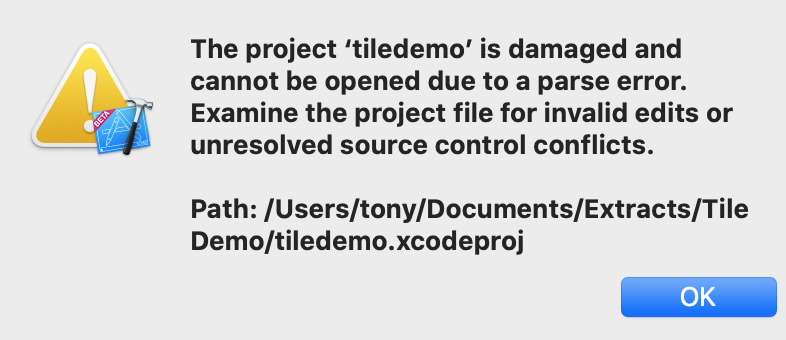
 tonycowan
on 23 Sep 2019
tonycowan
on 23 Sep 2019
Related issues
 nunodonato
·
3Comments
nunodonato
·
3Comments
 Spooner
·
3Comments
Spooner
·
3Comments
 blurymind
·
3Comments
blurymind
·
3Comments
 testman42
·
3Comments
testman42
·
3Comments
 Zylann
·
3Comments
Zylann
·
3Comments
Most helpful comment
I get this error on 3.0.2 stable