Operating system or device, Godot version, GPU Model and driver (if graphics related):
any, all
Issue description:
Godot doesn't have anyway to view embedded resources. This becomes a problem if you created a resource but forget to save to disk. this is troublesome to troubleshoot on a large project since it would likely get buried. Needle in a haystack anyone!
Steps to reproduce:
create a embedded resource like a shader. Leave it; Forget it; wait till your project grows. Then good luck.
Link to minimal example project:
Nice to have a profiler for embedded resources or just a way to keep track of them.
 vonflyhighace2
All 9 comments
Yeah seems to be a use case if you always embed resources when creating stuff and at some point you want to re-use one. Though I almost never embed resources unless I intentionally know they are small enough or never going to be reused. But if I change my mind... searching by name won't work because they have no name, so only way is to find the scene in which it is and remember in which spot it wad used.
Would this present in a window showing all embedded resources in all scenes? (Remember they have no name, would need to be listed by node+property path)
 Zylann
on 17 Dec 2017
Zylann
on 17 Dec 2017
Maybe an option in the fle manager RMB menu, "Show embedded resoures?"
 reduz
on 17 Dec 2017
reduz
on 17 Dec 2017
Maybe an option in the fle manager RMB menu, "Show embedded resoures?"
I think this, along with dynamic auto-generated names would be a good solution. When you enable Show Embedded Resources, any scenes in the currently viewed directory will have their embedded resources show, with auto-generated names along-the-lines of SceneName@Node/Path!Property
Obviously the actual solution would need some more thought put into it than that, but I think it's a starting point.
 RabbitB
on 19 Dec 2017
RabbitB
on 19 Dec 2017
I'm really new to Godot (and very impressed by it!) and I too have thought about this usability issue already.
How about just putting everything imaginable in the Node tree view? I think it would be the most logical and fastest place to look for anything a specific node has eaten. They would stay organized. I know virtually nothing about Blender, but at least it _looks_ like they have done it about that way and thus it might be a good candidate to steal and rework ideas from:
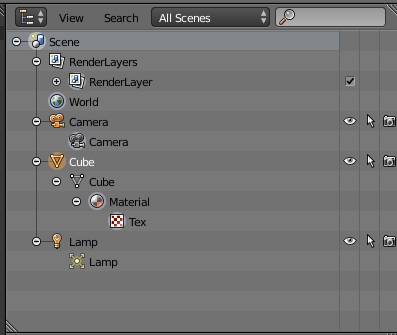
(Such as the possibility to show all scenes in a unified tree view at once, like the "All Scenes" button suggests -- possibly the main scene even highlighted with a special icon or background, why not -- in addition to the everything-in-the-node-tree feature, of course.)
 lmjk
on 21 Dec 2017
lmjk
on 21 Dec 2017
How would you show embedded resources that are shared between multiple nodes? Just shown twice?
Zylann
on 21 Dec 2017
@lmjk Right click on any node and you can see the embedded resources already,.
reduz
on 21 Dec 2017
@Zylann As the suggestion involves the node as part of the auto-generated resource name, listing for each use is viable. Especially if an identifier could be visibly added that signified if different listings pointed to the same resource.
Another possible alternative is to list only the first instance of the resource that's found, but if you right-click the listing, you're given all known aliases (as the auto-generated name essentially acts as a human-usable path to the embedded resource).
RabbitB
on 21 Dec 2017
@reduz Didn't know, thanks for the tip! I'm mostly learning the 2.1 now, but those v3 features are quite tempting...
lmjk
on 21 Dec 2017
According to reduz's comment, this was implemented in 3.0. Closing.
 Calinou
on 26 May 2020
Calinou
on 26 May 2020
Related issues
Zylann
·
3Comments
 Spooner
·
3Comments
Spooner
·
3Comments
 SleepProgger
·
3Comments
SleepProgger
·
3Comments
 blurymind
·
3Comments
blurymind
·
3Comments
 n-pigeon
·
3Comments
n-pigeon
·
3Comments
Most helpful comment
Maybe an option in the fle manager RMB menu, "Show embedded resoures?"