Godot: Why is importing models so complicated in Godot 3.0
In Unity I am able to very easily drag and drop a 3D model. It can be saved as a blend file or as a fbx file and it would work just perfectly fine.
How come in Godot 3.0 it is more complicated. I have to first export the model using better collada add on for Blender, and then I have to import the model etc?
 Raj2032
All 39 comments
FBX is an exported format.
As for better collada, it is because those editors don't actually do it correctly with their built in exporters, whether due to rushed implementations or otherwise. The better collada addon is there to remedy the fact that the exported format is totally broken, or at least is missing components.
Unity can license out the FBX importer (as far as I know, FBX requires licensing from autodesk - something which an open source project will rarely have the funds to do), and a blend file is a lot more complex than just a model or mesh, as it contains things like application settings, thumbnails, layer data, and loads of information you'd expect to work with godot, but it can't without baking it down every single time it loads up the editor.
Instead, Godot opts for open, well documented formats. DAE (collada) is one such format.
 Silvea12
on 10 Dec 2017
Silvea12
on 10 Dec 2017
Hi Andrew,
I am seriously having confusions as to how to import a dae file format on
Godot 3.0. can you please give me a step by step guide please?
On Sun, Dec 10, 2017 at 1:21 PM, Andrew Silver notifications@github.com
wrote:
FBX is an exported format.
As for better collada, it is because those editors don't actually do it
correctly with their built in exporters, whether due to rushed
implementations or otherwise. The better collada addon is there to remedy
the fact that the exported format is totally broken, or at least is missing
components.Unity can license out the FBX importer (as far as I know, FBX requires
licensing from autodesk - something which an open source project will
rarely have the funds to do), and a blend file is a lot more complex than
just a model or mesh, as it contains things like application settings,
thumbnails, layer data, and loads of information you'd expect to work with
godot, but it can't without baking it down every single time it loads up
the editor.Instead, Godot opts for open, well documented formats. DAE (collada) is
one such format.—
You are receiving this because you authored the thread.
Reply to this email directly, view it on GitHub
https://github.com/godotengine/godot/issues/14489#issuecomment-350520262,
or mute the thread
https://github.com/notifications/unsubscribe-auth/Ab79BlumCzDJgjFLRl4ei2QBPxrKnnj2ks5s-0A0gaJpZM4Q8VgN
.
Raj2032
on 10 Dec 2017
Dae files should auto-import into Godot just like models auto import into Unity. Just make sure it's somewhere in the project folder and it will create a scene file that you can use. :)
 NathanWarden
on 10 Dec 2017
NathanWarden
on 10 Dec 2017
Unity opens .blend files by actually calling blender to export an fbx and reading it, we can't do this because Blender does not come with any useful exporter for us out of the box. Maybe if they ever merge the GLTF2 importer we will be able to do the same.
Regarding FBX support, some users are working on FBX support via GDNative, which should be super easy to install once 3.0 is out, you will be able to get it from the asset library.
 reduz
on 10 Dec 2017
reduz
on 10 Dec 2017
Well I do see a readable file so do I just click and drag it?
On Sun, Dec 10, 2017 at 1:55 PM, Nathan notifications@github.com wrote:
Dae files should auto-import into Godot just like models auto import into
Unity. Just make sure it's somewhere in the project folder and it will
create a scene file that you can use. :)—
You are receiving this because you authored the thread.
Reply to this email directly, view it on GitHub
https://github.com/godotengine/godot/issues/14489#issuecomment-350521360,
or mute the thread
https://github.com/notifications/unsubscribe-auth/Ab79BmUDWNORz-wbsZ3ua7ueir7pybe1ks5s-0ghgaJpZM4Q8VgN
.
Raj2032
on 10 Dec 2017
Raj2032 - Just put your DAE file in your godot project directory (assuming 3.0)
Would be nice to have tighter integration with blender.
 rminderhoud
on 10 Dec 2017
rminderhoud
on 10 Dec 2017
@Raj2032 Godot 3.0 works a lot like Unity as far as importing assets easily and non-destructively. If you've used Godot 2.x before you'll need to unlearn it since the import workflow is now completely different. You should be able to drag and drop in assets if you want to, but keep in mind it will make a copy of the asset, so any changes you make you'll want to do to the project copy that you dragged in, not the original. I usually just export my Blender/Modo/etc file directly, overwriting the existing dae file.

NathanWarden
on 11 Dec 2017
HI Nathan,
First of all how do you export the object to ensure its material properties
are coming up, and also when you first exported your materials, did it turn
to the colour blue? If so may I know what you did to remove the blue colour
in your ojbect?
On Mon, Dec 11, 2017 at 11:46 AM, Nathan notifications@github.com wrote:
@Raj2032 https://github.com/raj2032 Godot 3.0 works a lot like Unity as
far as importing assets easily and non-destructively. If you've used Godot
2.x before you'll need to unlearn it since the import workflow is now
completely different. You should be able to drag and drop in assets if you
want to, but keep in mind it will make a copy of the asset, so any changes
you make you'll want to do to the project copy that you dragged in, not the
original. I usually just export my Blender/Modo/etc file directly,
overwriting the existing dae file.[image: screenshot from 2017-12-10 19-39-37]
https://user-images.githubusercontent.com/629422/33811513-6506406e-dde2-11e7-8624-09273db1010a.png—
You are receiving this because you were mentioned.
Reply to this email directly, view it on GitHub
https://github.com/godotengine/godot/issues/14489#issuecomment-350596781,
or mute the thread
https://github.com/notifications/unsubscribe-auth/Ab79BhPReFvXODM-VpR3mcvgVRQWYhLkks5s_HtngaJpZM4Q8VgN
.
Raj2032
on 11 Dec 2017
By default, Godot uses the environment to light your object, so the blue color is actually coming from the environment, not the material itself. If you look just to the left of the red box in the image I added above that's the default environment (which can be changed in Project > Project Settings > Rendering > Environment). Double click on that and you can change the settings. Don't forget to save it by clicking the save/disk icon in the inspector or it will revert the settings the next time you open Godot :)
Another option, which would be more realistic for outdoors than changing the environment, would be to add a directional light, rotate it how you'd like, and then tint it with a very slight reddish color. This would represent a more realistic look to your scene. :)
NathanWarden
on 11 Dec 2017
Here are some images regarding lighting from my previous post:
Before Adding a Light
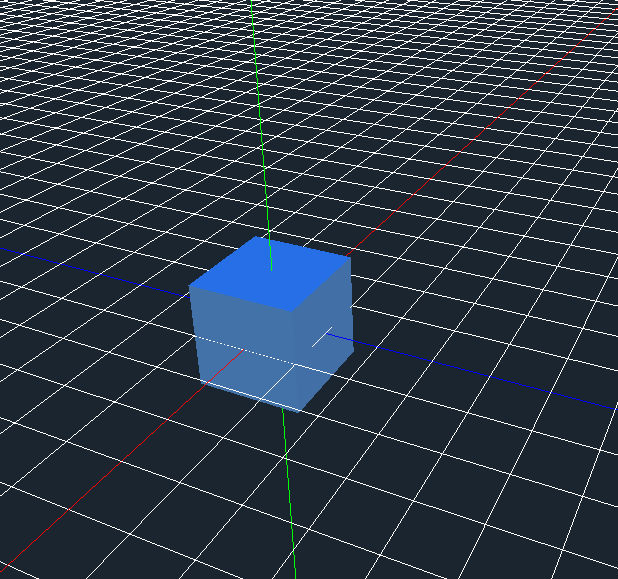
After Adding a Light

NathanWarden
on 11 Dec 2017
Hi Nathan,
Thanks for your help :) I have some additional questions though. I have
created an animation in Blender to a 3D object, how do I export this using
the better collada addon and what should I do in Godot 3.0 in order to
succesfully import the object with animations as I was unable to do this
for some reason?
Additionally for some reason my other objects WITHOUT animations has a
material attached to it under the cycles render in Blender, when I exported
it either using Better Collada addon or by exporting it as obj, for some
reason when I import it in Godot 3.0, the object does not seem to be
showing the material that I have added to it, can you please give me a step
by step solution to this please sorry to ask you so many things =D
On Tue, Dec 12, 2017 at 12:28 AM, Nathan notifications@github.com wrote:
Here are some images regarding lighting from my previous post:
Before Adding a Light
[image: withoutlight]
https://user-images.githubusercontent.com/629422/33833232-09e7fba8-de4d-11e7-9944-e9a167a95a5c.pngAfter Adding a Light
[image: withlight]
https://user-images.githubusercontent.com/629422/33833261-1d0eb280-de4d-11e7-8775-b6070ab4df31.png—
You are receiving this because you were mentioned.
Reply to this email directly, view it on GitHub
https://github.com/godotengine/godot/issues/14489#issuecomment-350723781,
or mute the thread
https://github.com/notifications/unsubscribe-auth/Ab79BgUE616TEVMbzeQ0qD63qUwYElKgks5s_S3mgaJpZM4Q8VgN
.
Raj2032
on 11 Dec 2017
Cycles materials won't be exported as they are something specific to Blender.
 Zireael07
on 11 Dec 2017
Zireael07
on 11 Dec 2017
For materials, you want to use blender eevee I believe. The materials for that should be cross compatible. It isn't in the current mainline version of blender, but the current beta has it.
Silvea12
on 11 Dec 2017
@Raj2032 To be honest I haven't exported any animations out of Blender into Godot yet, so I couldn't help you there. As for cycles materials, I'd have to go with what @Zireael07 and @Silvea12 said. I typically just use the standard materials in Blender which seem to export fine for me.
NathanWarden
on 11 Dec 2017
Hi all
So using the obj format I am able to export my materials but for some
reason the objects are reflective, how do I fix this issue? Also is the
materials supposed to be exported as well under Blender Render using the
Better Collada addon?
On Tue, Dec 12, 2017 at 5:04 AM, Nathan notifications@github.com wrote:
@Raj2032 https://github.com/raj2032 To be honest I haven't exported any
animations out of Blender into Godot yet, so I couldn't help you there. As
for cycles materials, I'd have to go with what @Zireael07
https://github.com/zireael07 and @Silvea12 https://github.com/silvea12
said. I typically just use the standard materials in Blender which seem to
export fine for me.—
You are receiving this because you were mentioned.
Reply to this email directly, view it on GitHub
https://github.com/godotengine/godot/issues/14489#issuecomment-350806677,
or mute the thread
https://github.com/notifications/unsubscribe-auth/Ab79BnDBsLzb09-CvqgNm3fpNmOHVxY-ks5s_W6lgaJpZM4Q8VgN
.
Raj2032
on 12 Dec 2017
Hmmm, if they're being reflective, you may want to check and make sure the Metallic value under the Metallic foldout is set to 0.
I think the Blender render ones will export, but I'm not so sure about that if they are using a node graph. I know that they should if the materials are used in the generic, non-node graph, way. Someone else who uses Blender more would be better suited to answer that question more accurately. :)
NathanWarden
on 12 Dec 2017
Hi Nathan,
Where do I go to find the metallic foldout?
Also I just had a play around with Blender 2.8 and using the Eevee render,
when I exported my object using the obj format, the object would not appear
at all in Godot, is there something I have to do? I did use the better
collada addon for Blender but for some reason I am getting an error
everytime I try and export it using that.
On Tue, Dec 12, 2017 at 3:45 PM, Nathan notifications@github.com wrote:
Hmmm, if they're being reflective, you may want to check and make sure the
Metallic value under the Metallic foldout is set to 0.I think the Blender render ones will export, but I'm not so sure about
that if they are using a node graph. I know that they should if the
materials are used in the generic, non-node graph, way. Someone else who
uses Blender more would be better suited to answer that question more
accurately. :)—
You are receiving this because you were mentioned.
Reply to this email directly, view it on GitHub
https://github.com/godotengine/godot/issues/14489#issuecomment-350944046,
or mute the thread
https://github.com/notifications/unsubscribe-auth/Ab79Bs7QMCKiYOlf7QLHiqR5oLB5zFSJks5s_gT8gaJpZM4Q8VgN
.
Raj2032
on 12 Dec 2017
@Raj2032 Wavefront (OBJ) spec defines that the default material is phong shaded. That is why your stuff is glossy. You may want to use .dae or just edit the material manually - your .mtl file won't help you.
Silvea12
on 12 Dec 2017
For materials: I use the gltf-Format with the Khronos exporter+node-group (For Cycles)
https://github.com/KhronosGroup/glTF-Blender-Exporter
 MrJustreborn
on 12 Dec 2017
MrJustreborn
on 12 Dec 2017
Wavefront (OBJ) spec defines that the default material is phong shaded. That is why your stuff is glossy. You may want to use .dae or just edit the material manually - your .mtl file won't help you.
OBJ/MTL files do not support PBR materials, so you will have to use glTF 2.0 (as Collada doesn't support PBR materials either, IIRC).
 Calinou
on 12 Dec 2017
Calinou
on 12 Dec 2017
I am going to try and use the gltf-Format with the Khronos. @MrJustreborn I
wanted to know do I just install the one file in Blender as provided in the
link?
On Wed, Dec 13, 2017 at 12:30 AM, Hugo Locurcio notifications@github.com
wrote:
Wavefront (OBJ) spec defines that the default material is phong shaded.
That is why your stuff is glossy. You may want to use .dae or just edit the
material manually - your .mtl file won't help you.OBJ/MTL files don't support PBR materials, so you will have to use glTF
2.0 (as Collada doesn't support PBR materials either, IIRC).—
You are receiving this because you were mentioned.
Reply to this email directly, view it on GitHub
https://github.com/godotengine/godot/issues/14489#issuecomment-351051427,
or mute the thread
https://github.com/notifications/unsubscribe-auth/Ab79BuNXwpe5Tfe6-WjOS8bk6gJzKY-wks5s_n_lgaJpZM4Q8VgN
.
Raj2032
on 13 Dec 2017
Is it possible to leverage Assimp for doing model loading into Godot resources? This would open the door to a lot of formats instead of fussing with plugins for blender and other software. It was already requested in #7883 but if there's plans on making importing more seemless it should be considered for more than just blend files.
 nhydock
on 13 Dec 2017
nhydock
on 13 Dec 2017
@Raj2032 It's very simple to install the extension: https://github.com/KhronosGroup/glTF-Blender-Exporter#installation
How to use the glTF-Extension is documented here: https://github.com/KhronosGroup/glTF-Blender-Exporter/blob/master/docs/user.md
MrJustreborn
on 13 Dec 2017
I understand how to install extensions but I don't understand this "I use
the gltf-Format with the Khronos exporter+node-group" Are these two
seperate addons?
On Wed, Dec 13, 2017 at 6:22 PM, MrJustreborn notifications@github.com
wrote:
@Raj2032 https://github.com/raj2032 It's very simple to install a
extension: https://github.com/KhronosGroup/glTF-Blender-
Exporter#installation
Here is a installationguid for extension: https://blender.stackexchange.
com/a/1689
How to use the glTF-Extension is documented here: https://github.com/
KhronosGroup/glTF-Blender-Exporter/blob/master/docs/user.md—
You are receiving this because you were mentioned.
Reply to this email directly, view it on GitHub
https://github.com/godotengine/godot/issues/14489#issuecomment-351305544,
or mute the thread
https://github.com/notifications/unsubscribe-auth/Ab79Buid-CxjSJmYXACbKJjs23Nwq6whks5s_3tNgaJpZM4Q8VgN
.
Raj2032
on 13 Dec 2017
No, the exporter is the extension and the node-group a just a node-group for the PBR-Material.
It's documented here: https://github.com/KhronosGroup/glTF-Blender-Exporter/blob/master/docs/user.md
Just link the group and use it for your materials.
MrJustreborn
on 13 Dec 2017
I downloaded the zip file and then in Blender I went to addons, install
from file, so then I selected the zip file that I downloaded from the link
you have provided, but then it showed this (let me know if you did not get
an image)
[image: Inline image 1]
so how do I activate this addon as I can't find it?
On Wed, Dec 13, 2017 at 8:11 PM, MrJustreborn notifications@github.com
wrote:
No, the exporter is the extension and the node-group a just a node-group
for the PBR-Material.
It's documented here: https://github.com/KhronosGroup/glTF-Blender-
Exporter/blob/master/docs/user.md
Just link the group and use it for your materials.—
You are receiving this because you were mentioned.
Reply to this email directly, view it on GitHub
https://github.com/godotengine/godot/issues/14489#issuecomment-351329165,
or mute the thread
https://github.com/notifications/unsubscribe-auth/Ab79Bj3aju-dC-OhyNJlz3ekhiHLzMHcks5s_5S6gaJpZM4Q8VgN
.
Raj2032
on 15 Dec 2017
@Raj2032 I can't see the image.
What ZIP did you download? - The Link is a GitHub-Repo, that you could download as ZIP but the addon is in the "scripts" folder. How to install this addon is documented here:
Otherwise, copy the io_scene_gltf2 folder to the scripts/addons folder of your Blender installation.
https://github.com/KhronosGroup/glTF-Blender-Exporter/tree/master/scripts#scripts
MrJustreborn
on 15 Dec 2017
Hey man, thank you very much :)
On Fri, Dec 15, 2017 at 6:58 PM, MrJustreborn notifications@github.com
wrote:
@Raj2032 https://github.com/raj2032 I can't see the image.
What ZIP did you download? - The Link is a GitHub-Repo, that you could
download as ZIP but the addon is in the "scripts" folder. How to install
this addon is documented here:Otherwise, copy the io_scene_gltf2 folder to the scripts/addons folder of
your Blender installation.
https://github.com/KhronosGroup/glTF-Blender-Exporter/tree/master/scripts#
scripts—
You are receiving this because you were mentioned.
Reply to this email directly, view it on GitHub
https://github.com/godotengine/godot/issues/14489#issuecomment-351938521,
or mute the thread
https://github.com/notifications/unsubscribe-auth/Ab79BmjiU8xJcFizXYp9Q8lR5tLbr8crks5tAiajgaJpZM4Q8VgN
.
Raj2032
on 15 Dec 2017
Hey man
In this link
https://github.com/KhronosGroup/glTF-Blender-Exporter/raw/master/docs/glTF_03_Blender_Link_Material.png
Where do I find the links?
On Sat, Dec 16, 2017 at 1:25 AM, Joe Smith justman111111@gmail.com wrote:
Hey man, thank you very much :)
On Fri, Dec 15, 2017 at 6:58 PM, MrJustreborn notifications@github.com
wrote:@Raj2032 https://github.com/raj2032 I can't see the image.
What ZIP did you download? - The Link is a GitHub-Repo, that you could
download as ZIP but the addon is in the "scripts" folder. How to install
this addon is documented here:Otherwise, copy the io_scene_gltf2 folder to the scripts/addons folder of
your Blender installation.
https://github.com/KhronosGroup/glTF-Blender-Exporter/tree/
master/scripts#scripts—
You are receiving this because you were mentioned.
Reply to this email directly, view it on GitHub
https://github.com/godotengine/godot/issues/14489#issuecomment-351938521,
or mute the thread
https://github.com/notifications/unsubscribe-auth/Ab79BmjiU8xJcFizXYp9Q8lR5tLbr8crks5tAiajgaJpZM4Q8VgN
.
Raj2032
on 17 Dec 2017
Nevermind I found it
On Sun, Dec 17, 2017 at 5:54 PM, Joe Smith justman111111@gmail.com wrote:
Hey man
In this link https://github.com/KhronosGroup/glTF-Blender-
Exporter/raw/master/docs/glTF_03_Blender_Link_Material.pngWhere do I find the links?
On Sat, Dec 16, 2017 at 1:25 AM, Joe Smith justman111111@gmail.com
wrote:Hey man, thank you very much :)
On Fri, Dec 15, 2017 at 6:58 PM, MrJustreborn notifications@github.com
wrote:@Raj2032 https://github.com/raj2032 I can't see the image.
What ZIP did you download? - The Link is a GitHub-Repo, that you could
download as ZIP but the addon is in the "scripts" folder. How to install
this addon is documented here:Otherwise, copy the io_scene_gltf2 folder to the scripts/addons folder
of your Blender installation.
https://github.com/KhronosGroup/glTF-Blender-Exporter/tree/m
aster/scripts#scripts—
You are receiving this because you were mentioned.
Reply to this email directly, view it on GitHub
https://github.com/godotengine/godot/issues/14489#issuecomment-351938521,
or mute the thread
https://github.com/notifications/unsubscribe-auth/Ab79BmjiU8xJcFizXYp9Q8lR5tLbr8crks5tAiajgaJpZM4Q8VgN
.
Raj2032
on 17 Dec 2017
How do I make the node group glTF Metallic Roughness exactly the same as my
Diffuse BSDF? Here is the link to my full question
https://blender.stackexchange.com/questions/96713/i-am-using-the-gltf-addon-how-do-i-make-my-node-group-gltf-metallic-roughness-e
On Sun, Dec 17, 2017 at 7:14 PM, Joe Smith justman111111@gmail.com wrote:
Nevermind I found it
On Sun, Dec 17, 2017 at 5:54 PM, Joe Smith justman111111@gmail.com
wrote:Hey man
In this link https://github.com/KhronosGroup/glTF-Blender-Exporter/
raw/master/docs/glTF_03_Blender_Link_Material.pngWhere do I find the links?
On Sat, Dec 16, 2017 at 1:25 AM, Joe Smith justman111111@gmail.com
wrote:Hey man, thank you very much :)
On Fri, Dec 15, 2017 at 6:58 PM, MrJustreborn notifications@github.com
wrote:@Raj2032 https://github.com/raj2032 I can't see the image.
What ZIP did you download? - The Link is a GitHub-Repo, that you could
download as ZIP but the addon is in the "scripts" folder. How to install
this addon is documented here:Otherwise, copy the io_scene_gltf2 folder to the scripts/addons folder
of your Blender installation.
https://github.com/KhronosGroup/glTF-Blender-Exporter/tree/m
aster/scripts#scripts—
You are receiving this because you were mentioned.
Reply to this email directly, view it on GitHub
https://github.com/godotengine/godot/issues/14489#issuecomment-351938521,
or mute the thread
https://github.com/notifications/unsubscribe-auth/Ab79BmjiU8xJcFizXYp9Q8lR5tLbr8crks5tAiajgaJpZM4Q8VgN
.
Raj2032
on 17 Dec 2017
Hey,
sorry but I'm NOT an expert in PBR-Materials. I can't help you here.
MrJustreborn
on 17 Dec 2017
Oh ok thanks,
When exporting the object, is everything that is appropriate selected by
default?
When I exported my object, in Godot in the left panel, I see two thing, one
is Cube.gltf and the other one is .mesh (check out the link to see the
image) https://i.stack.imgur.com/eJvFV.png
Which one do I drag into the 3D world?
On Sun, Dec 17, 2017 at 7:23 PM, MrJustreborn notifications@github.com
wrote:
Hey,
sorry but I'm NOT an expert in PBR-Materials. I can't help you here.—
You are receiving this because you were mentioned.
Reply to this email directly, view it on GitHub
https://github.com/godotengine/godot/issues/14489#issuecomment-352239816,
or mute the thread
https://github.com/notifications/unsubscribe-auth/Ab79Bk5RaG39EeyxBUTH_3CTvzwGF17Pks5tBM-PgaJpZM4Q8VgN
.
Raj2032
on 17 Dec 2017
You'll want to drag the Cube.gltf into the scene. The mesh is a resource, just like in Unity. The gltf file is more like a prefab.
NathanWarden
on 17 Dec 2017
Yo, sup.
For animations, you'll want to hit the "Export Animation" and "All Actions" tickbox on the left when you go to export the Collada file. Those options'll be on the left-hand side of the file browser in Blender.
 SolarLune
on 17 Dec 2017
SolarLune
on 17 Dec 2017
Hey,
Thanks for your guy's help, shit is just starting to work now finally, so
glad things are fine now, thanks for everyone's help :)
On Mon, Dec 18, 2017 at 4:50 AM, SolarLune notifications@github.com wrote:
Yo, sup.
For animations, you'll want to hit the "Export Animation" and "All
Actions" tickbox on the left when you go to export the Collada file. Those
options'll be on the left-hand side of the file browser in Blender.—
You are receiving this because you were mentioned.
Reply to this email directly, view it on GitHub
https://github.com/godotengine/godot/issues/14489#issuecomment-352272848,
or mute the thread
https://github.com/notifications/unsubscribe-auth/Ab79BiW0MAf7DMN4Zf6JjHL1fQ36WVx4ks5tBVRdgaJpZM4Q8VgN
.
Raj2032
on 18 Dec 2017
Can we natively code in GDNative (this is C++)?
On Mon, Dec 18, 2017 at 11:07 AM, Joe Smith justman111111@gmail.com wrote:
Hey,
Thanks for your guy's help, shit is just starting to work now finally, so
glad things are fine now, thanks for everyone's help :)On Mon, Dec 18, 2017 at 4:50 AM, SolarLune notifications@github.com
wrote:Yo, sup.
For animations, you'll want to hit the "Export Animation" and "All
Actions" tickbox on the left when you go to export the Collada file. Those
options'll be on the left-hand side of the file browser in Blender.—
You are receiving this because you were mentioned.
Reply to this email directly, view it on GitHub
https://github.com/godotengine/godot/issues/14489#issuecomment-352272848,
or mute the thread
https://github.com/notifications/unsubscribe-auth/Ab79BiW0MAf7DMN4Zf6JjHL1fQ36WVx4ks5tBVRdgaJpZM4Q8VgN
.
Raj2032
on 18 Dec 2017
How do we set up GDNative? As I am so confused?
On Mon, Dec 18, 2017 at 8:52 PM, Joe Smith justman111111@gmail.com wrote:
Can we natively code in GDNative (this is C++)?
On Mon, Dec 18, 2017 at 11:07 AM, Joe Smith justman111111@gmail.com
wrote:Hey,
Thanks for your guy's help, shit is just starting to work now finally, so
glad things are fine now, thanks for everyone's help :)On Mon, Dec 18, 2017 at 4:50 AM, SolarLune notifications@github.com
wrote:Yo, sup.
For animations, you'll want to hit the "Export Animation" and "All
Actions" tickbox on the left when you go to export the Collada file. Those
options'll be on the left-hand side of the file browser in Blender.—
You are receiving this because you were mentioned.
Reply to this email directly, view it on GitHub
https://github.com/godotengine/godot/issues/14489#issuecomment-352272848,
or mute the thread
https://github.com/notifications/unsubscribe-auth/Ab79BiW0MAf7DMN4Zf6JjHL1fQ36WVx4ks5tBVRdgaJpZM4Q8VgN
.
Raj2032
on 18 Dec 2017
This issue tracker is for bug reports and well-defined enhancements requests to implement in the engine, not for user support. Please use one of the other community channels for that: http://godotengine.org/community
 akien-mga
on 18 Dec 2017
akien-mga
on 18 Dec 2017
Related issues
 blurymind
·
3Comments
blurymind
·
3Comments
 testman42
·
3Comments
testman42
·
3Comments
 n-pigeon
·
3Comments
n-pigeon
·
3Comments
 Zylann
·
3Comments
Zylann
·
3Comments
 mooseyfaith
·
3Comments
mooseyfaith
·
3Comments
Most helpful comment
Unity opens .blend files by actually calling blender to export an fbx and reading it, we can't do this because Blender does not come with any useful exporter for us out of the box. Maybe if they ever merge the GLTF2 importer we will be able to do the same.
Regarding FBX support, some users are working on FBX support via GDNative, which should be super easy to install once 3.0 is out, you will be able to get it from the asset library.