Godot: Confusing size behaviour when controls are in a HBoxContainer
Godot 3.0
Windows 10 64 bits
I'm trying to make it so a control expands vertically within an horizontal container while keeping their width, but I'm failing so far... Everything I put inside ends up with a width of zero.
There is either a bug, or something implicit to know for this to work...
Repro steps:
1) Create a HBoxControl
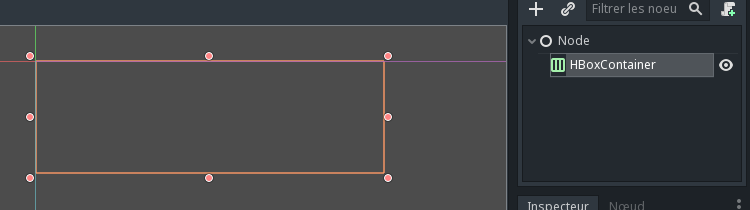
2) Create a ColorRect inside, notice it spawns with zero width
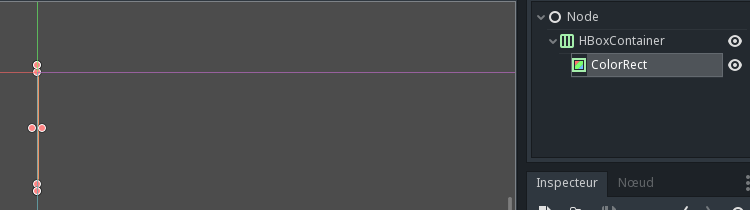
3) Give the ColorRect some width by dragging the right handle in the viewport
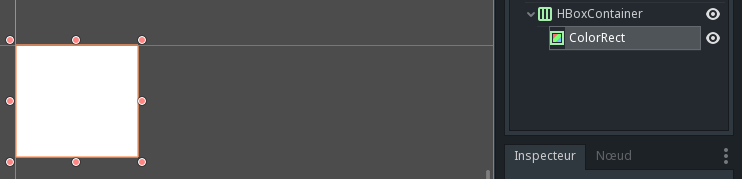
4) Resize the container, notice the ColorRect disappears as its size goes back to zero
Edit: apparently the only thing that worked was to set a minimum size. Is there a reason why it works that way? It's not very intuitive... and also not documented
 Zylann
All 10 comments
Within a container, the size of the node does not matter, it is overriden by the container.
Thus this is a normal behaviour.
 groud
on 11 Nov 2017
groud
on 11 Nov 2017
@groud this is where things get interesting: in a HBoxContainer, only the height and X position are relevant to change. I don't see any reason why the container would set the width to zero and use a totally different size property instead.
Zylann
on 11 Nov 2017
Yeah, the way control nodes work is a little bit inconsistent in some situations, but that's not a bug.
A container modifes the size of its children, and uses the minimum size to avoid shrinking it too much. Some nodes, like ColorRect, do not have a minimum size. Thus, if you want it to have one, you have to use the custom minimum size.
groud
on 11 Nov 2017
@groud that should be documented at least :)
Though it makes edition confusing in the editor, because you need to set size in inspector rather than simply dragging the handle.
Zylann
on 11 Nov 2017
See here.
Still I understand that it can be confusing, But I'm not sure what we can do about it. Maybe edit the minimum size instead of the normal one if we edit a child of a container ?
groud
on 11 Nov 2017
Could it be added to BoxContainer class documentation too? Because as a developer, that's where I ended up first when coding. There was no link to the tutorial page, and these are not bundled in the editor doc.
Zylann
on 11 Nov 2017
It's common behaviour of the whole container/control nodes system. I guess it could be added to the Container doc. :)
groud
on 11 Nov 2017
I would say, that the container system has been a stumbling block for me, and is why I'm reading all the issues trying to get a better understanding of how it works ("Yes, I've already read the current docs :)" ). Based on these threads, it's clear that I'm not the only one struggling with this. I know the system makes sense once you understand it, but it isn't consistent with most other UI tools. Not saying that it needs to be necessarily, but better documentation, and tutorials are needed to reduce the frustration of trying to learn something that doesn't conform to typical behavior and nomenclature in some instances.
 Linicks
on 17 Apr 2018
Linicks
on 17 Apr 2018
Hi,
I am currently playing with Godot and think that the title of this issue applies to my current situation. I have the following hierachy of nodes:
- HBoxContainer
- ColorRect1 (Color is "Red" and Horizontal Size Flag is "Fill")
- Label1 (Text is "Hello" and Horizontal Size Flags is "Shrink Center")
- ColorRect2 (Color is "Blue" and Horizontal Size Flag is "Fill" + "Expand")
- Label2 (Text is "World" and Horizontal Size Flags is "Shrink Center")
Label2 ("World") is correctly displayed in a cell of the size of the "World" text. But Label1 ("Hello") is hidden by the ColorRect2 ("Blue") while ColorRect1 has size 0 (not visible).
The behaviour that I expected was to see Label1 ("Hello") in ColorRect1 ("Red") of the size of Label1, then ColorRect2 ("Blue") taking all the available room (Because of the "Expand" Size Flag), then Label2 ("World").
My question is: why hasn't ColorRect1 the size of its Label1 children ?
 FlorentFlament
on 1 Jun 2018
FlorentFlament
on 1 Jun 2018
I'll close this issue as superseded by #20750 and #7633
groud
on 19 Sep 2018
Related issues
 mefihl
·
3Comments
mefihl
·
3Comments
 SleepProgger
·
3Comments
SleepProgger
·
3Comments
 RebelliousX
·
3Comments
RebelliousX
·
3Comments
 kirilledelman
·
3Comments
kirilledelman
·
3Comments
 bojidar-bg
·
3Comments
bojidar-bg
·
3Comments
Most helpful comment
Could it be added to BoxContainer class documentation too? Because as a developer, that's where I ended up first when coding. There was no link to the tutorial page, and these are not bundled in the editor doc.