Godot: Add simulated bool flag for physic bodies
Issue description:
I made a closed game in Godot, an asteroids clone. And I have problem with instancing asteroids (because they are rigidbodies) and it makes lot of comsumption because the 2d physics engine in Godot. For avoiding the lot of instancing time I made a SceneResourcePooler who gets resources by demaning, and it has a constant size of elements. This pooler at initialization creates the instance of the asteroid's scene (using .instance()) and adds to the parent node (using .add_child). This removes the initial loading time of the asteroids (_init(), ready(), etc). When an asteroid is needed we call a method of the pooler to get a unused asteroid. Remember, all asteroids are childs of the parent node in the scene, so if we made a pool of 30 asteroids, there will be 30 asteroids allocated in the scene. Those asteroids that will not be used has collisionshaped disabled ans sprites too. But I cannot "disable" the rigidbody. I saw in the Unity's documentation a property of RigidBody2d called "simulated" that enables/disables the rigidbody.
I think Godot needs this feature: https://docs.unity3d.com/ScriptReference/Rigidbody2D-simulated.html
Can be the feature made for Godot v3.0 or I need to fork the engine and add this property?
What do you think about this property?
 Alexia-AT-Digitecnology
All 38 comments
Can't you just remove unused asteroids from the scene (remove_child) and add them back (add_child) when needed?
 akien-mga
on 9 Nov 2017
akien-mga
on 9 Nov 2017
@akien-mga, it generates overhead (0,2s per each asteroid), because they are complex entities. That's why I need this "simulated" parameter. The root of the asteroid tree is a RigidBody2D.
Alexia-AT-Digitecnology
on 9 Nov 2017
Since rigidtbodies are a type of node, and they don't really have a renderable shape to them, is it possible to just ignore collision if the body's node is set to not visible in the tree?
 nhydock
on 9 Nov 2017
nhydock
on 9 Nov 2017
@nhydock, I change RigidBody mode to MODE_STATIC, but it is not ignored by the physics system, and I deactivate collision nodes too. It keeps lagging a lot because it's not ignored by the physics system.
Alexia-AT-Digitecnology
on 9 Nov 2017
@AndreaCatania, @akien-mga, is simple to add this property? I saw that in body_2d_sw.h there is a method called set_active(bool) that adds to a list in space_2d_sw.h of "active" elements.
Alexia-AT-Digitecnology
on 9 Nov 2017
This property is not required since is easy avoid collisions.
These are tree possible soluzions (the second solution is the one that you should use)
- Remove it from the scene (Could be fine)
- Set Layer and Mask to 0 (Recommended way)
- add collision exceptions (Don't to that)
 AndreaCatania
on 9 Nov 2017
AndreaCatania
on 9 Nov 2017
@AndreaCatania, I applied the second option, and stills lagging (the object is still used by the physics system). It will not collide because I disabled the collider and mask and layer is set to 0. If you need access to the source code I can give it to you by a private way to see and test it.
Alexia-AT-Digitecnology
on 9 Nov 2017
I don't know what do you mean with "It will not collide because I disabled the collider"; however (without going deeper) by setting Layer and Mask to 0 is like if you have completelly remove it from the physics scene.
I don't know exactly what's causing the problem, but probably it is elsewhere. Try to debug it in order to find the exact problem origin.
AndreaCatania
on 9 Nov 2017
@AndreaCatania, I see the profiler and it says the main problem is the physics system. The object set with mask and layer 0 is not completely removed from physics system, is still processing internally and generates lot of lag.
Alexia-AT-Digitecnology
on 9 Nov 2017
If you generate for example 4000 rigid bodies and set the collision mask and layer to 0, it will keep processing into physics system, generating lot of lag.
Alexia-AT-Digitecnology
on 9 Nov 2017
I honestly don't think the physics engine would lag with only 30 entities... Can you copy-paste the code you use in the physics_process (the new fixed_process) ?
 groud
on 9 Nov 2017
groud
on 9 Nov 2017
@groud exactly.
@Alexia-AT-Digitecnology share a sample project would be useful for debug
AndreaCatania
on 9 Nov 2017
If you generate for example 4000 rigid bodies and set the collision mask and layer to 0, it will keep processing into physics system, generating lot of lag.
Are these object moving? Another thing that you can do is set it as sleeping or static.
AndreaCatania
on 9 Nov 2017
I will free the code of the game. I think it's the only way to fix this.
Code: https://gitlab.com/Rockroids/RockroidsGame
Please, clone the project and see the lag. In Asteroid.gd line 178, change from MODE_STATIC to MODE_RIGID and you will see the master lag.
@AndreaCatania, @groud, @akien-mga : Please, test it.
Alexia-AT-Digitecnology
on 9 Nov 2017
You're setting the position in the _process function ! Movement shouldn't be done there.
Also you'd better use kinematic body instead, if you don't need realistic physics.
groud
on 9 Nov 2017
@Alexia-AT-Digitecnology: hint hint, gitlab offers free private repos. So if you later on want the code to be closed, just switch it to private :)
 Zireael07
on 9 Nov 2017
Zireael07
on 9 Nov 2017
@Zireael07, It was private, I freed to public for your testing.
Alexia-AT-Digitecnology
on 9 Nov 2017
@Alexia-AT-Digitecnology I didn't test your code, but from @groud comment I think I understand what's going on.
So if you have some code inside the _process function of asteroids that is used to move it you MUST muve it inside the _integrate_forcesfunction.
This is because this function is called only when the RigidBody is not sleping. This means this code is not executed when you "hide" the asteroid.
In order to fully stoop the asteroid you should set layer and mask to 0 and set as sleeping.
I understand that this is not userfriendly so I will add the "active physics" parameter in order that I do these things in backend.
Side note: if you are using _process you have to use set_process(false) when your asteroid is "hidden" in order to avoid useless code.
AndreaCatania
on 9 Nov 2017
@AndreaCatania, the asteroid when it is not used is in sleeping mode, layer and mask 0, sprite disabled, and colliders disabled and set_process(false). Please, test the game.
Alexia-AT-Digitecnology
on 9 Nov 2017
@Alexia-AT-Digitecnology a lot of errors when colliding bullets and asteroids
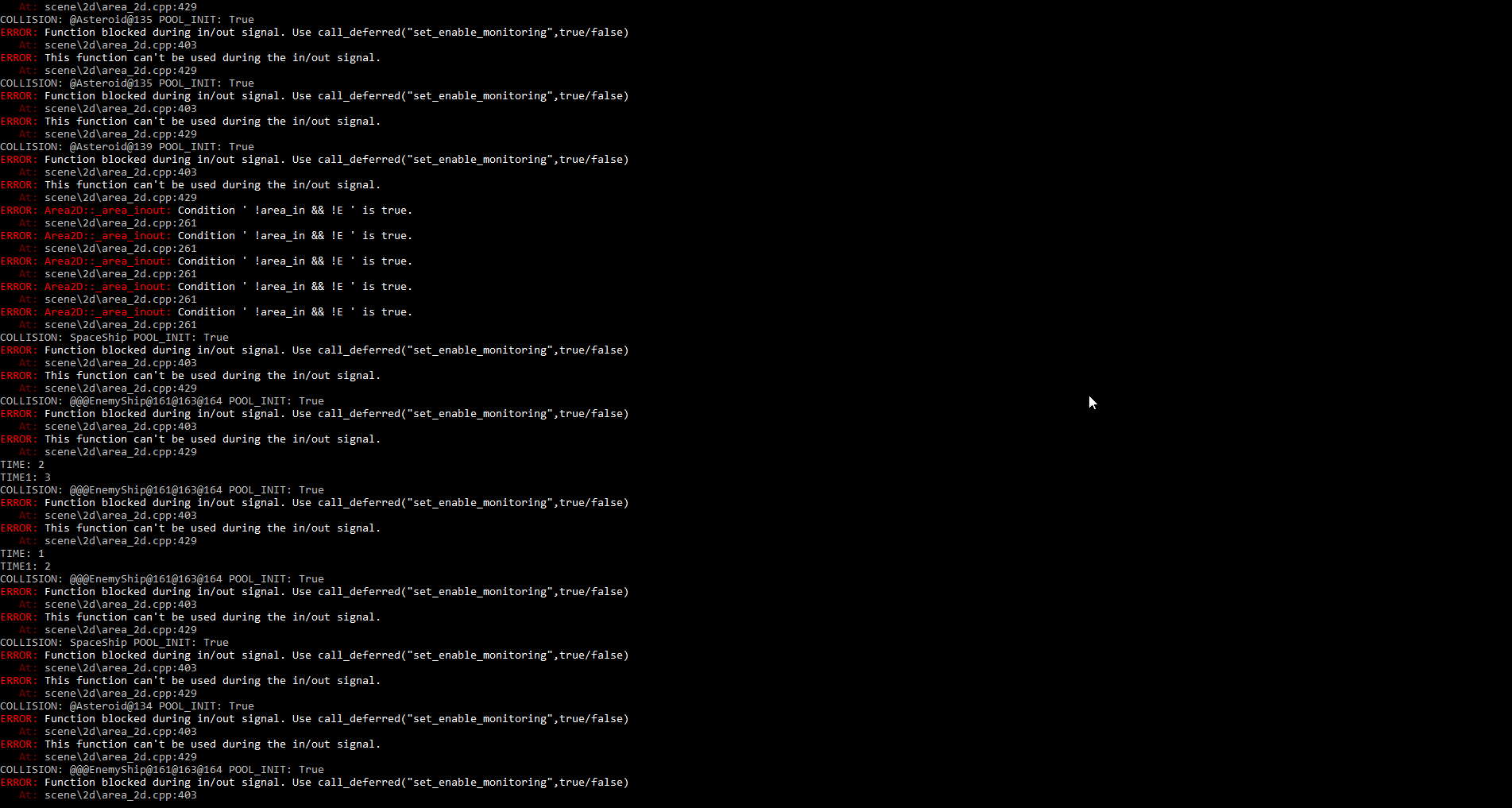
but delays happen at other times
 DmitriySalnikov
on 9 Nov 2017
DmitriySalnikov
on 9 Nov 2017
@DmitriySalnikov, solved this error log, commited to master.
Alexia-AT-Digitecnology
on 9 Nov 2017
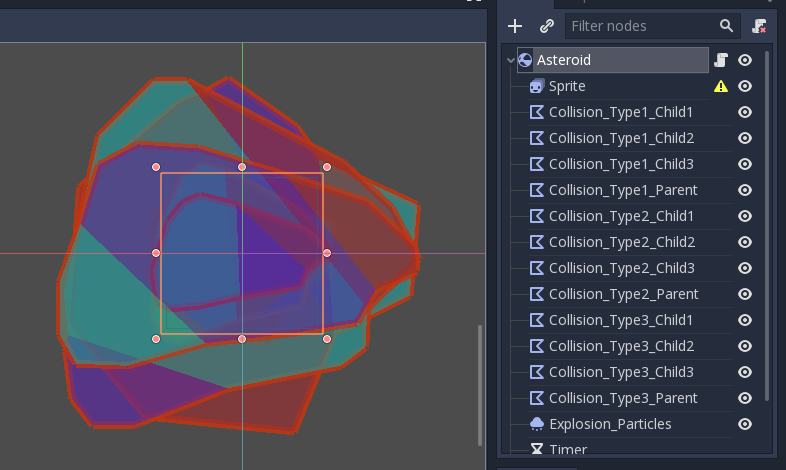
maybe there's another way?
for example load only one shape is needed at startup?
DmitriySalnikov
on 9 Nov 2017
@DmitriySalnikov, this is needed because there are types and subtypes of asteroids, each sprite inside animatedsprite has it's own collision.
Alexia-AT-Digitecnology
on 9 Nov 2017
I made a project for testing Rigid Bodies: https://gitlab.com/Rockroids/Tests/RigidBenchmarkOMatic
The fps are lowered when the objects are not being used too. Just move the "Player" with the arrow keys.
You can configure STEP and MAX_ELEMENTS in Main.gd to test more/less asteroids on screen.
Alexia-AT-Digitecnology
on 9 Nov 2017
@DmitriySalnikov, about the Asteroid collisions, I added the same number in the RigidBenchmarkOMatic app and frames dropped to 1 fps when I add asteroids. So this is one of the problems.
Alexia-AT-Digitecnology
on 10 Nov 2017
Another thing that significantly reduces frames are the Particles2d nodes. I added in the benchmark app and the fps drops from 800 to 50 when 0 asteroids are used.
Alexia-AT-Digitecnology
on 10 Nov 2017
I uploaded to master of RigidBenchmarkOMatic, a complex asteroid type, with multiple collisions (only one enabled) and Particles2D, and when you create the pool of asteroids it freezes some seconds, and drops the fps from 500 to 50. If you create 10 asteroids drops to 1-5 fps and the game crashes.
@AndreaCatania, does Godot uses all the colliders children of a RidigBody2d even though they are deactivated?
Alexia-AT-Digitecnology
on 10 Nov 2017
I tested this:
I made a project for testing Rigid Bodies: https://gitlab.com/Rockroids/Tests/RigidBenchmarkOMatic
And I found some problems.
I changed the pool size from 100 to 1000 and when I start it, the game starts lagging.
So I moved all code from _process to _integrate_forces and also I changed this set_mode(RigidBody2D.MODE_RIGID) to set_mode(RigidBody2D.MODE_STATIC).
For some reason with MODE_RIGID and sleep = true the physics is still running, but by using MODE_STATIC I'm able to stop body physics process.
In my test I was able to execute 400 asteroids with a pool of 1000 at 50FPS (more or less).
Also the pool is a good idea, but the iddle elements should be out of world.
However you have to optimize your code in order to fix this problem.
AndreaCatania
on 10 Nov 2017
@AndreaCatania, does Godot uses all the colliders children of a RidigBody2d even though they are deactivated?
They are deactivated, so I don't think so.
AndreaCatania
on 10 Nov 2017
@AndreaCatania, I have added your changes into Benchmark App, please clone again to keep it updated. The main problem is if I create an asteroid with aprox. 9 CollisionPolygon2d (8 disabled 1 enabled) the physics engine keeps traking all (the disabled too) and there is lot of lag. Please, look at the new model of Asteroid I made (Scene Asteroid.tscn) and see the changes. I added in the pooler the ability to add to tree only the needed resources (Asteroids), so try and see the notorious change of frames using it or not. If you add only 10 asteroid the app crashes!!! (OMG)
With RIGID_MODE_STATIC, and sleep true, the physics system keeps tracking the RigidBody too (look at Rockroids game, and shoot with the ship at position (0,0) of the screen, you will see a serious lag. Please clone again to keep it updated. I'm working continuosly on it and working harder.
Alexia-AT-Digitecnology
on 10 Nov 2017
@AndreaCatania, have you tested the new Benchmark app? @akien-mga, please test it too, I think there is a bug managing multiple collision shapes on a body.
Alexia-AT-Digitecnology
on 13 Nov 2017
As I said I tested it with 400 asteroid and a pool of 1000 and it was running at 50FPS after my modifications.
However the physics 2D engine doesn't put body in sleeping when you set it throught API and this is a bug.
AndreaCatania
on 14 Nov 2017
To prove this:
I think there is a bug managing multiple collision shapes on a body.
You should create a sample project with a lot of Rigid body with multiple shapes and check how many bodies can Godot handle in your PC.
In this case if the number of bodies in the world is not acceptable we can investigate on how to improve it.
But debug your project in order to understand if it is an engine problem or if it's your game problem is not possible
AndreaCatania
on 14 Nov 2017
@AndreaCatania, the last version of Benchmark app does have complex asteroids with multiple shapes (all inactive minus one). And it crashes. Please, test it. It's an engine problem. The shapes inactive are still being processed by the physics system.
Alexia-AT-Digitecnology
on 14 Nov 2017
@AndreaCatania, @akien-mga. I'm going to create 2 issues found in this thread.
Alexia-AT-Digitecnology
on 29 Nov 2017
We have now entered release freeze for Godot 3.0 and want to focus only on release critical issues for that milestone. Therefore, we're moving this issue to the 3.1 milestone, though a fix may be made available for a 3.0.x maintenance release after it has been tested in the master branch during 3.1 development. If you consider that this issue is critical enough to warrant blocking the 3.0 release until fixed, please comment so that we can assess it more in-depth.
akien-mga
on 8 Jan 2018
What's the status on this issue? There was a lot of discussion and the initial proposal has been dismissed, so maybe it should be closed, and if some of the points raised are still valid, they should be forked into a new thread?
akien-mga
on 26 Jan 2019
No answer, so I'll assume it can be closed. If the later findings should lead to open new, more focused issues, please do so :)
akien-mga
on 14 Nov 2019
Related issues
 blurymind
·
3Comments
blurymind
·
3Comments
 ivanskodje
·
3Comments
ivanskodje
·
3Comments
 EdwardAngeles
·
3Comments
EdwardAngeles
·
3Comments
 mooseyfaith
·
3Comments
mooseyfaith
·
3Comments
 testman42
·
3Comments
testman42
·
3Comments