Godot: Disable the viewport camera's interpolation when switching scene tabs or preset view angle
Operating system or device, Godot version
Linux Mint 18.2 Cinnamon x64, Godot master c9a925c
Issue description:
Each open scene tab will remember the position/rotation data of the viewport camera when switching to another tab, and re-apply it when switching back. When this happens, the movement to the new transform is interpolated, which doesn't make much sense and can be a little nauseating when switching between tabs often. It should really just 'jump' to the destination.
This is similar to #11008, but unlike what is stated there, it actually does happen when switching to already opened scenes (as shown in the video below).
Steps to reproduce:
- Create a new scene or two
- Move the camera around in each scene
- Switch between the scene tabs
- Vomit
 ghost
ghost
All 19 comments
I actually liked it a lot when I saw it for the first time ;)
you can disable inertia for non manipulation orbiting in the settings. but I guess you like that, just for scene switching it is annoying (for you ;) as I said I like it)
 toger5
on 2 Oct 2017
toger5
on 2 Oct 2017
:( I like it. Could be an option.
ghost
on 2 Oct 2017
I think this interpolation between scenes is totally unnecessary too.
 guilhermefelipecgs
on 2 Oct 2017
guilhermefelipecgs
on 2 Oct 2017
I like the effect in the video. It creates sort of location awareness. So I think making it optional is the way to go.
 hubbyist
on 2 Oct 2017
hubbyist
on 2 Oct 2017
The way I see it, each scene tab is its own "frame of reference", for lack of a better term. Each scene isn't necessarily related to another spatially, and having the camera act as if they were regardless of context is pretty weird to me.
If you guys like it, I'm fine with this just being a checkbox in the editor settings.
ghost
on 2 Oct 2017
This is actually a good thing, i remember that before, moving long distances and then switching to another scene (an object for instance) will let you far away from that object, i dont think we need a setting here, we cant add a setting for every user that wants things different, @homer666 also maybe you can provide a valid use case were this behavior is bad for you, not simply switching back and forth between empty scenes.
 djrm
on 2 Oct 2017
djrm
on 2 Oct 2017
Having an object/player scene (usually small) and a level scene (usually large) open and switching between them will lead to the camera wildly swinging to origin whenever you need to work on the object, and swinging back to wherever it was last in the level scene. This doesn't portray a good sense of spatial awareness at all IMO, in fact I find it fairly disorienting. You may as well just remove the 'swing' and just have the camera 'cut' to its position.
Also, your example isn't very clear, I'm not really sure what you're trying to say is being fixed by this.
ghost
on 2 Oct 2017
Totally agree with OP on this one. As the scenes may not be related this animation has no purpose. When you have to switch between two scenes this might be really annoying.
 groud
on 2 Oct 2017
groud
on 2 Oct 2017
Also agree that it has no real purpose and the pros don't really justify the cons. I just personally like the transition. :P
ghost
on 2 Oct 2017
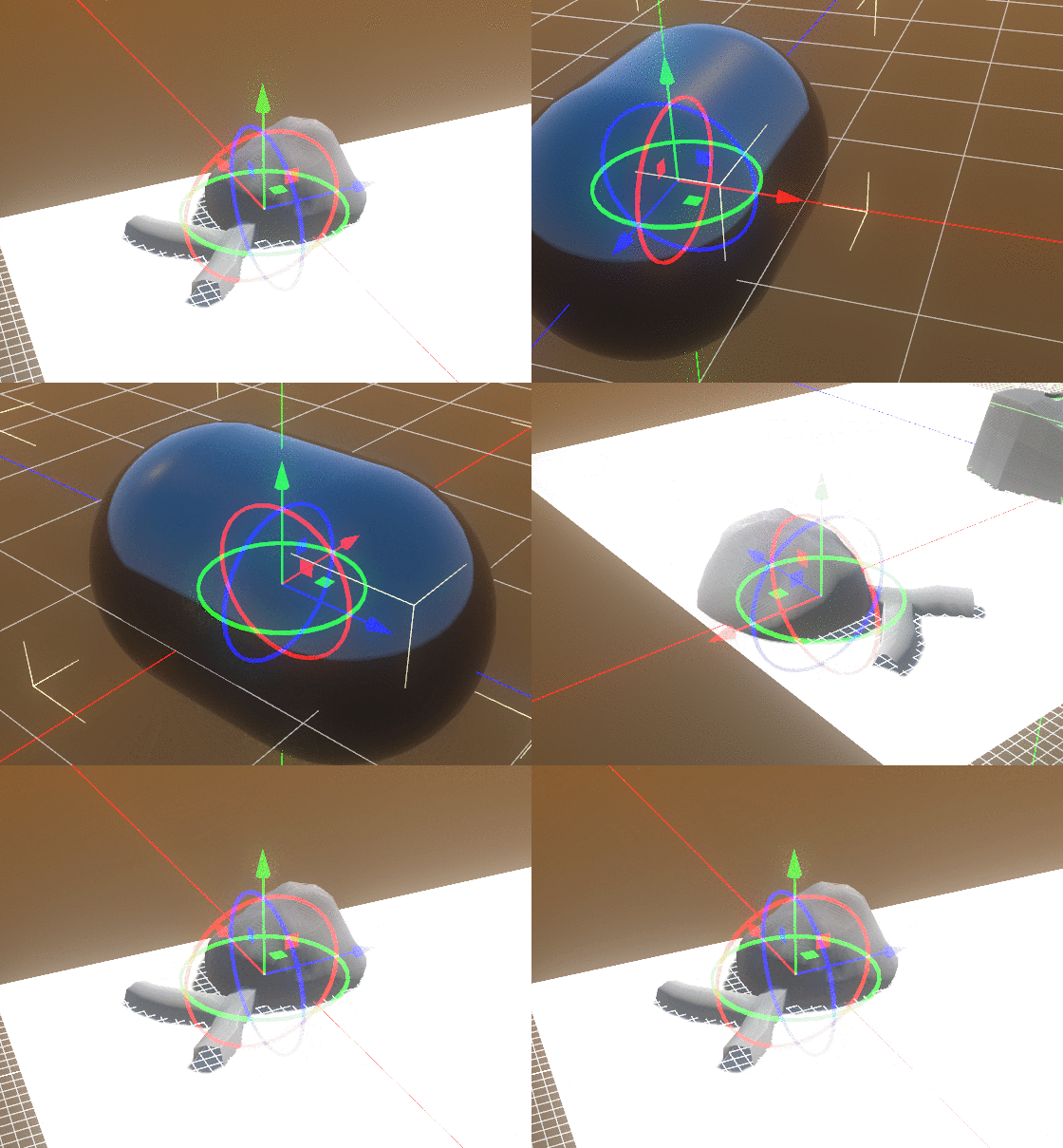
there are some cases where the transform does not produce the minimal movement, meaning that sometimes it will perform multiple rotations and its actually really bad, like in this example
djrm
on 3 Oct 2017
I can take care of it. Probably today.
toger5
on 3 Oct 2017
Maybe qe could do sth like this:
Always reset the camera to a default location. Top down. And than animate it to the location where the iser left the scene. So ther is a little transition?
toger5
on 3 Oct 2017
No, we don't need a transition when switching between tabs.
I know it is beautiful, but as it might disturb some people I definitely think this is not a good choice.
Please keep the editor sober, some people may spend hours on it. We shouldn't sacrifice the usability for the sake of having fancy effects. :)
groud
on 3 Oct 2017
Its simpler anyways. (without the transition i proposed)
toger5
on 3 Oct 2017
I gotta say, I really like the spin, and it's not too often that you'd switch scenes for it to become annoying, I think. However, I understand if others want / need it gone (if they have a condition, like motion sickness).
 SolarLune
on 7 Dec 2017
SolarLune
on 7 Dec 2017
@SolarLune saw your tweet!
And agree it just gives this "I immediately feel how much better Godot 3 is" feeling.
toger5
on 7 Dec 2017
Wanted to take a stab at this, but didn't yet find where the animation/interpolation is triggered. Farthest I got was finding spatial_editor_plugin.cpp.
 mhilbrunner
on 3 Jan 2018
mhilbrunner
on 3 Jan 2018
@mhilbrunner Here is the line:
https://github.com/godotengine/godot/blob/b7b0ffd5c49e950c57eeac1171d0900bbbb69fa6/editor/plugins/spatial_editor_plugin.cpp#L2113
To remove the interpolation, you need to pass zero to this method, but all interpolation will be removed, you need to check to only remove interp. when the scene changes.
guilhermefelipecgs
on 3 Jan 2018
We have now entered release freeze for Godot 3.0 and want to focus only on release critical issues for that milestone. Therefore, we're moving this issue to the 3.1 milestone, though a fix may be made available for a 3.0.x maintenance release after it has been tested in the master branch during 3.1 development. If you consider that this issue is critical enough to warrant blocking the 3.0 release until fixed, please comment so that we can assess it more in-depth.
 akien-mga
on 7 Jan 2018
akien-mga
on 7 Jan 2018
Related issues
 n-pigeon
·
3Comments
n-pigeon
·
3Comments
 SleepProgger
·
3Comments
SleepProgger
·
3Comments
 Zylann
·
3Comments
Zylann
·
3Comments
 bojidar-bg
·
3Comments
bojidar-bg
·
3Comments
 EdwardAngeles
·
3Comments
EdwardAngeles
·
3Comments
Most helpful comment
Its simpler anyways. (without the transition i proposed)