Godot: Godot 2D/3D preference on node searching
Any device probably, version 2.1.4.
Issue: When I'm using Godot to make 2D games, and I want to for example put a 2D node like RigidBody2D, I type rigidbody and always the 3D node comes for the first choice, that's for every node that have an equal on 2D.
That's not a big issue, just usability.
Solutions that I think:
1- When you choose a 2D node, change the search to a 2D preference;
2- Make so that you can get the 3D nodes disappear;
3- When creating a project you could make a selection between a 2D or 3D project.
4- When using the 2D tab and add a node, it comes to preference 2D nodes when searching.
 lucianohd
All 7 comments
3 is not possible since there are a lot of cool things you can do with using 3d and 2d nodes at the same time. not only in the same project even in the same scene it can be used.
I like the preference approach. dependent on the nodes already available the search just gives higher priority to spatial or canvas items.
also 2 is okay.
I would implement it with two toggle buttons the let you enable/disable spatial and canvas items. than you also can hide both... (maybe there even could be two buttons 2d, 3d, control) so dependent if you are working on a 3d game a 2d game or an interface you can optimise the search
 toger5
on 29 Sep 2017
toger5
on 29 Sep 2017
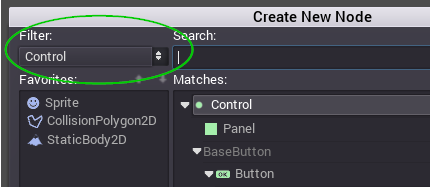
I have suggested it a long time ago... #3734 My idea was to have a drop down to filter.
 puppetmaster-
on 29 Sep 2017
puppetmaster-
on 29 Sep 2017
dropdown is also good. but I prefer the multiple button approach, so that you can have all kinds of combinations turned on/ off
toger5
on 29 Sep 2017
@toger5 Should Timer Node (as example) only be visible when everything is turned off or could special node be always visible?
I prefer always visible.
puppetmaster-
on 29 Sep 2017
yea definitely always visible.
I think the main thing that should be fixed is to always select the correct node between the ones with similar names.
(I guess every experienced user is using the search option to add a node. And than it is quite annoying if you always have to press down arrow when working on 2d.)
So it should only hide spatial nodes or 2d nodes to guarantee that you get the node type you are working with first.
But thinking about it activating and deactivation or even spending some time wondering why a node is not listed (because it is hidden) might also lead to frustration. so a smart preference which is taking the root node into consideration is maybe the better option?
Also adds no ui elements which is always nice since it keeps the editor simple.
toger5
on 29 Sep 2017
I'm working on the automatic preference right now.
Just to let other contributors now.
This definitely is not a mistake I think since it also could work in combination with the drop down or the toggle buttons.
toger5
on 29 Sep 2017
done,
Check the pr if it behaves as expected.
toger5
on 29 Sep 2017
Related issues
 gonzo191
·
3Comments
gonzo191
·
3Comments
 n-pigeon
·
3Comments
n-pigeon
·
3Comments
 ducdetronquito
·
3Comments
ducdetronquito
·
3Comments
 RayKoopa
·
3Comments
RayKoopa
·
3Comments
 nunodonato
·
3Comments
nunodonato
·
3Comments
Most helpful comment
@toger5 Should Timer Node (as example) only be visible when everything is turned off or could special node be always visible?
I prefer always visible.