Godot: Make F2 shortcut for renaming nodes configurable
Hey im an Vim/Emacs guy and i love my keyboard shortcuts, Godot is really good at letting me stay on the keyboard + having intuitive binds.
But there are a few i feel are missing
Rename currently selected node in the Scene Tree
When im setting up my nodes i use ctrl-A and the arrow keys, however i have found no way to rename in the same manner. Currently i just doubleclick on the node.Switch between 2D,3D,Script,AssetLib
I use an external editor, and i dont use the builtin text editor. However every time i click on a script even if i have an external editor set it opens the text editor view, and i have to use my mouse to return to 2D/3D.
Theres probably smarter people who can think of more but these are the ones i feel are breaking my keyboard based workflow the most.
 MartinBlondin
All 21 comments
Rename currently selected node in the Scene Tree I believe with F2 you can rename (unless you was asking for something else)
Switch between 2D,3D,Script,AssetLib F1, F2, F3 (F4 is for help not asset lib)
 kubecz3k
on 22 Sep 2017
kubecz3k
on 22 Sep 2017
Hey thanks! i dont have the function keys,thats why i wasnt finding them.
Sorry for suggesting switching between the editors, i feel a bit silly now.
However i cant seem to find the renaming keybind in the hotkey settings window, i would like to change this to something else, do you know what it is called or is it really not in there?
MartinBlondin
on 22 Sep 2017
I use an external editor, and i dont use the builtin text editor. However every time i click on a script even if i have an external editor set it opens the text editor view, and i have to use my mouse to return to 2D/3D.
You mean like this option? :)

 akien-mga
on 22 Sep 2017
akien-mga
on 22 Sep 2017
Probably what Akien gave you, will solve your problem to some degree :) However when it comes to rebinding those F2 F3 etc you should check EditorSettings->Shortcuts->Editor category
When it comes to rename node (F2) unfortunatelly I can't find it under EditorSettings->Shortcuts->Scene Tree category...
kubecz3k
on 22 Sep 2017
Hey guys thanks for the help.
Yes i found the keys to switch between the editors and rebinded them to ctrl+n rather than f(n)
My only issue now is the
When it comes to rename node (F2) unfortunatelly I can't find it under Scene Tree category...
Does this issue count as a feature request? Because i want to be able to change this to ctrl+r or so.
MartinBlondin
on 22 Sep 2017
When it comes to rename node (F2) unfortunatelly I can't find it under Scene Tree category...
Does this issue count as a feature request? Because i want to be able to change this to ctrl+r or so.
Sure, edited the issue accordingly. It should be trivial to implement.
akien-mga
on 22 Sep 2017
I would like to try to implement this.
Where should we configure this shortcut? Under Scene Tree?
 seixasfelipe
on 21 Oct 2017
seixasfelipe
on 21 Oct 2017
@akien-mga I've been looking into this for a bit and I've found that it's not really feasible to change the F2/Enter/KP_Enter bindings without breaking other things. What is possible though is to add a new (by default empty) shortcut that users can change to whatever they want to on top of the existing functionality. I'd be more than happy to add this as my first Hacktoberfest PR if no-one else is working on this :)
 zedutchgandalf
on 23 Oct 2017
zedutchgandalf
on 23 Oct 2017
Just saying, if it's not really feasible to change the current bindings without breaking things, then that sounds like a change we should already be making, to fix that exact issue. :)
 LikeLakers2
on 23 Oct 2017
LikeLakers2
on 23 Oct 2017
Has this node renaming been resolved? It's very common task, I'd love to have a shortcut for it
 basharabdullah
on 5 Mar 2018
basharabdullah
on 5 Mar 2018
It seems that the problem is still not solved. Could I try to implement it if no one else is working on? :-)
 LinkTsang
on 7 Mar 2018
LinkTsang
on 7 Mar 2018
@LinkDoyle Go on, I doubt someone else has taken it without having been able to make a PR already :)
 bojidar-bg
on 8 Mar 2018
bojidar-bg
on 8 Mar 2018
@LinkDoyle I would if I knew how, but I'm still new. Would be great if you do. Thanks
basharabdullah
on 8 Mar 2018
@bojidar-bg @basharabdullah Sorry for my carelessness and bad English >_<.
I think it's strange that the shortcut for renaming nodes is in scene tree, so I tried to add the renaming dialog:
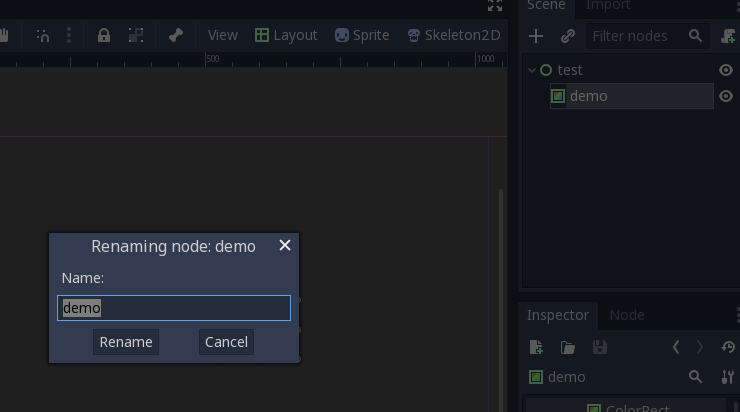
And the shortcut is under the EditorSettings->Shortcuts->Scene Tree now:
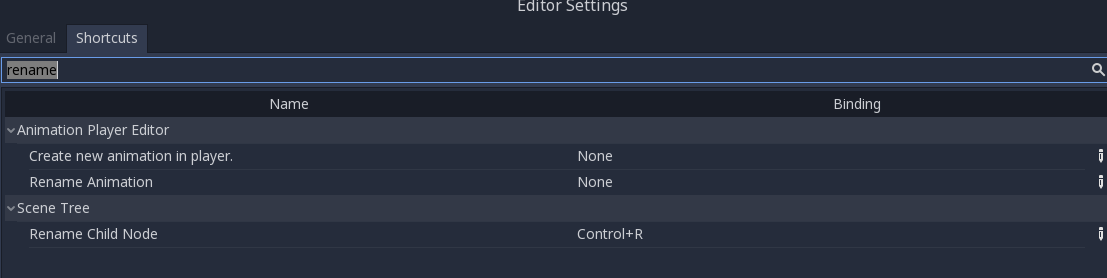
Could you give me some advice? Thanks.
LinkTsang
on 9 Mar 2018
@LinkDoyle I'm not the right person to give advise. Hope someone more involved can chime in. But can you explain why you see a popup better than rename in position?
basharabdullah
on 10 Mar 2018
Why does F2 need to be used? Just pressing enter should be good enough...
On Sat, Mar 10, 2018 at 6:01 PM, Bashar Abdullah notifications@github.com
wrote:
@LinkDoyle https://github.com/linkdoyle I'm not the right person to
give advise. Hope someone more involved can chime in. But can you explain
why you see a popup better than rename in position?—
You are receiving this because you are subscribed to this thread.
Reply to this email directly, view it on GitHub
https://github.com/godotengine/godot/issues/11496#issuecomment-372066395,
or mute the thread
https://github.com/notifications/unsubscribe-auth/AF-Z21FOCNxC51N8NhEgXo8qG_6IpUwJks5tdD8agaJpZM4Pg89l
.
 reduz
on 10 Mar 2018
reduz
on 10 Mar 2018
@reduz on Mac yes. But on Windows it's not conventional. Might seem awkward to users
basharabdullah
on 11 Mar 2018
The renaming key is hardcoded on tree.cpp
void Tree::_gui_input(Ref<InputEvent> p_event) {
          [...]
            case KEY_F2:
            case KEY_ENTER:
            case KEY_KP_ENTER: {

                if (selected_item) {
                    //bring up editor if possible
                    if (!edit_selected()) {
                        emit_signal("item_activated");
                        incr_search.clear();
                    }
                }
                accept_event();

            } break;
The problem that I found when I tried to fix it was that I couldn't have access to the editor_settings keybindings because this class was created before the editor_settings (I don't know).
At that time I was able to configure a shortcut on SceneTreeDock::_unhandled_key_input(Ref<InputEvent> p_event), but it was overwritten by this key binding on tree.cpp.
Once the tree.cpp class have access to editor_settings, I think it wil be trivial to add this shortcut.
seixasfelipe
on 11 Mar 2018
The Tree class might exist outside the editor, so, no, it shouldn't access editor_settings directly.
bojidar-bg
on 12 Mar 2018
@reduz Maybe it is personal habit on Windows.F2 is default Rename Key on Windows.
step 1)Focus item by mouse with right hand.
step 2)Press F2 with left hand
setp 3)Select letters or move cursor by mouse with right hand.
My game is 2D, Pressing F2 to 3D preview is annoying.
I even want to hide the 3D preview button!
If renaming name by Enter, the step is:
step 1)Focus item by mouse with right hand.
step 2)Press Enter by right hand
step 3)Use mouse to select letters by right hand. Or press KeyLeft or KeyRight by right hand.
Right hand is a little busy!
Set Enter to the Rename key is not a good choice.
In godot3.1.1, F2 is not Rename Key.
But MouseLeft DoubleClick is equal with F2 in windows.
And i find I can set F2 to be Rename Key in Editor -> Editor Settings -> Search "rename".
It's perfect.
 miblooming
on 6 Aug 2019
miblooming
on 6 Aug 2019
Looks like this issue was resolved in 3.1. The shortcut can be changed and isn't set to anything by default (as you can just hit Enter).
 KoBeWi
on 9 Aug 2019
KoBeWi
on 9 Aug 2019
Related issues
 ducdetronquito
·
3Comments
ducdetronquito
·
3Comments
 rgrams
·
3Comments
rgrams
·
3Comments
 kirilledelman
·
3Comments
kirilledelman
·
3Comments
 blurymind
·
3Comments
blurymind
·
3Comments
 n-pigeon
·
3Comments
n-pigeon
·
3Comments