Godot: Running a game sometimes only shows project manager window
Operating system or device, Godot version, GPU Model and driver (if graphics related):
Windows 10 (1703) x64
Godot v3.0.alpha_custom_build.bc005a5
Issue description:
Sometimes when running a project, godot can't find the project.godot file, and just shows the project manager instead of the actual game. This seems to happen randomly, sometimes a few times in a row, sometimes just once. Running godot editor as admin doesn't change anything, as well as moving the project to different locations (like c:\users... or another drive)
Console output:
* Debug Process Started *
Couldn't open C:\dev\godot\bin/godot.windows.opt.tools.64.pck
Couldn't open godot.windows.opt.tools.64.pck
Couldn't load/find C:/Users/Christian/godottest/test_project/project.godot or project.binary
Couldn't load/find C:/Users/Christian/godottest/project.godot or project.binary
Couldn't load/find C:/Users/Christian/project.godot or project.binary
Couldn't load/find C:/Users/project.godot or project.binary
Couldn't load/find C://project.godot or project.binary
OpenGL ES 3.0 Renderer: GeForce GTX 1070/PCIe/SSE2
GLES3: max ubo light: 409
GLES3: max ubo reflections: 455, ubo size: 144
WARNING: not found: gdnative/singletons
SVG_GENERATION TIME: 0.084
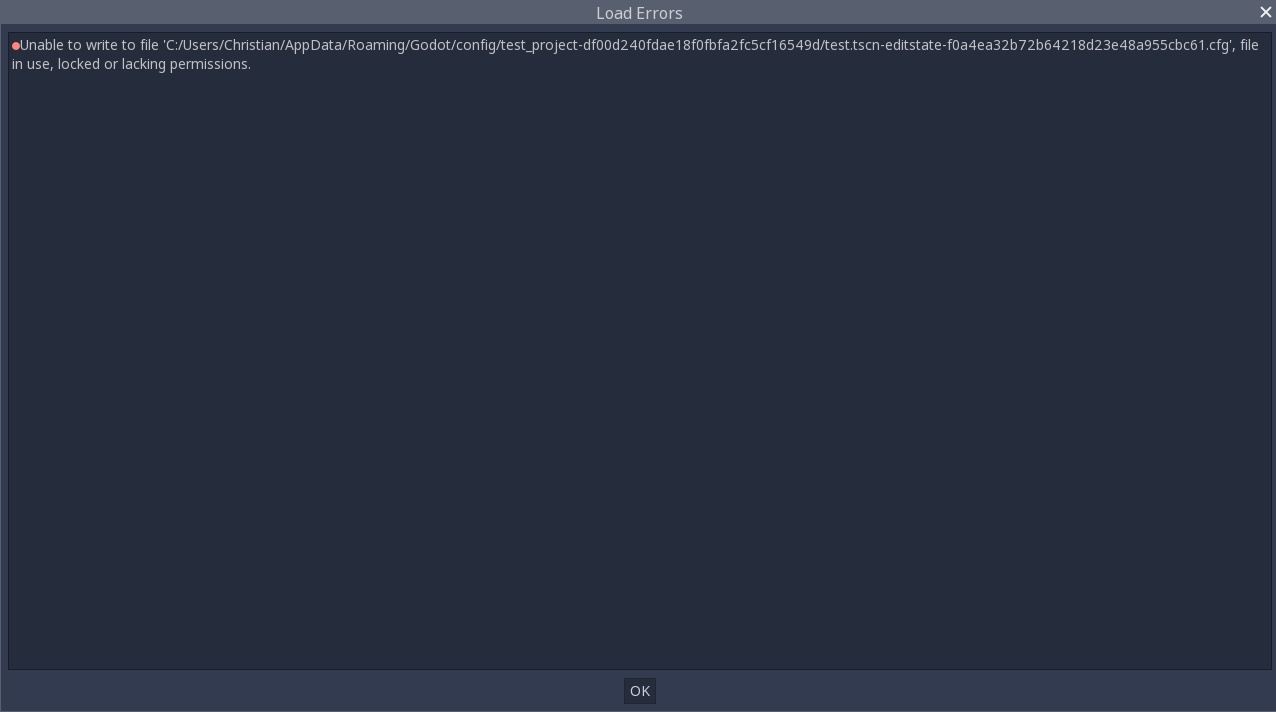
I also sometimes get errors like this one, maybe it's related. On my game project the error lists my project.godot file most of the time, and once it appeared, it is shown on nearly every time I try to run the game. But I couldn't reproduce this from my test project. Only restarting the godot editor seems to fix it for a while.
:
Steps to reproduce:
- create a simple test project (I just added a label and set start scene)
- try running it a few times in a row
Link to minimal example project:
 Vorion86
All 33 comments
Looks like a duplicate of #6393
 eon-s
on 19 Sep 2017
eon-s
on 19 Sep 2017
Could be the same bug. Disabling autosave (Save before running) in editor settings seems to fix it for me. Now I just have to hit STRG+S to save manually before running the game, which of course is not the best solution.
Why does godot write the project.godot file every time I run the game, when autosave is enabled? I don't see any changes in the file, but the modified date updates every time.
Vorion86
on 19 Sep 2017
Yes, I can confirm that I am also getting this on recent builds under Win10. No idea how to replicate it though, happens maybe once every 5 times I hit the play button.
 fracteed
on 20 Sep 2017
fracteed
on 20 Sep 2017
can confirm it aswell, but disabling autsave works like a charm as Vorion suggested. Cant find a way to reproduce it, it happens pretty randomly
 scayze
on 20 Sep 2017
scayze
on 20 Sep 2017
Having similar issue. While in project view - running game just opens another project list window, and editing project just opens empty project. Tested on MacOS (x64, debug_release) build bf371dc
 ghost
on 22 Sep 2017
ghost
on 22 Sep 2017
David, the macos issue is a different one and fixed.
This seems to have to do with godot not being able to open the project file
because there still is a read lock, possible from another copy of godot.
On Sat, 23 Sep 2017 at 5:25 am, Dāvis Mičulis notifications@github.com
wrote:
Having similar issue. While in project view - running game just opens
another project list window, and editing project just opens empty project.
Tested on MacOS (x64, debug_release) build bf371dc
https://github.com/godotengine/godot/commit/bf371dcb3294027c209cc40a42fdbf438d4261af—
You are receiving this because you are subscribed to this thread.
Reply to this email directly, view it on GitHub
https://github.com/godotengine/godot/issues/11391#issuecomment-331538556,
or mute the thread
https://github.com/notifications/unsubscribe-auth/AB2vaYD2WpnGIBp_wSXSYa70S0G6wiDcks5slAmNgaJpZM4PbDaM
.>
Kindest regards,
Bastiaan Olij
https://www.facebook.com/bastiaan.olij
https://www.youtube.com/channel/UCrbLJYzJjDf2p-vJC011lYw
https://github.com/BastiaanOlij
 BastiaanOlij
on 22 Sep 2017
BastiaanOlij
on 22 Sep 2017
Tried on newer build (a42fbfc) and same behaviour.
ghost
on 23 Sep 2017
@davismiculis that is because the PR hasn't been merged yet:
https://github.com/godotengine/godot/pull/11482
BastiaanOlij
on 23 Sep 2017
@BastiaanOlij thanks for the info, just built on d3ea922 and its working fine now!
ghost
on 23 Sep 2017
I just wanted to chime in to say that I also get this issue on Windows 10 x64, across five projects, two PCs and a laptop.
It happens completely randomly, about two in five times I try to run my game via either F5 or clicking the play button in the top right hand corner of the editor.
Using calinou's almost nightly builds from bintray. The issue has persisted for a few weeks at this point.
 Scott3730
on 3 Oct 2017
Scott3730
on 3 Oct 2017
@ScottMakesGames , yeah it is annoying and the only way around it is to turn off auto save, which is what I have gone back doing. 2 in 5 times is about the same ratio that I was getting under WIn10.
fracteed
on 4 Oct 2017
@ScottMakesGames the current build should still have the logging I added in there, it tells you were it is trying to open up project files. When no project file can be opened it will default back to the project selection. It would be good to see the output of the log when this happens, it will help us identify why its not opening your project.
BastiaanOlij
on 4 Oct 2017
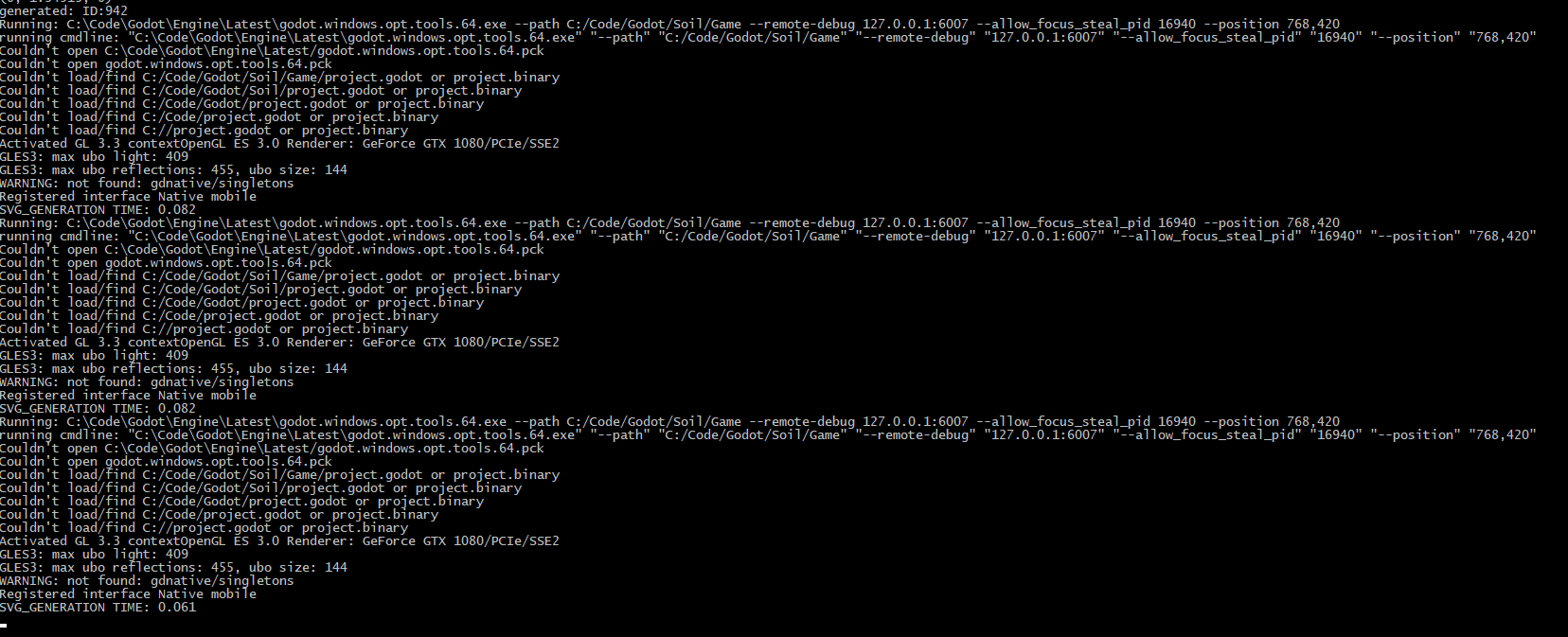
This was three consecutive attempts at running the game from the editor. Two by pressing F5, and one by pressing the play button in the top right hand corner. On the fourth attempt, it launched my game with no issue.
Scott3730
on 4 Oct 2017
Hum, it's probable that the autosave is still writing to the disk when you try to launch the game, preventing it to start.
We probably have to implement a way to wait until the end of writing before launching the game.
 groud
on 4 Oct 2017
groud
on 4 Oct 2017
Yeah it seems like its trying to load it from the right spot so the only thing I can think off is that the project file is still locked...
BastiaanOlij
on 5 Oct 2017
Someone should send Windows back to primary school to learn to read and write at the same time..
Anyway, if the issue is a race condition, I guess we can just add a 500 ms delay after saving the project and before running it when using Godot on Windows.
 akien-mga
on 7 Nov 2017
akien-mga
on 7 Nov 2017
Looks like I'm seeing the same issue in alpha2 (and later build with Bullet)
 Zireael07
on 7 Nov 2017
Zireael07
on 7 Nov 2017
Omg, did not know someone else was experiencing this or it was just me :P
I did do the disable autosaving in editor settings and it seemed to work for now.. :P (W7, 64-bit)
@Vorion86 Thank you for writing this out
ghost
on 7 Nov 2017
There may be a reason why this is happening. I think project settings
rewrites the config a few seconds after it is modified. Something may be
changing the project settings on run (nothing should but maybe something
is), causing it to save about the same time the project runs.
On Unixes this is not a problem because disk blocks are reference counted,
and you can write a new file while the old is being read. This is not the
case on Windows, which has a lot more primitive locking system.
On Nov 7, 2017 1:58 PM, "Dillybob92" notifications@github.com wrote:
Omg, did not know someone else was experiencing this or it was just me :P
I did do the disable autosaving in editor settings and it seemed to work
for now.. :P (W7, 64-bit)—
You are receiving this because you are subscribed to this thread.
Reply to this email directly, view it on GitHub
https://github.com/godotengine/godot/issues/11391#issuecomment-342548922,
or mute the thread
https://github.com/notifications/unsubscribe-auth/AF-Z2_BWPIBbtvEU7NMjQdoHNdbbRse1ks5s0IwdgaJpZM4PbDaM
.
 reduz
on 7 Nov 2017
reduz
on 7 Nov 2017
I can confirm that it does rewrite the project.godot file when you run the project. There's no actual change in the contents, but the modified date is updated.
 vnen
on 7 Nov 2017
vnen
on 7 Nov 2017
@reduz I found something fascinating/odd.
This bug seems to only exist when you use a Godot executable, that was compiled using Windows.
Because I am using the latest nightly here: http://godot3builds.digitecnology.com/ 64-bit windows, and this issue doesn't happen whatsoever. I have previewed by game scenes about 50 times now and never got project manager window. However, there is a tiny minuscule delay when scene previewing compared to a Godot executable compiled on Windows.
..and we can go even deeper...
12551 only happens when using a Godot executable that is compiled under Windows. I cannot replicate 12551 if using one of the nightly builds.
I have no idea if that has any correlation (probably not), however, I think compiling on Windows is... just not a good idea right now. I think I will load up linux on a harddrive and just compile to a windows platform via scons :P haha
ghost
on 7 Nov 2017
it'll take me longer to set up a dev environment that it would for someone just to test if calling flush() after the file is closed after saving makes this go away.
 captainwasabi
on 9 Nov 2017
captainwasabi
on 9 Nov 2017
I don't think the compiler has anything to do with this @Dillybob92 I compiled godot with mingw following that guide and it still opens the project manager when trying to run the game.
 mrcdk
on 9 Nov 2017
mrcdk
on 9 Nov 2017
@mrcdk Deleted my posts. Just got a project manager preview, gosh damnit :(
Yep, still happens under MinGW compilation. However, I know for a FACT doing MinGW compared to MSVC did fix the Project Settings crash. Sorry about that. You are correct
Edit: It does seem to happen less though...
ghost
on 9 Nov 2017
I'm also hitting this issue on master. The funny thing is, sometimes the game properly starts, sometimes it starts the editor launcher, and sometimes it starts the game with the editor launcher viewport (ie the window has the size of the editor launcher window).
 arcanis
on 13 Nov 2017
arcanis
on 13 Nov 2017
Also getting this 5% of the time in 3.0 alpha2, it's pretty random.
Actually getting the project manager 50% of time today :O
Nothing particular in the log, the usual lines
 Zylann
on 14 Nov 2017
Zylann
on 14 Nov 2017
As reported in linked duplicate, it's still happening in beta 1 (I saw it twice yesterday)
Zireael07
on 1 Dec 2017
I confirm that this is still happening.I get it quite often on Windows 10 x86_64. No particular error in the output.
EDIT: It seems to me that it happens when I launch the project from the Script Editor.
 BraindeadBZH
on 1 Dec 2017
BraindeadBZH
on 1 Dec 2017
Happening to me too. Windows 10 64-bit, Godot 3.0 Beta 1 64-bit.
 brainsick
on 2 Dec 2017
brainsick
on 2 Dec 2017
I think this link to this issue.
When I press F6 to start my main scene instead of F5 I don't get the project list to appear but sometime the project settings are not loaded, window size incorrect, input map missing, ...
BraindeadBZH
on 2 Dec 2017
@BraindeadBZH: nope, separate issue.
Zireael07
on 2 Dec 2017
@BraindeadBZH if it happens intermittently, might be related, because it seems that this issue is caused by the settings file being saved when the scene runs. But if it happens all the time, then it's likely something else.
vnen
on 2 Dec 2017
@vnen it happens randomly too, so I would say it is related, which also might confirm that it is an issue with the settings file.
BraindeadBZH
on 2 Dec 2017
Related issues
 ivanskodje
·
3Comments
ivanskodje
·
3Comments
 kirilledelman
·
3Comments
kirilledelman
·
3Comments
 RayKoopa
·
3Comments
RayKoopa
·
3Comments
 timoschwarzer
·
3Comments
timoschwarzer
·
3Comments
 bojidar-bg
·
3Comments
bojidar-bg
·
3Comments
Most helpful comment
Someone should send Windows back to primary school to learn to read and write at the same time..
Anyway, if the issue is a race condition, I guess we can just add a 500 ms delay after saving the project and before running it when using Godot on Windows.