Godot: Can fall through one way platforms (regression from 77ec304)
Windows 10
Godot 3.0 6b99950
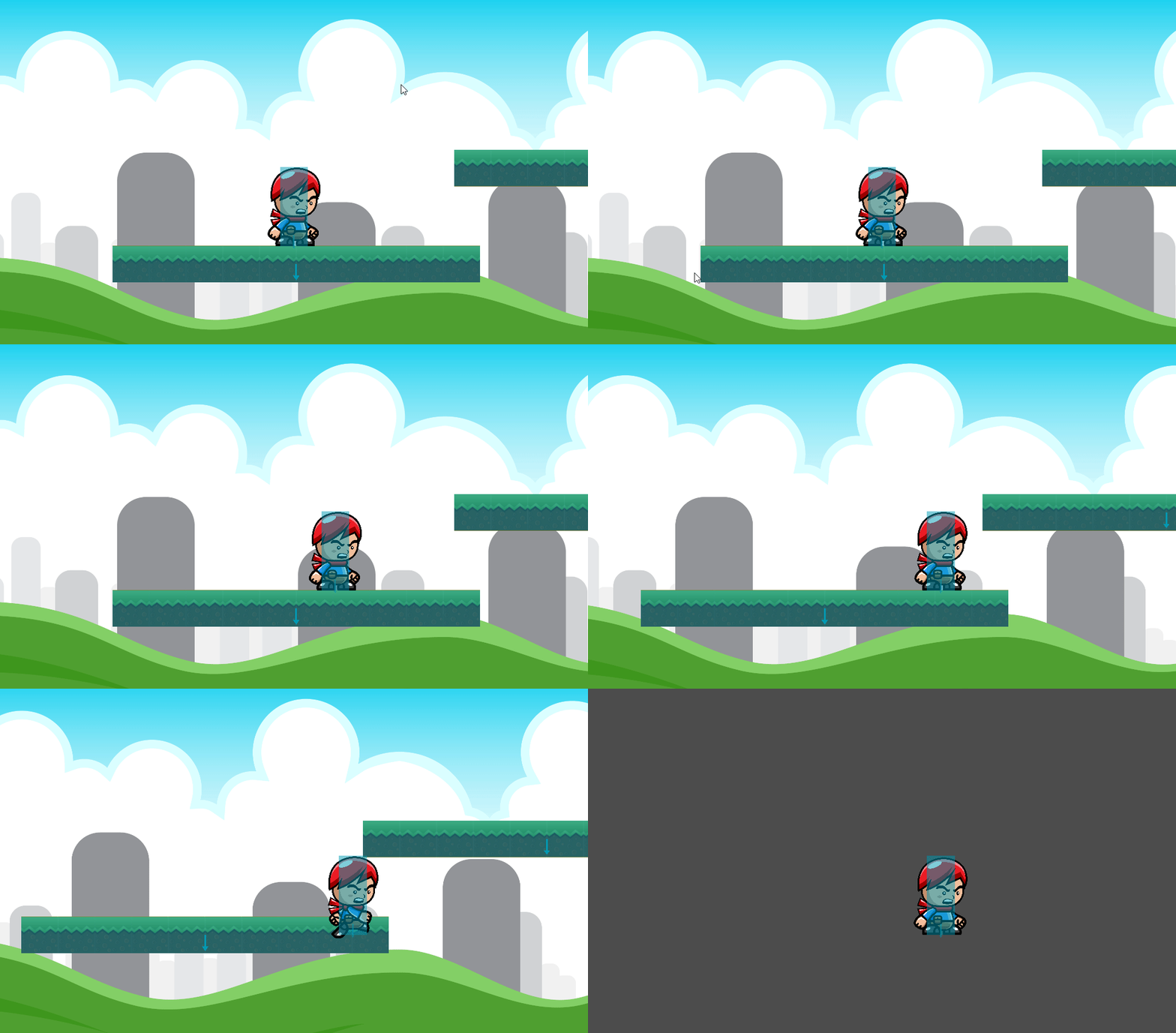
Can fall through platforms with one way collision enabled.
Expect not to fall through them.
Start jumping and moving left to right several times and you will fall through.
Press arrow Up to jump arrow left/right to move
Attached is animated gif showing what happens. Also in imgur link of the same thing. Also project file.
https://i.imgur.com/WG9RUHL.gifv

 willt
willt
All 32 comments
CC @RandomShaper
 akien-mga
on 4 Sep 2017
akien-mga
on 4 Sep 2017
In 3.0 the OWC implementation is @reduz's, IIRC. Anyway, I could try to debug it, but this week I'm out of town.
 RandomShaper
on 5 Sep 2017
RandomShaper
on 5 Sep 2017
I can't reproduce the bug (on linux), does the same with other kind of shapes or with capsule only?
 eon-s
on 5 Sep 2017
eon-s
on 5 Sep 2017
I think the "bug" gets triggered when you touch another platform. Here I changed it to a square and enabled collision shapes in the debugger. As soon as I touch the other platform I fall.
willt
on 5 Sep 2017
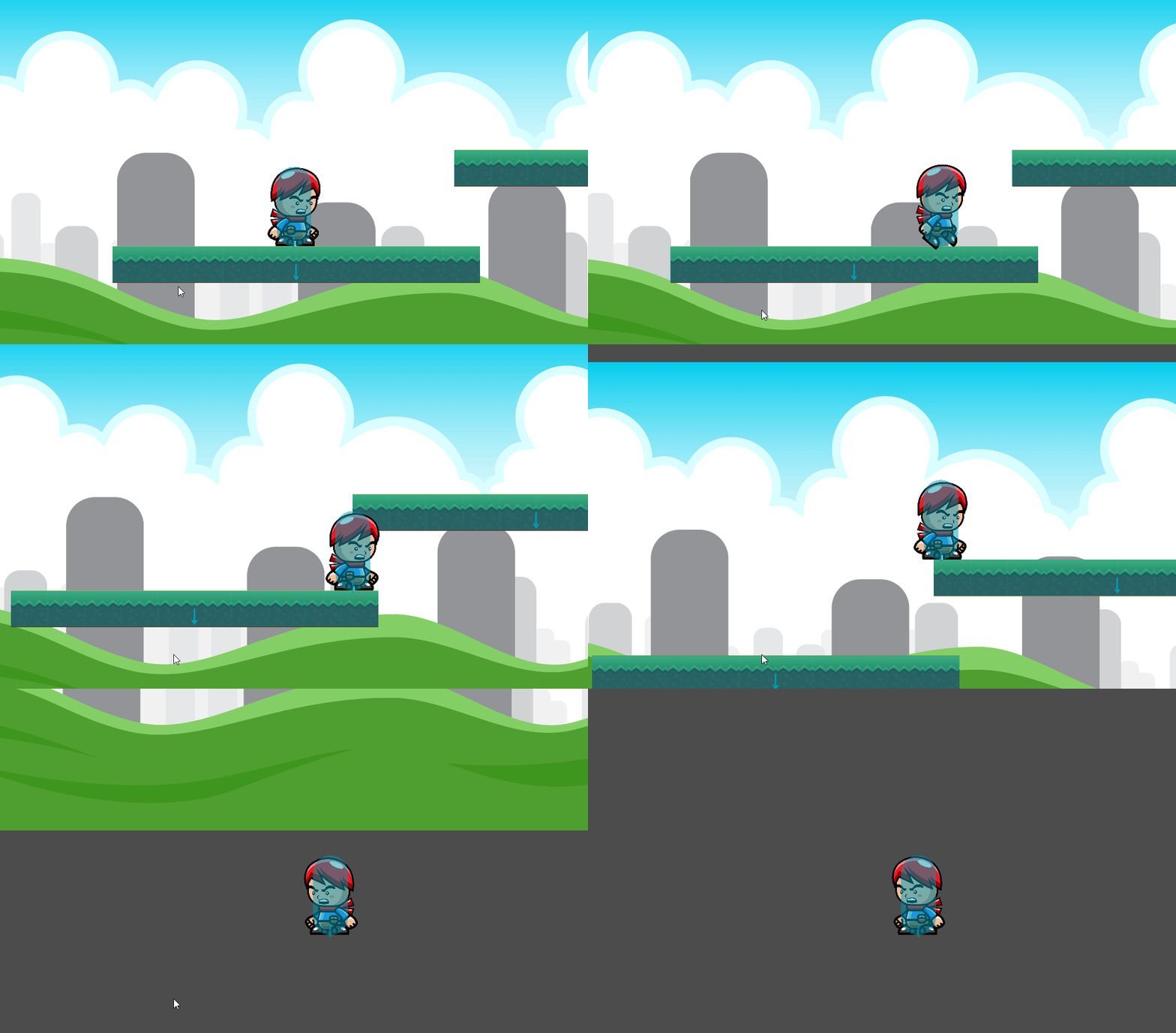
With the capsule collider I don't fall as soon as I touch it but when I walk back to the left after jumping.
Very strange. I can try to strip out more of the project if you think that will help debug?
willt
on 5 Sep 2017
Tested with rigidbodies too, these fail on different situations (like fall on rotation, hit on sides), so looks like 1 side shapes are badly broken now.
eon-s
on 5 Sep 2017
Rotated KinematicBody2D's shapes fail to hit 1 side shapes too.
eon-s
on 5 Sep 2017
Cool so im not crazy. :)
Anything I can do to help debug?
willt
on 5 Sep 2017
Please make a testcase!
On Sep 4, 2017 9:23 PM, "William Taylor" notifications@github.com wrote:
Cool so im not crazy. :)
Anything I can do to help debug?—
You are receiving this because you were mentioned.
Reply to this email directly, view it on GitHub
https://github.com/godotengine/godot/issues/10971#issuecomment-327042448,
or mute the thread
https://github.com/notifications/unsubscribe-auth/AF-Z219w6-U906fJ59dCJ5vrpSTKNCmlks5sfJRpgaJpZM4PMNFN
.
 reduz
on 5 Sep 2017
reduz
on 5 Sep 2017
Would be happy to if I can figure out how.
willt
on 5 Sep 2017
Ah, wait, @willt, you use rays to check collision and not full velocity on move_and_slide.
Rays do not work correctly on 1 side and may be introducing some extra bugs on your code...
move_and_slide uses full velocity on the method, you should not use delta time on that.
eon-s
on 5 Sep 2017
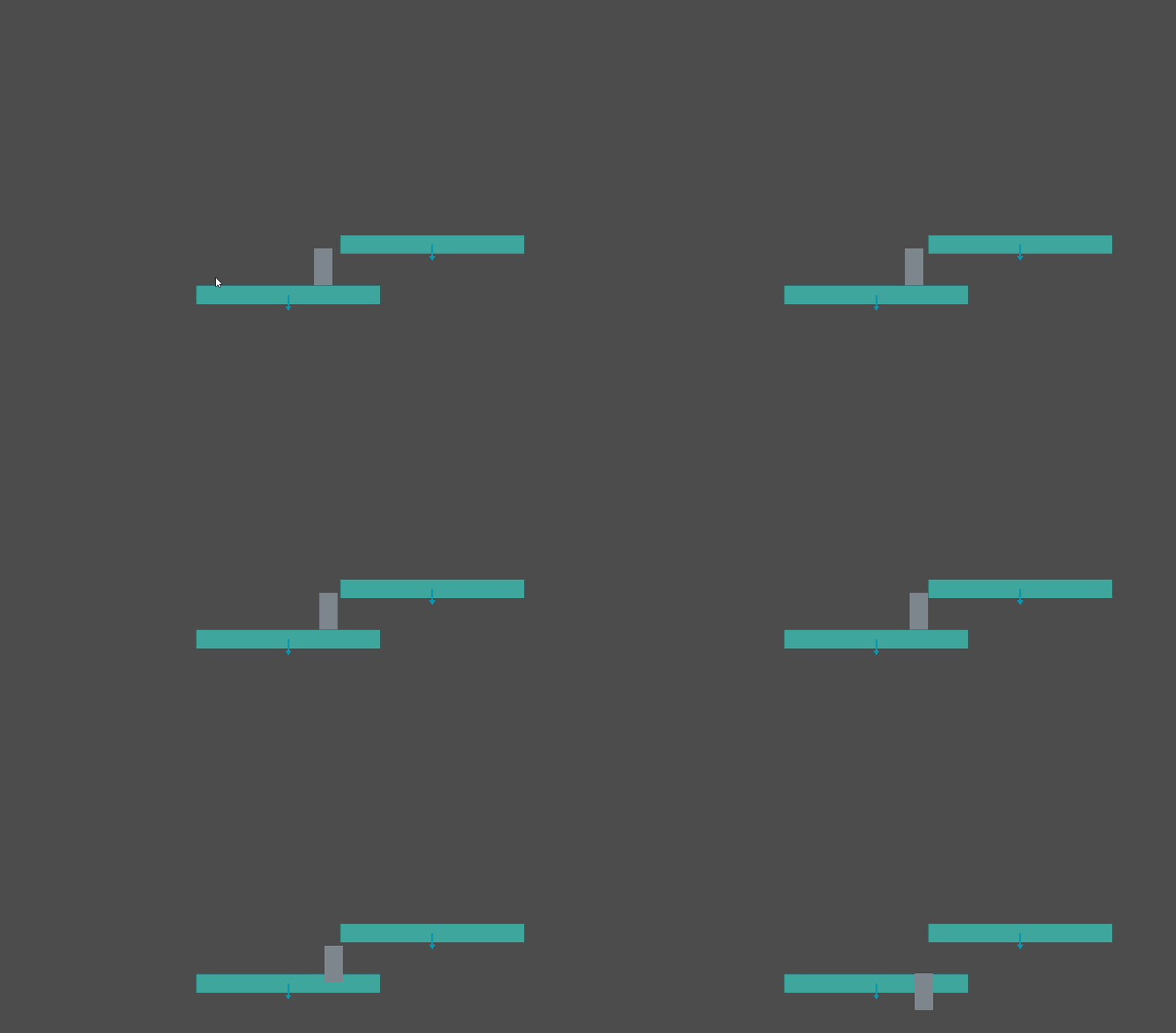
I've reduced the project even smaller. It doesn't uses rays at all now. No input etc. It doesn't trigger every time so run it a couple times if it doesn't work.
willt
on 5 Sep 2017
Your last project does vel*delta, that is multiplied by step internally and looks like the extreme low value introduces some bugs (related to the separation?).
eon-s
on 5 Sep 2017
The same logic is used in the demo here: https://github.com/godotengine/godot-demo-projects/blob/194655c80571595c67b11e9347b1d55316119e39/2d/kinematic_character/player.gd
If you don't have delta applied you would fly across the screen i think
willt
on 5 Sep 2017
that demo uses "force" to determine velocity, is not the same.
eon-s
on 5 Sep 2017
Just tested this code. Does the same thing.
And in that code on line 62 they have this "velocity += force*delta"
func _fixed_process(delta):
    var force = Vector2(0, 10)
    force.x += 2
    velocity += force
    velocity = move_and_slide(velocity, Vector2(0, -1))
willt
on 5 Sep 2017
Force in the sense of acceleration, force(pixels/(secsec))delta(sec)=velocity(pixels/sec)
Velocity(pixels/sec)*delta(sec) != velocity
eon-s
on 5 Sep 2017
Its called force in the demo but I don't think it's really force in the sense of force = mass * acceleration is it?
I believe the code I had was essentially the same except I was adding in acceleration.
At any rate without debating the laws of motion. I think its safe to say the bug happens with or without
delta being given to move_and_slide. Would you agree?
willt
on 5 Sep 2017
Yes, it happens at very low motion values (I think, I need to try to replicate).
eon-s
on 5 Sep 2017
Well, I can't seem to be able to make it fail anymore with the example projects, I will keep testing...
eon-s
on 5 Sep 2017
@eon-s Did you change something to make it stop failing?
willt
on 5 Sep 2017
Yes, but then tried on a clean project (2nd one) too, weird (rotated shapes keep failing, though).
I'll see if I can start some kind of testbed for kinematic bodies this week to make it easier to break them.
eon-s
on 5 Sep 2017
@eon-s
I have a suspicion that this commit https://github.com/godotengine/godot/commit/77ec304966436405e2975f7da480846cc074f838
is possibly when things broke. Downloading a build from here: https://bintray.com/calinou/godot/editor/2017-08-30.8ed1a28#files
I can not replicate the bug.
willt
on 5 Sep 2017
confirmed in my original project the bug does not exist.
Also I just backed out commit 77ec304966436405e2975f7da480846cc074f838 recompiled and problem is gone. I could try to debug further but I think @reduz will probably have better luck than me. :)
Let me know if you need anything else.
ps I used this to remove the commit:
git rebase -p --onto 77ec304966436405e2975f7da480846cc074f838^ 77ec304966436405e2975f7da480846cc074f838
@RandomShaper did a better implementation of this for 2.1, so I guess I'll wait until he's back from vacation to improve this
reduz
on 8 Sep 2017
Oh, it's been a week of work in Madrid. I've enjoyed my new company, but I'd not call it vacation. :)
Maybe this weekend I can check it.
RandomShaper
on 8 Sep 2017
Okay I think i've narrowed this down a bit more.
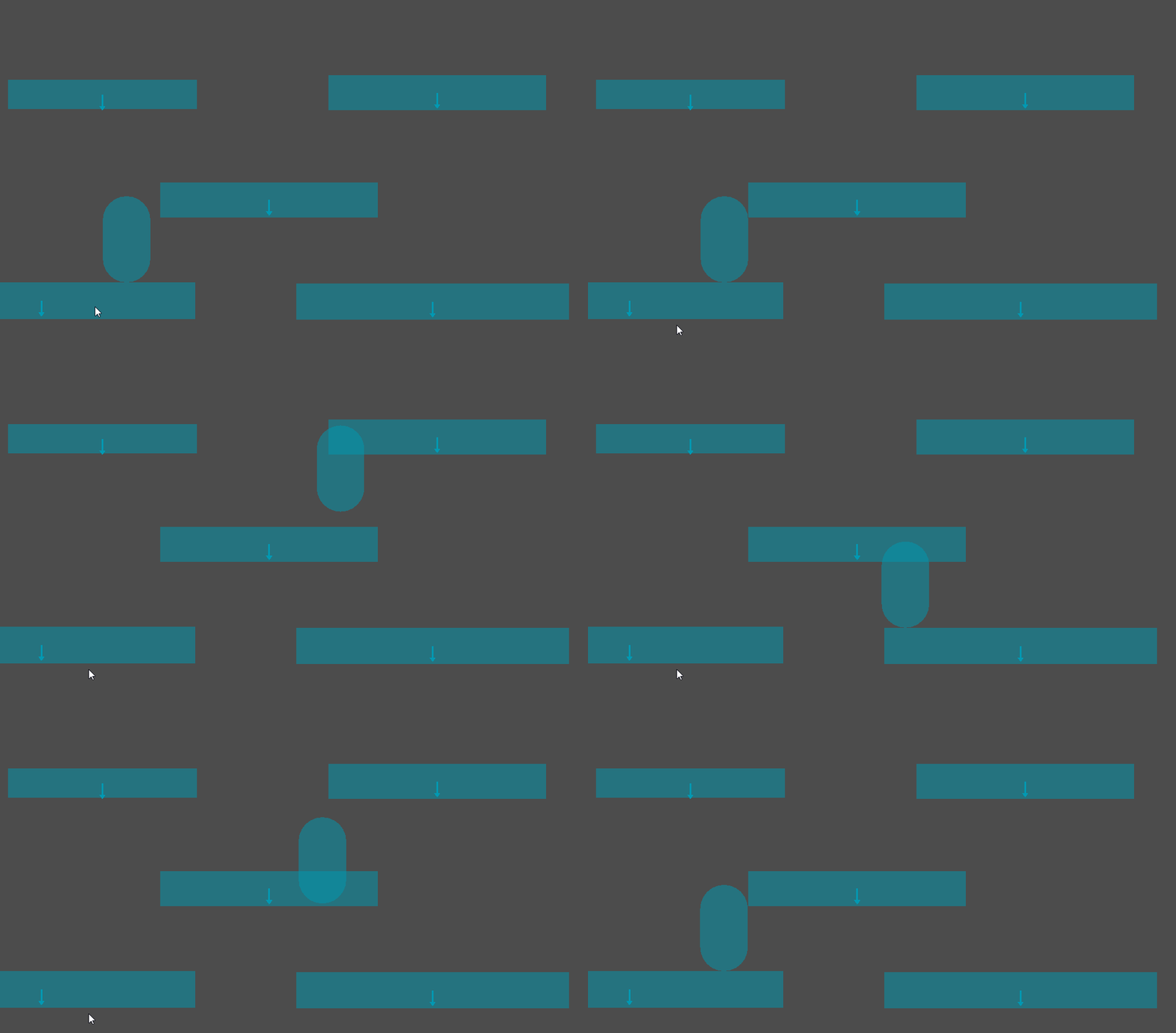
The problem seems to be with collision shapes that have been duplicated.
Please see attached gif and project. In project enable collision shapes in debug.
The middle platform and top right platform are duplicates of each other. (ie I have right clicked on one and clicked duplicate and dragged it over)
You will see if you are touching both at the same time you fall through.
Now that I have a better idea of whats going on ill poke around and see if I can resolve it but im not familiar with the code at all so im sure you will be able to fix it right away. :)
willt
on 9 Sep 2017
oh i see, makes total sense that this makes it fail with the code I added,
i will work on it asap
On Sat, Sep 9, 2017 at 2:52 AM, William Taylor notifications@github.com
wrote:
Okay I think i've narrowed this down a bit more.
The problem seems to be with collision shapes that have been duplicated.
Please see attached gif and project. In project enable collision shapes in
debug.
The middle platform and top right platform are duplicates of each other.
(ie I have right clicked on one and clicked duplicate and dragged it over)
You will see if you are touching both at the same time you fall through.Now that I have a better idea of whats going on ill poke around and see if
I can resolve it but im not familiar with the code at all so im sure you
will be able to fix it right away. :)[image: 2017-09-08_22-46-46]
https://user-images.githubusercontent.com/340016/30237498-361ff436-94e8-11e7-8ea6-b7f1f0f25155.gifDuplicateCollisionBug.zip
https://github.com/godotengine/godot/files/1289577/DuplicateCollisionBug.zip—
You are receiving this because you were mentioned.
Reply to this email directly, view it on GitHub
https://github.com/godotengine/godot/issues/10971#issuecomment-328256797,
or mute the thread
https://github.com/notifications/unsubscribe-auth/AF-Z2x1uFTz9TgEUCGD_-Pf-VhF0Vngbks5sgievgaJpZM4PMNFN
.
reduz
on 9 Sep 2017
confirmed fixed thanks!
willt
on 17 Sep 2017
It stills happens on v3.0.2.stable when using circle or capsule collider for the player. It can be fixed by changing the player collider to a rectangle. It should also work with circle or capsule though.
 jahd2602
on 3 Apr 2018
jahd2602
on 3 Apr 2018
@jahd2602 you can open a new issue about that.
 vnen
on 3 Apr 2018
vnen
on 3 Apr 2018
I can confirm what @jahd2602 said. It is occurring with a circle/capsule container.
 justinluk
on 30 Jun 2018
justinluk
on 30 Jun 2018
Related issues
 ndee85
·
3Comments
ndee85
·
3Comments
 RebelliousX
·
3Comments
RebelliousX
·
3Comments
 RayKoopa
·
3Comments
RayKoopa
·
3Comments
 Spooner
·
3Comments
Spooner
·
3Comments
 timoschwarzer
·
3Comments
timoschwarzer
·
3Comments
Most helpful comment
oh i see, makes total sense that this makes it fail with the code I added,
i will work on it asap
On Sat, Sep 9, 2017 at 2:52 AM, William Taylor notifications@github.com
wrote: