Godot: VisibilityEnabler2D does not take effect when it is added to scene tree.
Operating system or device - Godot version:
Godot 2.1.3
Issue description:
When a scene with a VisibilityEnabler2D is add to the scene tree outside of the screen, VisibilityEnabler2D will not take effect, it only take effect when it enter screen and then exit screen.
Steps to reproduce:
Link to minimal example project:
 alexzheng
All 9 comments
NoBody care about this issue? Or am I using this node in a wrong way?
alexzheng
on 27 Jun 2017
Also I have tried this in 3.0, it's the same.
alexzheng
on 28 Jun 2017
Maybe I should not call set_fixed_process(true) or set_process(true) in _ready.
Just let the VisibilityEnabler2D call it.
If it's not bug, it can be closed
alexzheng
on 28 Jun 2017
But it would be better to disabled it when added to screen tree outside of the screen, no matter whether it's on or off.
alexzheng
on 28 Jun 2017
First of all thank you for your report and sorry for the delay.
We released Godot 3.0 in January 2018 after 18 months of work, fixing many old issues either directly, or by obsoleting/replacing the features they were referring to.
We still have hundreds of issues whose relevance/reproducibility needs to be checked against the current stable version, and that's where you can help us.
Could you check if the issue that you described initially is still relevant/reproducible in Godot 3.0 or any newer version, and comment about its current status here?
For bug reports, please also make sure that the issue contains detailed steps to reproduce the bug and, if possible, a zipped project that can be used to reproduce it right away. This greatly speeds up debugging and bugfixing tasks for our contributors.
Our Bugsquad will review this issue more in-depth in 15 days, and potentially close it if its relevance could not be confirmed.
Thanks in advance.
Note: This message is being copy-pasted to many "stale" issues (90+ days without activity). It might happen that it is not meaningful for this specific issue or appears oblivious of the issue's context, if so please comment to notify the Bugsquad about it.
 kubecz3k
on 3 Apr 2018
kubecz3k
on 3 Apr 2018
Still relevant
alexzheng
on 4 Apr 2018
Relevant code in scene/2d/visibility_notifier_2d.cpp if anyone wants to debug further.
 akien-mga
on 22 Nov 2018
akien-mga
on 22 Nov 2018
I don't seem to be able to replicate the issue. Maybe it was fixed already?
@alexzheng if you still experience this, can you provide clearer instructions how to replicate the issue - or even better, a test scene?
 rxlecky
on 1 Dec 2018
rxlecky
on 1 Dec 2018
I can confirm this still in 2019
Godot version:
Godot Engine v3.1.beta2.official
OS/device including version:
Sony VAIO SVE14A15FBW:
- Windows 10 x64
- Intel(R) Core(TM) i5-2450M @ 2.5GHz (4 CPUs)
- 6GB RAM
- AMD Radeon HD 7600M
- XBOX 360 wired gamepad
Issue description:
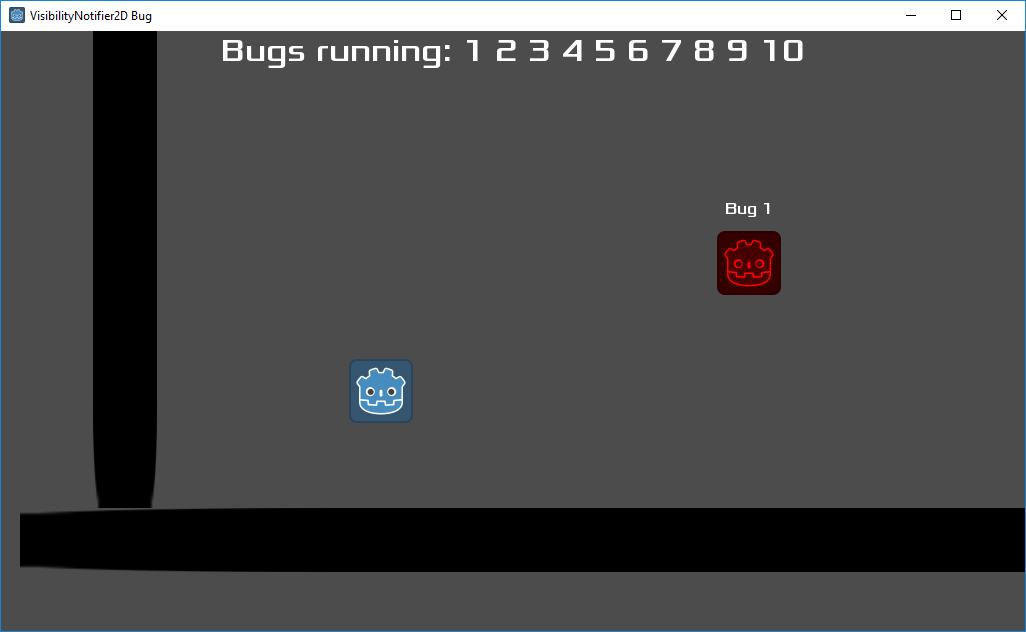
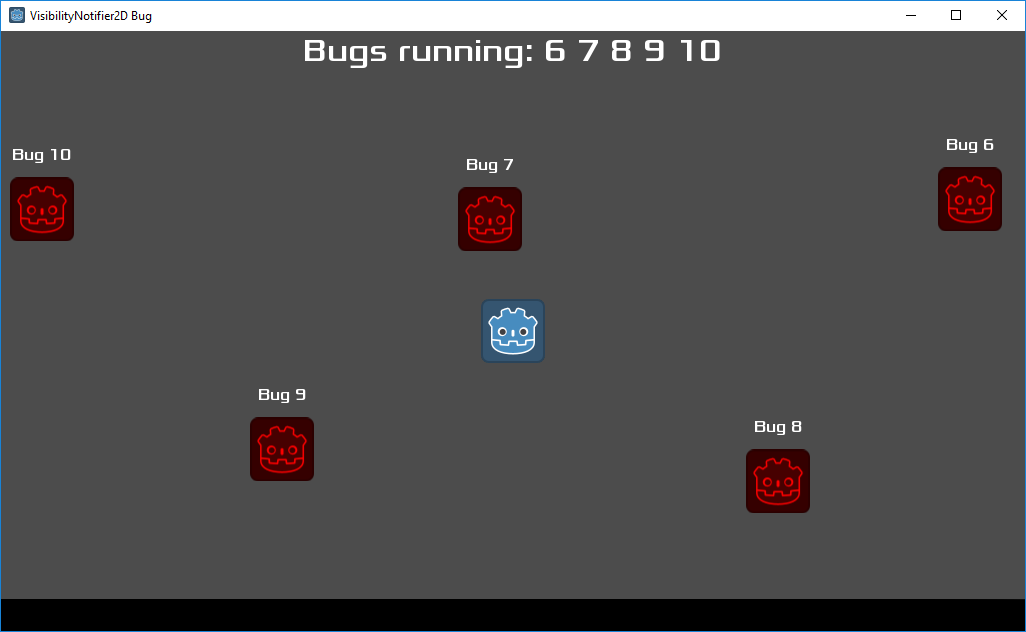
VisibilityEnabler2D doesn't disable elements that start off-screen until they (enter>>exit) the screen for the first time.
This behavior defeats the purpose of the node, since you must manually disable everything at start, which is already the scope of VisibilityNotifier2D.
Steps to reproduce:
- Create a scene.
- Set the root node to whatever type you like, even PhysicsBody2D or AnimationPlayer.
- Create a child node of type VisibilityENABLER2D, mark all of its checkboxes.
- Create a built-in script, print anything at process.
- Instance one or many copies of it in another scene, position them OUT OF SCREEN.
- Hit play. Print text will be displayed below at the output, even for elements out of screen.
- Move the camera as to show the VisibilityEnabler2D's, then move away to hide them.
- Print messages will stop.
Minimal reproduction project:
VisibilityEnabler2D Bug.zip
At very start:
After enter>>exit:
 FlavioFS
on 4 Mar 2019
FlavioFS
on 4 Mar 2019
Related issues
 n-pigeon
·
3Comments
n-pigeon
·
3Comments
 rgrams
·
3Comments
rgrams
·
3Comments
 mefihl
·
3Comments
mefihl
·
3Comments
 ducdetronquito
·
3Comments
ducdetronquito
·
3Comments
 Zylann
·
3Comments
Zylann
·
3Comments
Most helpful comment
I can confirm this still in 2019
Godot version:
Godot Engine v3.1.beta2.official
OS/device including version:
Sony VAIO SVE14A15FBW:
Issue description:
VisibilityEnabler2D doesn't disable elements that start off-screen until they (enter>>exit) the screen for the first time.
Steps to reproduce:
Minimal reproduction project:
VisibilityEnabler2D Bug.zip
At very start:
After enter>>exit: