Godot: Provide Windows installers for the Godot editor
Windows installers will allow for a better out-of-the-box user experience, providing things such as start menu entries, easier installation and uninstall procedures, built-in export templates, registering file associations and more.
Possible candidates for this are:
- NSIS
- Inno Setup
- MSI package (the "official" Windows installer system)
Export templates may or may not be bundled (it will make the installer size grow significantly). They could also be downloaded in the installer, if the user chooses to install them.
As a bonus, we could also provide guidance or scripts for packaging Godot projects in Windows installers.
 Calinou
All 16 comments
After some experimentation, I'm mostly convinced by Inno Setup - it's easy to set up, and the installer works well. Uninstalling works flawlessly as well, and users can opt in and out of desktop icon and start menu entry creation.
Once I get around to updating my unofficial builds, I will include Windows installers made using Inno Setup as the recommended option for Windows users.
Calinou
on 18 Apr 2017
I beg a pardon for interruption. But in my humble opinion Wix Toolset is a way to go if you need MSI. I have some experience with it and I love it. In windows community it is considered de facto tool for that purpose. I could help prepare MSBuild scripts if you would pick Wix Toolset. :)
 tomuxmon
on 25 May 2017
tomuxmon
on 25 May 2017
This would be great to have for 3.0, it would add familiarity layer to Windows users. It seems not hard to make and maintain, should be easy to update for each release.
 vnen
on 6 Jun 2017
vnen
on 6 Jun 2017
Ok I have played a bit with WIX (after some long time 😄 ). I have prepared minimalist script in my repo. It appears you are actually not forced to use MSBuild and can instead use CLI tools directly.
To go forward (if that is needed) I need directions.
- Should godot.exe be installed in program files folder (requires elevated permissions) or in app data folder.
- What shortcuts are required. Start menu shortcut , desktop shortcut or both.
- Should export templates be included and how.
To my understanding WIX allows bundling more then one MSI in a single bootstrapper in a Bundle / Chain / MsiPackage combination..
Further MsiPackage allows supplying DownloadUrl so basically your installer boostrapper could be like 1 meg and instead download stuff on demand. But ALAS I have not played with that yet..
tomuxmon
on 7 Jun 2017
Answering the points:
- IMO installing in AppData with self contained mode is the most useful option.
- Both desktop and start menu (I guess it can be an option for the user, right?)
- No export templates. The user can download and install with the editor interface.
vnen
on 7 Jun 2017
I have updated my repo a bit.
- Resulting msi installs under ..\AppData\Local\Godot
- Both shortcuts are included
- Editor is launched after install
So far there is no UI whatsoever. I think there is no need so far. Unless install path configuration or icon preference is really needed.
If we need UI after all, I could include default Wix toolset UI, but then we would need to replace (supply) default bitmaps (or use default scary red discs 😄).
tomuxmon
on 12 Jun 2017
@tomuxmon cool, can you also make it register the *.godot project files with the editor?
 27thLiz
on 12 Jun 2017
27thLiz
on 12 Jun 2017
It seems it is possible, but I am not sure if it does not require elevation. will test tomorrow.
tomuxmon
on 12 Jun 2017
It is well possible in per user install 😀. But with obvious limitations: *.godot files will be opened with Godot editor only for current use; file association can not be advertised (most probably not relevant);
Check my repo if you want to test build msi.
Do you guys see anything else needed?
tomuxmon
on 13 Jun 2017
I've tested your installer locally (on Windows 10, with several installs and uninstalls), it works well, some comments:
- An installer containing a 28.8 MB binary compresses down to 10.5 MB in the
.msifile. In comparison, placing the binary in a.zipfile compresses it down to 12.5 MB. This makes the download smaller, which is always nice to see. - The installer is quite long to create (about 17 seconds here), but is very fast to install (about 1 second). End users don't have to create installers anyway, so this is probably fine.
- Uninstalling works well and is fast (about 1 second here too). The Add/Remove Programs dialog successfully displays installation size and version information.
- The
.godotfile association is working, and seems to be advertised (but not set by default) in the "Open With" dialog. - No administrator rights are required for installation (which is a good thing).
- The start menu entry is located in
%APPDATA%\Microsoft\Windows\Start Menu\Programs, which works fine for user-wide start menu entries. - The actual Godot binary is located in
%LOCALAPPDATA%\Godot, which makes sense for user-wide installation. - The project manager automatically starts as soon as Godot is installed. This is a bit strange, but these days, I see more and more programs (such as Atom) doing this, so I guess it's fine.
- The icon should be supplied with 256² and 128² variants as well. This is easy to do (and adds about 80 KB to the icon file), just modify the icon sizes passed to ImageMagick. This way, the desktop icon looks good even when it's huge and on hiDPI displays (and it also removes the border around the icon in Add/Remove Programs):
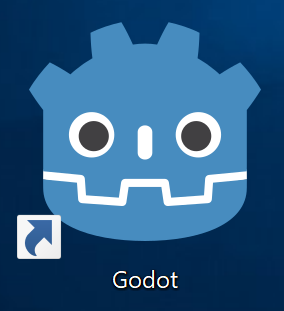
Also, I suggest not using the self-contained mode for this, as %APPDATA% is the standard location for user data. If users have trouble finding it, we can add a button in the editor to open the user data location in a file manager (which is very easy to do, using OS.shell_open()).
Overall, I think Wix works well for our use case, so 👍 .
Calinou
on 15 Jun 2017
My suggestion for self-contained mode is mostly for the possibility of installing multiple versions. I guess it might not be really needed.
One question: how does updates works with this installer? Can a new installer be ran and automatically update?
vnen
on 15 Jun 2017
@vnen The most precious UpgradeCode of a Product is used to identify installer package (and item in add/remove programs). So if you have for example version 3.0.0 installed and you run 3.0.1 or later msi, older version will be uninstalled first (with all components that included the msi).
So when building production msi you have to settle down on your GUID and NEVER change it. If you want to have side by side installs you just change UpgradeCode and you basically have new product (changing name too would help user a bit..).
tomuxmon
on 15 Jun 2017
I'm using @Calinou's installers, but I do miss an actual wizard. The thing runs to fast and closes on its own. If it weren't for Godot open right afterwards, it would seem as it didn't work.
vnen
on 22 Jul 2017
I can add default UI (with possibility to opt out when building?). I will need images to replace defaults (mentioned in defaul WIX UI link). Currently I am in military service and will be awailable after one week.
-----Pradinis laiškas-----
Nuo: "George Marques" notifications@github.com
Išsiųsta: 2017-07-22 05:17
Kam: "godotengine/godot" godot@noreply.github.com
Kopija: "Tomas Dambrauskas" tomuxmon@gmail.com; "Mention" mention@noreply.github.com
Tema: Re: [godotengine/godot] Provide Windows installers for the Godoteditor (#8057)
I'm using @Calinou's installers, but I do miss an actual wizard. The thing runs to fast and closes on its own. If it weren't for Godot open right afterwards, it would seem as it didn't work.
—
You are receiving this because you were mentioned.
Reply to this email directly, view it on GitHub, or mute the thread.
tomuxmon
on 22 Jul 2017
Update:
After using Inno Setup with the Godot editor, it turns out to be a decent solution as well, especially since it can be run in WINE, which allows for compiling and packaging Godot for Windows from Linux (using MinGW), unlike the WiX Toolset which currently doesn't run in WINE.
It's also easy to make it generate an installer which asks for installation location, desktop shortcuts and the like, while making it runnable by regular (non-administrator) users. It installs very quickly, and automated silent installs are still supported by passing the /INSTALL /VERYSILENT command-line flags.
Here's an example godot.iss file to use with Inno Setup: https://github.com/Calinou/godot-builds-ci/blob/master/resources/innosetup/godot.iss
Calinou
on 29 Dec 2017
Feature and improvement proposals for the Godot Engine are now being discussed and reviewed in a dedicated Godot Improvement Proposals (GIP) (godotengine/godot-proposals) issue tracker. The GIP tracker has a detailed issue template designed so that proposals include all the relevant information to start a productive discussion and help the community assess the validity of the proposal for the engine.
The main (godotengine/godot) tracker is now solely dedicated to bug reports and Pull Requests, enabling contributors to have a better focus on bug fixing work. Therefore, we are now closing all older feature proposals on the main issue tracker.
If you are interested in this feature proposal, please open a new proposal on the GIP tracker following the given issue template (after checking that it doesn't exist already). Be sure to reference this closed issue if it includes any relevant discussion (which you are also encouraged to summarize in the new proposal). Thanks in advance!
 akien-mga
on 26 May 2020
akien-mga
on 26 May 2020
Related issues
 gonzo191
·
3Comments
gonzo191
·
3Comments
 testman42
·
3Comments
testman42
·
3Comments
 Spooner
·
3Comments
Spooner
·
3Comments
 RayKoopa
·
3Comments
RayKoopa
·
3Comments
 ndee85
·
3Comments
ndee85
·
3Comments
Most helpful comment
I've tested your installer locally (on Windows 10, with several installs and uninstalls), it works well, some comments:
.msifile. In comparison, placing the binary in a.zipfile compresses it down to 12.5 MB. This makes the download smaller, which is always nice to see..godotfile association is working, and seems to be advertised (but not set by default) in the "Open With" dialog.%APPDATA%\Microsoft\Windows\Start Menu\Programs, which works fine for user-wide start menu entries.%LOCALAPPDATA%\Godot, which makes sense for user-wide installation.Also, I suggest not using the self-contained mode for this, as
%APPDATA%is the standard location for user data. If users have trouble finding it, we can add a button in the editor to open the user data location in a file manager (which is very easy to do, usingOS.shell_open()).Overall, I think Wix works well for our use case, so 👍 .