Godot: EDIT: 2D editor should not allow editing controls that are children of containers, not move or resize.
Operating system or device - Godot version:
Xubuntu 14.04 64-bit, compiled myself Godot 2.1.2 & templates.
Issue description:
I noticed the problem with ScrollBars in my android app when edited and exported from 2.1.2. For no reason at all ScrollBars - when clicked on - drop to the value of 0 and the grabber part does not react to any clicking, dragging, moving etc. to change the value. It remains at 0 value no matter what. :(
App exported from 2.1 had no such problems and ScrollBars worked properly.
Trying to recreate the bug in newly created project (attached in this issue) I was not able to recreate exact behavior, but I found other, similar, but I guess related problem.
Check the attached project or take the steps below:
*_When opening the project, notice that the left ScrollBar is just a dot in the upper left corner. I saved the project with it having the same parameters/values/look as the right ScrollBar._
Steps to reproduce:
Create ScrollContainer. Add a VScrollBar child to it. Set VScrollBar's position, size and/or rotation (or use the attached project).
Run the project. No matter of previous settings VScrollBar will be just a dot of size(12,12) in position (0, 0) and probably other parameters changed (default settings?)
Also:
You may change the settings of the VScrollBar and save the project. Then quit to the Project List and load the project again. You will see reset values of size, position etc.
I was not able to reproduce "zeroing" effect after clicking, but I guess this strange behavior is probably connected to the problems I found in my app.
Link to minimal example project:
scroller_test.zip
 freemanfromgodotengine
All 40 comments
I can reproduce it on editor with 2.1.1 stable, 2.2 alpha and 3.0 alpha.
It doesn't happen with 2.1 stable.
I guess something is changed between 2.1 stable and 2.1.1 stable.
- created new project
- make 2d node
- zoom out a little bit
- quit to project manager
- open project again

no vertical scroll bar, horizontal scroll bar is just dot.
it's fixed if resize window or drag scene.
 volzhs
on 25 Jan 2017
volzhs
on 25 Jan 2017
@volzhs i can also reproduce this behavior by just zooming out and then zoom in again one step at a time. By doing this, at some point, the vertical scrollbar becomes a little dot, and the horizontal scrollbar jumps to the top of the window.

EDIT
This is in 2.1.1-stable
EDIT
Also happens in 2.1.2-stable
 Keetz
on 25 Jan 2017
Keetz
on 25 Jan 2017
I was wondering about this, but never reproduced it. I even clicked on the little dot once, it was as if it were daring me to do so, and got all sorts of buggy scrolling behavior until I relaunched Godot.
 avencherus
on 25 Jan 2017
avencherus
on 25 Jan 2017
Thanks @volzhs @Keetz for the confirmation.
I checked again and can confirm that in version 2.1-stable scrolling works and looks properly.
freemanfromgodotengine
on 25 Jan 2017
Search for the "scroll" keyword in the changelog 2.1.1-stable, there are various potential culprits :) http://download.tuxfamily.org/godotengine/2.1.1/Godot_v2.1.1-stable_changelog.txt
 akien-mga
on 25 Jan 2017
akien-mga
on 25 Jan 2017
I have a suspicious commit. I will look into it.
volzhs
on 25 Jan 2017
What I found is not about ScrollContainer or ScrollBar.
It's about weird scrollbar on 2D editor viewport.
I will make PR for it, but I guess it does not fix main issue.
volzhs
on 25 Jan 2017
From a simple search of the document given by @akien-mga I see some positions that could change something with ScrollBar behavior:
Elia Argentieri (1):
Make the step property useful for sliders as described in #5773
Mason Ashbridge (1):
Slider value accounts for grabber offset
Pawel Kowal (9):
ScrollContainer expand children bug fix
Add scrolling to Tree control in Drag and Drop mode
sanikoyes (2):
fix ScrollContainer cannot scroll when scroll bar is hidden
freemanfromgodotengine
on 25 Jan 2017
@freemanfromgodotengine I can reproduce your issue with your sample project with 2.1 stable also.
no matter what position/size in editor is gone and be shown as dot size when run.
volzhs
on 25 Jan 2017
I don't know if this is related, but there is also weird behavior for horizontal scroll bars in code editor.
If you try to drag and drop a resource such as script/scene to the code editor to get the NodePath for say preload, if the path is too long, then it will be pasted correctly, but without horizontal bar. You have to add tabs/spaces manually for another line to see the text for the path.
I tried to look for a place in the source code to fix the problem, but I am new to Godot source code, it kind of looks like spaghetti for me. Is code_editor.cpp the right place? I see h_scroll variables commented out in find and replace functions.
 RebelliousX
on 25 Jan 2017
RebelliousX
on 25 Jan 2017
@RebelliousX I think it would be somewhere in the codepath that handles the drag and drop of the resource.
 bojidar-bg
on 25 Jan 2017
bojidar-bg
on 25 Jan 2017
@bojidar-bg I skipped 1 week of godot's updates, but for v2.1.2 I can't reproduce the issue. It only happened to me in the v2.2-legacy branch, and still can't reproduce. :/ I am glad though.
SInce this is fixed in ad899a0dd974a58674882cefe62ac0914fdd4a6e, why it is still open?
RebelliousX
on 1 Feb 2017
@RebelliousX Since it wasn't merged into master from what I could see. :smiley:
bojidar-bg
on 1 Feb 2017
I edited tools/editor/plugins/canvas_item_editor_plugin.h according to https://github.com/godotengine/godot/commit/ad899a0dd974a58674882cefe62ac0914fdd4a6e and compiled Godot 2.1.2 from scratch. The problem I described previously remains.
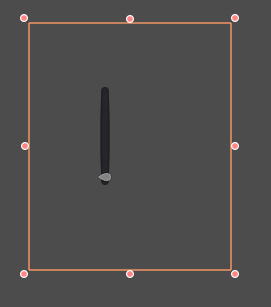
Whenever I click on VSlider the value drops to 0 and the grabber stays there no matter what.
It looks like this in my app:

Nothing changed in my code or nodes settings since it worked fine in godot-2.1-stable, so I guess problem is not in my code.
freemanfromgodotengine
on 19 Feb 2017
The problem is still present in binary version 2.1_20170319 that was given in "Preparing for 2.1.3-stable" #8087 by @akien-mga
freemanfromgodotengine
on 24 Mar 2017
Just to be sure, is the problem fixed in master, or does it affect both branches similarly?
akien-mga
on 31 Mar 2017
The problem is still present in a few day old v3.0.alpha.custom_build I compiled from master
Faulty behavior is exactly the same as in 2.1.1+ versions.
I attach version 3 compatible project here:
scroller_bug_in_v3.0_test.zip
Again (and to make clear), the project I', saving and attaching looks like this:

Right scrollbar is outside of the ScrollContainer and behaves as expected.
Left scrollbar is inside the ScrollContainer and has a bug.
If project is run, it look like this (notice small dot in the upper left corner - that's the left scrollbar):

When saved and opened again, it opens like this (even if save it with both scrollbars looking ok, like in the first picture):

freemanfromgodotengine
on 2 Apr 2017
Just checked again with master and it's still there.
I also found #4954 that clearly is the same or related issue.
freemanfromgodotengine
on 24 Jun 2017
I checked today again. This problem still remains in Godot 3.0 alpha compiled from master yesterday.
freemanfromgodotengine
on 24 Sep 2017
All scrollbar logic is in the same place in Godot:
https://github.com/godotengine/godot/blob/master/scene/gui/scroll_bar.cpp
And the Range logic is here:
https://github.com/godotengine/godot/blob/master/scene/gui/range.cpp
 reduz
on 6 Nov 2017
reduz
on 6 Nov 2017
Ok.. so what is this about? Is this about the VSlider issue or the ScrollContainer?
The VSlider issue seems fixed for me...
The ScrollContainer part is not really an issue as I understood (see #5942).
That's not how ScrollContainer should be used imho... in a scroll container should be a panel or something (with defined min size!) and the scroll container will do the rest, so you have a nice scroll bar, if needed.
If you anyway want to do that setup as described, you still would have to set min size - this is by design.
Please correct me if I get anything wrong.
 fodinabor
on 13 Nov 2017
fodinabor
on 13 Nov 2017
The issue is simple. Just put VSlider in the ScrollContainer and VSlider stops working properly. Which one is wrong I don't know. Something seams to affect VSlider when it's put into the ScrollContainer.
...in a scroll container should be a panel or something
Yes, for example TextLabel with as many letter as you need that are off the screen (that's in my setup and working on 2.1 versions of Godot), but the problem is not about that. The problem is that VSlider does not keep it's size, that you set.
freemanfromgodotengine
on 14 Nov 2017
Still there's no issue for me if I have a VSlider VScrollbar in a ScrollContainer and set min size!
+
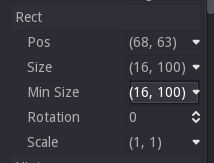
->
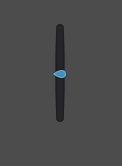
fodinabor
on 14 Nov 2017
@fodinabor Which version of Godot is it?
freemanfromgodotengine
on 14 Nov 2017
Screenshots are from 2.1.4, same in current 3.0 though..
using your example project I just added min size and it's fine.
fodinabor
on 14 Nov 2017
I have to try that. But still, if you use VSlider out of the ScrollContainer you don't have to set the Min Size for it to keep the set size, so at least it's inconsequent behavior.
freemanfromgodotengine
on 15 Nov 2017
On a newly build master 3.0, after setting Min Size, the size of the VSlider that is in the ScrollContainer is kept. However, it's position is not. VSlider inside the ScrollContainer is always relocated to 0,0 position.
The same happens when you relocate VSlider node in the Scene tree menu and put it as a child of ScrollContainer. No matter what it's original position, it changes to 0,0.
I don't think it's normal.
freemanfromgodotengine
on 19 Nov 2017
I checked today. The same happens on 2.1.4-stable.
Additionally I noticed (testing on 2.1.4-stable), that if there is some other node in the ScrollContainter already, it's scale, position (maybe other parameters?) are going to be reset as well. It looks like this - pay attention to Scroll Containter Area label text with scale 3,3 while I move the VScrollBar node to make it a child of ScrollContainer:
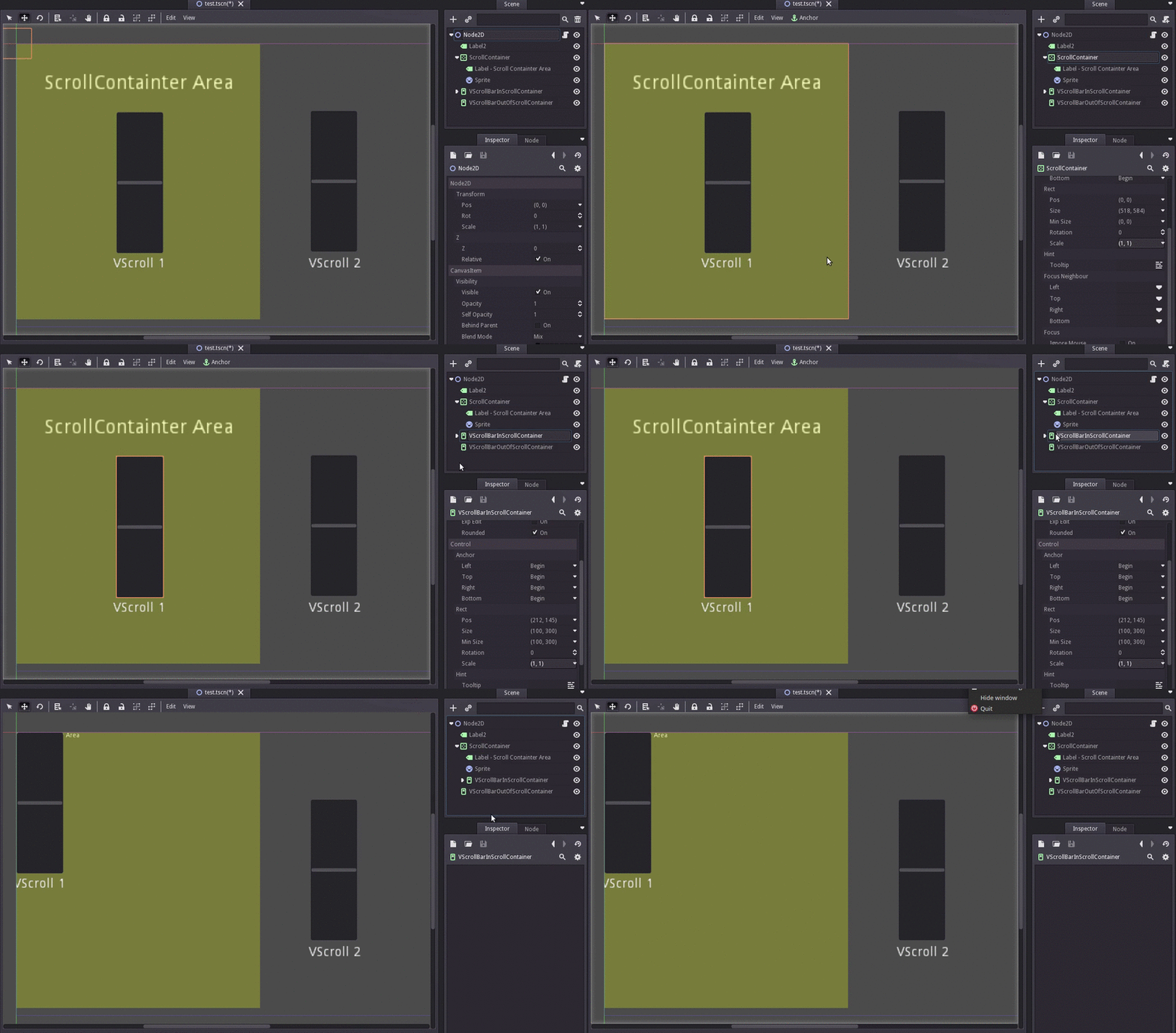
So, it looks like strange things happen to nodes in the ScrollContainter.
Clearly it is not only VScrollBar problem. Label node is also affected. For example editing Label's text resets it's scale and position as well. It happens also after saving the project and opening again. Children's nodes scale and position (but not grandchildren nodes (sic!)) appear reset to: scale 1,1 and position 0,0.
Button nodes were also affected in my tests.
What might be interesting, sprite node seams not to be affected - yellow area in the project is a resized yellow sprite and it keeps it's settings.
Example project:
scroller_test_for_Godot_2.1.4-stable.zip
To make it clear, the project I saved looked like this:
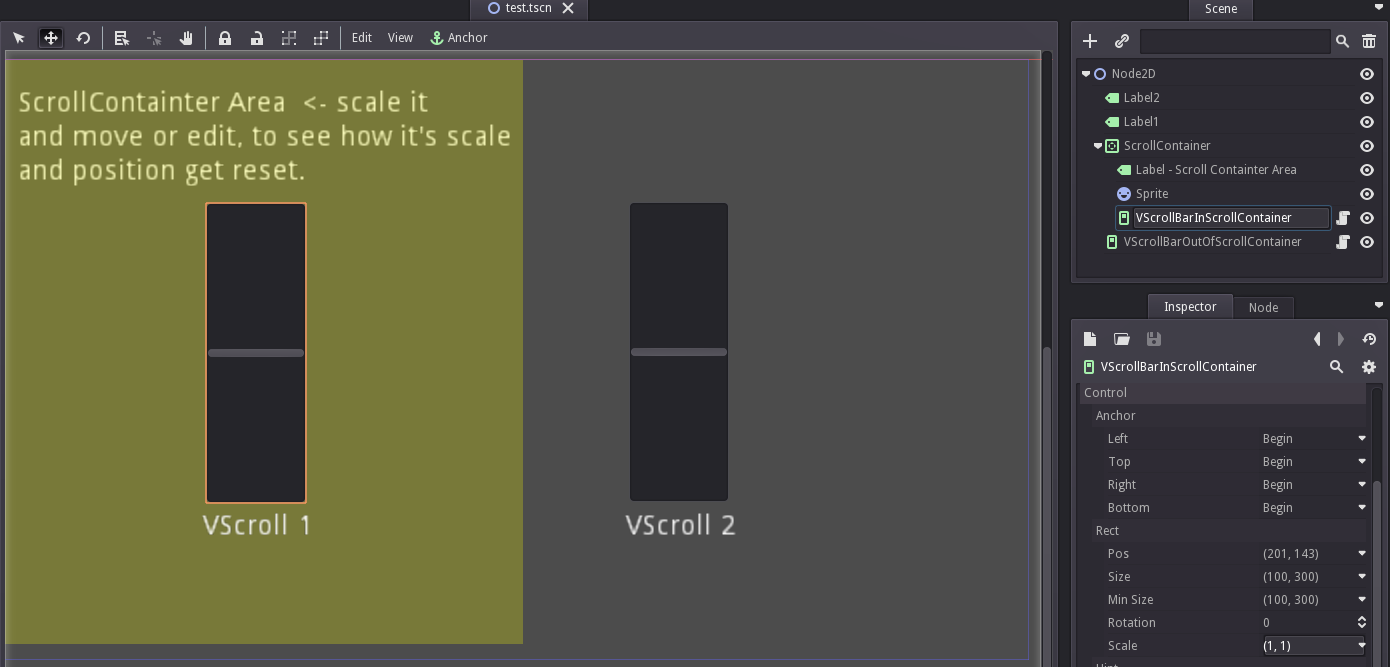
Also it bothers me - why do we have that Min Size parameter and things shrink without setting it?
freemanfromgodotengine
on 20 Nov 2017
In Godot, Containers are responsible for rearranging/resizing their children, and changing the position or size of those children directly is not supported.
As mentioned in another issue (which I can't find right now..), we might, one day, remove the ability to drag controls inside a container, and make resizing them change their min size instead.
Returning to this issue, I would suggest putting some other container (for example, an HBoxContainer) inside the ScrollContainer setting up a min size on the VScrolls (in case you want them to be that wide), and playing around with their "Size flags". That way, you would be able to tell the engine how you want them to arranged.
Another option might be to put a wrapper control node with min size equal to the area you want to be able to scroll through, and then just put the scrollbars inside it.
bojidar-bg
on 20 Nov 2017
@bojidar-bg Thank you for the explanation and hints.
So, is this present behavior of nodes in ScrollContainer, that I described above, normal now?
freemanfromgodotengine
on 20 Nov 2017
Yes, this behaviour is normal now, in the past, and probably in the future 😃
bojidar-bg
on 20 Nov 2017
@bojidar-bg I still can't wrap my head around this issue. If like you say "Containers are responsible for rearranging/resizing their children", then why in my example Container rearranges and resizes only some of it's children? Is there a reason that Sprite node does not get resized?
freemanfromgodotengine
on 21 Nov 2017
@freemanfromgodotengine Control nodes are only responsible for Control nodes, they can't manipulate Node2D's or other nodes.
Control nodes are meant for UI stuff, and the whole rearranging/resizing is actually pretty usefull in my opinion, i have created some nice responsible UI pretty easy because of it.
Keetz
on 21 Nov 2017
@Keetz @bojidar-bg I really appreciate your effort to explain to me what's going on. Thanks.
However I still think, that behavior of nodes of the saved scene when they rearrange into 0.0 position or rescale to 1,1 when edited or loaded into editor is a bug. Most users expect, that when they save something in some position or scale, it should be saved in such state and stay like that after loading again. They also do not expect that after normal operation of rearranging nodes in the scene's tree, some other nodes will be rearranged into 0,0 position or scale 1,1.
Current behavior is very unintuitive, misleading and inconsistent.
If the only solution is - like @nojidar-bg suggested -
"putting some other container (for example, an HBoxContainer) inside the ScrollContainer"
, then I propose, that editor should prevent users from placing any other kind of nodes as a child of ScrollContainer. At least some warning should be given, that position of children nor their scale will not be kept after saving etc..
freemanfromgodotengine
on 25 Nov 2017
We have now entered release freeze for Godot 3.0 and want to focus only on release critical issues for that milestone. Therefore, we're moving this issue to the 3.1 milestone, though a fix may be made available for a 3.0.x maintenance release after it has been tested in the master branch during 3.1 development. If you consider that this issue is critical enough to warrant blocking the 3.0 release until fixed, please comment so that we can assess it more in-depth.
akien-mga
on 9 Jan 2018
I'm not familiar with criteria developers use for assessing issues as critical, so I can't tell.
Is resetting the values of parameters of position, size and scale - as well as not keeping those settings after saving the project or scene - a critical issue?
I just can tell, that for me it's a show stopper.
freemanfromgodotengine
on 10 Jan 2018
@freemanfromgodotengine at this point, "critical" is only things that make the engine freeze or crash.
 vnen
on 10 Jan 2018
vnen
on 10 Jan 2018
@vnen Godot runs, but it is not doing some basic things as expected, as I described in this issue.
However I am sure, that setting and then realizing that the settings are gone - in the saved project! - of, let's say 100 or more Control nodes will be as severe for users, as Godot crashing or freezing before saving the project.
freemanfromgodotengine
on 10 Jan 2018
@groud Were we not thinking of disabling gizmo editing for controls that are children of a container?
reduz
on 30 Jul 2018
Closing as superseded by #20750
 groud
on 19 Sep 2018
groud
on 19 Sep 2018
Related issues
 kirilledelman
·
3Comments
kirilledelman
·
3Comments
 mefihl
·
3Comments
mefihl
·
3Comments
 RayKoopa
·
3Comments
RayKoopa
·
3Comments
 n-pigeon
·
3Comments
n-pigeon
·
3Comments
 rgrams
·
3Comments
rgrams
·
3Comments
Most helpful comment
I can reproduce it on editor with 2.1.1 stable, 2.2 alpha and 3.0 alpha.
It doesn't happen with 2.1 stable.
I guess something is changed between 2.1 stable and 2.1.1 stable.
no vertical scroll bar, horizontal scroll bar is just dot.
it's fixed if resize window or drag scene.