Godot-proposals: Predefined shapes for Path2D
Describe the project you are working on
Currently working on 2 different types of space shooter where the enemies travel along paths.
Describe the problem or limitation you are having in your project
Currently there is no facility to create predefined shapes such as you can for Collision2D for example. This means that trying to create a smooth circular path is very difficult.
Describe the feature / enhancement and how it helps to overcome the problem or limitation
Add some predefined shapes for creating curved paths. Or enhance existing tooling to make creating curves easier.
Describe how your proposal will work, with code, pseudo-code, mock-ups, and/or diagrams
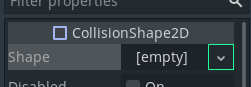
Replicate this functionality to provide circle, capsule shapes etc. This is less of an issue for non-curved shapes/surfaces.
If this enhancement will not be used often, can it be worked around with a few lines of script?
I guess it could be done with a script but it would be time consuming and complicated to calculate the positions of the points required for a circle.
Is there a reason why this should be core and not an add-on in the asset library?
It would bring Path2D into alignment with other node types that offer predetermined shapes.
 nathanjwtx
All 3 comments
I guess it could be done with a script but it would be time consuming and complicated to calculate the positions of the points required for a circle.
Vector2.rotated() should make this quite easy :slightly_smiling_face:
tool
extends Path2D

const SIZE = 100
const NUM_POINTS = 32


func _ready() -> void:
    curve = Curve2D.new()
    for i in NUM_POINTS:
        curve.add_point(Vector2(0, -SIZE).rotated((i / float(NUM_POINTS)) * TAU))

    # End the circle.
    curve.add_point(Vector2(0, -SIZE))
Results in:
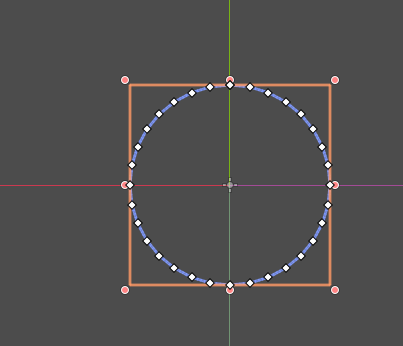
Open circle arcs can also be drawn this way by decreasing the angle increment between each iteration (and removing the line that ends the circle).
 Calinou
on 2 Dec 2020
Calinou
on 2 Dec 2020
Thanks! Let me give that a try. :)
nathanjwtx
on 2 Dec 2020
I think what would be useful is creating a general-purpose polygon generator, including (and not limited) to those Shape2D resources which were rather meant to be used as collision shapes. Those polygon nodes could then be used as children of anything to define the path, drawing, light occluders, navigation etc.
See Flattening/converting collision shapes into polygon-based shapes topic at godot-extended-libraries/godot-ideas#15 for related GIP proposals.
 Xrayez
on 3 Dec 2020
Xrayez
on 3 Dec 2020
Related issues
 davthedev
·
3Comments
davthedev
·
3Comments
 SpyrexDE
·
3Comments
davthedev
·
3Comments
SpyrexDE
·
3Comments
davthedev
·
3Comments
 IllusiveS
·
3Comments
IllusiveS
·
3Comments
 sprite-1
·
3Comments
sprite-1
·
3Comments
Most helpful comment
Vector2.rotated()should make this quite easy :slightly_smiling_face:Results in:
Open circle arcs can also be drawn this way by decreasing the angle increment between each iteration (and removing the line that ends the circle).