Godot-proposals: Unify disabling of nodes
Describe the project you are working on:
Godot
Describe the problem or limitation you are having in your project:
Many users (specially those who come from Unity I guess) complain that it's not so easy to turn off objects like they do over there.
In Godot, you can turn on and off most types of objects:
- Visual 2D and 3D objects can be hidden
- Physics objects can be disabled
- Animation player can stop their processing
- process functions in script can be turned on and off via process property.
- etc
But its kinda not unified nor always easily available from the UI, so this can be a hassle. I understand that in Godot you don't really need to do pooling like you do in Unity, so you can just create and free objects without much of a performance hit or GC unpredictability, but I still think having this may be of interest.
Describe the feature / enhancement and how it helps to overcome the problem or limitation:
This proposal is about providing a way to unify this from the UI for most cases, so it's easier to toggle things off and on.
The proposal will consist of a few features working together
Describe how your proposal will work, with code, pseudocode, mockups, and/or diagrams:
This will be implemented via the following features:
Feature 1: Disable when hidden
The first feature will be a new property on 2D and 3D nodes: "disable_when_hidden"
The property will be enabled by default, and it will result in:
- nodes that are hidden will no longer receive process or global input events.
- physics objects will just go disabled and stop affecting collision or areas
Feature 2: Expose Process
For nodes that are neither 2D or 3D (or nodes that use scripts with the process function), if they can be inactivated, they will show a small gear icon instead of the eye in the scene tree, which will do a simliar function. If parents nodes are hidden, this will also
deactivate:

Please keep answers strictly on-topic or I will delete the comment. if you want to request or discuss a completely unrelated feature, open a separate proposal
 reduz
reduz
All 70 comments
Feature 2 is confusing; is it correct that clicking the gear icon will toggle the node's visibility?
If so, I feel like the icons could be more descriptive:

 hoontee
on 14 Nov 2020
hoontee
on 14 Nov 2020
This is great, I would also love to be able to lock certain aspects of a node. For example: lock scaling so that I can't accidentally grab the scaling handles while trying to move nodes around.
This should be discussed in a separate proposal. Also, in the 3D editor, you can already choose which gizmos to display (translation/rotation/scale) using the buttons at the top of the 3D viewport.
 Calinou
on 14 Nov 2020
Calinou
on 14 Nov 2020
I would do this: add an 'active' property to nodes, toggling this to false would gray out the node and sub nodes in the editor (no added clutter due to new icons), stopping all processing on them and making them invisible to other nodes.
 PLyczkowski
on 14 Nov 2020
PLyczkowski
on 14 Nov 2020
add an 'active' property to nodes
Yeah, that would probably be much simpler to implement and simpler to use.
Also important to note that for this property to be useful, toggling it needs to make any descendants active or inactive as well.
hoontee
on 14 Nov 2020
Maybe there will be some confusion between active and paused. What do you think about this?: the new icon in the tree items is a shorthand for the pause mode property.
 RandomShaper
on 14 Nov 2020
RandomShaper
on 14 Nov 2020
I would do this: add an 'active' property to nodes
Also agree with this as it's a lot more intuitive and would have better UX. The other problem I have with disable_when_hidden is that if the user doesn't want that functionality at all in their game, they'll have to disable it on every node if it's true by default. It's a two-step process of toggling that property and hiding the node as opposed to simply deactivating it like the suggestion above, and that is clearer because it's standalone and not linked to another property (visibility).
I would also be against using a gear icon on anything that is not a settings button.
 vybr
on 14 Nov 2020
vybr
on 14 Nov 2020
Following up on my last comment, feature 1 may be implemented via a new pause mode: PAUSE_MODE_BY_VISIBILITY (or a better name).
RandomShaper
on 14 Nov 2020
I agree with the Suggestion for a new Pause Mode, However I must disagree with the Feature Implementation, instead of having it as a new Property that will mean having to toggle "disable_when_hidden" for every node could quickly become tiresome for those that don't want that and could lead to unexpected client side issues, as if a node is missed when setting the feature to off, and it's parent is hidden (hence disabling all it's children with the property set to true) because human error is bound to fail to properly disable the property on a node or 2 and overconfidence will lead some people trying to diagnose in places where there's nothing wrong and possibly making plenty of bug reports for a bug that isn't there but is actually misuse.. Instead the implementation should in my opinion go something like:
1.Default Node Mode = Inherit from parent (much like the current pause works)
2.Disable When Hidden (DWH) = Explicitly tells the node to disable when hidden, all of it's Children with inherit will be disabled, no change if they have explicitly stated otherwise, and the Children of it's Children will inherit based on their parent's state, Example will be below, works for all the modes..
3.Don't Disable When Hidden (DDWH) = Explicitly tells the node to Stay active when hidden
Example:
Root Node Mode = DWH
Root/Child1 Mode = Inherit --> Root Node Mode --> Currently DWH
Root/Child2 Mode = DWH --> Doesn't matter what it's parent mode is
Root/Child2/Child1 Mode = Inherit --> Root/Child2 = DWH --> Root/Child2/Child1 DWH
Root/Child2/Child1/Child1 Mode = DDWH --> It's parent is DWH, however it doesn't inherit, so DDWH no matter the other nodes in the tree
 mrjustaguy
on 14 Nov 2020
mrjustaguy
on 14 Nov 2020
It seems to me that _disabled_ and _hidden_ are completely orthogonal properties:
- _Disable_ is for physics/logic processing, and toggling it will change the game's semantics.
- _Hidden_ is a purely visual setting, and will only change the game's graphics.
I don't think disable_when_hidden is desirable, especially not with default true. If the user needs those semantics, he/she can easily change both settings. As they're different concepts, the UI should probably make the distinction between the two clear, not trying to unify them into a single button.
 Bromeon
on 14 Nov 2020
Bromeon
on 14 Nov 2020
Will this just deactivate every aspect of the node, or are you planning to add options for only disabling process or only disable input?
I don't think the disable when invisible option is the best way to do this, it leads to UX problems that you're trying to solve with replacing an eye with a gear icon. What if the option is disabled, do you hide the gear icon? But the other objects always have an eye, that way you think you can tell from the hierarchy which objects get disabled, but you actually don't.
Theres also the option that I want to disable the script on a node (which is possible in unity), but not hide the node. This is something you're not accounting for, it still has to be done by calling quite a few functions from script.
In unity disabling works with a checkbox in the top left corner of the inspector. This disables the object and all its components. But, each component, _like a renderer_, can also be disabled separately. I'd rather see godot doing something similar and keeping these things separate altogether.
 robbertzzz
on 14 Nov 2020
robbertzzz
on 14 Nov 2020
@PLyczkowski, @vybr , @Bromeon Ok, thanks for the feedback, I see the point of what you mean.
So then, what about this? following your sugestions, we remove the pause mode, and we add a new enum (exposed as a combo property) to nodes called ProcessMode, for which values would be:
- Inherit (use parent, this is default)
- Normal (will be suspended on pause, the default if no parent changes)
- PauseOnly (will only run if pause is on)
- Always (will run always, paused or not)
- Disabled (Node will never do any processing)
So, this way you can turn off processing of objects entirely at any point in the scene tree. It needs to be noted however that this will not hide the nodes, as this would be orthogonal to hiding. If you want nodes to completely stop doing anything, you would need to disable them _and_ hide them, both things separately. If you prefer this explicitly, then it should be doable, and does not break compatibility with existing scenes.
Because this can be difficult to track in the editor (as it makes no sense to put an extra icon besides the eye), we just gray out nodes if they are disabled.
I personally like this solution you guys suggested more than my original proposal, since I think its much clearer and likely useful.
reduz
on 14 Nov 2020
@reduz how do you distinguish greyed out (non-processing) nodes from inherited nodes in that case?
robbertzzz
on 14 Nov 2020
Sounds good, but I'd use a different word for the _Normal_ mode (_Inherit_ is quite normal too and it may be hard to remember the difference). Since _Normal_ means 'use the global pause mode set for the scene tree', maybe _Global_ or _Tree_ can work, or a better alternative.
RandomShaper
on 14 Nov 2020
@reduz: What you are suggesting in terms of pause is extremely close to #1011, which has an open PR over at Godot: https://github.com/godotengine/godot/pull/39606
 Zireael07
on 14 Nov 2020
Zireael07
on 14 Nov 2020
The ProcessMode idea seems Great to me, However as @RandomShaper pointed out Normal might be the wrong word, however I guess sufficient Docs on the matter would clear that problem somewhat.
How would "StandardProcess" or just "Standard" work instead of "Normal"?
mrjustaguy
on 14 Nov 2020
Regarding the hide-on-pause thing, I was considering maybe making visibility a tri or quad-state or adding another property about forcing some visibility depending on the current pause state of the node.
But I think that would be adding clutter for something that you can easily implement manually, perfectly tailored for the needs of your game.
RandomShaper
on 14 Nov 2020
@Zireael07 That proposal is probably not doable in practice, because pause needs to be a system wide thing. When you enable pause, the physics are stopped entirely. Here when you stop processing of a branch, the object gets removed from the physics but things continue.
reduz
on 14 Nov 2020
@reduz, if, according to @Zireael07's proposal, the idiom for pausing the whole game changed from pausing the SceneTree to setting pause on the root node, what would be the difference, besides an uglier syntax?
RandomShaper
on 14 Nov 2020
For nodes that are neither 2D or 3D (or nodes that use scripts with the process function), if they can be inactivated, they will show a small gear icon instead of the eye in the scene tree,
is this only UI change or setting visible=false to root node will deactivate everything in child nodes include scripts?
I do not want more "confusion" in Godot because lots of confusing features that not documented...
what would be the difference, besides an uglier syntax?
adding "pause" button to Godot editor UI at "hide" button that in Godot now can be more "clean" to understand
 danilw
on 14 Nov 2020
danilw
on 14 Nov 2020
@mrjustaguy @RandomShaper maybe WhenActive ?
reduz
on 14 Nov 2020
@robbertzzz @danilw Agreed it's confusing, will need to think of something else for how to make it clearer that its not active.
@danilw if there is something you find confusing that is not documented, open an issue in the docs repo:
https://github.com/godotengine/godot-docs
reduz
on 14 Nov 2020
@reduz making the node name italic could work? Or giving active nodes a lighter background?
robbertzzz
on 14 Nov 2020
@reduz WhenActive works just fine in my opinion.
mrjustaguy
on 14 Nov 2020
I like _Normal_ better than _WhenActive_. I'm even starting to assimilate the mapping between _Normal_ and its meaning. So it may be a good name after all. And @mrjustaguy is right in that the docs can clarify any doubt.
RandomShaper
on 14 Nov 2020
@reduz making the node name italic could work? Or giving active nodes a lighter background?
Maybe having different color node names to signal their status? White as Processing and Gray as Not Processing maybe? Italics would probably be a Little confusing and unintuitive as to which state is which.
mrjustaguy
on 14 Nov 2020
@reduz making the node name italic could work? Or giving active nodes a lighter background?
Maybe having different color node names to signal their status? White as Processing and Gray as Not Processing maybe? Italics would probably be a Little confusing and unintuitive as to which state is which.
This will create problems with distinguishing between not processing and inherited nodes, which are also greyed out. Hence the background colour suggestion :)
robbertzzz
on 14 Nov 2020
Didn't think about that. In that case, Background Coloring makes more sense.
mrjustaguy
on 14 Nov 2020
That proposal is probably not doable in practice, because pause needs to be a system wide thing. When you enable pause, the physics are stopped entirely. Here when you stop processing of a branch, the object gets removed from the physics but things continue.
I can't say anything about the technical part, but in my opinion proposal #1011 is the cleanest solution to the problem. 3 states is simpler than 5, and besides, it removes the global SceneTree.paused property.
 dalexeev
on 14 Nov 2020
dalexeev
on 14 Nov 2020
True #1011 has fewer states, However it also lacks the functionality added by the added states..
In it State 1 is Inherit, State 2 is Disabled, and State 3 is Always, while this one also has PauseOnly and Normal/WhenActive/whatever.. I mean yeah the 2 new ones Could be implemented client side with scripts, however it'd prove to be quite a hassle in some scenarios..
Considering the fact that this is a UX improvement, More Options & Simpler - Cleaner Control = Better (as long as there aren't Too many options, and Honestly 5 is hardly too many)
Only reasons I see not to go with https://github.com/godotengine/godot-proposals/issues/1835#issuecomment-727186192 or some even more refined idea (if anyone can think of any) would be Implementation difficulties or clutter, the latter not being the an issue, there ain't like 20 pointless, very nuanced, hard to differentiate between settings.
mrjustaguy
on 14 Nov 2020
@mrjustaguy There is no need for these two states in context #1011, when for nested nodes you can simply change the mode directly. These two states are reduced to one very exotic Anti-Inherit mode.
dalexeev
on 14 Nov 2020
@reduz
So then, what about this? following your sugestions, we remove the pause mode, and we add a new enum (exposed as a combo property) to nodes called ProcessMode, for which values would be:
- Inherit (use parent, this is default)
- Normal (will be suspended on pause, the default if no parent changes)
- PauseOnly (will only run if pause is on)
- Always (will run always, paused or not)
- Disabled (Node will never do any processing)
Sounds good! Like others suggested, the naming might be a bit clearer. What about:
- Inherit
- ActiveOnly (makes clear that this is the opposite of PauseOnly -- is that state called "Active" at all?)
- PauseOnly
- Always
- Never (makes clear it's the opposite of Always)
It could still make sense use other terms like "Disabled" if they have a long history and are a well-understood concept in Godot.
Bromeon
on 14 Nov 2020
@dalexeev Unless I misunderstood something in #1011 the ability
1.to process Only when Paused (PauseOnly)
and
2.the ability to Only work when Active (as in not Paused)
don't exist, and would have to be implemented via script, and there'd be the issue of inheriting the 2 states that are in here that aren't in that proposal.
@Bromeon You're right, Never is a Direct opposite, and does convey the same message as Disabled in terms of what it does, so ties well I'd say
mrjustaguy
on 14 Nov 2020
@dalexeev There is not much I can add to what I wrote previously, as nice as the proposal may look, it's technically unfeasible and misses the point because pausing is not only about nodes, but about suspending physics and other system wide stuff, so you need these extra states anyway.
Suspending part of the physics in different parts of the scene is not possible (or it would make pausing much harder and unpredictable), because physics engines are continuous feedback loops, so for pausing all you can do is suspend all of it. It's a pragmatic solution to the problem.
reduz
on 14 Nov 2020
@reduz, if, according to @Zireael07's proposal, the idiom for pausing the whole game changed from pausing the
SceneTreeto setting pause on the root node, what would be the difference, besides an uglier syntax?
Normally, autoloads should continue in the pause mode. Then there is no need to pause the root node, i.e. instead
get_tree().root.pause_state = PAUSE_STATE_STOP
better to do
get_tree().current_scene.pause_state = PAUSE_STATE_STOP
uglier syntax
By analogy with
hide() # visible = false
show() # visible = true
we can add methods like
pause_turn_on()  # pause_state = PAUSE_STATE_STOP
pause_turn_off() # pause_state = PAUSE_STATE_PROCESS
pause_reset()    # pause_state = PAUSE_STATE_INHERIT
it's technically unfeasible
To this I cannot answer anything because of my ignorance. We are waiting for what @aaronfranke will say to this.
Unless I misunderstood something
I'm afraid it's true. :smiley: In #1011 we are moving away from the global pause state, now a property of each individual node.
dalexeev
on 14 Nov 2020
I agree with #1011 current root.pause has no use(or it overcomplicated/lack needed features to use, and faster to make your own pause system for the current project)
and this "Unify disabling of nodes" may include an option for just stopping "trees" of nodes that simplify thinks alot I think
danilw
on 14 Nov 2020
Suspending part of the physics in different parts of the scene is not possible
Change physics body mode (Rigid/Static/Kinematic) or change Physics Mask/Layer... this how I do it right now...
it can be done on "engine level" I think and templated for all phys-body...
danilw
on 14 Nov 2020
I'm afraid it's true. 😃 In #1011 we are moving away from the global pause state, now a property of each individual node.
Eh, I think you're actually the one misunderstanding something..
Yes Current system is Bad, However #1011 doesn't address it well, This does a better job.
Want to Pause the whole thing? Just have everything inheriting it's parent's state, and disable the root node.
Want to Pause only the Player? Just Pause it and have all of it's children inherit
Want to Run something when it's parent is Paused? Just use PauseOnly or Always
Want to Have Total Control of when Something is or isn't running? Switch the Node's from Always or Never
Many more examples of the Current Proposal in action like the above..
1011 Wouldn't be very elegant at some of those
As far as Methods, what's stopping you from doing that with this proposal? In fact it'd just add another 2 options.
Note: Pause_State_Stop and Pause_State_Process are Basically identical to Never/Disabled and Always respectively in terms of their effect on a node.
mrjustaguy
on 14 Nov 2020
@dalexeev @mrjustaguy @danilw
You are discussing the same things without realizing I think. All the functionality proposed in #1011 is already present here. If you want to suspend part of the tree, you can with this proposal, simply set manually the PROCESS_MODE_DISABLED and it will do what you ask for, none of the children will work any longer. It's up to you if you later have issues with the physics engines because you had some stable bodies and when they come back they are no longer stable, you will have to suspend them manually or something.
So yes, you can use this instead of the pause system if you want, and there will be no harm. Pause is reserved for suspending things at engine level instead, which is also the most common use case because you want physics to stop.
So if the discussion is why having both the pause system AND the ability to stop nodes, this is about usability as I mentioned before. The first fits the most common use cases, the second it's up to you to use and deal with side effects.
reduz
on 14 Nov 2020
Please note that this feature can be used not only to implement a game pause, but also to disable/enable processing of unused parts of the scene tree. This is why having a global SceneTree.paused property is bad.
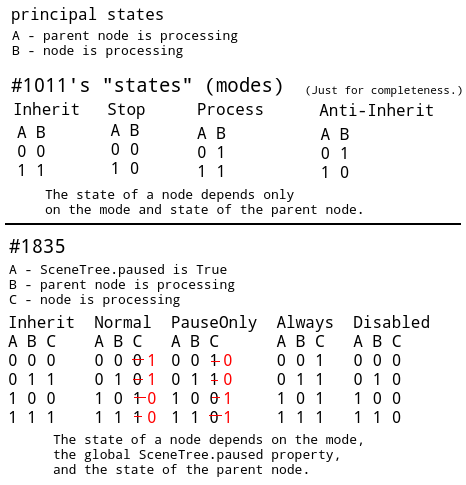
Any node can be either active or stopped, no third is given. All other "states" are synthetic. Inherit mode means that a node always has the same state as its parent. It is theoretically possible to add an Anti-Inherit mode, which means that the node always has the opposite state of its parent (but this mode is too exotic). It is not a good idea to bind the state of a node to a global variable.
In current implementation

A - SceneTree.paused is True
B - parent node is processing
C - node is processing

Inherit  Stop    Process
A B C    A B C   A B C
0 0 1    0 0 1   0 0 1
0 1 1    0 1 1   0 1 1
1 0 0    1 0 0   1 0 1
1 1 1    1 1 0   1 1 1
Suspending part of the physics in different parts of the scene is not possible
But, in the current implementation, if I turn on SceneTree.paused, I can still use physics on those nodes that are still processing, right? (I haven't tested this.)
dalexeev
on 14 Nov 2020
Considering the call to close the other request, I'll reintroduce my use-case and what is needed to accomplish it under the current system.
I have a game where the menu system should be paused when in the normal gameplay state and visually hidden, and the normal gameplay state should be paused but visible when in the menu system. Same goes for cutscene system, time system, and so on. Certain contexts require specific systems active and others paused (and visually reflect that). While the current pause system can accommodate simpler games, larger games would require keeping the tree paused at all times, while switching out the inactive node branches. This is an odd workflow, and even so, not currently feesible with the heavy memory leak that the pause system introduces, and would quickly break the game if the scene tree required staying in the pause state at all times.
In the meantime, as a work around, I made a Node extension that enables/disables the physics process, process, input, etc of a node and every descendant of that node (which I access using another node extension), which seems to replicate the desired pause effect of stopping everything while remaining visible.
 markdibarry
on 14 Nov 2020
markdibarry
on 14 Nov 2020
@reduz
It's up to you if you later have issues with the physics engines because you had some stable bodies and when they come back they are no longer stable, you will have to suspend them manually or something.
Unclear what you mean by stable.. Do you mean something along the lines of this example?
Example:
RigidBody Ball is on the StaticBody Floor
StaticBody Floor is set to PROCESS_MODE_DISABLED
RigidBody Ball Falls as there is no StaticBody Active to prevent the fall
As far as the rest, We seem to have tangled up the Pause & Process Modes in the discussion leading to the confusion.
Thanks for pointing it out and Sorry for cluttering the discussion with the miscommunications.
@dalexeev I think I get what you're trying to say now...
Please note that this feature can be used not only to implement a game pause, but also to disable/enable processing of unused parts of the scene tree.
1835 Can emulate this, here's how: Want to Disable processing of an unused part of the scene tree? use a Script to change Process Mode of the Node that is the root of the unused part(s) to Disabled, and if you want to reactivate them do the exact same thing just change Disabled to Inherited (Original process mode) or Enabled/Active/Whatever (if inherited is set on all children of the node that is being disabled, otherwise would be more nodes to disable, but same procedure)
mrjustaguy
on 14 Nov 2020
@markdibarry, could you elaborate on the memory leak you mention? That's likely offtopic here, but I want to know more about it to see if a bug about it should be opened.
RandomShaper
on 14 Nov 2020
@RandomShaper There's already an open issue #41643, assigned and set for 4.0 so both of these would probably be remedied at the same time. It was only relevant because these are the two issues with the pause system that caused me to make my own pause Node extension methods. The node extensions avoid both of these issues, and I've shared the code with multiple people who've had the same issue with the limitations of the pause system.
So while this doesn't fix the system's flaws, the pause system can be avoided entirely with a simple workaround to disable all process/internal-process of nodes and their descendants, though I don't know how performant it is when dealing with descendant searching.
markdibarry
on 14 Nov 2020
If you want to suspend part of the tree, you can with this proposal, simply set manually the PROCESS_MODE_DISABLED and it will do what you ask for,
This changes a lot! (In the current implementation, it is necessary to have SceneTree.paused == true, see my comment above.) However, I still believe that #1011 is easier to understand and more in the spirit of Godot. I hope it can be implemented.
dalexeev
on 14 Nov 2020
@dalexeev Depending on what you're trying to achieve, you may need to set process, process_internal, physics_process, physics_process_internal, and the input ones as well. Especially relevant for timer nodes, I found. But I might be just talking out my butt. Just stuff I found through trial and error.
markdibarry
on 14 Nov 2020
@dalexeev Again, you have to stop thinking about pause for what you want to do, pause is somethng else and it involves other engine parts besides the nodes. What you want to do will be doable by disabling nodes (and hance their sub-nodes). Stopping processing of a physics node will just remove it from the physics altogether, and setting it back will put it back, otherwise existing nodes will continue interacting with them and modifying them.
Additionally physics engines reach stability over various frames, as simulation converges, if you remove al physics objects and put them back again, your simulation will go unstable for a bit and objects that were previosly stable will most likely move a bit. This might be undesired in many games, so this is why pause just stops processing physics altogether. This why, when you resume, everything is as before.
Again, you can still do what you want. If you are using only KinematicBody and you don't use RigidBody for anything, then it will most likely don't matter if you just disable parts of the scene tree instead of setting pause to on.
reduz
on 14 Nov 2020
Comparing the proposal here to the current Godot and #1011:
- Inherit (use parent, this is default)
- Normal (will be suspended on pause, the default if no parent changes)
- PauseOnly (will only run if pause is on)
- Always (will run always, paused or not)
- Disabled (Node will never do any processing)
In the current Godot, "Stop" is similar to "Normal" here, and "Process" is similar to "Always" here. "PauseOnly" and "Disabled" are new functionalities here, both of which are not possible with the current system.
In #1011, "Stop" is similar to "Disabled" here, and "Process" is similar to "Always" here. I also tacked on "Root" in the PR which is the same as "Normal" proposed here, simply because it was easy to code. Even without that, #1011 is flexible enough that you can implement "Normal" and "PauseOnly" with user code. #1011 also removes the SceneTree's global pause state.
I generally prefer simple building blocks to complex ones.
EDIT: That said, the proposal here is absolutely an improvement on the current system, it would work for my use cases, and I support it. The proposal here is mostly a superset of #1011.
 aaronfranke
on 14 Nov 2020
aaronfranke
on 14 Nov 2020
@aaronfranke As I explained in other answers, the problem is that you are trying to make Pause do something that its not designed to do, and that it will not work in some use cases. This is why instead, the process mode is used.
Pause needs to work as expected, the rest are just new features.
reduz
on 14 Nov 2020
But, in the current implementation, if I turn on SceneTree.paused, I can still use physics on those nodes that are still processing, right? (I haven't tested this.)
It takes a single RigidBody and a script to check that when you pause the SceneTree, the body will be frozen even if it has PAUSE_MODE_PROCESS. This is why #1011 is rather irrelevant. Disabling a node is more like removing it from SceneTree than pausing.
I have a game where the menu system should be paused when in the normal gameplay state and visually hidden, and the normal gameplay state should be paused but visible when in the menu system.
I don't get why would you need to keep both of them at the same time. If the menu is invisible and paused during gameplay, it doesn't need to exist. Just instance the menu scene when opening menu or instance it when starting game, but don't add to the tree until needed.
 KoBeWi
on 14 Nov 2020
KoBeWi
on 14 Nov 2020
@KoBeWi Maybe that was a bad example. There are other systems that interact with it that end up with needing multiple "pause modes", but I can't remember them off the top of my head. Either way the Node extensions allows one to circumvent the current Pause system's limitations and memory leak, so just saying that anyone in need of a more complex system isn't completely stuck if it's not a priority or not planned to be accommodated. Just an FYI that there are manual alternative options in the meantime.
markdibarry
on 15 Nov 2020
An approach to make the "disabled mode" to work like InstancePlaceholder may be better, because this suggestion still does not disable _init or _ready, nor the signals when entering the tree and getting ready, making everything even more confusing (users would expect the disabled instances to not work at all).
And I think that pause should not be touched (is a feature that works well) but extended instead to work with pause layers and other suggestions already made for it.
 eon-s
on 15 Nov 2020
eon-s
on 15 Nov 2020
Unity main enable/disable system (mentioned in the proposal) disables whole GameObjects branches, no processing, no rendering, nothing.
Here it seems the intent is to add a way to arbitrary disable only the processing part of nodes, leaving the visibility unaffected.
But when I "turn off" a node I'd expect it to be as if it didn't exist at all. So, no rendering too.
However, it's true that being able to selectively disable the processing or the rendering of a node branch, or both, could be handy.*
The behaviour of completely "turn off" a node branch can be obtained removing the node from the scene tree, but it's not so convenient as it doesn't handle the re-enabling part, due to it not saving its node path and its position among its siblings e.g.
I'm ok with a system to separately enable or disable the processing and the rendering part of nodes.
*An inconsistency that one may find is that the enabled/disabled state of processing of a node branch can be tweaked at any level in a branch, but the visibility state cannot, as only Node2Ds and Node3Ds can be hidden.
This would make sense since only those nodes can be hidden, but this way the user has no transparent control over the visibility of an arbitrary branch of nodes.
So, proposal 1 could be (Unity-like):
- Disabling system: turn off every functionality of a node and its children. Physics bodies get removed.
- Visibility system: turn off the rendering part of a node and its children.
- Pause system: turn off processing of nodes. System-wide. Physics bodies get paused.
Proposal 2:
- Disabling system: turn off the processing part of a node and its children. Physics bodies get removed.
- Visibility system: turn off the rendering part of a node and its children.
- Pause system: turn off processing of nodes. System-wide. Physics bodies get paused.
Systems 1 and 3 may be joined together in some way, but I'm not sure it would be for the better since they have different scopes.
 samdze
on 15 Nov 2020
samdze
on 15 Nov 2020
@samdze That is kind of the idea, I also though it may be better to join both systems (this is what originally the proposal was about disable when hidden), but from the user feedback and comments, it's clear that having them separated is more Godot-like and something actually useful for many. So, it is as you say, there are 3 systems here.
- Visibility
- Processing
- Pause
What Unity does is disabling the first two at once, but I think this makes more sense in Unity's design, because culling and drawing is also done by the GameObject (so it is actually part of processing there), while in Godot this is done internally in the servers (potentially in a separate thread for performance) so visibility and processing are separate things. It makes more sense, as many users noted, to have them separate.
Pause is also something very Godot like, it's probably something you could obviate entirely with the new design because you could disable physics manually, but it just makes usability much easier for most common use cases, as it's just a switch you flip and saves you a good amount of scene configuration.
reduz
on 15 Nov 2020
Yeah I think I'd like all these three systems to be separated.
But I'd also like to have access to visibility like I would have access to processing in this case.
So that I could show or hide nodes starting from an arbitrary parent. (must not be a CanvasItem or Node3D)
This way the processing and drawing systems would really complement each other.
samdze
on 15 Nov 2020
Not sure if this is currently covered or not, but I think it would be quite useful to have an easy way to temporarily disable branches of the tree within the editor (but they could remain enabled at runtime). For large scenes the editor can get bogged down running everything at once, especially when you have a lot of tool scripts. I would like to be able to hide and disable the branches I'm not currently working on.
 djrain
on 15 Nov 2020
djrain
on 15 Nov 2020
@samdze you can run hide()/show() in GDScript.. you can also call it from any node to the desired node by using commands like get_parent() to go up the tree and get_child() to go down the branch, or get_node() with the path of the desired part...
mrjustaguy
on 15 Nov 2020
@mrjustaguy that's not the same thing, it is not encapsulated behaviour and you'd also lose automatic handling like the insertion of a node into a hidden branch (without a CanvasItem or Node3D as the root) and get the new node affected as well.
samdze
on 15 Nov 2020
@samdze I understand your concern, but in practice, your parent node will most certainly be a canvasitem or node3d, so I am not very worried about that.
reduz
on 15 Nov 2020
@reduz Yes, almost always, but this would be a good opportunity to parallelize and standardize these two systems to all nodes.
Consider also that a non-CanvasItem/Node3D in the middle of a node branch breaks the inheritance of the visibility state.
CanvasLayer or Viewport nodes are not too rare to be found in the middle of a scene e.g.
samdze
on 15 Nov 2020
@samdze I personally like it more the way it is, if nodes have nothing to do with visibility, they should not have anything related to it. It's up to you to organize them in a way its useful for you.
All nodes can do processing, but not all nodes can do visibility, so the status quo is well reflected.
reduz
on 15 Nov 2020
Wait @reduz I think I figured out what @samdze is trying to say, and it's not actually that related to this proposal, and more of a current issue with visibility inheritance that @samdze stumbled upon, however it's also a very much an effect of misuse, as normally one wouldn't put a visible node on a no-visibility node.
Example Project/MRP for Godot 3.2.3 Stable:
Visibility.zip
Instructions:
Look at the Cube
Hide Root Node --> Cube still visible, because it's a child of a tween (or any other no-visibility node really)
This is possibly expected behavior and misuse, but it could be a Bug, and as it has some relevance to the discussion happening I'm putting it here. If it is a Bug I'll open an issue, If not, might make sense to note this in the docs.
mrjustaguy
on 16 Nov 2020
@mrjustaguy that is entirely expected, its up to you to chain the right types of nodes.
reduz
on 16 Nov 2020
@reduz Well yes, it's a bit of a trade-off, convenience vs. an unrelated property in a few nodes.
But I understand it's not a perfect solution, so I guess it's ok as it is.
@mrjustaguy should be expected behaviour as standard nodes don't know anything about visibility. Not ideal, but makes sense.
samdze
on 16 Nov 2020
Yeah I expected that the type of behavior is expected and I stated that it's probably just misuse, as I don't see any reason to order nodes in a way that no-visibility nodes are parents to visible nodes, just noted it in relation to https://github.com/godotengine/godot-proposals/issues/1835#issuecomment-727648557 and https://github.com/godotengine/godot-proposals/issues/1835#issuecomment-727649200 as I saw a possibility of a misunderstanding (not a huge probability but eh, better point out the obvious and leave no room for an actual bug to hide vs not pointing it out and there being a miscommunication hiding an actual bug if there was one, Right?)
mrjustaguy
on 16 Nov 2020
A simple question before I go into detail. Why does calling set_process(false) not disable timers?
Regardless of my timer question, I'd love this feature. Here's why: I have a large tilemap/flip screen game and so have to disable/enable everything not in screen. Currently this is pretty painful and error prone. Currently I do this for every child:
set physics off
set process off
set visible to false
set all collision boxes off
But as I've just found out, timers are still running and all my nodes are still active in the game! these nodes just don't want to stop :(
What makes it worse is when you have nested nodes, it makes coding pretty much a tortuous affair.
 chucklepie
on 17 Nov 2020
chucklepie
on 17 Nov 2020
You're looking for set_process_internal()and set_physics_process_internal().
markdibarry
on 17 Nov 2020
@markdibarry what is this 'set_process_internal'? I've read the docs and it makes no sense to make, simply refers to an internal process and says it's for advanced use... does it stop timers running, collision events being raised, screen notifiers, yield returns being triggered, etc?
chucklepie
on 17 Nov 2020
Unless I'm doing something wrong, I'm calling this in code, and while all nodes seem to be disabled (they aren't visible and have no collision), they are still raising area2d body entered events and timers are still running?
        for container in children.get_children():
            Globals.debugprint("Disabling items in container " + container.name)
            #refresh_map_objects(container.name,false,true,current_level,true)
            container.propagate_call("set_process",[false])
            container.propagate_call("set_process_internal",[false])
            container.propagate_call("set_physics",[false])
            container.propagate_call("set_physics_internal",[false])
@reduz
ProcessMode:
- Inherit (use parent, this is default)
- Normal (will be suspended on pause, the default if no parent changes)
- PauseOnly (will only run if pause is on)
- Always (will run always, paused or not)
- Disabled (Node will never do any processing)
I like that. And keep visibility separately as how is working now in the Editor.
But in the code, add a method enable() and disabled() on each node :
node.enable(visible=true) ---->  that will set up visibility to true and setup ProcessMode to original arguments
or
node.disable(visible=false) ---->  that will set up visibility to false and setup ProcessMode to Disabled
On that way I will replace in my gdscript:
self.set_process(false)
self.set_process_input(false)
self.visibility = false
by
self.disable()
or
self.enable(visibility=true, ProcessMode=Always) to enable everything set up the ProcessMode to Always and visibility to true by default
why not to add :
node.enable_childrens/ node.disable_childrens(visibility, ProcessMode) to enable/disable the process and visibility for all childrens.
The visibility arguments, (argument 1), can be true, false or null. if is NULL the visibility value of the node doesn't change with the method.
if the second argument, the ProcessMode is null, enable() will give the previous/original value before the disabled.
That can be a compromise between the godot style and the Unity style where Unity's users will do : node.enable() or node.disable() with the default arguments.
 stebulba
on 17 Nov 2020
stebulba
on 17 Nov 2020
@markdibarry set_process_internal() does not work as expected (or at least not as I expected), see https://github.com/godotengine/godot/issues/43689
When you call the method, it doesn't just enable/disable but this _internal version also actually starts all the timers running.
chucklepie
on 19 Nov 2020
Related issues
 rainlizard
·
3Comments
rainlizard
·
3Comments
 IllusiveS
·
3Comments
IllusiveS
·
3Comments
 WizzardMaker
·
3Comments
WizzardMaker
·
3Comments
 Torguen
·
3Comments
Torguen
·
3Comments
 regakakobigman
·
3Comments
regakakobigman
·
3Comments
Most helpful comment
@PLyczkowski, @vybr , @Bromeon Ok, thanks for the feedback, I see the point of what you mean.
So then, what about this? following your sugestions, we remove the pause mode, and we add a new enum (exposed as a combo property) to nodes called ProcessMode, for which values would be:
So, this way you can turn off processing of objects entirely at any point in the scene tree. It needs to be noted however that this will not hide the nodes, as this would be orthogonal to hiding. If you want nodes to completely stop doing anything, you would need to disable them _and_ hide them, both things separately. If you prefer this explicitly, then it should be doable, and does not break compatibility with existing scenes.
Because this can be difficult to track in the editor (as it makes no sense to put an extra icon besides the eye), we just gray out nodes if they are disabled.
I personally like this solution you guys suggested more than my original proposal, since I think its much clearer and likely useful.