Godot-proposals: Add option to repeat 3D materials based on texture
Describe the project you are working on:
3d Rougelike
Describe the problem or limitation you are having in your project:
I can't seem to create a 1x2x1 cube and a 1x1x1 material that maps onto that cube by tiling
I have tried trilinear mapping and using uvs of 3,2,1
Describe the feature / enhancement and how it helps to overcome the problem or limitation:
basically I would like to see a option to automatically scale the by tiling the texture instead of stretching it
Describe how your proposal will work, with code, pseudocode, mockups, and/or diagrams:
I would guess that the uv would take a Vector2 where the texture would tile without trilinear mapping
here is a example of what I want to do with 1 material based on the size of the mesh

currently the meshes above use different materials and there doesn't seem to be a way to use only one
If this enhancement will not be used often, can it be worked around with a few lines of script?:
I don't want to have to attach a script to every mesh just to do something a material should do.
Is there a reason why this should be core and not an add-on in the asset library?:
It would be good for 3d block based games
 Shadowblitz16
All 12 comments
Isn't this possible by enabling "repeat" when you import the texture and then setting the "uv scale" in your SpatialMaterial? Or are you asking for something else?
 clayjohn
on 24 Oct 2020
clayjohn
on 24 Oct 2020
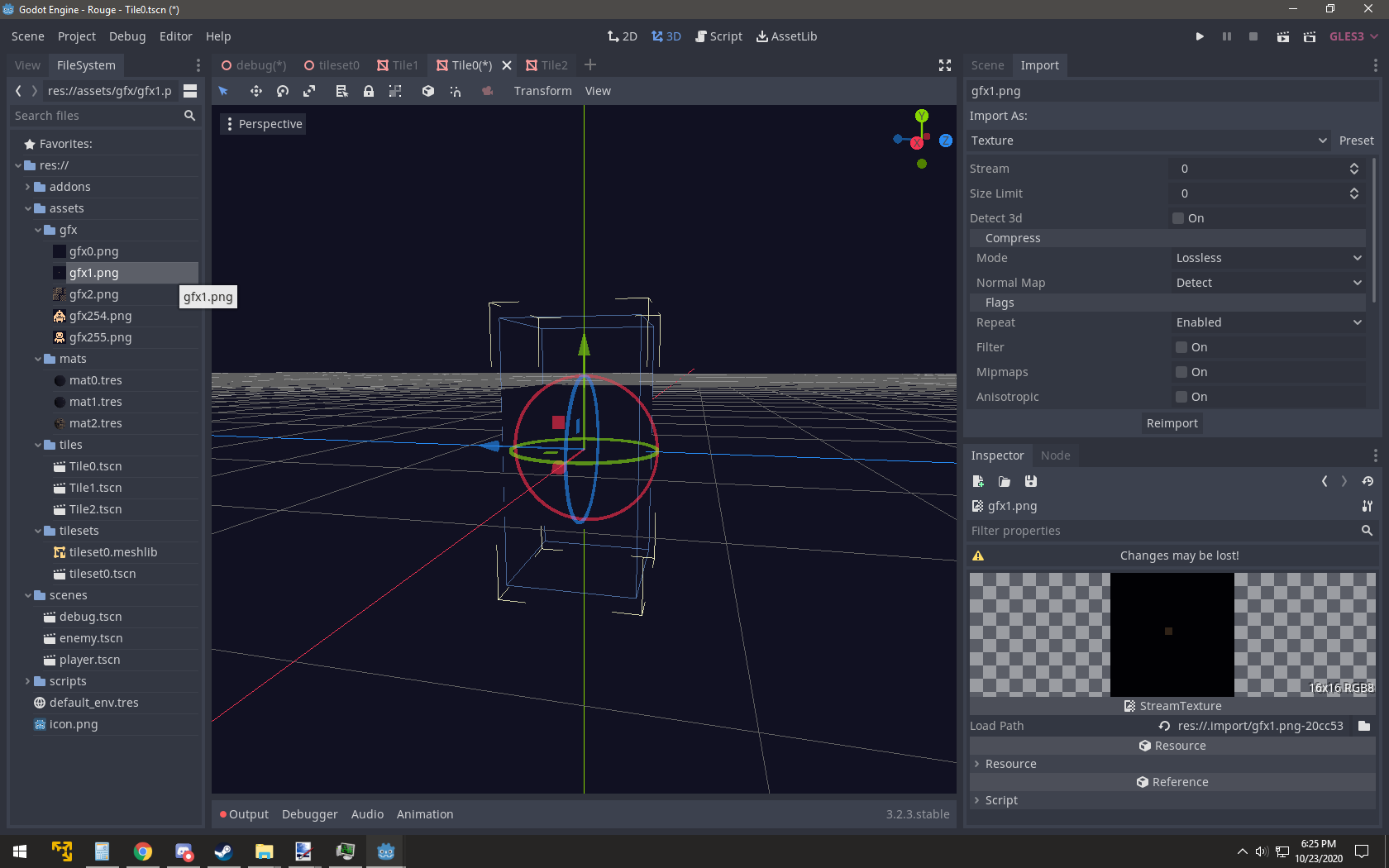
Nope doesn't seem to work. I have my textures set to repeat but it still stretches (ignore the scene view)
Shadowblitz16
on 24 Oct 2020
What about triplanar_world_coords?
 SIsilicon
on 24 Oct 2020
SIsilicon
on 24 Oct 2020
I don't think I have that option
Shadowblitz16
on 24 Oct 2020
I think I forgot what the name was exactly.
Something about world coords though.
SIsilicon
on 24 Oct 2020
Right! It's called World Triplanar.
SIsilicon
on 24 Oct 2020
the issue is that doesn't work.
I found out it was a uv issue.
I made my own cubes in blender where each side shares the same uv in units.
however I think it would be nice to have a option to modify the uvs generated for the cube
Shadowblitz16
on 24 Oct 2020
Oh my apologies. I thought your material was using triplanar mapping.
SIsilicon
on 24 Oct 2020
no I tried it it didn't really work out
Shadowblitz16
on 24 Oct 2020
trilinear mapping
I think you mean "triplanar mapping" instead.
The issue title seems quite vague tbh. It seems to me you are actually wanting something specific here, as your game has been made only of cubes from what I saw earlier. That can either be solved by giving your cubes correct UVs, or by using triplanar mapping. There are just a few catches currently.
UV mapping
- First of all, you can do it for any sort of mesh in a 3D modeling program, but I know you dont want to do any of that. Life is hard for people wanting specific workflow in a generalist engine... so your issue is not impossible, it's only a matter of convenience. And luckily, generalist engines come with options to adapt for anyone's workflow, only with a bit of knowledge and setup.
- So you could write a tool script doing that for you, but it's a bit of work and level designers dont always have a coder for them to do this I guess.
- It's also possible to write a shader that somehow does it but too complicated for non-experienced people, and likely not the best approach.
So we are back to your specific use case: cubes? So CubeMesh, it is. That mesh type is procedural, and would need an option to choose how UVs are generated, so that if you give it different dimensions it would either stretch or tile based on the options.
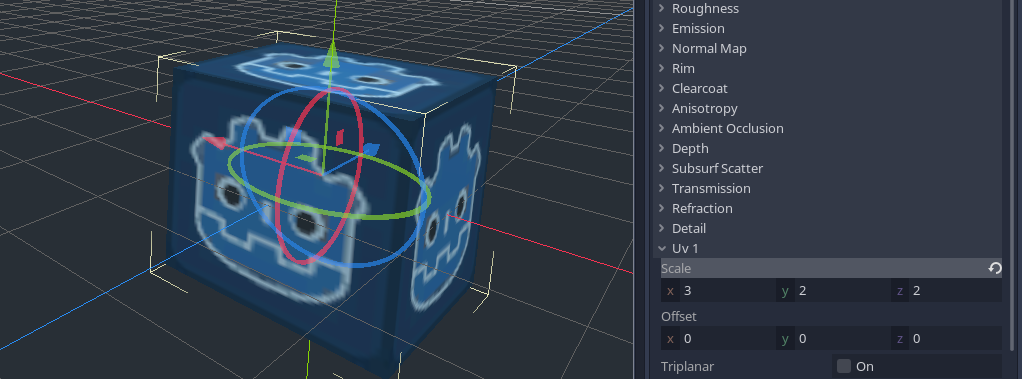
The default UV-mapping is meant for you to layout the 6 faces in a 3x2 fashion on the texture.
But if you want only one texture, the only way I could find according to the doc, is to make it display the texture on each face is by changing UV1 scale to 3, 2, 1:
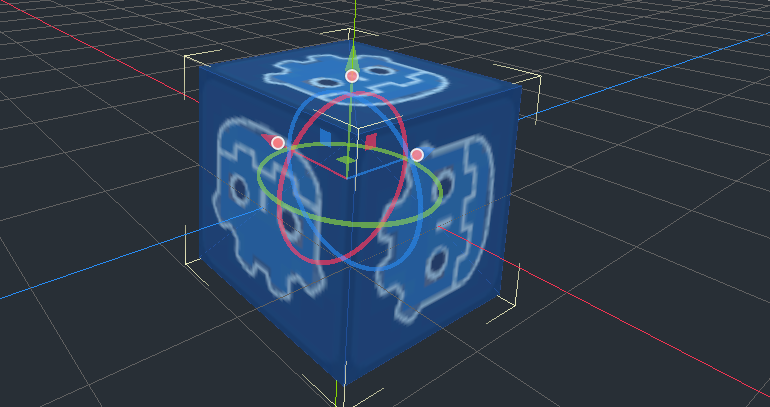
There is an alternative to CubeMesh, which is CSGBox. That node actually generates with slightly different UVs, although I dont understand the choice of convention it has, because each face along the Y axis has a different orientation which may not be wanted:
Tiling with triplanar mapping
Previous solutions work for a cube, but you want boxes of different dimensions. Once again all options cited above about UV-mapping would solve that, but you want something that works for you out of the box (unless something gets added to trhe engine ofc). Using multiple cubes would actually work, and you could perhaps use GridMap to design entire levels more simply than tring to position and scale all these boxes. But let's say you want to keep doing the latter.
You suggested triplanar mapping. This is a more expensive solution which is technically a bit overkill considering the use case of cubes, but it's a nice general solution for lazy UV-mapping of any sort of environment, which was even recommended by Reduz when he described the development process of the TPS demo. We could try using it to make the texture tile, right?
Going from scratch, taking a CubeMesh, this is what I get:
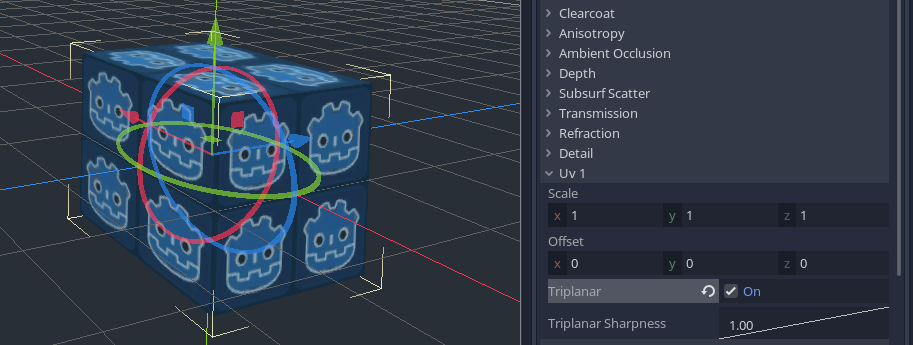
It might look strange to see double the amount of repetition, but it's actually normal: the default cube has a size of 2 units across. So it shows 2x2 tiles. And it tiles, because the texture I used (the famous icon.png) has repeat enabled by default. You said yours does not repeat, but I'm sure you forgot something. Make sure to go to the Import tab, check this:
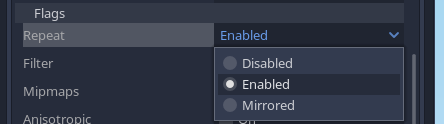
And important, click Reimport. I've seen several people miss that :D
Ok, so back to my test, let's try a 1x4x1 column:
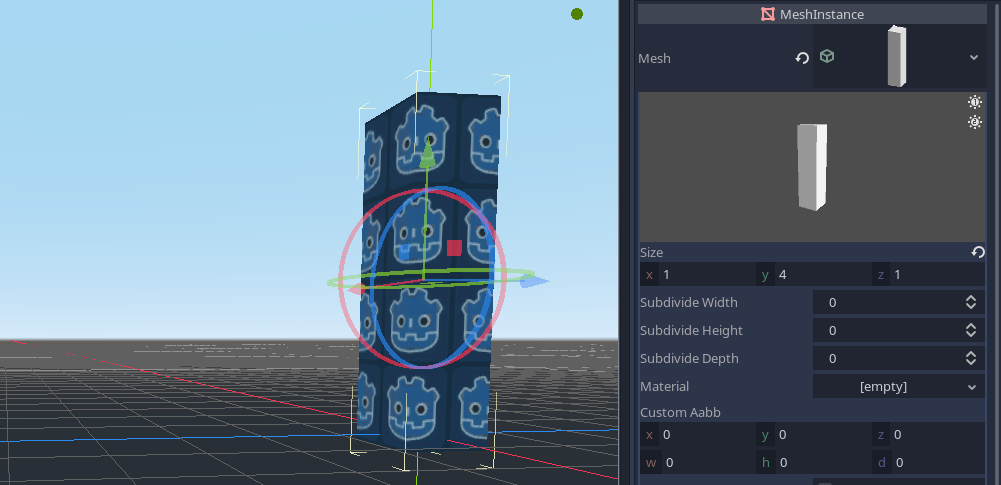
Tiling is offset the wrong way. The reason, once again, is because of the way CubeMesh UVs are generated, they are centered, and don't actually start from 0. So a size of 1 in x for example will make the UV go from -0.5 (half the texture) to +0.5 (other half of the texture), which gives us that result.
You could try modeling your own cube like you tried, which is a good solution: give each face UVs going from 0 to 1. This way, tiles will always start from 0, and when you scale the cube, they will just continue tiling onwards. However, each time you scale you will of course need to update the UV1 scaling in your material, to account for that.
So if you want to avoid this two-step process, one way is to use as suggested by @SIsilicon, set triplanar mapping to use world space. You can use this technique even with the built-in CubeMesh, one important detail to make sure your MeshInstance is properly snapped to the grid.
Not like this:
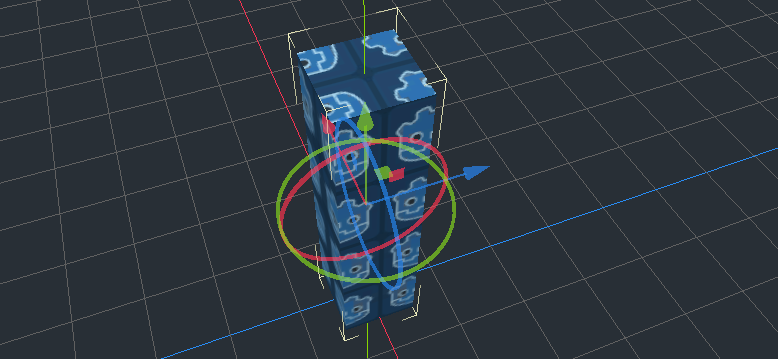
But like this instead:

And from here, tiling just works by only using scaling and translating:
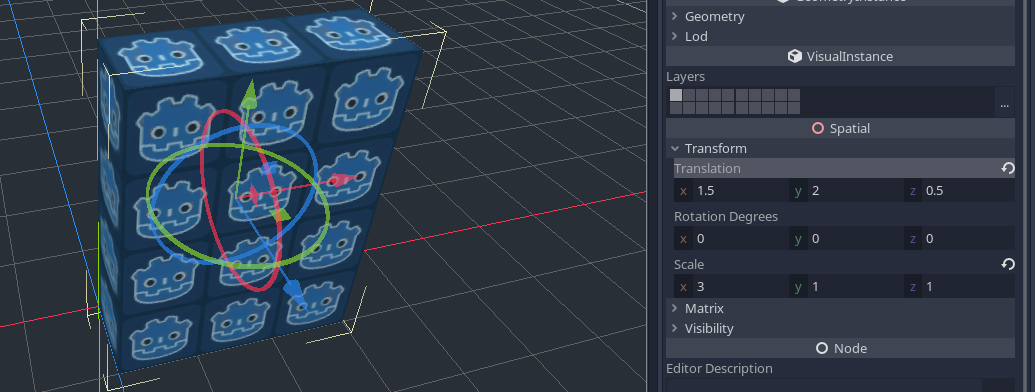
Note: using a cube that is centered to its lower corner would also make this easier to snap to the grid. But that's a one-time work: cube.zip. If CubeMesh had such option with a "repeat" UV option, it would eliminate the need to make such model and would eliminate world-space triplanar limitations.
Note 2: with world triplanar and CSGBox you also get collision automatically generated for free. But I think CSGBox likely needs the same extra options as CubeMesh.
Sorry if that turned into an entire tutorial but when I see titles like this I think it's either a lack of information, or a problem of understanding what the use case actually is. Repeating textures "in general" already works, and as listed earlier, having more options on CubeMesh would make this use case easier, which is completely different from what the title assumed.
 Zylann
on 24 Oct 2020
Zylann
on 24 Oct 2020
I think you mean "triplanar mapping" instead.
Autocorrect got me again! 😠
SIsilicon
on 24 Oct 2020
@Zylann Thankyou I am still learning 3d so I don't know alot of things.
This could possibly be added to the docs as well under cube mesh and trilinear mapping.
I still do think it would be nice to be able to generate single uv faces for cubes
Shadowblitz16
on 25 Oct 2020
Related issues
 sprite-1
·
3Comments
sprite-1
·
3Comments
 IllusiveS
·
3Comments
IllusiveS
·
3Comments
 Xrayez
·
3Comments
Xrayez
·
3Comments
 SleepProgger
·
3Comments
SleepProgger
·
3Comments
 PLyczkowski
·
3Comments
PLyczkowski
·
3Comments
Most helpful comment
I think you mean "triplanar mapping" instead.
The issue title seems quite vague tbh. It seems to me you are actually wanting something specific here, as your game has been made only of cubes from what I saw earlier. That can either be solved by giving your cubes correct UVs, or by using triplanar mapping. There are just a few catches currently.
UV mapping
So we are back to your specific use case: cubes? So
CubeMesh, it is. That mesh type is procedural, and would need an option to choose how UVs are generated, so that if you give it different dimensions it would either stretch or tile based on the options.The default UV-mapping is meant for you to layout the 6 faces in a 3x2 fashion on the texture.
But if you want only one texture, the only way I could find according to the doc, is to make it display the texture on each face is by changing
UV1scale to3, 2, 1:There is an alternative to
CubeMesh, which isCSGBox. That node actually generates with slightly different UVs, although I dont understand the choice of convention it has, because each face along the Y axis has a different orientation which may not be wanted:Tiling with triplanar mapping
Previous solutions work for a cube, but you want boxes of different dimensions. Once again all options cited above about UV-mapping would solve that, but you want something that works for you out of the box (unless something gets added to trhe engine ofc). Using multiple cubes would actually work, and you could perhaps use
GridMapto design entire levels more simply than tring to position and scale all these boxes. But let's say you want to keep doing the latter.You suggested triplanar mapping. This is a more expensive solution which is technically a bit overkill considering the use case of cubes, but it's a nice general solution for lazy UV-mapping of any sort of environment, which was even recommended by Reduz when he described the development process of the TPS demo. We could try using it to make the texture tile, right?
Going from scratch, taking a

CubeMesh, this is what I get:It might look strange to see double the amount of repetition, but it's actually normal: the default cube has a size of 2 units across. So it shows 2x2 tiles. And it tiles, because the texture I used (the famous

icon.png) hasrepeatenabled by default. You said yours does not repeat, but I'm sure you forgot something. Make sure to go to theImporttab, check this:And important, click
Reimport. I've seen several people miss that :DOk, so back to my test, let's try a 1x4x1 column:
Tiling is offset the wrong way. The reason, once again, is because of the way
CubeMeshUVs are generated, they are centered, and don't actually start from 0. So a size of1inxfor example will make the UV go from-0.5(half the texture) to+0.5(other half of the texture), which gives us that result.You could try modeling your own cube like you tried, which is a good solution: give each face UVs going from 0 to 1. This way, tiles will always start from 0, and when you scale the cube, they will just continue tiling onwards. However, each time you scale you will of course need to update the
UV1scaling in your material, to account for that.So if you want to avoid this two-step process, one way is to use as suggested by @SIsilicon, set triplanar mapping to use world space. You can use this technique even with the built-in
CubeMesh, one important detail to make sure your MeshInstance is properly snapped to the grid.Not like this:

But like this instead:

And from here, tiling just works by only using scaling and translating:

Note: using a cube that is centered to its lower corner would also make this easier to snap to the grid. But that's a one-time work: cube.zip. If
CubeMeshhad such option with a "repeat" UV option, it would eliminate the need to make such model and would eliminate world-space triplanar limitations.Note 2: with world triplanar and CSGBox you also get collision automatically generated for free. But I think CSGBox likely needs the same extra options as
CubeMesh.Sorry if that turned into an entire tutorial but when I see titles like this I think it's either a lack of information, or a problem of understanding what the use case actually is. Repeating textures "in general" already works, and as listed earlier, having more options on
CubeMeshwould make this use case easier, which is completely different from what the title assumed.