Godot-proposals: Add Preview Sun and Preview Sky options to 3D editor
Describe the project you are working on:
Godot
Describe the problem or limitation you are having in your project:
Having default lighting conditions when editing isolated 3D scenes is an annoyance and has always been.
Due to the modular nature of Godot, if you add a DirectionalLight or a WorldEnvironment to an isolated scene, only to test how an object looks, then these remain when the scene is instantiated into another one. There is the "Editor Only" tickbox, but it does not solve the problem because the main scene will also have extra lights from the instances when edited. Its also highly unintuitive.
For this, the "Default Environment" was added, but its quite a hassle, and adds loading time to projects because that sky has to be generated, even in 2D projects when the file exists.
Additionally many artists complain that they would just like to have a simple "looks good" tick to see their geometry.
Its finally time to solve this problem once and for all.
Describe the feature / enhancement and how it helps to overcome the problem or limitation:
Simple, easy to use, light and sky menus will be provided. They will save the data only in the editor and only for the current user (this setting is editor only, is not saved to the scene file and does not appear during run-time).
The users may want to carry over the quickly edited sky and sun to the final scene so they can optionally, convert this "editor only" sun and sky or environment to scene nodes (DirectionalLight and WorldEnvironment). When nodes of this type exist in the scene, the editor provided ones will become disabled (can no longer be used, since the scene nodes are used instead).
Describe how your proposal will work, with code, pseudocode, mockups, and/or diagrams:
The idea is to add these two icons to the 3D editor (sorry my artistic skill is terrible, they will be improved):
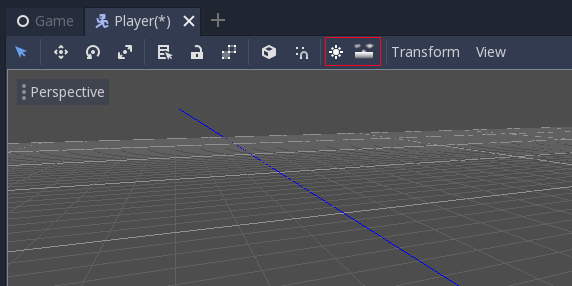
They toggle a default light and default sky on and off.
To edit them, options can be added into the view menu.
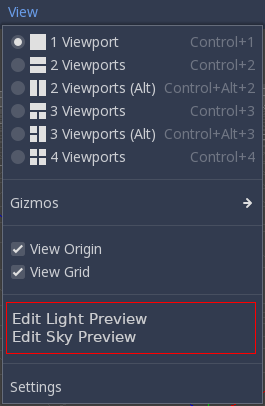
Again both the sun/sky icons and the menu item will appear grey if a DirectionalLight or WorldEnvironment is present on the scene respectively.
Each of the editors will look as follows:
Sun Preview Editor:

Sky Preview Editor (needs some discussion on simplified exposed features, or possibly just a ready made "HDR" mode option that enables glow/tonemap and other "looks good" options):

If this enhancement will not be used often, can it be worked around with a few lines of script?:
No, this is core editor.
Is there a reason why this should be core and not an add-on in the asset library?:
This is core editor.
 reduz
reduz
All 14 comments
So these settings aren't the same ones in the scene? While faster to load i'd prefer testing within the same conditions instead of a separate enviroment. Plus maybe a simpler sky as default for preview within WorldEnviroment can be faster to load too?
For example i'd have presets instead of two separate buttons with special sun/sky implementation. You prepare the two (Directional light and WorldEnviroment) in a scene, then add a preset with those couple (or one of the two) to switch within a list in the toolbar (combobox). No need to create a new implementation and more flexible in my opinion.
Not all projects or levels have the same test lighting, you would need to change them everytime and this can have you switch fast from a setting to another. For example a daylight with sky, dawn light with sky, no sky with light, a preview with a certain HDR and another with a different one, etc then switch from "Disabled" to whatever. Also if your light change in game (ex. sun moving over time) it's useful to simulate some settings in the editor without running the project everytime.
In most of the cases the editor will have the 3 default presets (Sun only, Sky only, Sun and sky) but users could customize the list and if sky/sun within Godot change in the future you can use the same logic for the presets.
 vagrantG
on 2 Oct 2020
vagrantG
on 2 Oct 2020
@vagrantG presets sounds like a good idea
reduz
on 2 Oct 2020
About the preset selection, maybe in the toolbar the option could be named "Editor lighting" with "Scene" or "Preview" if you choose a preview preset. This not to waste space in the toolbar (if you want to see the preset or select a new one you click on the UI element and you see the list with a check on the active preset). "Scene" uses the settings within the opened project, "Preview" the editor settings. If the editor opens one without sun/light it autoselects one of the other presets (maybe a checkbox to select the preferred one to auto use? or just the first that usually will be the most used one provided by the engine).
This way the user is less likely to make mistakes by seeing what is active and possibly start customizing with their own presets.
vagrantG
on 2 Oct 2020
Preview lighting would be great when creating a scene, but the way this is suggested I would have to manually match my preview lighting with whatever I plan to have in the final composite scene. And I would have to do that every time I update my lighting...
Maybe we could automatically create (and update!) presets from any scene that has an sky or hdri?
 Ansraer
on 2 Oct 2020
Ansraer
on 2 Oct 2020
Maybe a Project Settings Sun editor properties like unity has with their global illumination settings?
 crisestudio
on 3 Oct 2020
crisestudio
on 3 Oct 2020
I like the idea of presets as well. Maybe we can do something like:
Sun
- Day
- Sunset
- Night
Environment
- Simple | Physical | Panorama
- Basic Features (Sky and nothing else)
- Advanced features (Sky, tonemap, glow, SSAO, distance fog with Aerial perspective)
 clayjohn
on 3 Oct 2020
clayjohn
on 3 Oct 2020
This will help cleanup the things a lot. Currently I add a pre made scene with world and light for every asset. This scene auto destroy itself at EnterTree. But a native solution to this would be great. If implemented as custom presets for Sun Light + Environment even better.
 vitorbalbio
on 3 Oct 2020
vitorbalbio
on 3 Oct 2020
@vitorbalbio I thinkt he idea is to also add an Editor Mode to WorldEnvironment, so if you tick it, its only enabled when you are editing this scene, but it does nothing when the game runs or when its instantiated. Light already has something like this. This way you can match things, or even save an Environment resource and share it for testing. The preview button is mostly for a quick preview, that you can later use in the scene.
reduz
on 3 Oct 2020
I have started working on this. Preliminary results are looking good.
clayjohn
on 25 Oct 2020
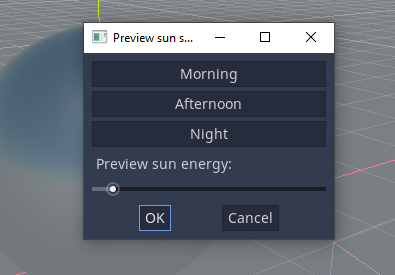
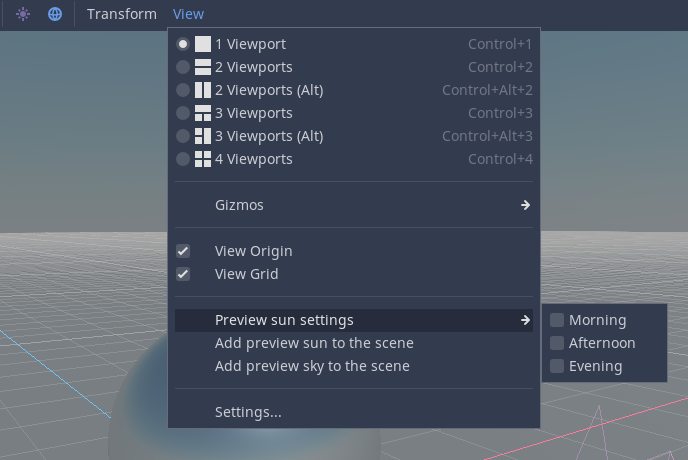
What do people prefer for UI, a popup menu like above? or just a submenu?
PopupMenu:
SubMenu:
clayjohn
on 27 Oct 2020
I think it makes sense to put it in the popup under View>Settings.
Also, sun energy needs a text field, maybe like the other options in the settings popup.
 Jummit
on 27 Oct 2020
Jummit
on 27 Oct 2020
@clayjohn
I tried a few approaches and it felt less [annoying] to use having them in the submenu. Since the submenu has less steps.
- click [dialog]
- pick midnight
- click ok
vs
- click view
- hover over preview sun and hover over morning (click)
The options I tried was allow changing the sun settings via a slider next to the Transform, View text and presets of 1) different times 2) different Sky Environment IBL settings. 3) an entire environment where you can also place anything including props and characters.
Edited:
Also there's a problem about keeping the settings saved over multiple scenes. Should the settings be per launch of Godot Engine or per scene. Per launch of Godot Editor is more useful.
 fire
on 27 Oct 2020
fire
on 27 Oct 2020
We had a lengthy discussion regarding this issue today on IRC. I will summarize the results here
Key use-cases
We settled on 2 primary use cases for this feature:
- Beginner users who need easy to access default lighting (essentially https://github.com/godotengine/godot-proposals/issues/348)
- Intermediate users who want to visualize scenes without adding nodes so that the scenes can be instanced in other scenes
A 3rd use-case was rejected:
- Advanced users who want to tweak assets in instanced scenes under very specific lighting conditions in editor
For this 3rd use-case, we will add an "editor-only" setting to WorldEnvironment nodes
First use-case
The first use-case is solved by getting rid of "default_env.tres" and replacing it with a "Preview Sun" and "Preview Sky" button in the Toolbar for 3D scenes.
Second use-case
On IRC there was considerable debate over how to solve the second use-case. Some supported having a handful of presets like in https://github.com/godotengine/godot-proposals/issues/1599#issuecomment-703046099. While others felt that more control was needed, including a tool to rotate the preview sun and some flexibility with the Environment options.
By the end of the discussion I think it was clear that for beginner users it may be useful to have a couple presets like:
- Simple (Sun, Sky)
- HDR (Sun, Sky, tonemap, glow, SSAO)
And then for more advanced users, expose tweakable parameters in a popup menu:
- Sun Direction
- Sun Color
- Sun Energy
- Sky Type (Procedural + color setting, or Physical)
- Tonemap (enabled or disabled + whitepoint)
- Glow (just enabled or disabled)
- SSAO (just enabled or disabled)
Users who need to fine tune more settings can use editor-only lights and an editor-only environment.
clayjohn
on 28 Oct 2020
I see that in this proposal allows toggling the sun on/off and toggling the sky on/off, but what about the light that the sky emits on objects? I think the skylight should be blue if there is a sun and white otherwise as stated in https://github.com/godotengine/godot-proposals/issues/348#issuecomment-653945590
 aaronfranke
on 1 Dec 2020
aaronfranke
on 1 Dec 2020
Related issues
 Torguen
·
3Comments
Torguen
·
3Comments
 WizzardMaker
·
3Comments
WizzardMaker
·
3Comments
 Xrayez
·
3Comments
Xrayez
·
3Comments
 lupoDharkael
·
3Comments
aaronfranke
·
3Comments
lupoDharkael
·
3Comments
aaronfranke
·
3Comments
Most helpful comment
@vitorbalbio I thinkt he idea is to also add an Editor Mode to WorldEnvironment, so if you tick it, its only enabled when you are editing this scene, but it does nothing when the game runs or when its instantiated. Light already has something like this. This way you can match things, or even save an Environment resource and share it for testing. The preview button is mostly for a quick preview, that you can later use in the scene.