Godot-proposals: Document how to set a Theme Property of Control node
Describe the project you are working on:
(Applies to any project)
Describe the problem or limitation you are having in your project:
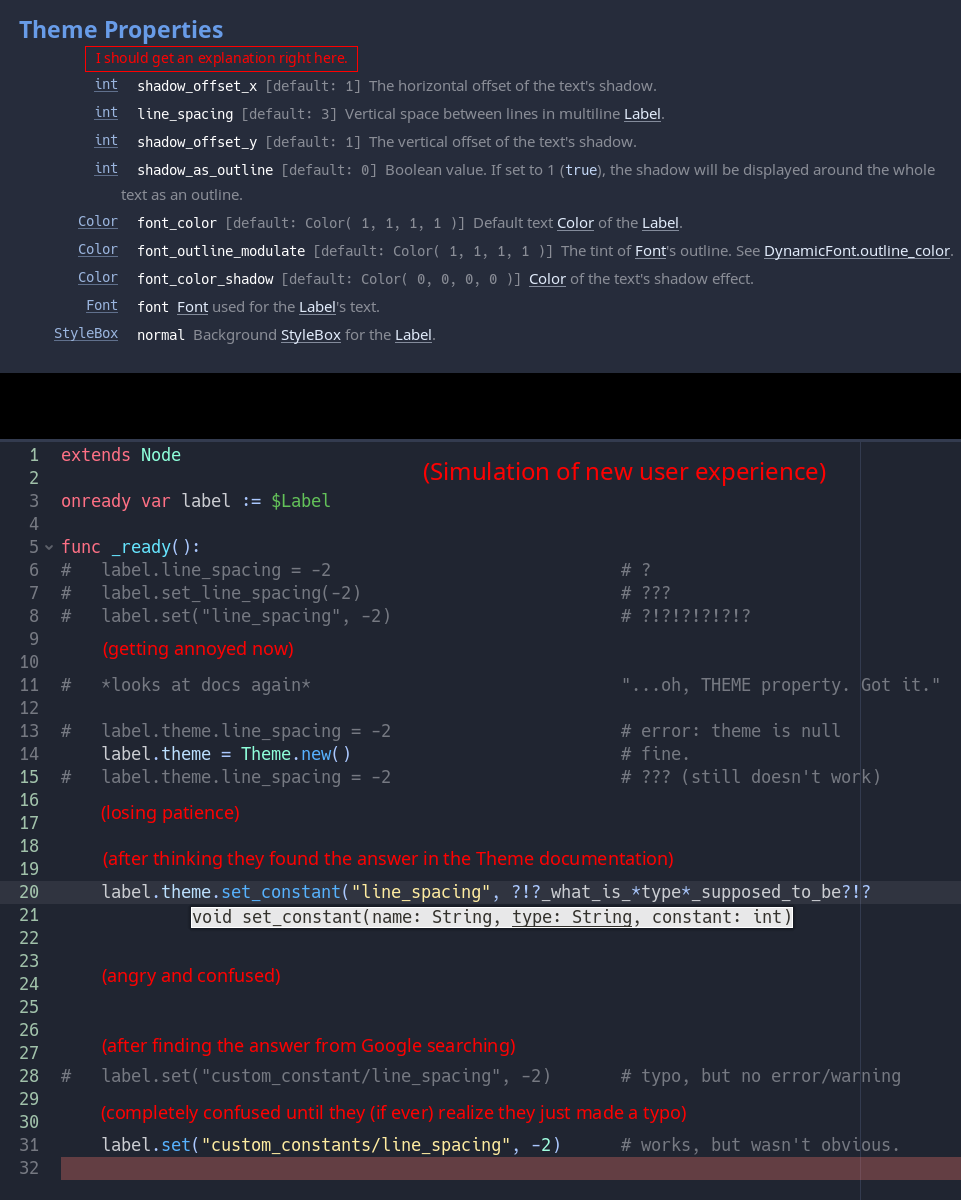
Setting a Control node's "theme property" with code is not intuitive and needs explanation in the docs.
To do this, a user has to figure out that they need to use <control>.set("custom_constants/...", <value>)
How are they supposed to figure this out?
Is the fact that you can hover over an inspector property to see its 'path' even documented anywhere?
Even if a user figures this out, when they use <control>.set(...), if they have a typo or write an incorrect string in the set(...) function, they get no warning/error to let them realize their mistake.
(See: #1494)
Describe the feature / enhancement and how it helps to overcome the problem or limitation:
- Document that you can hover over an inspector property to see its 'path'
- Document how to set Control theme properties using
set("custom_constants/...", <value>)
Describe how your proposal will work, with code, pseudocode, mockups, and/or diagrams:
If this enhancement will not be used often, can it be worked around with a few lines of script?:
No.
Is there a reason why this should be core and not an add-on in the asset library?:
This is a documentation-related.
P.S.
Seriously, what is the type argument in theme.set_constant(...) supposed to be?
All I could find on it was this thread from 2016.
https://godotengine.org/qa/4215/explanation-of-string-type-argument-in-theme-api
The docs page keeps using this word by never explains it.
https://docs.godotengine.org/en/stable/classes/class_theme.html
 Error7Studios
All 2 comments
We have a demo about this now :slightly_smiling_face:
https://github.com/godotengine/godot-demo-projects/tree/master/gui/theming_override
To do this, a user has to figure out that they need to use
<control>.set("custom_constants/...", <value>)
That approach relies on a magic setter. The safer/more "proper" approach is to use add_*_override("name", value) (where * is color, constant, font, icon, shader or stylebox). (In 4.0, it's add_theme_*_override() instead.)
Seriously, what is the
typeargument intheme.set_constant(...)supposed to be?
type is the node class you want to apply the theme property to (as a string). For instance:
theme.set_constant("line_spacing", "Label", 5)
 Calinou
on 12 Sep 2020
Calinou
on 12 Sep 2020
The safer/more "proper" approach is to use add_*_override("name", value)
Thanks! I see it now. I looked in the Label and Theme class, but forgot to check the Control class.
If See: 'add_*_override()' methods in Control class was at the top of the Theme Properties section for the Label/Button/etc., that would be more user friendly.
(or See: 'add_theme_*_override()' methods in Control class for 4.0)
(In 4.0, it's add_theme_*_override() instead.)
Nice.
type is the node class you want to apply the theme property to (as a string)
I see, thanks! That really needs to be explained in the docs somewhere, though.
If I see type I'm going to think of the enums TYPE_STRING, TYPE_ARRAY, TYPE_DICTIONARY, etc.
(And/or perhaps that parameter should be renamed to node_class or node_type or something.)
Error7Studios
on 12 Sep 2020
Related issues
 davthedev
·
3Comments
davthedev
·
3Comments
 IllusiveS
·
3Comments
IllusiveS
·
3Comments
 SleepProgger
·
3Comments
SleepProgger
·
3Comments
 regakakobigman
·
3Comments
regakakobigman
·
3Comments
 KoBeWi
·
3Comments
KoBeWi
·
3Comments
Most helpful comment
We have a demo about this now :slightly_smiling_face:
https://github.com/godotengine/godot-demo-projects/tree/master/gui/theming_override
That approach relies on a magic setter. The safer/more "proper" approach is to use
add_*_override("name", value)(where*iscolor,constant,font,icon,shaderorstylebox). (In 4.0, it'sadd_theme_*_override()instead.)typeis the node class you want to apply the theme property to (as a string). For instance: