Godot-proposals: Add a command palette to quickly perform operations listed in the editor menus
Describe the project you are working on:
The Godot editor :slightly_smiling_face:
Describe the problem or limitation you are having in your project:
While there are "quick open" menus for scenes, scripts and resources, there is no equivalent for menu items listed at the top of the editor or in context-specific menus. This can decrease, productivity for keyboard-centered users since you have to reach for the mouse more often.
Describe the feature / enhancement and how it helps to overcome the problem or limitation:
A command palette can be integrated to perform actions listed in various editor menus. These could be registered automatically by the command palette somehow (or the other way around; editor menus will signal their presence to the command palette).
There should be a keyboard shortcut defined by default as well. Since we already use Space for other purposes in Godot, I think something like Ctrl + Shift + P (Cmd + Shift + P on macOS) could make sense. This is the same shortcut as Visual Studio Code uses for its command palette.
To bind the command palette to Ctrl + Shift + P, we'd have to reassign the Preview Canvas Scale shortcut to another combination. That shortcut is probably not used very often, so it should be fine.
Describe how your proposal will work, with code, pseudocode, mockups, and/or diagrams:
The modal should consist of a LineEdit that acts as a search field, then an ItemList that lists the search results. When entering text, the first result is automatically selected. Pressing the Up and Down arrow keys navigates in the results. Pressing Enter performs the action associated to the selected result.
For editor actions that have a keyboard shortcut associated, we should also display the associated shortcut. This helps the user memorize shortcuts.
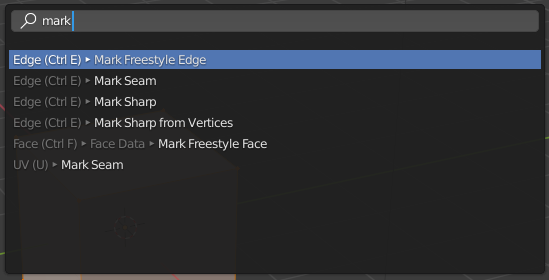
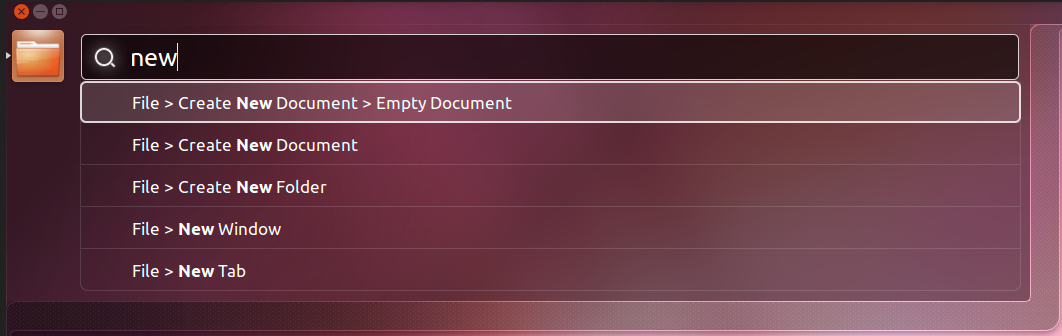
Here are some examples of command palettes in other programs:
Blender
Visual Studio Code

Ubuntu Unity HUD
If this enhancement will not be used often, can it be worked around with a few lines of script?:
No, as this is core editor functionality.
Is there a reason why this should be core and not an add-on in the asset library?:
If #70 is implemented, there's a chance this could be implemented as an add-on. However, command palettes are becoming really popular in creative/productivity software these days. It'd be a shame to pass on this opportunity in Godot :slightly_smiling_face:
 Calinou
All 14 comments
Initial thoughts/spitball: I guess it could loop through everything up to the editor node, kind of like I do in my fix for input propagation issues in PR #39039. Get all relevant shortcuts for windows that are open/visible and compile them into a list, somehow storing the method pointers that executing those actions would call.
 EricEzaM
on 1 Sep 2020
EricEzaM
on 1 Sep 2020
My personal preferences:
- Command palette should have own shortcuts (1-3 letters) for all commands.
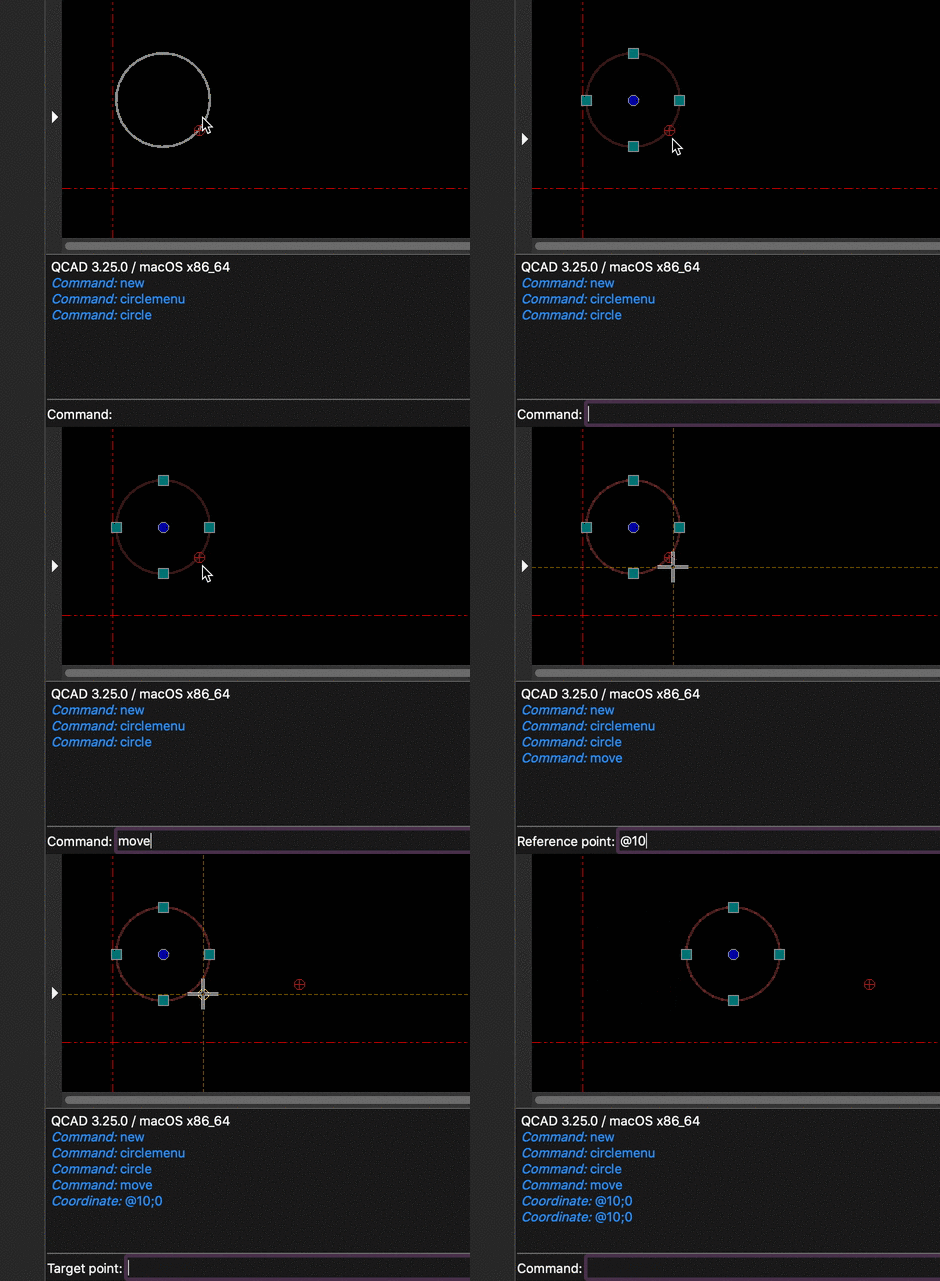
- In addition to the menu options, expose scene editing commands (creating, moving, resizing nodes) and accept coordinates/parameters for these commands, like AutoCAD command line. (e.g. select nodes,
Space,m,@10;0to move by 10 pixels to the right.)
 bruvzg
on 1 Sep 2020
bruvzg
on 1 Sep 2020
In addition to the menu options, expose scene editing commands (creating, moving, resizing nodes) and accept coordinates/parameters for these commands, like AutoCAD command line. (e.g. select nodes, Space, m, @10;0 to move by 10 pixels to the right.)
This should be addressed by https://github.com/godotengine/godot-proposals/issues/1215. (It should be possible to add the same features to the 2D editor.)
Calinou
on 1 Sep 2020
UE4 has something similar (but is more useful for setting the properties of Engine itself, not navigating the Editor) - triggered with the Tilde key. I've been missing that functionality in Godot as well :)
 dreamsComeTrue
on 1 Sep 2020
dreamsComeTrue
on 1 Sep 2020
So I did what I said in my earlier comment... doesn't really seem feasible.
So far, I can loop through the editor and find all PopupMenu items, store their callback (e.g. activate_item) and then populate a "Command Palette" from that. Then, when a command is selected, call the callback with the appropriate arguments.
Note: This was extermely quick so it looks like garbage... but it works.
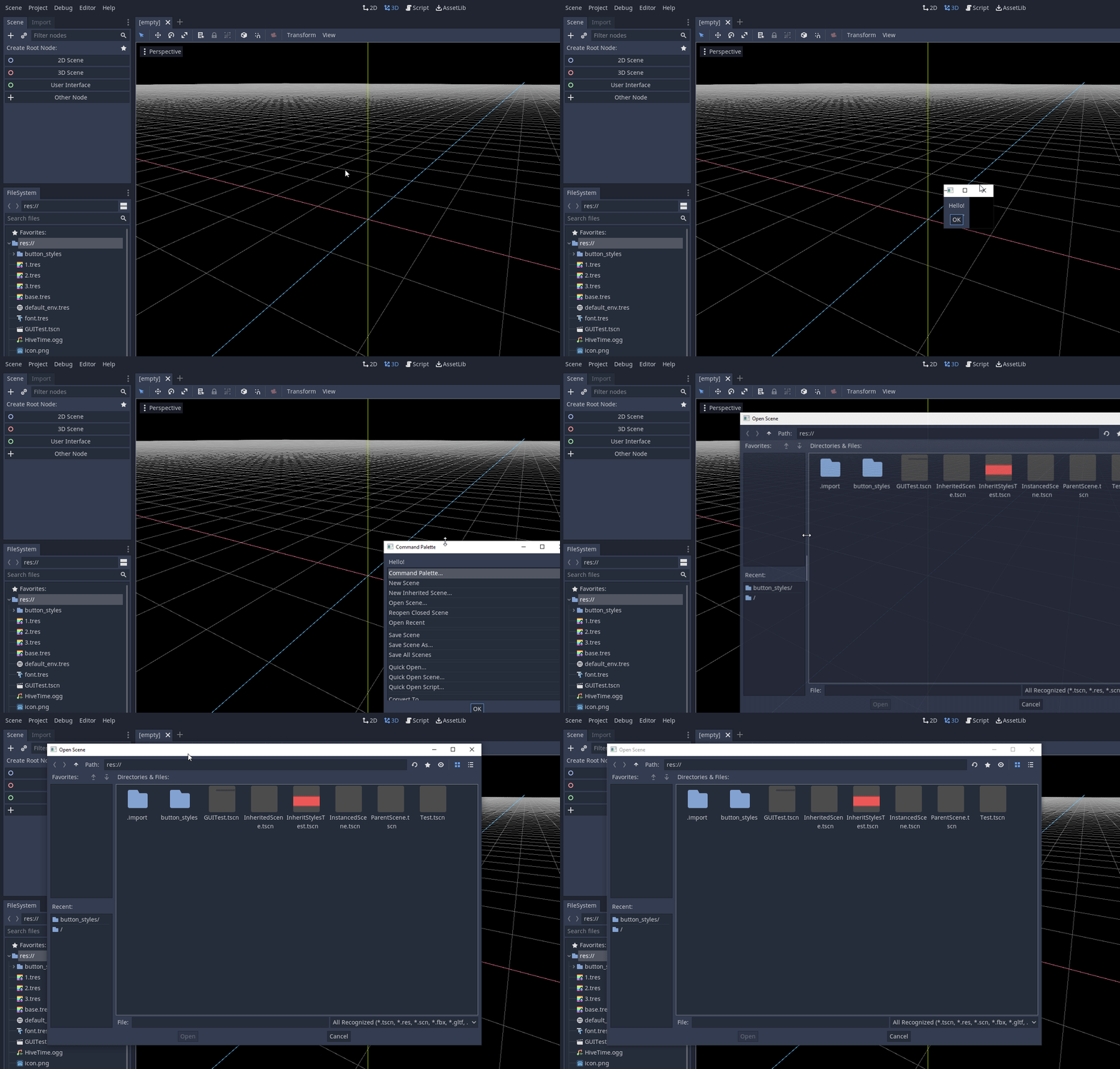
However, how do you handle submenus? Sure, you can ignore them, and just keep their children, like in the "Convert To..." menu, but an item that just says "MeshLibrary...", which doesn't make any sense. Again, you could concatenate the submenu name, so you would get "Convert To... MeshLibrary..." but that looks bad. You also lose context, such as the fact that this is in the Scene menu.
So, I think it would be much better and easier to separately register commands that would go into the command palette.
For example it could be similar to the connect method:, EditorNode::get_singleton()->register_command(command_name, callable_callback, callback_params)
This way, using the example above, you might do (in EditorNode):
register_command(TTR("Convert Scene to Mesh Library"), callable_mp(this, &EditorNode::_menu_option), varray(FILE_EXPORT_MESH_LIBRARY))
It gives you full control over how the item would be described in the command palette, and as a result allows you to provide context.
The question then is how to fit in shortcuts? The trouble with shortcuts is that they change depending on the context - i.e. CTRL + A selects all in the text editor, but creates a new node in the scene tree dialog.
EricEzaM
on 2 Sep 2020
However, how do you handle submenus?
Well, look at the screenshots at how Blender and Unity did it. I don't see any problem with that approach.
So, I think it would be much better and easier to separately register commands
I think it would be enough to register entire PopupMenus instead of single commands. Registering every command is cleaner, but would require a lot of rewriting.
 Jummit
on 2 Sep 2020
Jummit
on 2 Sep 2020
However, how do you handle submenus?
Well, look at the screenshots at how Blender and Unity did it. I don't see any problem with that approach.
How it looks in the command palette is separate to how it works on the back end. We can format and display it however we like, I was talking about how we get the list of commands in the first place, and how to link it all up.
So, I think it would be much better and easier to separately register commands
I think it would be enough to register entire PopupMenus instead of single commands. Registering every command is cleaner, but would require a lot of rewriting.
Yeah maybe you could register popup menus. However, there are other commands that are in buttons, context menus, etc.
EricEzaM
on 2 Sep 2020
Again, you could concatenate the submenu name, so you would get "Convert To... MeshLibrary..." but that looks bad. You also lose context, such as the fact that this is in the Scene menu.
Writing it as "Scene > Convert To... > MeshLibrary..." (or "Convert To... > MeshLibrary...") sounds good to me. In general, command palettes are quite wide, so using long option names isn't an issue.
Calinou
on 2 Sep 2020
Should it be context sensitive? Like... The 3D editor is loaded in memory all the time, but if it isn't visible should it's commands be included? Perhaps they should be greyed out or something? It would also perhaps be nice to show context for those:
3D Editor > View > Settings...
as opposed to just
View > Settings...
Especially considering both 2d and 3d editors have a View menu...
EricEzaM
on 2 Sep 2020
@EricEzaM I think only the options currently available in the given view should be shown. Therefore, if you have the 2D editor open, don't show 3D-specific options.
There may be exceptions to this rule, though.
Calinou
on 2 Sep 2020
If someone chooses to implement this by registering PopupMenus, only the visible menus could show up in the list. Buttons could be registered too.
Jummit
on 2 Sep 2020
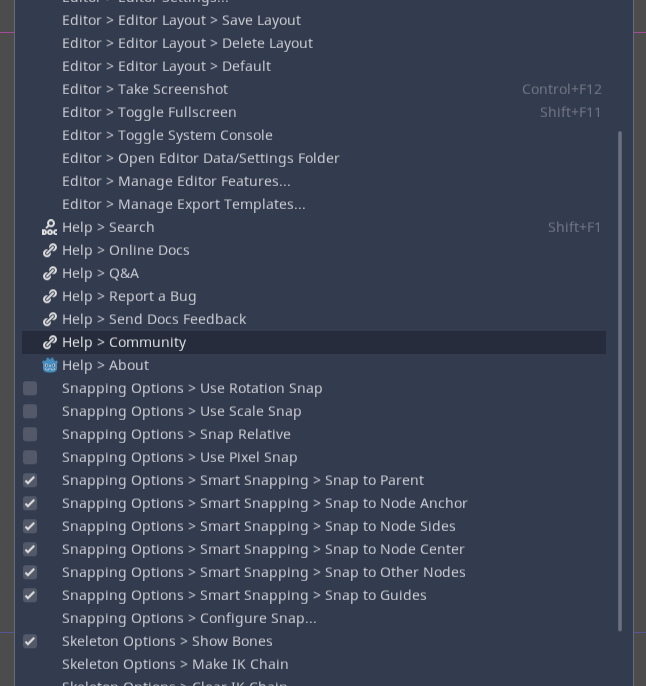
Next thing would be how to display the options. So far I have tried Trees and PopupMenu's.
Tree's allow a bit more control, but it isn't easy to support everything needed at once - checkboxes (radio and normal) icons, and 2 sets of text - the name and the shortcut text. PopupMenu support's all of this out of the box. However, it is harder to get filter functionality in as PopupMenu's are not easily extensible, as they are a window in of themselves..
Also, Tree's use columns to organise their content and the options you have to size them are fairly limited, so it's difficult to get the name and shorcut showing for all items fully.
Another option is to use a custom hierarchy of controls... Really not optimal as the Command Palette would have potentially hundreds of options and flooding the hierarchy with that many object's probably isn't a very good idea.
The final option (not done yet, much more work) is to custom draw each item. However, that would be duplicating a lot of code that already exists in PopupMenu as the functionality would be very similar, I would just need to add a search box. This is really not ideal as it just increases the amount of code needed to be maintained. Neither tree nor popupmenu are very good solutions at this stage.
I could perhaps change PopupMenu directly to include a LineEdit for searching but then that would be changing all PopupMenu's which isn't optimal either.
PopupMenu
Here I can display both the checkbox/radio and the icon.
Tree
In this case I choose one of checkbox or icon, depending on if the item is checkable. Also notice some names are cut off.

EricEzaM
on 3 Sep 2020
how could this work for third party plugins?
I suppose some api should be provided to register commands in the palette, etc.
 me2beats
on 25 Sep 2020
me2beats
on 25 Sep 2020
@me2beats If the proposal uses #70 as suggested, then it would be done with an EditorActions singleton that is exposed to the scripting API. That way, people can just add their own registered scripting callbacks or attach their own callbacks to an existing editor action. They could also arbitrarily execute actions that are defined either by engine code or their own plugin's script code.
extends EditorPlugin
var palette = load("command_palette.gd").new()
func _enter_tree():
    get_editor_interface().get_base_control().add_child(palette)
    EditorActions.add_action("command_palette/show", palette.show)
    EditorActions.add_action("command_palette/hide", palette.hide)
func _input(event):
    # some logic to check for a certain keyboard input?
    if need_to_open_palette():
        EditorActions.execute_action("command_palette/show")
func _exit_tree():
    get_editor_interface().get_base_control().remove_child(palette)
    EditorActions.remove_action("command_palette/show")
    EditorActions.remove_action("command_palette/hide")
Something to that effect.
 willnationsdev
on 29 Nov 2020
willnationsdev
on 29 Nov 2020
Related issues
 wijat
·
3Comments
wijat
·
3Comments
 davthedev
·
3Comments
davthedev
·
3Comments
 PLyczkowski
·
3Comments
davthedev
·
3Comments
PLyczkowski
·
3Comments
davthedev
·
3Comments
 WizzardMaker
·
3Comments
WizzardMaker
·
3Comments
Most helpful comment
So I did what I said in my earlier comment... doesn't really seem feasible.
So far, I can loop through the editor and find all PopupMenu items, store their callback (e.g.
activate_item) and then populate a "Command Palette" from that. Then, when a command is selected, call the callback with the appropriate arguments.Note: This was extermely quick so it looks like garbage... but it works.

However, how do you handle submenus? Sure, you can ignore them, and just keep their children, like in the "Convert To..." menu, but an item that just says "MeshLibrary...", which doesn't make any sense. Again, you could concatenate the submenu name, so you would get "Convert To... MeshLibrary..." but that looks bad. You also lose context, such as the fact that this is in the
Scenemenu.So, I think it would be much better and easier to separately register commands that would go into the command palette.
For example it could be similar to the
connectmethod:,EditorNode::get_singleton()->register_command(command_name, callable_callback, callback_params)This way, using the example above, you might do (in EditorNode):
register_command(TTR("Convert Scene to Mesh Library"), callable_mp(this, &EditorNode::_menu_option), varray(FILE_EXPORT_MESH_LIBRARY))It gives you full control over how the item would be described in the command palette, and as a result allows you to provide context.
The question then is how to fit in shortcuts? The trouble with shortcuts is that they change depending on the context - i.e. CTRL + A selects all in the text editor, but creates a new node in the scene tree dialog.