Godot-proposals: Add support for editing manual/tutorial Markdown files in the script editor
Describe the project you are working on:
A dungeon crawler with a dolphin character.
Describe the problem or limitation you are having in your project:
I'm having to switch between Godot and a text editor a lot.
Describe the feature / enhancement and how it helps to overcome the problem or limitation:
Rather then having to switch to another program to view and edit text documentation, it would be great to be able to edit and view documentation directly in Godot.
Describe how your proposal will work, with code, pseudocode, mockups, and/or diagrams:
This proposal is meant for higher-level documentation. Low-level code documentation is a separate concern.
To edit documentation, I imagine this would be almost completely identical to the Script editor (just with different highlighting). I mostly use Markdown for documentation. Here is an example:
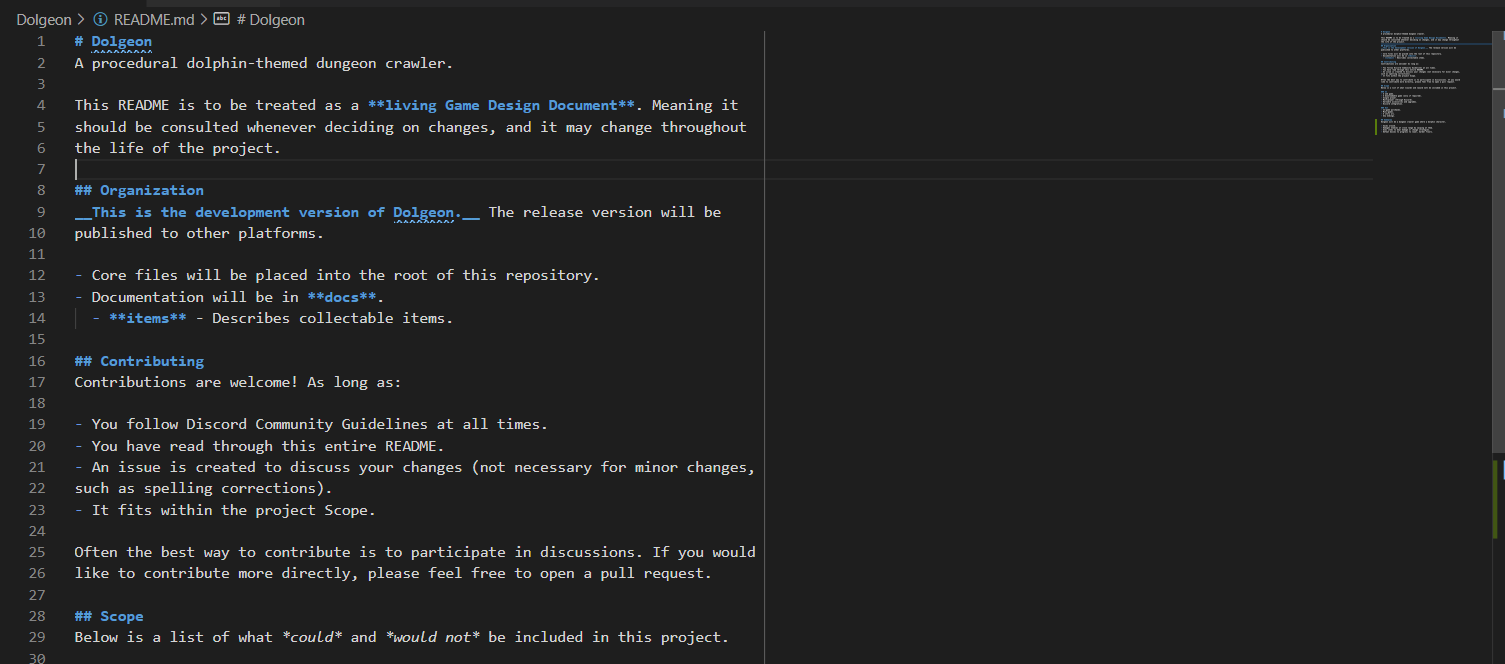
Optimally there would be a toggle button on the toolbar to switch between editing and viewing. And documentation would be placed alongside Godot documentation tabs.

If this enhancement will not be used often, can it be worked around with a few lines of script?:
Definitely not a few. I have not worked on the editor and am unsure how easy it would be to add.
Is there a reason why this should be core and not an add-on in the asset library?:
Optimally everyone should have some kind of documentation to keep their project on track (along with keeping a team in sync). "Failing to plan is planning to fail." Seeing as this is advantageous to everyone, it should be provided to everyone.
I can write several paragraphs on how beneficial documentation is if needed (but please don't make me).
 cloewen8
All 5 comments
But you can already edit text files. You need to open them from within the script editor.
 KoBeWi
on 25 Aug 2020
KoBeWi
on 25 Aug 2020
@cloewen8 from your first screenshot, it seems that you are using VSCode/Theia. I found myself doing the same: I open the same project in Godot and in VSCode, one in each monitor. While Godot's editor has nice features regarding the language, syntax, autocompletion, etc. I feel it falls short for working with multiple scripts at the same time. For example, I did not find how to split the editor or how to open multiple terminals. On the other hand, VSCode/Theia are better suited for these tasks, but the integration is slightly worse: in Godot F5 or Ctrl+S updates the project; in VSCode, I need to change the window, press F5, and come back.
Hence, my proposal would be to improve the integration between Godot and VSCode/Theia (or other editors), instead of adding features such as Markdown preview to Godot. Markdown, reStructuredText, AsciiDoc... I think that's a box that should better remain closed in Godot. For reference https://desktop.github.com/ does not include editor features; instead, 'Open with VSCode' is a context option. GitHub Desktop has many flaws, but this is a nice feature.
Anyway, should markup languages be supported in Godot, apart from the editor, I would expect them to be available as alternative formats to BBCode in RichTextLabel: https://docs.godotengine.org/en/stable/classes/class_richtextlabel.html
 umarcor
on 25 Aug 2020
umarcor
on 25 Aug 2020
But you can already edit text files. You need to open them from within the script editor.
I'm glad to see that it is an option. I did not expect to see markdown syntax highlighting. Odd that markdown is not in the recognized file types, despite having proper syntax highlighting. Guess just a few more things needed:
- [x] Markdown syntax highlighting.
- [ ] Markdown should be listed as a recognized file type (
*.md) in the Open prompt. - [ ] Markdown files should appear in the FileSystem.
- [ ] Markdown compiled view, to view the compiled html (bonus).
Hence, my proposal would be to improve the integration between Godot and VSCode/Theia (or other editors), instead of adding features such as Markdown preview to Godot.
I'd be happy with this. Even just having buttons in either program to swap between would be a big help. And if scripts opened in VSCode by default that would be amazing! I like Godot's script editor but it is lacking.
It would still be good to have Godot support Markdown as a fallback though. Not all computers have a code editor (big shock I know!). I feel like Godot's portability really should be maintained.
cloewen8
on 25 Aug 2020
And if scripts opened in VSCode by default that would be amazing!
This can't be done by default, as we can't guarantee that VS Code will be present on the user's system…
 Calinou
on 25 Aug 2020
Calinou
on 25 Aug 2020
Actually, I find the built-in editor quite nice. Hoewer, it is an editor, not an IDE for text-based projects. OTOH, communicating Godot with an external editor to provide all the internally known class/variable/scene names, etc. can be a huge task that would likely be specific for each "external IDE". That's why I think that a middle ground would be nice. As @cloewen8 said, "just having buttons in either program to swap between would be a big help", to which I add that swap means bringing focus to a given file/script.
In fact, it can probably be implemented as a plugin/asset for Godot combined with a VSCode extension. I did install VSCode extension godot-tools and it is really close to what we might expect. However, I did not yet find/read/try the following:
- Run a Godot project from VS Code.
- Open workspace with Godot editor.
- Run the workspace as a Godot project.
- List Godot's native classes.
Note that how to "set VS Code as your default script editor for Godot" is explained: https://github.com/godotengine/godot-vscode-plugin#settings. So, I think that the only missing feature would the buttons and/or shortcuts in Godot for changing focus to the same document in VSCode, and vice versa. With such shortcut, you could change from viewing a markdown file in Godot to previewing it VSCode with just two actions: "bring focus in VSCode" + Ctrl+K V.
/cc @Geequlim
umarcor
on 25 Aug 2020
Related issues
 Torguen
·
3Comments
Torguen
·
3Comments
 rainlizard
·
3Comments
rainlizard
·
3Comments
 SpyrexDE
·
3Comments
SpyrexDE
·
3Comments
 SleepProgger
·
3Comments
SleepProgger
·
3Comments
 wijat
·
3Comments
wijat
·
3Comments