Godot-proposals: Add picture-in-picture camera previews to the editor when a Camera3D node is selected
Describe the project you are working on:
3D Game
Describe the problem or limitation you are having in your project:
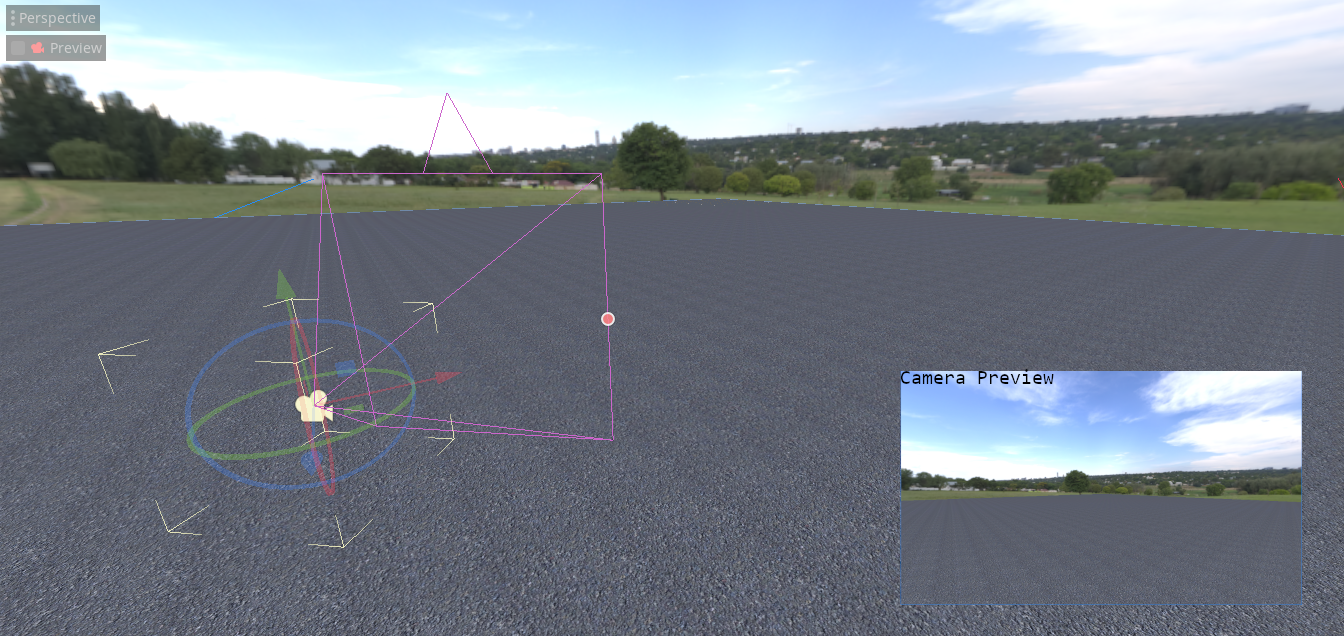
Can't easily tell what is visible on the camera.
Describe the feature / enhancement and how it helps to overcome the problem or limitation:
To have a small pop-up window like in Unity showing what is in the camera's view.
Describe how your proposal will work, with code, pseudocode, mockups, and/or diagrams:
If this enhancement will not be used often, can it be worked around with a few lines of script?:
Nope
Is there a reason why this should be core and not an add-on in the asset library?:
I image quite a few people would find this feature helpful.
Bugsquad edit (keywords for easier searching): picture in picture, PiP
 bjr29
bjr29
All 7 comments
This could be really helpful. I wouldn't need to simultaneously switch to preview mode or manually type my coordinates when repositioning my Camera.
 NoodleSushi
on 6 Jun 2020
NoodleSushi
on 6 Jun 2020
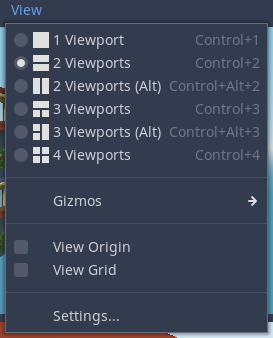
What's the problem with multiple viewports?

 Jummit
on 6 Jun 2020
Jummit
on 6 Jun 2020
Too big for what we really need, @Jummit
 Zireael07
on 6 Jun 2020
Zireael07
on 6 Jun 2020
There's an option "Align Transform with View" under Perspective menu that will automatically position the camera to your current view, so you can align it even without preview.
 KoBeWi
on 6 Jun 2020
KoBeWi
on 6 Jun 2020
What if you want to see it with the selected camera's settings?
bjr29
on 6 Jun 2020
When using culling masks, you can't preview what a specific effect looks because the editor camera sees all, so you enter preview. But you can't move the preview camera, or see what it sees in a preview thumbnail, so you can't look at your effect from different angles short of using multiple views.
Either way, the camera preview system could use some additional functionality.
 Razoric480
on 23 Aug 2020
Razoric480
on 23 Aug 2020
Being able to view the object from its perspective while modifying the object's attributes is a big feature for me. This is a great proposal to solve the problem. Would also love to see it applied to all 3D node types such as spotlights.
 dodgyville
on 25 Sep 2020
dodgyville
on 25 Sep 2020
Related issues
 SleepProgger
·
3Comments
SleepProgger
·
3Comments
 Torguen
·
3Comments
Torguen
·
3Comments
 WilliamTambellini
·
3Comments
WilliamTambellini
·
3Comments
 SpyrexDE
·
3Comments
SpyrexDE
·
3Comments
 wijat
·
3Comments
wijat
·
3Comments
Most helpful comment
Too big for what we really need, @Jummit