Godot-proposals: Wavy/squiggly underline + popup for code errors
Describe the project you are working on:
The GDScript compiler.
Describe the problem or limitation you are having in your project:
The current way the GDScript code editor display errors is by highlighting the whole line with a red background:
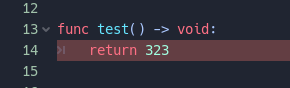
Also it puts the error message at the bottom:

The problem is that it's too outstanding from the surrounding environment, making it grab too much attention, which you don't really want when you just stopped writing code for a few seconds (at which point you know it's wrong).
This also prevents showing more than one error at once, which will be possible with the new GDScript parser.
Describe the feature / enhancement and how it helps to overcome the problem or limitation:
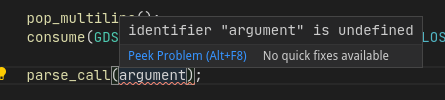
Using wavy (AKA squiggly) underline on detected errors is common in pretty much all modern code editors. This would be less attention grabbing and would allow reporting more errors at once.
To show the error details, a tooltip popup would show with the error message when the mouse hovers the offending code. This would allow the user to see each error message when it's needed.
Describe how your proposal will work, with code, pseudocode, mockups, and/or diagrams:
An example of how Visual Studio Code deals with this:
If this enhancement will not be used often, can it be worked around with a few lines of script?:
It will be used often and cannot be worked around AFAIK.
Is there a reason why this should be core and not an add-on in the asset library?:
It's an integral part of the GDScript editor. It must be part of the code editor control.
 vnen
vnen
All 4 comments
I made a pull request which implements this feature: https://github.com/godotengine/godot/pull/35962
There's an ongoing TextEdit refactor, so it might have to be redone from scratch before it can be merged.
Also, I'd prefer the background to be kept; just make it more subtle. This makes it significantly easier to spot the error in a busy script (one of my pet peeves with vanilla VS Code). Ideally, we could even show the error inline like when using the Error Lens VS Code extension:

It can also work with squiggles displayed at the same time, it's just not demonstrated on the official screenshot:

Of course, this would be toggleable in the Editor Settings. The message would be cut off if it exceeds the script editor's width. It would also be viewable in full by hovering it, which would make a tooltip appear.
 Calinou
on 4 Jun 2020
Calinou
on 4 Jun 2020
The subtle background looks good but the inline message looks to busy for me (so could be a setting).
Also, VS Code shows errors on the minimap (and the scroll bar), which helps me locate issues more easily in a big file:
That would be a good addition too.
vnen
on 4 Jun 2020
For showing errors on minimap, see proposal https://github.com/godotengine/godot-proposals/issues/987
 Zireael07
on 4 Jun 2020
Zireael07
on 4 Jun 2020
I would also like this for warnings, for the opposite reason: I never pay attention to them, since they are hidden under their tab which I have to select and expand to see them.
 Zylann
on 8 Jun 2020
Zylann
on 8 Jun 2020
Related issues
 SleepProgger
·
3Comments
SleepProgger
·
3Comments
 KoBeWi
·
3Comments
KoBeWi
·
3Comments
 wijat
·
3Comments
wijat
·
3Comments
 PLyczkowski
·
3Comments
PLyczkowski
·
3Comments
 davthedev
·
3Comments
davthedev
·
3Comments
Most helpful comment
I would also like this for warnings, for the opposite reason: I never pay attention to them, since they are hidden under their tab which I have to select and expand to see them.