Godot-proposals: Add margins and padding to Control nodes
Describe the project you are working on:
Space ship game that requires gamepad and keyboard input.
Describe the problem or limitation you are having in your project:
I keep running into the problem where I have to modify my theme or style or having to create additional padding nodes to position controls within a container.
I have tried using things like margin containers but this doesn't always work and requires a extra node just to position the control
these things start to add up and in no time I have 3 layers of containers to get the flow, position, size and clip I need for only one control.
Describe the feature / enhancement and how it helps to overcome the problem or limitation:
I suggest allowing us to specify a margin and padding for controls that is separate from its rect.
this allows us to make gui easier since we don't have to search through a bunch of container children
I would also suggest that like the anchor a padding and margin rect be added to the godot editor to ease of use.

Describe how your proposal will work, with code, pseudocode, mockups, and/or diagrams:
basically it would be similar to winforms but alot less buggy in which containers still position and resize their controls but users are allowed to adjust how they do it.

If this enhancement will not be used often, can it be worked around with a few lines of script?:
this enhancement would be use alot more then the current system. while it allows for bypassing a bunch of nested container controls it they would also still be useful for alignment.
I don't think this can be worked around due to how containers position their controls but if it can be it would require quire a bit of knowledge about the godot engine and some people just want to make a gui.
Is there a reason why this should be core and not an add-on in the asset library?:
this would be added in the core because currently the gui system can be bit infuriating to work with
 Shadowblitz16
All 49 comments
This is possibly a duplicate of #728
 aaronfranke
on 9 May 2020
aaronfranke
on 9 May 2020
I have tried using things like margin containers but this doesn't always work and requires a extra node just to position the control
Well, working with UI requires lots of containers sometimes. The worst part is that smart snapping gets weird when you put too much on the scene, otherwise it's not really bad.
btw if you use PanelContainer, you can use content_margin property of StyleBox to replace MarginContainer.
 KoBeWi
on 9 May 2020
KoBeWi
on 9 May 2020
@KoBeWi
this requires a bunch of nested controls just to get something like a clipped border.
the point of this is so that we have somewhat of a way to organize our controls
@aaronfranke this is not the same thing as he is talking about merging containers and controls while I am talking about allowing us to specify a margin and a border between containers and the control.
currently the margin container doesn't even work it this way since its position and margin are tied to each other and the parent container resizes the position and size
Shadowblitz16
on 11 May 2020
currently the margin container doesn't even work it this way since its position and margin are tied to each other and the parent container resizes the position and size
The margins of a MarginContainer are defined as custom constants, they have nothing to do with the basic Control's margins. This is basically stated in the documentation: https://docs.godotengine.org/en/stable/classes/class_margincontainer.html
That being said, I agree the naming is a little bit confusing. That's why I wanted, at some point, to rename the Control's margins properties to "offset_left", "offset_right" and so on. So that people stop understanding them as they were like CSS margins.
 groud
on 11 May 2020
groud
on 11 May 2020
@groud shouldn't the offset be ignored by the parent container then.
the point I am trying to make is its not very easy if at all possible to offset position and size of a control in a container.
every other gui library out there lets you do this.
the only extra part of this suggestion is to allow people to set a padding as well.
Shadowblitz16
on 11 May 2020
@groud shouldn't the offset be ignored by the parent container then.
It should yes. It's just that visually in the editor those values get updated while they should not. That's why editing those values should not be possible.
the point I am trying to make is its not very easy if at all possible to offset position and size of a control in a container.
They aren't meant for it. If you need precise control on the positioning, you need to use a normal control as a parent instead of a container. The margins and anchors system allow you more custom positioning. And if the problem is only about the margins around the Control, then a MarginContainer works perfectly.
every other gui library out there lets you do this.
Could you provide examples ? I am not sure a lot of libraries allow you to specify a padding for each Control/Container node, but I might be wrong.
groud
on 11 May 2020
- winforms
- wpf
- any sort of wpf like library
- css
@groud shouldn't the offset be ignored by the parent container then.
It should yes. It's just that visually in the editor those values get updated while they should not. That's why editing those values should not be possible.
they don't just get updated. position and margin are synced and margin isn't really a margin its a offset like you said
the point I am trying to make is its not very easy if at all possible to offset position and size of a control in a container.
They aren't meant for it. If you need precise control on the positioning, you need to use a normal control as a parent instead of a container. The margins and anchors system allow you more custom positioning. And if the problem is only about the margins around the Control, then a MarginContainer works perfectly.
no containers are for layouts
controls should be positioned by these layouts but should also have say in the amount of spacing around them.
every other gui library out there lets you do this.
Could you provide examples ? I am not sure a lot of libraries allow you to specify a padding for
each Control/Container node, but I might be wrong.
winforms
wpf
any sort of wpf like ui
css
you should really read up on the importance of margins and padding in ui.
I feel you don't understand what they are and how they help
Shadowblitz16
on 13 May 2020
they don't just get updated. position and margin are synced and margin isn't really a margin its a offset like you said
What I meant by that is that, as soon as you resize the parent Container, the position, size, margins and anchors properties are going to be overridden. They are consequently not reliable and should not be updated (or synced, as you wish), when modified in the editor. They should not be editable at all.
no containers are for layouts
controls should be positioned by these layouts but should also have say in the amount of spacing around them.
No, that's not how Godot works. Once again, you want the engine adapt to your vision of things, but this spacing can completely be handled by a MarginContainer, as I said above.
you should really read up on the importance of margins and padding in ui.
I feel you don't understand what they are and how they help
I already know what they are and I they work, but, once again, you did not provide any use case for them which are not already covered by another solution in the engine (you can use MarginContainer or even a normal control node in the hierarchy to achieve the same result).
The only problem it could have with it is that it adds another node in your hierarchy, but honestly, I don't think it is a problem personally, as GUI layouts will always be complex anyway.
If we absolutely want to replace this intermediate MarginContainer by properties, I fear this will confuse users even more as they are going to be yet another set of Margins-like properties. This padding/margin will be used only inside containers as they can't be mixed with the current margins (or offset if we rename them), as those can be negative too, unlike padding. In the end, you node's position could be influenced by:
- anchors,
- margins,
- position,
- size,
- you new padding property
IMHO, the properties system is already complex enough, there is no need to complexify it even more.
groud
on 13 May 2020
@Shadowblitz16 I would like to point out that you have the option to implement your own UI system in user code, using Godot's existing nodes as a base. You could create this as a proof-of-concept that people can try, or you can maintain it and publish it on the asset library.
aaronfranke
on 13 May 2020
they don't just get updated. position and margin are synced and margin isn't really a margin its a offset like you said
What I meant by that is that, as soon as you resize the parent Container, the position, size, margins and anchors properties are going to be overridden. They are consequently not reliable and should not be updated (or synced, as you wish), when modified in the editor. They should not be editable at all.
then this should be considered a bug if they are not stable enough to expose to the inspector. and in that case the gui system should be rewritten
no containers are for layouts
controls should be positioned by these layouts but should also have say in the amount of spacing around them.No, that's not how Godot works. Once again, you want the engine adapt to your vision of things, but this spacing can completely be handled by a MarginContainer, as I said above.
godot doesn't work like that because its not implemented yet.
my vision is to make godot easier to use.
and we shouldn't have to add 50 margin container's just because we want to have a offset from the parent container.
also I have said this already margin containers don't even work for things like tab containers since the tab container resizes the margin container making the margin container useless.
I have already posted this issue which YOU closed that had a example project https://github.com/godotengine/godot/issues/38576
you should really read up on the importance of margins and padding in ui.
I feel you don't understand what they are and how they helpI already know what they are and I they work, but, once again, you did not provide any use case for them which are not already covered by another solution in the engine (you can use MarginContainer or even a normal control node in the hierarchy to achieve the same result).
The only problem it could have with it is that it adds another node in your hierarchy, but honestly, I don't think it is a problem personally, as GUI layouts will always be complex anyway.
If we absolutely want to replace this intermediate MarginContainer by properties, I fear this will confuse users even more as they are going to be yet another set of Margins-like properties. This padding/margin will be used only inside containers as they can't be mixed with the current margins (or offset if we rename them), as those can be negative too, unlike padding. In the end, you node's position could be influenced by:
- anchors,
- margins,
- position,
- size,
- you new padding property
IMHO, the properties system is already complex enough, there is no need to complexify it even more.
I provided at least 2 reasons why this would make the gui system better why don't you reread this suggestion.
I don't see how you don't think padding is a good thing to add to controls.
by your logic why do we even have anchors and margins if they can just be another node.
controls could simply just be a position and size but they aren't because it would again generate too many node to do anything.
this isn't any more complex then any other gui system.
they all have..
- anchors
- padding
- margins
- a rect
- some even have a border which is a one extra thing
@Shadowblitz16 I would like to point out that you have the option to implement your own UI system in user code, using Godot's existing nodes as a base. You could create this as a proof-of-concept that people can try, or you can maintain it and publish it on the asset library.
I shouldn't have to implement basic gui features that should already be there.
Shadowblitz16
on 16 May 2020
I can follow @Shadowblitz16 argumentation and I would like to add some of my point of view which are often needed - especially if you rely heavily on layouts. Of course you can solve it differently with godot, but this is such a fundamental concept I really would like to take into consideration of redesigning the already great UI solution.
I also would like to point out "make your own solution" sounds like there are arguing points which are good but are not taking into consideration as this would change the UI system to much that backard compatibility is really hard?
Padding for Button content
the text and the distance to the border of the button should easily set up using padding. Often it looks way better to have some horizontal and vertical space between text and border. Having a property for that would be fantastic.
Margins for any control improves usability to improve UI quality
The current margin seems not be a layout but a relative positioning concept. Margin is "normally" an additional spacing around the control, the godot margin seems to inset that - thats really weird when you come from anything else. It is a common use case to tightly pack the elements using layouters and then add margins to controls to make it look good - and it is a fast and reliable workflow: You can concentrate on layout - as you would expect from a layouter as the name says - and define the distances with margins in a separate step simply by modifying the controls margin. My approach is currently to add everywhere margin containers where it is needed, this takes a lot of time and I would be much faster using a typical margin system.
Technical side
The implementation should be simple and can be integrated in control base class by simply adding the margin during size calculation and remove it during rendering phase and the benefit would be the system is much clearer and nearer to what anybody knows from one of the most common techniques for styles and layouting: CSS.
Downsides
As already said: backwards compatibility? People who like the current system and are not willing to change their mind?
 trommlbomml
on 30 Jun 2020
trommlbomml
on 30 Jun 2020
I'm coming from a renpy/unity background as a GUI designer. I've heard lots of people praising Godot's versatile interface design tools, but as soon as I've started using it, I've found the way Godot handles interface cumbersome.
The biggest advantage of adding margins, alignment and padding directly to the containers and buttons is simplicity. This simplicity removes the barrier that stands in front of developers migrating from other platforms.
There's also an obvious benefit to mimicking other successful platforms: flattening the learning curve.
Unity is switching to CSS for it's interface design by introducing their "UI builder", and that move alone makes it the engine of choice for tons of web developers that might have an idea to build a game or app, growing their user base by a huge margin.
I don't know why people argue against improving the tools they're using. It's not like we're asking to remove those center, align or margin containers and break backwards compatibility, all we ask for is improving the rest of them to make it easier for the newcomers and not leaving them scratching their heads for something that was simple everywhere else.
 Kiaazad
on 15 Sep 2020
Kiaazad
on 15 Sep 2020
I don't know why people argue against improving the tools they're using. It's not like we're asking to remove those center, align or margin containers and break backwards compatibility, all we ask for is improving the rest of them to make it easier for the newcomers and not leaving them scratching their heads for something that was simple everywhere else.
Adding multiple ways to achieve the same thing is not necessarily a net upgrade in terms of usability. It can introduce choice paralysis while making it more difficult for maintainers to fix bugs in the GUI system.
 Calinou
on 15 Sep 2020
Calinou
on 15 Sep 2020
Adding multiple ways to achieve the same thing is not necessarily a net upgrade in terms of usability. It can introduce choice paralysis while making it more difficult for maintainers to fix bugs in the GUI system.
Adding multiple ways is the first step of letting the users decide which way they prefer, specially when one involves much less work. We can deprecate the one less popular to prevent the slim chance that somebody couldn't decide which one to use.
I should warn you about cult mentality when you do something a certain way and believe it's the best till you get used to the way things are and resist any change. It's not that hard to find an excuse to maintain the status quo if you are looking for it.
I would love to be an advocate for the Godot engine, but it had to shoot that arrow to my knee and send me searching fora solution to some problem that shouldn't exist in the first place. instead of pushing my clients to switch to Godot, I'm arguing on Github for something that's clearly bothering the users to the point that there are multiple issues submitted for it.
all I'm saying is: Give us the legs to walk on our own before preaching about the efficiency of wheels.
Kiaazad
on 15 Sep 2020
That won't happen sorry. We won't maintain several systems if the use cases are the same, especially if the only reason to have another system is "for the sake of letting people have the choice". As @Calinou mentioned, the additional workload on contributors would not be worth.
However, you are still free to create a new GUI system via a plugin, maintain it, then make it used by a significant amount of people to proove us your solution is better than the current one. In such case we would consider integrating it, or even replacing the current implementation. But otherwise, this won't happen.
groud
on 15 Sep 2020
I would do that if I was using Godot for long enough to know what goes where. But you can't expect that from a newcomer, and those experienced enough to do so, are already part of the no change necessary cult.
I'm sure you can see the flaw in in your otherwise perfectly reasonable suggestion.
Kiaazad
on 15 Sep 2020
and those experienced enough to do so, are already part of the no change necessary cult.
Well, wouldn't say it's a cult... And I would even say it's actually the opposite, since we are asking for good rational reasons to change our system, while you're advocating for changes for the sake of it. You know, " you should look at the beam your own eye instead of the mote in ours." :wink:
groud
on 15 Sep 2020
I won't argue what is, and what isn't a cult mentality. Instead...
I'll suggest: instead of rejecting the idea, point out the people that are asking for the feature to the proper starting point to implement what they are asking for, perhaps as a plugin that you've suggested.
And since it's the issue that's frequently coming up, maybe assign an experienced developer to guide them.
Kiaazad
on 15 Sep 2020
I'll suggest: instead of rejecting the idea, point out the people that are asking for the feature to the proper starting point to implement what they are asking for, perhaps as a plugin that you've suggested.
And since it's the issue that's frequently coming up, maybe assign an experienced developer to guide them.
I'd be happy to help working on a solution, if we identify where the problem is, and if it worth solving because everyone would agree it's a problem. Right now, the only problem I identified in this proposal is the fact that our system leads to big nested structures of nodes. For me, it's not a big problem, and so far, we don't have a lot of complains about it too. So consequently, there's little interest in experienced contributors working on a solution for this (directly or indirectly). Note that you are welcome to prove me wrong, if you gather a lot of people having a big problem with this situation, we may reconsider the importance of the problem.
You can have a look to our workflow, it explains how we select things to implement pretty well: https://docs.godotengine.org/en/latest/community/contributing/best_practices_for_engine_contributors.html
groud
on 15 Sep 2020
And since it's the issue that's frequently coming up
Is it really that frequent? Only 3 people commented here that aren't Godot engine members and the OP has no upvotes. Personally I don't really recall this problem being mentioned elsewhere (although I don't follow every community channel much). I mean, it's not really apparent that this proposal has much support.
As for the implementation, doing it via plugin would probably involve writing new GUI system. It would be easier to make a PR and maybe distribute a custom build for interested people. All relevant code to implement this proposal should be inside control.cpp.
KoBeWi
on 15 Sep 2020
I am also a bit astonished about how people argue against something which is well established solution in UI systems - like e.g. the anchor system. Furthermore this is an approval issue tracker and I think that's also a reason there are not so much upvotes?
@KoBeWi it is not frequent because people are told e.g. add a margin container, update the texture or simply increase the size, that's also what I think @Calinou means there are other ways to do it - which is I think not ideal or basic problems like making layouting simple.
I also think that a lot of UI designs in games are more based on mockups and not on layouts like you do for business applications, where you need way more flexibility than in a compared simple game UI.
I think a good Idea would be using a pull request, too. At least my intention was to produce some focus on this topic to make more people aware of this property.
trommlbomml
on 15 Sep 2020
It's a case of "Abraham Wald and the Missing Bullet Holes". Most of those whom have this problem just give up and move unto another engine. The few that bother to submit an issue, really care about open source and the potential value that Godot can bring to their workflow.
In my case, I've already developed the rest of the game for my client, moving onto another engine means starting from scratch and I'm too lazy to give up that easily.
The only argument I keep hearing is: For me, it's not a big problem. In my opinion that is the wrong attitude towards those whom see it as a big problem and try to help correcting it.
I've pointed out several problems with the current system that you've already agree on at least one, but let me list them again in case I didn't get any of those points across:
- The current system leads to big nested structures of nodes.
- It's very unintuitive for those whom are migrating from other engines.
- It's very unintuitive for those with a background in some of the most popular languages out there, (don't tell me 94% of the internet is wrong with their fancy CSS styles)
- The learning curve is too steep.
- We're losing new users to maintain the status quo.
- My clients are not happy about the slow progress of their project (yes I'm counting that as a problem)
Kiaazad
on 15 Sep 2020
@KoBeWi: IIRC we had a similar issue back on the bug tracker and it had more support there.
The main reasoning in favor was familiarity for users of most engines out there (and yes, that includes CSS)
 Zireael07
on 15 Sep 2020
Zireael07
on 15 Sep 2020
Most of those whom have this problem just give up and move unto another engine.
Fwiw, I also came with a CSS background, got confused by Godot's notion of margins, and had a similar initial impression as you. However after using it for a while the system started to make sense, and perhaps it is even superior to how CSS works.
 bluenote10
on 15 Sep 2020
bluenote10
on 15 Sep 2020
@bluenote10 Renaming margins to offsets might be enough to cure the confusion :slightly_smiling_face:
Having done web development professionally, CSS is good and all, but supporting a CSS-like system within Godot is a lot of work and might end up confusing people as well (because it won't behave exactly like CSS in a browser would).
Calinou
on 15 Sep 2020
I also hope CSS like support is not coming to Godot as a core features - it's hell in detail to layout everything good, other layout systems are way easier including Godot. But having the margin model and maybe call it different would be a good solution I think. Maybe we can refer for this not as offset but maybe spacing as it is indeed adding space around controls?
trommlbomml
on 15 Sep 2020
the issue is not the naming its that there is no way to specify outer spacing
The containers resize their children which have no control over their size forcing the user to have a extra node for every container in the scene.
Shadowblitz16
on 16 Sep 2020
forcing the user to have a extra node for every container in the scene.
Why exactly an extra node is a problem?
KoBeWi
on 16 Sep 2020
@KoBeWi same reason an extra 1000 nodes is a problem
- it makes navigating the scene harder in both editor and in script
- it allocates more data making the game bigger and slower
- its unnecessary and is the reason why padding, margins, and borders exist in the first place
Shadowblitz16
on 16 Sep 2020
Why exactly an extra node is a problem?
Already mentioned in the thread by @Kiaazad: if you need it a lot the tree grows massively just because you want to have some space between elements, this is from a usability point very bad. I mean the property for horizontal fill/shrink start/end are also not nodes but properties of control.
trommlbomml
on 16 Sep 2020
Here's how I make a frame with 3 buttons in renpy.
frame:
    has hbox
    label _("Rollback Side")
    textbutton _("Disable")
    textbutton _("Left")
    textbutton _("Right")
and it looks like this:
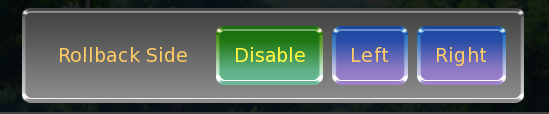
Can somebody show us how a superior system does it please.
Kiaazad
on 16 Sep 2020
To even support @Kiaazad what I mean:
- I do not want to change the ninepatch texture to have the distance from the text to the button, padding/margin would solve this easily
- I do not want to add a margin container to a vbox container to the label, the box and the panelcontainer, I have to think about this building the core layout and adding it afterwards is really clunky.
- I do not want to not use a button and replace it with a texture rect and manually to add the margins just because It can work this way.
- Theming would solve this in general but when you have different cases where from the specific layout you need other margins you need to add further custom themes/styles.
simple would be 5 nodes:
- panel container
- vbox
- label
- button
- button
- button
- vbox
and add for each element just margins on the controls itself. the existing solution would lead to the following layout:
- panel container
- margin container
- vbox
- margin container
- label
- button
- button
- button
- margin container
And the point is this is a small, simple UI. if you have larger UIs with more cases you really mess up your already quite complex layout with a lot of margin container nodes which, makes it harder to read. And I think one of the core good concepts of godot is that the tree represents an easy view of your game.
trommlbomml
on 16 Sep 2020
Well, @trommlbomml, I was waiting for one of the defenders of the current system to answer:
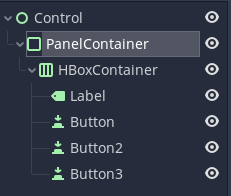
Then I would unleash my gotcha moment to ask:
VVV
Very good, It feels great when the teacher asks you an easy question doesn't it?
Now do this:
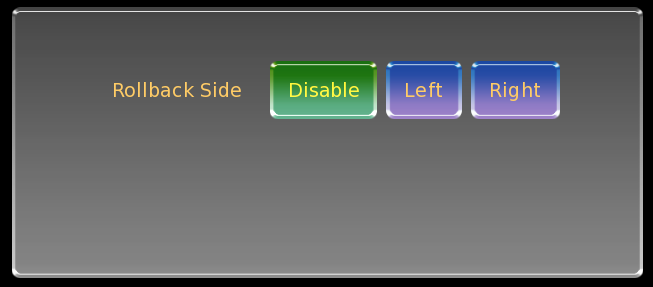
It was as simple as:
frame:
    xysize 700,300
    has hbox
    yalign 0.2
    label _("Rollback Side")
    textbutton _("Disable")
    textbutton _("Left")
    textbutton _("Right")
And for my next trick: I would simply ask them to resize the frame without the whole interface going through a mental breakdown. But I guess everybody have seen it coming from miles away.
I'm sure after enough fiddling with the numbers, everything is doable in the current system, but that fiddling is costing us our time and sanity.
Kiaazad
on 16 Sep 2020
I think your point is a bit biased to a solution of a different system you like, we should focus on arguing how this can be simpler with the provided proposal in this issue in Godot.
trommlbomml
on 16 Sep 2020
I think your point is a bit biased to a solution of a different system you like, we should focus on arguing how this can be simpler with the provided proposal in this issue in Godot.
My intention was pointing out a common situation that the current system doesn't meet the user's expectation and cause problem while designing their interface. but unfortunately it seems that our pleas are falling on deaf ears.
Kiaazad
on 22 Sep 2020
Over the years I've increasingly gravitated toward minimal box models where each UI element does one thing and does it well. This leads to more flexible layouts that are easier to reason about, debug, and more performant.
This is because the more UI systems rely on kitchen-sink widgets, defining layout becomes less about addition and more about subtraction, where the developer must fight against an array of gravitational forces. And when elements become heavier, there becomes less room for lighter, more specialized elements.
If anything, I'd like Godot's base Controls to be leaner.
One of the concerns raised in this thread is node complexity. That is not really a matter of layout, but of abstraction. The solution to complexity is rarely to globally make each element more complex, it's to break up the problem into smaller, more manageable pieces.
The real question is whether Godot's UI system supports abstractions powerful enough to resolve the problems raised in this thread. If not then the UI may need better abstractions.
As an example, creating disciplined web styling means rarely EVER specifying margin and padding on a particular element. Spacing should already be handled by consistent theming. (That's just an example—I'm not advocating CSS.)
 silentorb
on 20 Oct 2020
silentorb
on 20 Oct 2020
As a Front-end develop of over 15 years I have to fervently disagree with your idea of disciplined "web styling" never using Margins and Padding. With things such as VH and VW in CSS, we have such an extreme level of control for responsive layouts that I believe it is irresponsible and restrictive to not utilize Margins and Padding responsibly. If we had something as simple as how VH/VW work in CSS, then we would skyrocket above every other Game engine's UI system out there. I actually hope I am just misunderstanding what you said, because I am very confused how you could not take advantage of both Margin and Padding.
I truly appreciate your desire to keep things lean, as I have over the years always preferred to use as little as possible when it comes to front-end frameworks, etc. This is why I use Godot over Unity now. I have leaned on Eric Meyer's CSS reset for my entire career. But, not having something as simple as Padding in a UI is just plain silly. For Godot it doesn't even have to be applied to multiple containers, we simply need a PaddingContainer for now. Ideally in the future we take advantage of systems like a VH/VW from CSS that factors in the width/height ratios.
 d3is
on 30 Oct 2020
d3is
on 30 Oct 2020
we simply need a PaddingContainer for now
How is it different than MarginContainer?
KoBeWi
on 30 Oct 2020
A MarginContainer's Left/Top/Right/Bottom Margin values do not consider the child elements sizes. In CSS, you have the ability to set a size for an element and an internal padding, so the elements within the parent element will seek to fill the width of the container, but then wrap once it hits the width-padding and not pushing the container outside of its maximum widths.
d3is
on 30 Oct 2020
@d3is A MarginContainer, with its child set to "Fill" on both directions, already does this. The child element will fill the width/height minus the margin and must fit in this space. Maybe I'm not understanding correctly, can you provide an example?
aaronfranke
on 30 Oct 2020
If you have a Margin or HBox container with 2 or more Children, you cannot let the children expand to a Max size of the parent container with a padding around them that will wrap any following children to the next line. This actually outlines 2 problems in that you cannot set a padding, or a max size for a basic container.
d3is
on 30 Oct 2020
you cannot let the children expand to a Max size of the parent container with a padding around them that will wrap any following children to the next line
If it's about wrapping, then it sounds like a missing Container type. Instead of adding properties to every Control node, we could just add a WrapContainer (or whatever it is called) that would try to fit its children without expanding. This is totally doable and doesn't require any changes to the current API.
(not to mention that it can already be implement in GDScript)
KoBeWi
on 30 Oct 2020
before rambling about how godot interface tools don't make sense, I have to ask: how do you even make a text inside a panel with some margin around the text. shouldn't it be something like:
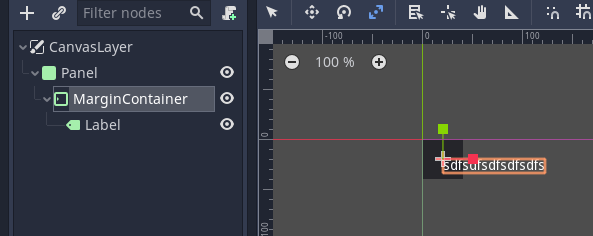
maybe I'm dumb or something but this is an example of what I mean by unintuitive.
Kiaazad
on 30 Oct 2020
@Kiaazad Godot's UI system is mostly outside-in, you have to make the parents bigger first, and the children don't get to resize their parents. In particular, containers such as MarginContainer determine the size and position of their children with minimal exceptions, such as the minimum size property, and Label and Button resizing themselves (but not parent containers) to fit the text.
aaronfranke
on 30 Oct 2020
@Kiaazad Godot's UI system is mostly outside-in.
That's a major flaw, and I think the source of every problem mentioned in this topic.
When it comes to advanced interface design, the content is the king and any container have to scale and fit the king, not the other way around. a dialogue box needs to accommodate the dialogue, big or small, nobody likes to have limitations on how much text they can show.
I did suspect that is the case and was about to submit a ticket to change the interface elements design to inside out, but it was so unlikely that somebody made this mistake and nobody have noticed it yet, I had to ask first.
If none of the developers are willing to spend their time to fix this flat tire, please provide some information where I can start and I'll somehow do it myself.
Kiaazad
on 30 Oct 2020
@Kiaazad I personally much prefer Control nodes as they are to HTML/CSS, and I think many/most Godot users would agree. I doubt Control nodes will fundamentally change in this way. Control nodes are battle tested and work great for many types of UIs without dynamically sized content, it works great for menus of games, and don't forget the Godot editor itself.
However, you should be able to use Godot's Control nodes as a base (or maybe CanvasItem) and design your own UI system. It would be a great idea for an add-on in the asset library for people that want content-aware inside-out UIs. If such a system were optional and could exist in parallel with Control nodes, I would imagine it would be received quite positively.
aaronfranke
on 30 Oct 2020
Control nodes are battle tested and work great for many types of UIs without dynamically sized content,
that's the exact problem, once an engine is past the flappy bird type of games, bigger game developers come in and they have a vision of how the information must be shown, it wouldn't be about showing coin count and a single health bar anymore, they expect to add any weird item, spell or quest they have dreamt last night and the interface must accommodate however size the name and description is, great for many types of UIs without dynamically sized content doesn't cut it anymore.
can somebody give me a link to some documentation page that contains the instruction on how to change/extend the nodes to create the correct type of nodes please. don't assume everybody have spend as much time as you have on godot and automatically knows everything you know when you mention add-on, asset library and control nodes. I've only spent few hours on godot before I got frustrated and closed it. pretend you're talking to a complete noob.
Kiaazad
on 30 Oct 2020
@Kiaazad Designing a whole new UI system is a complex task. If you wish to do this, I highly recommend you familiarize yourself with Godot first, including how the current UI system works and what it can/can't do.
But briefly: Control nodes are the base type for Godot's UI system. All UI nodes inherit from Control, and they are all colored green. Control inherits from CanvasItem, and CanvasItem inherits from Node. CanvasItem is the base for all 2D nodes, and only Control and Node2D (the blue ones) directly inherit from it (so blue nodes aren't part of the UI system).
An add-on (aka plugin) is a folder that contains a scripts/scenes/whatever and also a config script. Add-ons can be distributed just by copying the folder, or via the Asset Library which allows users to download and install add-ons from inside the editor.
aaronfranke
on 30 Oct 2020
@Kiaazad Designing a whole new UI system is a complex task. If you wish to do this, I highly recommend you familiarize yourself with Godot first, including how the current UI system works and what it can/can't do.
I design/code UI systems for a living, it's not that complex to me and it's not an issue, my whole problem is what the current UI system can't do. it should, but can't. that's all.
thanks for the links and description, much appreciated.
Kiaazad
on 30 Oct 2020
Related issues
 wijat
·
3Comments
aaronfranke
·
3Comments
wijat
·
3Comments
aaronfranke
·
3Comments
 WilliamTambellini
·
3Comments
WilliamTambellini
·
3Comments
 davthedev
·
3Comments
davthedev
·
3Comments
 arkology
·
3Comments
arkology
·
3Comments
Most helpful comment
Over the years I've increasingly gravitated toward minimal box models where each UI element does one thing and does it well. This leads to more flexible layouts that are easier to reason about, debug, and more performant.
This is because the more UI systems rely on kitchen-sink widgets, defining layout becomes less about addition and more about subtraction, where the developer must fight against an array of gravitational forces. And when elements become heavier, there becomes less room for lighter, more specialized elements.
If anything, I'd like Godot's base Controls to be leaner.
One of the concerns raised in this thread is node complexity. That is not really a matter of layout, but of abstraction. The solution to complexity is rarely to globally make each element more complex, it's to break up the problem into smaller, more manageable pieces.
The real question is whether Godot's UI system supports abstractions powerful enough to resolve the problems raised in this thread. If not then the UI may need better abstractions.
As an example, creating disciplined web styling means rarely EVER specifying margin and padding on a particular element. Spacing should already be handled by consistent theming. (That's just an example—I'm not advocating CSS.)