Godot-proposals: Accessing different viewport buffers through ViewportTextures
Describe the project you are working on:
This proposal applies to any project involving screen space shaders.
Describe the problem or limitation you are having in your project:
You see, what I'd like to access the depth texture of the scene for a shader of mine. However, because shader is so expensive, I wanted to render the effect at half or even quarter resolution to composite on top of the scene. But then I would have no access to the depth texture as it would not be accessible from any other viewport.
Plus, I have another project that requires access to the material buffers (normal, metalness, etc.) for a screenspace effect, but those aren't accessible period!
Describe the feature / enhancement and how it helps to overcome the problem or limitation:
What I propose is that user should be given access to these buffers from viewport textures, maybe like give viewport textures a buffer_mode (with color being the default). This way, a lot more 3D visual effects can be achieved, such as screen space global illumination, and the ability to use a viewport's depth texture from another viewport.
Describe how your proposal will work, with code, pseudocode, mockups, and/or diagrams:
Starting from this function:
https://github.com/godotengine/godot/blob/4d2c8ba922085a94ab7e963d23289fb8ed9c1f08/drivers/gles3/rasterizer_storage_gles3.cpp#L7530-L7540
we could expose the buffers to the front end. However, I also see that the buffers are set as Renderbuffer Objects. They would need to be initialized as textures in order to be accessible.
If this enhancement will not be used often, can it be worked around with a few lines of script?:
No, 'cause this requires low level access to the rendering API.
Is there a reason why this should be core and not an add-on in the asset library?:
Because of the reason above.
 SIsilicon
All 28 comments
Also, I'm willing to do the code implementation myself.
SIsilicon
on 6 May 2020
This is planned for 4.0! Your help would be very welcome. Please join the developer IRC channel so you can discuss the best way to implement it with Juan.
 clayjohn
on 6 May 2020
clayjohn
on 6 May 2020
Well, I'm actually talking about 3.2.
Don't get me wrong. I would love to help out with Godot 4.0's rendering API, but I don't have much experience with Vulkan, and even if I did, I don't have the hardware to even test it yet.
The feature I was talking about, I was speaking for Godot 3.2. I know 4.0 will come along with more features, but I wanted to see if it's possible to add some to 3.2, while it's still at least relevant.
SIsilicon
on 6 May 2020
Plus I wouldn't worry about inconsistencies between versions. After all, there will be _lots_ of changes and features in 4.0. It would even be possible to port this feature up to 4.0, if the pull request goes through.
SIsilicon
on 6 May 2020
In general we won't add new features to previous releases. The reason for that is that new features typically introduce a lot of usability problems and bugs and the idea behind the maintenance releases is that things get more stable instead of less stable. There are exceptions. For example, batching is being added to the GLES2 2D renderer. Batching is a much needed feature that just wasn't ready for the 3.2 release and in order to merge it, we are painstakingly testing it in beta builds.
Another catch is that the 3.2 rendering API wasn't created with this proposal in mind and is not very flexible. So adding access to the various buffers will be very difficult to implement in an elegant way and will be especially prone to creating bugs and breaking user's projects.
That being said, since you are willing to do the work yourself you could always fork the engine and do the work. If you are able to do it in a clean way that doesn't look too error prone we could consider merging it in (but this would be unlikely). If it doesn't get merged in, you would have to maintain your own fork (which shouldn't be too hard because we won't be making substantial changes to the 3.2 branch).
clayjohn
on 6 May 2020
Noted. I'm sure I can figure out a way of implementing this without introducing bugs.
SIsilicon
on 6 May 2020
I would love to see it :) ping me when you have something and I will be glad to discuss it with you.
clayjohn
on 6 May 2020
Hey hey! I have some progress to show today. The code works great, and the buffers are now accessible.
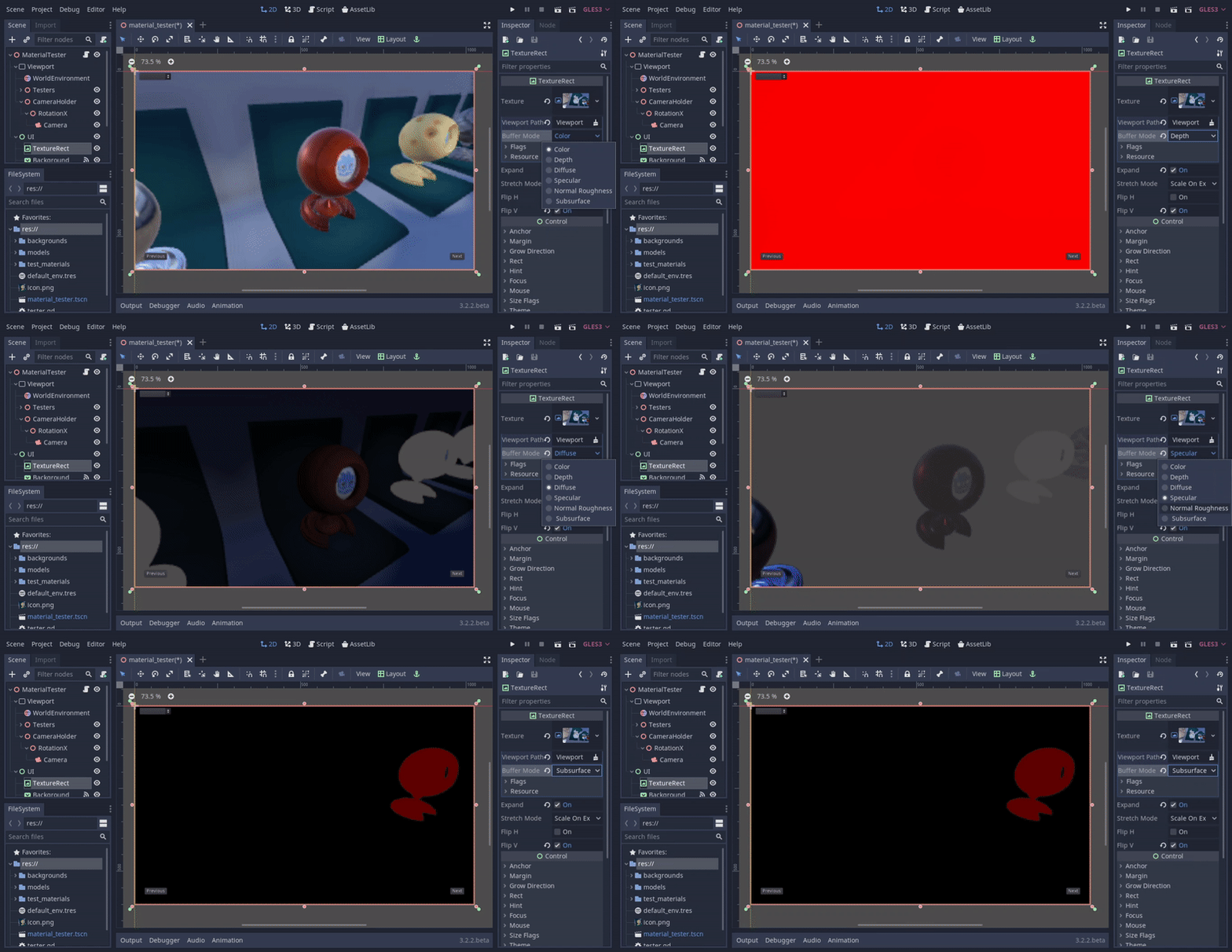
The depth buffer works fine by the way. It just looks all red because of how its data is stored. Speaking of depth buffer, it's data is currently inaccessible through get_data for now, since its a 24-bit depth format, but I think that's OK for now.
I also noticed that some of the buffers are only accessible when post process effects like SSR and SSAO are enabled, so I also added a force_mrt variable to Viewport incase you want to access those buffers without enabling those heavy effects, but I haven't tested it yet. Just a few more days of bug ironing. :)
SIsilicon
on 17 May 2020
That looks great! Indeed, mrts have to be enabled for the various buffers to get used. Using MRTs will also add some overhead.
clayjohn
on 17 May 2020
Would be nice if depth would be displayed as grey scale. To be honest I don't understand how it shows up as solid read yet is supposed to store the depth buffer. I only know depth buffers are greyscale image. If the red channel is supposed to be used as the depth buffer, we would not see a solid color, we would see red fading to transparent.
In the studio we often just screenshot or print screen and use that for iterating on concept art and level design. If it would show up as greyscale it would make iteration flow faster and would also make more visual sense to artists creating visual effects.
 golddotasksquestions
on 17 May 2020
golddotasksquestions
on 17 May 2020
Would be nice if depth would be displayed as grey scale. To be honest I don't understand how it shows up as solid read yet is supposed to store the depth buffer. I only know depth buffers are greyscale image. If the red channel is supposed to be used as the depth buffer, we would not see a solid color, we would see red fading to transparent.
You can display the depth buffer as grey scale by taking the red channel and coping its values to both the green and blue channels, making the depth display monochrome. That said, from a purely performance perspective, leaving it red might be better since it avoids having to set two additional properties per pixel.
 TwistedTwigleg
on 18 May 2020
TwistedTwigleg
on 18 May 2020
Would be nice if depth would be displayed as grey scale. To be honest I don't understand how it shows up as solid read yet is supposed to store the depth buffer. I only know depth buffers are greyscale image. If the red channel is supposed to be used as the depth buffer, we would not see a solid color, we would see red fading to transparent.
In the studio we often just screenshot or print screen and use that for iterating on concept art and level design. If it would show up as greyscale it would make iteration flow faster and would also make more visual sense to artists creating visual effects.
Here's how the depth buffer works. It only stores it's data in one channel. The fact that it's red is irrelevant. You can easily display it as greyscale by doing this.
COLOR.rgb = texture(tex, uv).rrr;
Interestingly though it _does_ show up as greyscale when working in GLES2.
Also, the reason why it _appears_ to be solid red is because of the camera's mode being Perspective. Most of the information is packed close to the camera's near plane, and you'd have to do some math to make it linear. TLDR, the depth buffer should work exactly the same as the built-in DEPTH_TEXTURE variable in spatial shaders.
SIsilicon
on 18 May 2020
The fact that it's red is irrelevant. You can easily display it as greyscale by doing this.
No, it's not irrelevant.
You can't screenshot the red channel and use it immediately as depth buffer in visual art software like After Effects, Photoshop, what have you.
You also can't assume artists know or understand shader code. This may be easy to implement in a shader flow, but for multidisciplinary production flow, this is incredibly user unfriendly.
golddotasksquestions
on 18 May 2020
Ok, I think I could get it to look white out of the box. I could do some "texture swizzling" to make it look greyscale. However, the packed nature of the buffer must stay.
SIsilicon
on 18 May 2020
@SIsilicon
I'm not sure how hard it would be, but maybe make an optional depth mode that converts the texture from red to white? That way, those who need the grayscale image can get it, but those who do not can just use the raw depth buffer. That said, I'm not sure how much code complexity it would add, so maybe it is better to just have a single depth mode.
@golddotasksquestions
You can convert a completely red depth image to grayscale in a tool like Photoshop, and then use that as the depth. It is just an added step, but most tools that have basic color manipulation should allow for the needed color manipulation.
For example, here is the process I used on this image:
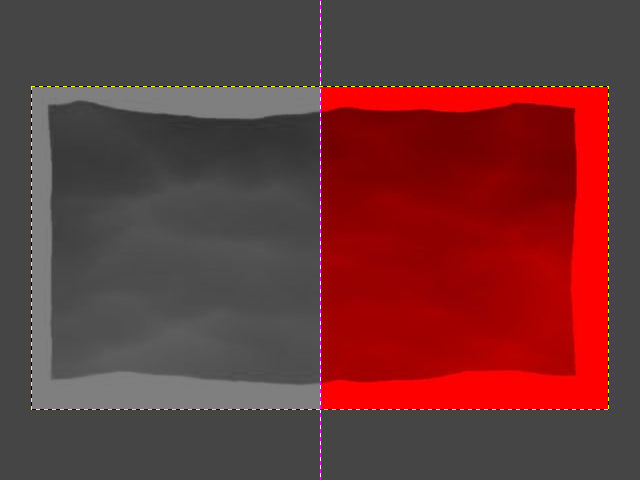
- Import the red image
- Click the Colors drop down, and select "Hue-Saturation"
- In the window that opens, set the "Saturation" slider to -100
- This will make the image grayscale 🙂
Granted, this is an additional step, However, it may be visual art software, like those you mentioned, use the red channel of the image, as it is commonly the first channel in a texture and depth only needs to be stored in one channel.
Based on this page from Adobe's help about image sharpness and this page about Photoshop channel basics, it also looks like you can selectively only make a single channel visible, and doing this for the red channel would result in an automatically grayscale image, if I understand the page correctly.
TwistedTwigleg
on 18 May 2020
@TwistedTwigleg
Don't worry, it shouldn't be hard at all. Just needed to add these two lines.
GLint swizzleMask[] = { GL_RED, GL_RED, GL_RED, GL_ONE };
glTexParameteriv(GL_TEXTURE_2D, GL_TEXTURE_SWIZZLE_RGBA, swizzleMask);
Plus, adding this makes the depth buffer look similar to the one in GLES2, which I previously stated was also grey-scale.
SIsilicon
on 18 May 2020
Awesome! In that case, maybe just keeping it grayscale is better after all, especially since it is just a couple extra lines of code.
TwistedTwigleg
on 18 May 2020
@TwistedTwigleg Thanks, I appreciate the effort you put into explaining the steps in detail, but I'm afraid you are explaining this to the wrong person, I'm using Photoshop for 23 years already.
golddotasksquestions
on 19 May 2020
Well I finally created a pull request, but some of tests have failed, and I don't know how to fix it. It works just fine on my machine. Perhaps there are some conflicts when merging with the other commits in the main repository. :/
SIsilicon
on 21 May 2020
Awesome!
From what I can deduce from the Travis error, it seems there is code that is not formatted with the correct clang format, and that is causing the issue.
Edit: or rather, there is a conflict or two that is not formatted correctly and causing the issue. From what I can deduce from the error log, the majority of the code looks to be okay.
TwistedTwigleg
on 21 May 2020
Ah, thanks! I'll get right on it and fix it. Silly me. :P
SIsilicon
on 21 May 2020
Well I'm confused. Can someone explain to me what this is supposed to mean?

SIsilicon
on 21 May 2020
I would say what it means, but honestly I have no idea! I knew at one point what it meant, but its been long enough that I forgot. I know the + represents additional changes/lines and the - means removed lines, but I am not sure which needs to be used in this case to make it compliant with the clang format.
I think there is a way to have clang-format run and make the adjustments automatically as a pre-commit hook.
TwistedTwigleg
on 21 May 2020
I think what @golddotasksquestions really wants is a Display Depth option added to the viewport display menu:
image of the menu
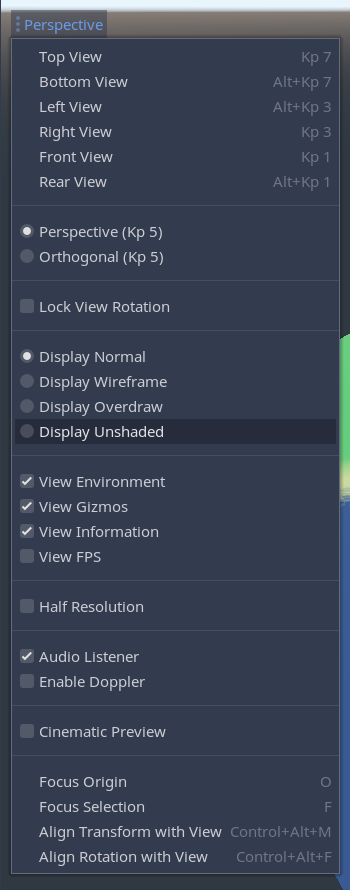
Buffer itself can continue to be in the red channel just fine, only the display preview needs to be in gray-scale. I do feel like it is a separate feature from this though.
 Megalomaniak
on 22 May 2020
Megalomaniak
on 22 May 2020
@Megalomaniak
I don't think it's a separate feature. I think it's a question whether you want to "Display the values" (greyscale) or "Display the result" (red channel as red, green channel as green, blue channel as blue, a mix between those as an additive mix).
Since I'm coming from visual development, I'm used to "Display the values", since I this allows to directly use that greyscale image elsewhere, be it as mask or channel.
golddotasksquestions
on 26 May 2020
Concerning this proposal, that _would_ be a separate feature. Such an option would require its own debug drawing mode, just like the other debug modes (unshaded, overdraw, wireframe).
SIsilicon
on 26 May 2020
So wondering if this will get picked for the 3.2 updates. Also, how would the buffers be accessible from the shaders? Right now it's possible to get a SCREEN_TEXTURE and DEPTH_TEXTURE inside the shader. Maybe the SCREEN_TEXTURE is dependent on the mode of the viewport?
 PranavSK
on 24 Jul 2020
PranavSK
on 24 Jul 2020
@Megalomaniak
I don't think it's a separate feature. I think it's a question whether you want to "Display the values" (greyscale) or "Display the result" (red channel as red, green channel as green, blue channel as blue, a mix between those as an additive mix).
Since I'm coming from visual development, I'm used to "Display the values", since I this allows to directly use that greyscale image elsewhere, be it as mask or channel.
No I mean the whole display (of whichever) is a separate feature that would or at least could follow this one. But I do agree that it would be useful of course. I'd recommend opening another proposal for it.
Megalomaniak
on 25 Jul 2020
Related issues
 PLyczkowski
·
3Comments
PLyczkowski
·
3Comments
 lupoDharkael
·
3Comments
lupoDharkael
·
3Comments
 WizzardMaker
·
3Comments
WizzardMaker
·
3Comments
 IllusiveS
·
3Comments
IllusiveS
·
3Comments
 sprite-1
·
3Comments
sprite-1
·
3Comments
Most helpful comment
Hey hey! I have some progress to show today. The code works great, and the buffers are now accessible.

The depth buffer works fine by the way. It just looks all red because of how its data is stored. Speaking of depth buffer, it's data is currently inaccessible through
get_datafor now, since its a 24-bit depth format, but I think that's OK for now.I also noticed that some of the buffers are only accessible when post process effects like SSR and SSAO are enabled, so I also added a
force_mrtvariable toViewportincase you want to access those buffers without enabling those heavy effects, but I haven't tested it yet. Just a few more days of bug ironing. :)