Godot-proposals: Double click Audio file in the FileSystem to start playback immediately.
Describe the project you are working on:
Implementing sounds.
Describe the problem or limitation you are having in your project:
Often it's not enough to give soundFX descriptive names. I have to listen to them to make sure it's the one I want to use. This is very tedious right now, as you have to double click the file in the FileSystem, then go over to the Inspector and press the play button.
Because of this issue it's even more tedious when you feel like you need to listen to the sound more than once, which is very common.

Describe the feature / enhancement and how it helps to overcome the problem or limitation:
Simply double clicking the file in the FileSystem should immediately start the playback. Double clicking the file while it is in playback, should immediately start the playback again from the beginning.

Describe how your proposal will work, with code, pseudocode, mockups, and/or diagrams:
Unfortunately I can't provide any code.
If this enhancement will not be used often, can it be worked around with a few lines of script?:
Would be used often by anyone who works with more than a hand full of audio files.
Is there a reason why this should be core and not an add-on in the asset library?:
I think it's a necessary improvement to usability.
 golddotasksquestions
All 11 comments
I'm not sure it's a good idea. Double-clicking is necessary to load the AudioStreamSample in the inspector, which can be done to then listen to it indeed, but also simply to review or change its properties (format, loop, etc.). I'm not sure it's a good idea to force making this action play a sound when you might not actually want to listen to the sample.
 akien-mga
on 5 Mar 2020
akien-mga
on 5 Mar 2020
@akien-mga Can you give me use case when you would _not_ want to play that sound on a double click? (note: a double click, not a single click, not a click-and-drag. just a double click directly in the FileSystem panel)
I can't think of one. Even if there is one, I feel like the cases I _want_ to have sound played on a double click in the FileSystem _by far_ outnumber those in which I might not want that to happen.
golddotasksquestions
on 5 Mar 2020
Can you give me use case when you would not want to play that sound on a double click? I can't think of one.
As I mentioned, if you want to review or edit flags without actually playing the sound. Double click is the way to edit a resource, and playing it is not necessarily what users associate with editing.
Even if there is one, I feel like the cases I want to have sound played on a double click in the FileSystem by far outnumber those in which I might not want that to happen.
That might be true, that's why I wrote "I'm not sure" twice. I'm raising a potential concern so that it can be discussed and either confirmed by some or discarded as not an actual problem.
akien-mga
on 5 Mar 2020
@akien-mga
I think it's good you raised your concern! That's what these proposals are for, to have a place for those discussions, right?
As I mentioned, if you want to review or edit flags without actually playing the sound.
That's certainly a valid usecase. However, it seems to me an incredibly rare one at that. How often do you edit your resource flags after import? 99.9% of all times I would want those to be set either externally before import or in the import settings.
For those who do happen to do this a lot for whatever reason though, and would feel annoyed by the playback, what would you think about a checkbox in the Project Settings to disable immediate playback on double click?
golddotasksquestions
on 5 Mar 2020
I agree that assigning double-click to act as "Play" for sound samples might not always be the expected behavior.
What about having some tool button next to sound samples? Just like the scene tree has buttons for nodes:
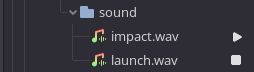
One could go further and implement more buttons for other resources if this kind of thing is implemented on the FileSystemDock level.
 Xrayez
on 5 Mar 2020
Xrayez
on 5 Mar 2020
I would find it more intuitive to double click on the name. A symbol like that is much harder to hit. Also if the FileSystem panel is too wide, you would have to readjust it first, so you know which icon belongs to which soundfile.
One solution could be to make the icon much wider, more like a button and align right at the end of the file name. But if you then have very varying filename lengths, those buttons are again not aligned underneath each other, defeating the purpose to quickly test-hear the files for comparison.
So again, I'd think a simple double click with a "disable" checkbox in the Project Settings would be the cleanest solution.
@Xrayez I'm curious, are you thinking of another usecase, other than the one Akien already mentioned?
golddotasksquestions
on 5 Mar 2020
@golddotasksquestions comment from https://github.com/godotengine/godot/pull/36819#issuecomment-595242814:
Won't this make the sound play when clicking an AudioStream resource in the Inspector? This is probably too invasive, especially for music.
For short samples the proposed solution is acceptable, but for longer samples such as music you'd have to do the opposite: turning off the music every time the file is double-clicked. The previously playing sample is stopped whenever the inspector is switched though.
Making this optional is the way to go I think. I'd personally enable this feature while working solo vs being in public where I tend to mute sounds to avoid unnecessary attention (of course I can mute system sound but still). So my opinion is biased. 😛
Xrayez
on 5 Mar 2020
Instead of a double-click (which is usually used to edit something, not to play it, in Godot), I think a simple autoplay mode that can be enabled in the inspector (next to the play button) would be enough. It would automatically play the sound when you select one. This is what Ableton Live does and it's quite practical.
 groud
on 5 Mar 2020
groud
on 5 Mar 2020
@Xrayez In public, if I don't have headphones plugged in, I just mute my laptop 😛
golddotasksquestions
on 5 Mar 2020
The UI in Unreal gives a separate button on the music file icon to play it. It seems to work for most people so putting a small play button on the right corner of a music file item in the FileSystem tree might be a solution.
As per the discussion above, having an option to disable this should also be there IMO because one of the key features in the 3.2 editor was adding editor feature disabling from a menu, and it would help the seasoned Godot game devs.
 IronicallySerious
on 5 Mar 2020
IronicallySerious
on 5 Mar 2020
In audio and producer world the key to start/stop playback use to be spacebar. Also on YouTube and a lot of audio/video player implementations. Don't know if it conflicts with anything else but it would be pretty straightforward to start/stop playback hitting spacebar when the audio file is selected/highlighted.
 Gianclgar
on 2 Apr 2020
Gianclgar
on 2 Apr 2020
Related issues
 Dorifor
·
3Comments
Dorifor
·
3Comments
 sprite-1
·
3Comments
sprite-1
·
3Comments
 Torguen
·
3Comments
Torguen
·
3Comments
 rainlizard
·
3Comments
rainlizard
·
3Comments
 lupoDharkael
·
3Comments
lupoDharkael
·
3Comments
Most helpful comment
I agree that assigning double-click to act as "Play" for sound samples might not always be the expected behavior.
What about having some tool button next to sound samples? Just like the scene tree has buttons for nodes:
One could go further and implement more buttons for other resources if this kind of thing is implemented on the FileSystemDock level.