Godot-proposals: Add a "close" button next to each open script file name
Describe the project you are working on:
Any
Describe the problem or limitation you are having in your project:
Closing open scripts is not as convenient as with modern editors.
Describe how this feature / enhancement will help you overcome this problem or limitation:
Add X close button next to each open script file name. Would make it easier, faster and less confusing than using CMD-W (for Mac) or (Right Click and choosing close).
Show a mock up screenshots/video or a flow diagram explaining how your proposal will work:

Describe implementation detail for your proposal (in code), if possible:
unsure
If this enhancement will not be used often, can it be worked around with a few lines of script?:
Will be used very often if not exclusively as opposed to CMD-W (on Mac) or RightClick and choose close
Is there a reason why this should be core and not an add-on in the asset library?:
should be part of editor.
 wyattbiker
All 15 comments
You can middle-click scripts in the list to close them; this also works with scene tabs. This pattern is very common in tabbed interfaces (try it in your Web browser of choice) :slightly_smiling_face:
Since this is already available, I'd prefer not adding a close button which could be misclicked.
 Calinou
on 10 Nov 2019
Calinou
on 10 Nov 2019
I find the current workflow also really confusing and would really welcome the x. It's also really annoying that scripts of deleted nodes still linger around in this list and you have to manually close them.
Even much worse: They even linger around if you delete the .gd file from the file browser!! No indication that any chance has happened (3.1). In 3.2 there is an indication because the name disappears from the list, but not the script itself, nor the place in the list, and neither the little cog symbol. You then have to rightclick and select "close" on the empty thing in the list. It's really weird and confusing.
 golddotasksquestions
on 10 Nov 2019
golddotasksquestions
on 10 Nov 2019
@golddotasksquestions What you describe is a bug (which is already reported btw).
 KoBeWi
on 10 Nov 2019
KoBeWi
on 10 Nov 2019
Giving close buttons to every file open in the list of open files is quite common though.
Most text editors have it, and even larger IDEs have this. However, there is a small detail that those programs have a horizontally stacked list of open files (instead of a vertical one that we find in Godot), which makes it very obvious that closing the file is really not going to affect the file contents (as opposed to the indication that the file will be deleted/altered).
 IronicallySerious
on 10 Nov 2019
IronicallySerious
on 10 Nov 2019
Since this is already available, I'd prefer not adding a close button which could be misclicked.
@Calinou Even though the middle-click shortcut is present everywhere, a close button is just as prevalent too. I'd say keeping things similar to what people see normally would be a good idea.
IronicallySerious
on 10 Nov 2019
Middle clicking feels strange so I would prefer a small button
 MCrafterzz
on 10 Nov 2019
MCrafterzz
on 10 Nov 2019
@Calinou, Mac users use a trackpad or Mighty Mouse don't have middle buttons. Also the argument you can click on X by accident, not sure if it holds water 🙂. The close button will notify you to save your code if it was modified. Worse thing will happen is to use Reopen Closed Script. It's right there on the File menu.
wyattbiker
on 11 Nov 2019
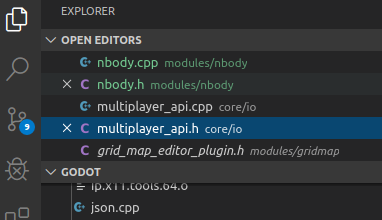
I would like this, but only when the x is only shown for scripts that are currently being edited or hovered over:
Will be used very often if not exclusively as opposed to CMD-W (on Mac) or RightClick and choose close
I always use middle click, but I would use x instead if it was available.
 Jummit
on 12 Nov 2019
Jummit
on 12 Nov 2019
@Jummit This sounds good to me. Maybe we could turn the "X" into a dot when the file has unsaved changes (to replace the (*) marker next to the filename)?
If we carry out this change, it should also be done for scene tabs, so that may be the subject for a future proposal.
Calinou
on 12 Nov 2019
Isn't that the case with scene tabs?
EDIT: Yes, it is. An X to close and a (*) when edited next to files would make it consistent with scene tabs.
Jummit
on 12 Nov 2019
@Jummit Not yet, though I've been meaning to do it:

Here's how it'd look like (just a mockup):

Calinou
on 12 Nov 2019
The problem with the middle mouse button is that there is no indicator this functionality exists (currently not even in the context menu). Also not everyone has a middle mouse button available as @wyattbiker explained. An x is a clear indicator and is available to everyone.
golddotasksquestions
on 12 Nov 2019
@Calinou,
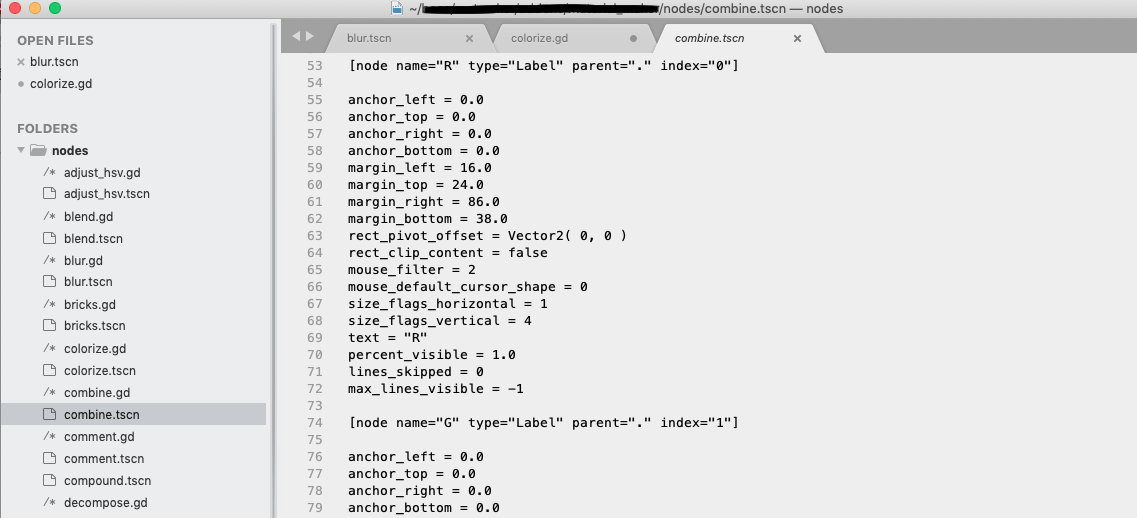
What @Jummit is suggesting (only show X for open files) makes sense in Visual Code. Visual Code (and Sublime), allows you to single click on any file in the Project and see a Preview of the file. Click away to another file and the Preview closes and re-opens the next one. Preview would be nice feature as well in Godot, but that it is another proposal and far more complex :)
The X's shown in the VCode image, is because he double clicked (or modified the Preview) which opens the script in a new tab. For Godot to keep things simple and convenient an X button or if you want move the modified (*) to flush right and when hovered turn it into X should be sufficient.
My suggestions for future enhancements is install Sublime (or VSCode) and check out how they do it. X button is close, o is modified but turns to X on hover. Italicized name is a Preview tab. Very elegant.
wyattbiker
on 13 Nov 2019
Related engine issue: godotengine/godot/issues/3774
Similar to VSCode, QTCreator also only shows the close button when hovered. I personally favour this workflow.
With that said, I don't see any reason not to have an option similar to scene tabs, that allows the user to have the close button displayed at all times.
 Paulb23
on 21 Nov 2019
Paulb23
on 21 Nov 2019
Also the argument you can click on X by accident, not sure if it holds water 🙂. The close button will notify you to save your code if it was modified. Worse thing will happen is to use Reopen Closed Script. It's right there on the File menu.
Yes, also any unsaved scripts/text files (which were likely deleted or moved) are now covered by godotengine/godot#40647, so not a big deal in my eyes.
I always tend to click on the text part as well, so not sure if I'd click on the "close" button by accident. If I do, I'd just Ctrl + Shift + T and it's back.
 Xrayez
on 27 Jul 2020
Xrayez
on 27 Jul 2020
Related issues
 Dorifor
·
3Comments
Dorifor
·
3Comments
 PLyczkowski
·
3Comments
PLyczkowski
·
3Comments
 Torguen
·
3Comments
Xrayez
·
3Comments
Torguen
·
3Comments
Xrayez
·
3Comments
 IllusiveS
·
3Comments
IllusiveS
·
3Comments
Most helpful comment
@Jummit This sounds good to me. Maybe we could turn the "X" into a dot when the file has unsaved changes (to replace the
(*)marker next to the filename)?If we carry out this change, it should also be done for scene tabs, so that may be the subject for a future proposal.