Godot-proposals: Keep multiple audio tracks in sync
Describe the project you are working on:
A game with dynamic audio based on gameplay context.
Describe how this feature / enhancement will help your project:
The audio in the game involves multiple tracks which are variations unto itself. Transitioning between tracks should be seemless and in-sync with one another, as they are layered. In my game all the tracks that I need to switch between are the same length and bpm, but this shouldn't be a requirement. Without accurate syncing, I've had tracks that need to play simultaneously and both be heard together end up becoming desynced, causing extreme dissonance as the beats are completely off.
This kind of feature is also incredibly useful for rhythm games that keep instrument tracks as separate streams, ie. Frets On Fire/Rock Band.
Show a mock up screenshots/video or a flow diagram explaining how your proposal will work:
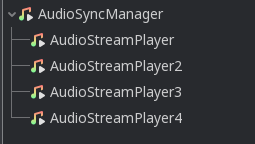
Describe implementation detail for your proposal (in code), if possible:
Using a manager node, allow all children audio streams within it to play simultaneously, their positions synced across them. Position and isPlaying should be controlled by the manager instead of each stream. Looping should still be managed by child streams, with sync position relative to the longest stream.
Through scripts developers can adjust things such as fade between tracks if they only wish to have one heard at a time.
If this enhancement will not be used often, can it be worked around with a few lines of script?:
Not presently without causing audio to jitter. Audio runs on a thread separate from the game loop, so attempting to modulate and keep tracks in sync using scripts is not ideal.
Is there a reason why this should be core and not an add-on in the asset library?:
Core at the present time does not expose enough low-level details about the audio streams and ability to keep them in sync. Most audio features are better suited integrated tightly with the engine, however if the APIs could be improved to expose more details then it's possible that this could be a feature managed better in an asset such as Godot-Mixing-Deck
 nhydock
All 4 comments
I second this. At the moment I haven't found a solution for dynamic music except going Fmod or Wwise route which makes questionable porting to all platforms.
 nezvers
on 1 Oct 2019
nezvers
on 1 Oct 2019
I didn't try it, but maybe this could be implemented with the new custom mixing capabilities? Like, in a callback to output audio frames, the game sums all the layers' samples.
 starry-abyss
on 15 Oct 2019
starry-abyss
on 15 Oct 2019
It would be really useful i.e. for rhythm games and effects like mickey-mousing. From a scripting API perspective what I think is needed are two ingredients:
- The ability to play/enqueue sounds starting at a certain sample-index/beat/measure/point in time
- Retrieve as accurately as possible the current time of a playing audio stream
(Note: The second part of the above API is AFAIK already implemented in Godot.)
An example of an API that already does this would be Unity3D's AudioSource.PlaySheduled function and its AudioSettings.dspTime
Combining those two APIs make the gameplay in the following 1 minute video possible.
@nhydock As a workaround you could autostart all tracks that you need (muted) and slowly change the volume on the tracks that you want to crossfade between. We actually used this in our DungeonTracks game because we had the same problem with the desyncing.
Edit:
It seems that the company that made the Unity plugin set its showcase video on private. What it showed was a top down shooter game where the enemy animations and players shots (visual effects and audiosamples) were in sync to the beat of the music.
 kerskuchen
on 28 Jan 2020
kerskuchen
on 28 Jan 2020
This would be fantastic for a project I'm working on. Right now basically doing this:
for music_track in music_tracks:
  music_track.play()
...but sometimes these are slightly unsynchronised.
Right now my plan is to create a module that adds a 'LayeredAudioStream' node that behaves like a normal AudioStream node, except it would support multiple AudioStream resources each with independent volumes.
 benjarmstrong
on 7 Nov 2020
benjarmstrong
on 7 Nov 2020
Related issues
 arkology
·
3Comments
arkology
·
3Comments
 regakakobigman
·
3Comments
regakakobigman
·
3Comments
 wijat
·
3Comments
wijat
·
3Comments
 rainlizard
·
3Comments
rainlizard
·
3Comments
 IllusiveS
·
3Comments
IllusiveS
·
3Comments
Most helpful comment
It would be really useful i.e. for rhythm games and effects like mickey-mousing. From a scripting API perspective what I think is needed are two ingredients:
(Note: The second part of the above API is AFAIK already implemented in Godot.)
An example of an API that already does this would be Unity3D's AudioSource.PlaySheduled function and its AudioSettings.dspTime
Combining those two APIs make the gameplay in the following 1 minute video possible.
@nhydock As a workaround you could autostart all tracks that you need (muted) and slowly change the volume on the tracks that you want to crossfade between. We actually used this in our DungeonTracks game because we had the same problem with the desyncing.
Edit:
It seems that the company that made the Unity plugin set its showcase video on private. What it showed was a top down shooter game where the enemy animations and players shots (visual effects and audiosamples) were in sync to the beat of the music.