Godot-proposals: Allow overriding how motion is projected along surfaces in `KinematicBody.move_and_slide()`
Describe the project you are working on: I am currently working (or more accurately I was, it's on a bit of a hiatus because of some other issues in Bullet physics that I'd rather be fixed before working further) on a 3D platformer. In platformers or any other kind of game with complex movement systems, having as much control as possible over movement as a programmer is vital to crafting a good experience, which is difficult to do with the current built in movement options for kinematic bodies.
Describe how this feature / enhancement will help your project: In implementing this proposal, the out-of-box utility and flexibility of move_and_slide() and kinematic bodies in general is greatly enhanced without breaking anything in how it's currently implemented, allowing those who need that more detailed control to do it with ease while those who don't can continue using it as they always have. I have been using the changes from my pull request (link in implementation section) for awhile now in multiple projects, and it's greatly reduced the amount of time I spend fine-tuning movement systems.
Describe implementation detail for your proposal (in code), if possible: I made a pull request for this awhile back though I feel it perhaps could be done better (I don't even know C++ so it's a bit of a miracle I got it working in the first place).
This is a snippet from the implementation, there are also similar functions for the ceiling and wall which are functionally exactly the same as this one, just called in different places when setting the motion within move_and_slide()
Slide function
Vector2 KinematicBody2D::slide_floor(Vector2 p_motion, Vector2 p_floor_direction, float p_floor_max_angle, Collision p_collision) {
    if (get_script_instance() && get_script_instance()->has_method("slide_floor")) {
        if (motion_cache.is_null()) {
            motion_cache.instance();
            motion_cache->owner = this;
        }

        motion_cache->collision = p_collision;

        return get_script_instance()->call("slide_floor", p_motion, p_floor_direction, p_floor_max_angle, motion_cache);
    } else {
        return p_motion.slide(p_collision.normal);
    }
}
and the relevant portion from move_and_slide()
Move and Slide portion
if (p_floor_direction == Vector2()) {
    //all is a wall
    on_wall = true;
} else {
    if (collision.normal.dot(p_floor_direction) >= Math::cos(p_floor_max_angle + FLOOR_ANGLE_THRESHOLD)) { //floor

        on_floor = true;
        on_floor_body = collision.collider_rid;
        floor_velocity = collision.collider_vel;

        if (p_stop_on_slope) {
            if ((lv_n + p_floor_direction).length() < 0.01 && collision.travel.length() < 1) {
                Transform2D gt = get_global_transform();
                gt.elements[2] -= collision.travel.project(p_floor_direction.tangent());
                set_global_transform(gt);
                return Vector2();
            }
        }

        motion = slide_floor(motion, p_floor_direction, p_floor_max_angle, collision);
        lv = slide_floor(lv, p_floor_direction, p_floor_max_angle, collision);

    } else if (collision.normal.dot(-p_floor_direction) >= Math::cos(p_floor_max_angle + FLOOR_ANGLE_THRESHOLD)) { //ceiling
        on_ceiling = true;
        motion = slide_ceiling(motion, p_floor_direction, p_floor_max_angle, collision);
        lv = slide_ceiling(lv, p_floor_direction, p_floor_max_angle, collision);
    } else {
        on_wall = true;
        motion = slide_wall(motion, p_floor_direction, p_floor_max_angle, collision);
        lv = slide_wall(lv, p_floor_direction, p_floor_max_angle, collision);
    }
}
A better (cleaner?) solution, perhaps, would be to have a single slide function paired with a CollisionType enum that is passed into the slide function.
Revision
Enum
enum CollisionType {
    COLLISION_FLOOR,
    COLLISION_CEILING,
    COLLISION_WALL,
};
Slide function
Vector2 KinematicBody2D::slide(Vector2 p_motion, Vector2 p_floor_direction, bool p_stop_on_slope, float p_floor_max_angle, Collision p_collision, CollisionType p_collision_type) {
    if (get_script_instance() && get_script_instance()->has_method("slide")) {
        if (motion_cache.is_null()) {
            motion_cache.instance();
            motion_cache->owner = this;
        }

        motion_cache->collision = p_collision;

        return get_script_instance()->call("slide", p_motion, p_floor_direction, p_floor_max_angle, motion_cache, collision_type);
    } else {
        return p_motion.slide(p_collision.normal);
    }
}
Move and Slide portion
if (collided) {
    found_collision = true;

    colliders.push_back(collision);
    motion = collision.remainder;
  CollisionType collision_type;

    if (p_floor_direction == Vector2()) {
        //all is a wall
        on_wall = true;
        collision_type = COLLISION_WALL;
    } else {
        if (collision.normal.dot(p_floor_direction) >= Math::cos(p_floor_max_angle + FLOOR_ANGLE_THRESHOLD)) { //floor

            on_floor = true;
            on_floor_body = collision.collider_rid;
            floor_velocity = collision.collider_vel;
            collision_type = COLLISION_FLOOR;

            if (p_stop_on_slope) {
                if ((lv_n + p_floor_direction).length() < 0.01 && collision.travel.length() < 1) {
                    Transform2D gt = get_global_transform();
                    gt.elements[2] -= collision.travel.project(p_floor_direction.tangent());
                    set_global_transform(gt);
                    return Vector2();
                }
            }

        } else if (collision.normal.dot(-p_floor_direction) >= Math::cos(p_floor_max_angle + FLOOR_ANGLE_THRESHOLD)) { //ceiling
            on_ceiling = true;
            collision_type = COLLISION_CEILING;
        } else {
            on_wall = true;
            collision_type = COLLISION_WALL;
        }
    }

  motion = slide(motion, p_floor_direction, p_stop_on_slope, p_floor_max_angle, collision, collision_type)
  lv = slide(motion, p_floor_direction, p_stop_on_slope, p_floor_max_angle, collision, collision_type)
}
GDScript implementation
extends KinematicBody2D

func slide(motion : Vector2, floor_direction : Vector2, stop_on_slope : bool, floor_max_angle : float, collision : KinematicCollision2D, collision_type : int) -> Vector2:
    match collision_type:
        COLLISION_FLOOR:
            // do stuff to motion
        COLLISION_CEILING:
            // do thing to motion
        COLLISION_WALL:
            // do thing to motion
    return motion
If this enhancement will not be used often, can it be worked around with a few lines of script?: It can certainly be worked around, though those workarounds range from mildly annoying to completely rewriting movement logic. I do feel many people would get a lot of use out of this, however.
Is there a reason why this should be core and not an add-on in the asset library?: Kinematic bodies are an essential part of the engine, by implementing this into the engine itself, it allows people to start making more complex and flexible movement systems out of the box without the need to implement workarounds and reinvent the wheel.
 BanchouBoo
All 6 comments
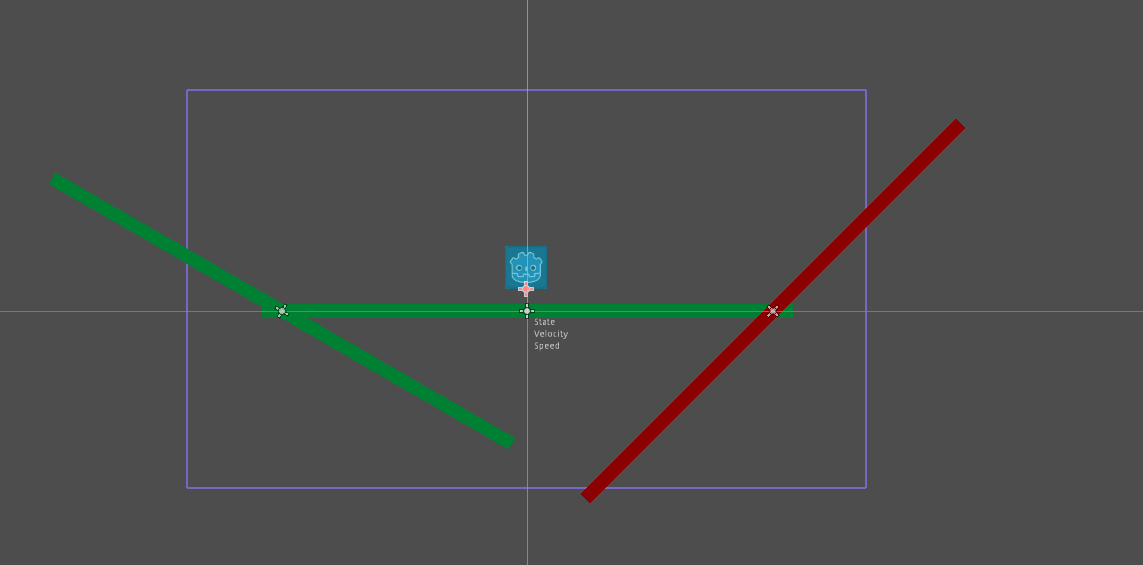
To provide a practical example, we'll use this simple scene. The green surfaces indicate they fall within the player's max floor angle (in this case, 30 degrees), while the red surface is angled above that value and thus is considered a wall.
For our simple controller we're gonna start with using the following code
Initial code
extends KinematicBody2D

enum States {
    GROUND,
    AIR
}

const HORIZONTAL_SPEED : = 6.0 * 64.0
const GRAVITY : = 600.0
const JUMP_FORCE : = -450.0

export(NodePath) var state_label_path
onready var state_label : Label = get_node(state_label_path)
export(NodePath) var velocity_label_path
onready var velocity_label : Label = get_node(velocity_label_path)
export(NodePath) var speed_label_path
onready var speed_label : Label = get_node(speed_label_path)

var current_state : int = States.GROUND
var velocity : = Vector2.ZERO

func _physics_process(delta : float) -> void:
    match current_state:
        _:
            velocity.x = get_horizontal_input() * HORIZONTAL_SPEED
            continue
        States.GROUND:
            state_label.text = "State: GROUND"
            move_ground(delta)
            if not is_on_floor():
                current_state = States.AIR
            if Input.is_action_just_pressed("jump"):
                current_state = States.AIR
                velocity.y = JUMP_FORCE
        States.AIR:
            state_label.text = "State: AIR"
            move_air(delta)
            if is_on_floor():
                current_state = States.GROUND
    velocity_label.text = "Velocity: %s" % velocity
    speed_label.text = "Speed: %s" % velocity.length()

func get_horizontal_input() -> float:
    return sign(
        Input.get_action_strength("move_right") - Input.get_action_strength("move_left")
    )

func move_ground(delta : float) -> void:
    velocity.y = 0.0
    velocity = move_and_slide_with_snap(velocity, Vector2(0, 32), Vector2.UP, true, 4, deg2rad(30.0))

func move_air(delta : float) -> void:
    velocity.y += GRAVITY * delta
    velocity = move_and_slide(velocity, Vector2.UP, false, 4, deg2rad(30.0))
In action this looks like this: https://streamable.com/v2znb
There are two problems
- When walking up the slope you lose a little bit of speed based on how steep the slope is.
- We can slide up the red slope, which should be treated as a wall.
For the first problem, this may be desired in some instances, and in this case it isn't too noticeable at a glance because it's not very steep, but there are plenty of instances where this is not desired behavior. One solution to this problem is to use raycast shapes, as described in this article, however this also changes the way your character interacts and collides with things in ways that may be undesired.
For the second problem, this is because we're assigning back to velocity which prevents gravity from building up in a favorable way, so the best solution in this case is to simply not assign back to velocity from the move_and_slide() call.
So using this revised code
Air movement revision
func move_air(delta : float):
    velocity.y += GRAVITY * delta
    move_and_slide(velocity, Vector2.UP, false, 4, deg2rad(30.0))
we get these results: https://streamable.com/rrhz7
This is a vast improvement, but certainly not perfect. Our horizontal movement is still being projected up the slope which pushes us far up it, far from what you'd typically want in most cases. To solve this using the code from my pull request mentioned in the initial post, we're going to implement the slide_wall() function in a way that let's us properly treat this slope as a wall.
Slide wall function
func slide_wall(motion : Vector2, floor_normal : Vector2, _floor_max_angle : float, collision : KinematicCollision2D) -> Vector2:
    var vertical_motion : = motion.project(floor_normal)
    motion -= vertical_motion # Temporarily remove vertical motion

    if sign(motion.x) != sign(collision.normal.x): # Cancel out any horizontal velocity towards the wall
        motion.x = 0.0

    if vertical_motion.normalized() == -floor_normal: # If falling, project gravity downward along the slope, else keep moving up
        motion += vertical_motion.slide(collision.normal).normalized() * vertical_motion.length()
    else:
        motion += vertical_motion
    return motion
So now we have this: https://streamable.com/7nxj5
This is a huge improvement. When walking into it from the ground, you completely stop as if it were a wall rather than sliding up it, and you can jump at it and land on it in any way and never gain any extra height or slide in a way that feels unnatural or looks strange. You may notice, however, that when walking into it we quickly switch between our ground and air state. This is because the ground state has no vertical momentum and only knows we're staying on the ground because we're using snapping via move_and_slide_with_snap(). Simply changing the constant y velocity on the ground from 0 to around 10 or so will solve this issue: https://streamable.com/xt0l0
So now what about the slopes we can walk up? For that we can implement slide_floor()
Slide floor function
func slide_floor(motion : Vector2, floor_normal : Vector2, _floor_max_angle : float, collision : KinematicCollision2D) -> Vector2:
    var vertical_motion : = motion.project(floor_normal)
    if vertical_motion.normalized() == -floor_normal: # Subtract vertical motion if it's going towards the ground, this gets rid of our constant downward velocity and also makes landing on slopes more stable, as we would otherwise slide down a tiny bit when landing
        motion -= vertical_motion

    motion = motion.slide(collision.normal).normalized() * motion.length() # Maintain speed while on ground, regardless of how steep the slope is
    return motion
So our final result is this: https://streamable.com/283qj
In just 20 lines of GDScript, we've given the player a constant ground speed and made unwalkable slopes function more like walls, leading to a much more consistent and stable movement with very minimal effort.
BanchouBoo
on 19 Sep 2019
Nice write up. Very coherent, easy to read, and great example videos!
I do have one question however. Can you achieve this same effect using a RigidBody2D with a circle collision? If true, what's the big differentiator from a developer using RigidBody2D instead of KinematicBody2D? I'm not saying this is bad because more enhancements to KinematicBody2D the better, but there is a point where a developer would be better off using a RigidBody2D node, and achieve even greater fluidity with movement.
 girng
on 19 Sep 2019
girng
on 19 Sep 2019
For things like character controllers, it is far better to directly control every aspect of movement rather fighting against a rigid body which is meant for more realistic physics that don't need to be as tightly controlled. It makes it easier in most cases to get the exact behavior you want with less likelihood for unintended reactions in the physics.
BanchouBoo
on 19 Sep 2019
This tutorial uses a RigidBody2D set to Character mode. Gif of the character falling down a slope smoothly. I was just curious why maybe someone would use a KinematicBody2D, but your explanation makes sense, thanks.
girng
on 19 Sep 2019
Overall I think this proposal is solid, personally I would just use move_and_collide and define my own logic but I understand that is a lot to ask of newer users.
I feel like the implementation details need to be ironed out (automatic callbacks vs defining callbacks by calling some method on kinematic body vs passing the functions directly into the move_and_slide function).
I also feel we need to be able to keep this optional and it should not be any extra work to keep the default "slide always" behavior.
 MunWolf
on 19 Sep 2019
MunWolf
on 19 Sep 2019
If anyone is interested in using this feature while waiting for any kind of official response/implementation, I have a patch built around the 3.2.1-stable tag here. No guarantee it'll work on master, any other branches, or another tag.
BanchouBoo
on 18 Apr 2020
Related issues
 regakakobigman
·
3Comments
regakakobigman
·
3Comments
 PLyczkowski
·
3Comments
PLyczkowski
·
3Comments
 davthedev
·
3Comments
davthedev
·
3Comments
 wijat
·
3Comments
wijat
·
3Comments
 KoBeWi
·
3Comments
KoBeWi
·
3Comments
Most helpful comment
To provide a practical example, we'll use this simple scene. The green surfaces indicate they fall within the player's max floor angle (in this case, 30 degrees), while the red surface is angled above that value and thus is considered a wall.

For our simple controller we're gonna start with using the following code
Initial code
In action this looks like this: https://streamable.com/v2znb
There are two problems
For the first problem, this may be desired in some instances, and in this case it isn't too noticeable at a glance because it's not very steep, but there are plenty of instances where this is not desired behavior. One solution to this problem is to use raycast shapes, as described in this article, however this also changes the way your character interacts and collides with things in ways that may be undesired.
For the second problem, this is because we're assigning back to velocity which prevents gravity from building up in a favorable way, so the best solution in this case is to simply not assign back to velocity from the
move_and_slide()call.So using this revised code
Air movement revision
we get these results: https://streamable.com/rrhz7
This is a vast improvement, but certainly not perfect. Our horizontal movement is still being projected up the slope which pushes us far up it, far from what you'd typically want in most cases. To solve this using the code from my pull request mentioned in the initial post, we're going to implement the
slide_wall()function in a way that let's us properly treat this slope as a wall.Slide wall function
So now we have this: https://streamable.com/7nxj5
This is a huge improvement. When walking into it from the ground, you completely stop as if it were a wall rather than sliding up it, and you can jump at it and land on it in any way and never gain any extra height or slide in a way that feels unnatural or looks strange. You may notice, however, that when walking into it we quickly switch between our ground and air state. This is because the ground state has no vertical momentum and only knows we're staying on the ground because we're using snapping via
move_and_slide_with_snap(). Simply changing the constant y velocity on the ground from 0 to around 10 or so will solve this issue: https://streamable.com/xt0l0So now what about the slopes we can walk up? For that we can implement
slide_floor()Slide floor function
So our final result is this: https://streamable.com/283qj
In just 20 lines of GDScript, we've given the player a constant ground speed and made unwalkable slopes function more like walls, leading to a much more consistent and stable movement with very minimal effort.