Godot-proposals: Make editor more compact and detailed
Looking at the blender editor you can see a lot of information that are ready to be used without any scroll. Each section like the inspector or the scene navigation is really detailed since no space is wasted.
Opposed to this the Godot editor uses too much spaces to represent even a checkbox, and this make the editor to look at first glance too spartan and later too uncomfortable. And is easy find yourself scrolling a lot during editor usage.
(Down a comparison)
The fact that Godot editor looks so spartan is due to two main factors in my opinion.
- The first one is due to the "General HUD generation" that allow to generate the HUD of any node fitting always in a good way all parameters no matter the type and the real space required.
- The other problem instead is the font type and font size.
Considering these two factors I think that the first one is good to have and difficult to improve, but the second one is easy to improve and changing is a benefit.
For this reason I want to propose to use a better font like the one used by blender (that is called blender and probably is OS) and then match the same font size used in blender.
Thanks to this change we may improve the look and feel of the editor a lot.
Some measurements:

 AndreaCatania
All 25 comments
I don't know, I always hated the blender inspector because everything was so scrunched together. I like the extra spacing. However, that's not saying this isn't a good idea. Different strokes for different folks I guess
 girng
on 4 Sep 2019
girng
on 4 Sep 2019
I agree, the Godot UI is too distended to the point it feels relatively confusing and hard to navigate.
I always notice that when I pass from Godot to Unity or vice versa:
In Unity, a lot of data is displayed in relatively little space, in a way that is still readable and makes me feel under complete control of the situation, I can easily see what I'm interacting with, the context in which I'm doing it, a lot of other data that might interest me etc... (also because the editor panels are rearranged at will)
In Godot, UI elements are big but it's not just a matter of size, the way they are displayed and organized makes it harder to track down what you're interacting with or what you'd like to interact with, the least amount of data accessible at a glance makes things worse.
 samdze
on 5 Sep 2019
samdze
on 5 Sep 2019
For the record, this is how the editor looks like at font size 13 with a window size of 1920×1080 (including window borders, which I displayed for completeness):

This is with font size 14 (the current default value):

Decreasing the font size increases the vertical screen real estate significantly, but care needs to be taken as to not make list elements too hard to click. For example, when the editor font size is set to 13, menu buttons become difficult to target:

This could be solved by increasing the vertical separation at lower font sizes.
However, there's another problem that stems from the code font. We'll likely want to resize it so it's not too big compared to the rest of the editor. The issue is that it looks poor at size 13, even though it looks good at sizes 12 and 14:

This is the code font at size 12:

This is the code font at size 14:

Size 12 might end up looking too small on some displays (or for people with not-great vision), so I'm not sure what we should do about the code font size.
 Calinou
on 5 Sep 2019
Calinou
on 5 Sep 2019
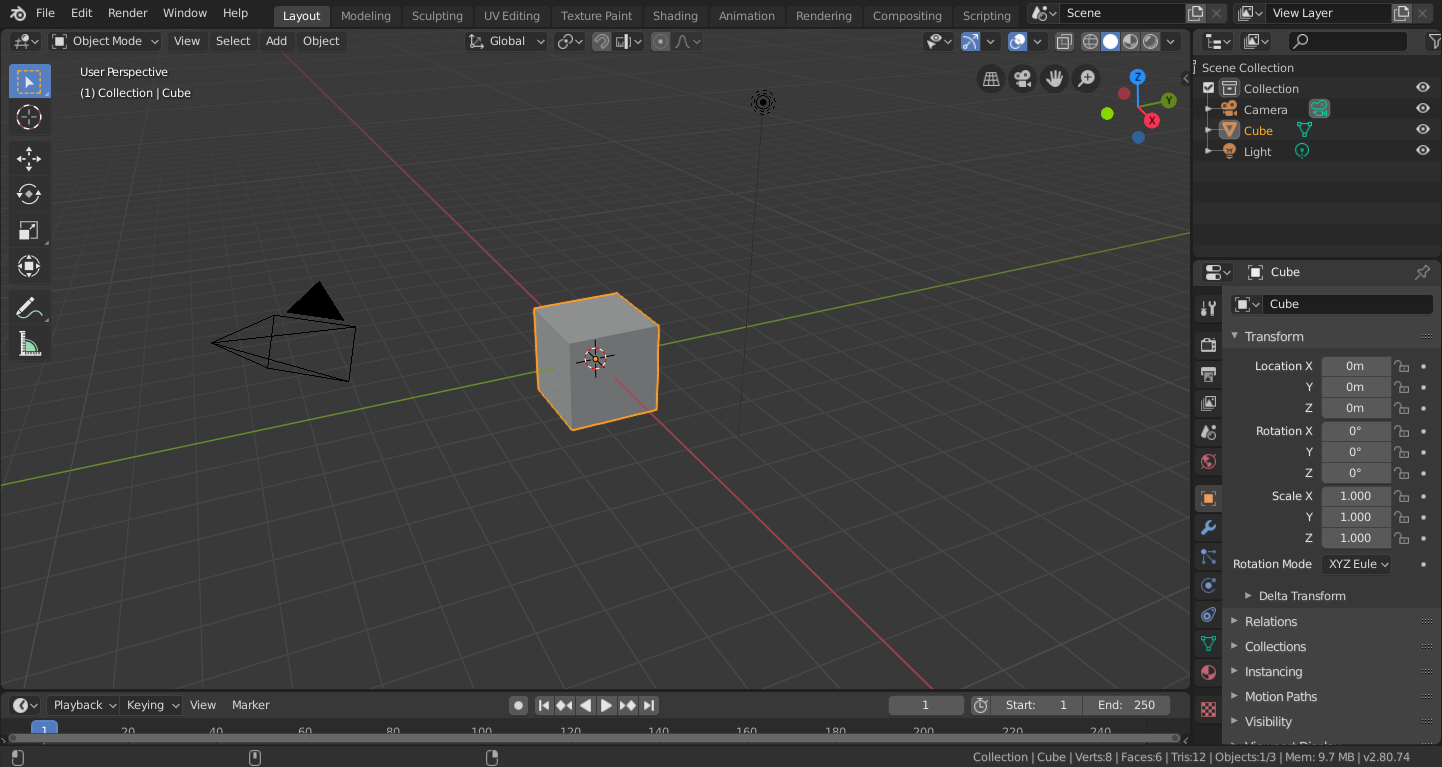
It's worth keeping in mind that the first screen shot comparison in this issue is (AFAICT) Blender 2.79 and recently Blender 2.80 was released with a revised UI after a lot of evaluation:
 follower
on 12 Sep 2019
follower
on 12 Sep 2019
Considering Blender recently redesigned their UI with Blender 2.8, if you're comparing with Blender, this proposal would be incomplete without a comparison with Blender 2.8's UI.
Overall I quite like Godot's current UI, but there are certainly ways to improve it. Checkboxes are an obvious example, currently each takes up the entire inspector width.
 aaronfranke
on 19 Sep 2019
aaronfranke
on 19 Sep 2019
@aaronfranke I don't know how checkbox design could be improved as to take less space in the inspector. Cramming multiple checkboxes on the same row sounds difficult to do, unless you resize the inspector to be very wide. Even then, you may end up displaying completely unrelated properties on the same row.
Calinou
on 19 Sep 2019
I think the UI issue is not just a matter of sizes.
How Godot arranges visual elements creates this subtle sensation of disorder that I don't feel using Unity, for example.
The text and other elements' size contributes to this feeling, but it's just one of the actors in my opinion.
As food for thought:
- The inspector generally gives me the idea that it is very limited in functionality (even if it is not)
maybe due to its limited variety when displaying different types of controls, they almost look all the
same, I think this is one of the reasons why I don't feel like I'm in full control. - I find it a little confusing as well:
property names and categories aren't visually organized and represented in the most readable and distinct way. (and I'd like if they could use more horizontal space effectively)
Maybe this is material for another proposal, but just wanted to explain why changing sizes is not enough imo.
samdze
on 19 Sep 2019
@samdze One way to improve the situation would be to align property names to the right, while keeping the property values left-aligned. This is commonly done in column-based interfaces to make two columns easier to read (look at music players).
Calinou
on 19 Sep 2019
related: godotengine/godot#2207.
 Jummit
on 19 Sep 2019
Jummit
on 19 Sep 2019
@Jummit the concept proposed there is very nice and also much more well organized and displayed than the current theme.
I hope Godot will go more towards that direction in the future, with 3.0 progress has been made, I'm sure there are ways to get even closer to that concept without sacrificing usability.
@Calinou I'm not sure it would be enough, I think there are other graphic elements that should be moved, resized and/or changed in shape/color. The concept godotengine/godot#2207 really gets this right.
samdze
on 19 Sep 2019
1. The inspector generally gives me the idea that it is very limited in functionality (even if it is not)
   maybe due to its limited variety when displaying different types of controls, they almost look all the
   same, I think this is one of the reasons why I don't feel like I'm in full control.
Interesting! To me, that uniformity of being all the same makes me feel _more_ confident
girng
on 19 Sep 2019
@girng Yeah, interesting. Why do you think it gives you more confidence?
To me the very similar look makes them appear as similar in functionality too, and the typical inspector control gives very little interactivity.
samdze
on 20 Sep 2019
@girng Yeah, interesting. Why do you think it gives you more confidence?
To me the very similar look makes them appear as similar in functionality too, and the typical inspector control gives very little interactivity.
Lol, not really sure tbh, it just does because I know the inspector will be uniform dependent on any possible future node I click (except the row title text might be different). This eases my mind I guess, hard to explain. I like that
girng
on 21 Sep 2019
Check this:

I've only changed the font to Source Code Pro and set the size to 12.
With only that change the inspector is much more compact.
AndreaCatania
on 7 Oct 2019
With only that change the inspector is much more compact.
...but, despite the fact that font looks just ugly there, each line looks like it would clamp with the bottom neighbour :( Maybe selection of right font would do the trick for you?
 dreamsComeTrue
on 19 Oct 2019
dreamsComeTrue
on 19 Oct 2019
Well, a proper font can make or break UI, this is true. I would like to note that we can achieve more concise look with the same font size using a shorter font.
I was trying out different Google Fonts to find a better fit, and Work Sans seems to be pretty and clear even at smaller sizes. I went for a thicker one (Medium), but it looks fine on regular thickness as well. Thicker style may work better, if changing font size from 14 to 13 or 12. Here is an overall comparison:
Editor Settings, default
Editor Settings, WorkSans Regular
Editor Settings, WorkSans Medium
As you can see, it's shorter, but wider. Which is a compromise: shorter font gives more vertical space, while eating more horizontal space to preserve clarity. Personally, I'm okay with that. In screenshots above this font gives a couple more lines of content on screen. Here's the Inspector with similar results:
Inspector, default
Inspector, WorkSans Regular
Inspector, WorkSans Medium
I don't feel like it adds more clutter with reduced vertical spacing, at least _between_ blocks of text. _Inside_ blocks, however, there is still a problem, that smaller font makes some buttons harder to click. I suggest, that in some areas font should be adjusted independently from the main font size and style. There might not be a universal solution, that is as good for Inspector as it is for the menus. Here's the main menu (the difference is 2 pixels):
Main Menu, default
Main Menu, WorkSans Regular
Main Menu, WorkSans Medium
I would like to add, that for the most part, Godot Editor is fine on smaller screens. I mainly use it on a 15.6" laptop, and while there is a criminally small amount of space for script editor because of the vertical list of script files (tabs would be much better, like in every other code editor), I wouldn't say, that the work is crippled or completely uncomfortable.
 pycbouh
on 6 Dec 2019
pycbouh
on 6 Dec 2019
@pycbouh Keep in mind character set support is an important criterion for us, as we'd like the editor to support as many languages as possible (without resorting to too many fallback fonts). I don't know how wide Work Sans' character set is, but it's most likely not as expansive as Noto Sans'.
Also, Work Sans tends to look too "stretched" when used as an UI font, so I'm not really convinced anyway.
Calinou
on 6 Dec 2019
@Calinou Yes, obviously, we need a font with full character set. I'm not advertising this particular font, this is just what I have found as an interesting alternative among the first 20-30 fonts available from Google and haven't checked if it did support characters beyond ASCII.
As to the stretched look, I think it's a matter of familiarity. Current one looks too stretched vertically, given a comparison. It's hard to have a font be smaller vertically and not use extra space horizontally, if we want it to remain readable.
pycbouh
on 6 Dec 2019
@Calinou Here's another example. Exo 2 looks like a font for a sci-fi game, which may be a turn-off, but even at 15 it allows for more information to be displayed on screen. At 14 it turns less readable IMO, but the amount of space available is enormous compared to Noto Sans.
Editor Settings, Exo 2 at size 14
Editor Settings, Exo 2 at size 15
We can all look for a more proper font, but to do so we need to establish, first and foremost, if we indeed see the benefit of changing it. If the maintainer team does not think that the change is needed or is beneficial, at least in principle, then this research is moot. And then we need to formalize requirements for such font, like character set support, font style, preferable dimensions, etc.
pycbouh
on 6 Dec 2019
I think the main reason why the concept from godotengine/godot#2207 looks visually pleasing is that it gets rid of the boxy outlines everything in Godot has. It also uses round edges for some elements and gets rid of some clutter, like the lines in the scene tree.
It also uses highlights in very few but important places, and has a better color scheme.
Jummit
on 11 Mar 2020
@Jummit That's precisely the style I've been using for my Godot editor theme redesign :slightly_smiling_face:
Calinou
on 11 Mar 2020
@Jummit Yes, all the current clutter, the unnecessary outlines and borders, the blocky style, make for a unpleasant UI compared to that one. The font then really adds to that, very elegant.
I think Godot should try to hide as much as possible the underlying structure that is obviously composed by block shapes, and this can be achieved, as already said, removing lines, rounding a few key UI shapes, highlighting UI elements in a smart and pleasant way and choosing a new coherent font.
Finally, a work of spaces and margins rebalancing could be needed as well.
@Calinou Can we see your progress?
samdze
on 11 Mar 2020
By the way, since we discussed fonts in December I've adapted IBM Plex Sans as my main GUI font for the editor. It does not have a dramatic effect on the editor space, but at medium thickness it looks much easier on the eye.
Default Noto Sans
IBM Plex Sans (Medium)
It's distributed under SIL OFL and has less glyphs than Noto, but European languages, including Cyrillic alphabet, should be covered.
Now, looking at Noto Sans' glyphs in Google Fonts does not feel as bad as it does in the editor. I can think of two things: there is some issue with rendering scaled down fonts in Godot; or Medium does it for me, and Noto does not have a Medium style.
While thickness may be subjective and down to one's (bad) eyesight, one of the issues with Noto I can show objectively: look at the "i"s. The dot is almost indistinguishable. And that's how the whole font feels to me.
pycbouh
on 11 Mar 2020
@samdze I keep the current work-in-progress branch here: https://github.com/Calinou/godot/tree/improve-editor-theme
It needs further tweaks to solve some quirks and avoid reducing the screen real estate available.
Now, looking at Noto Sans' glyphs in Google Fonts does not feel as bad as it does in the editor.
Can you take a screenshot of Noto Sans in your browser at the same size as the default Godot font? This is probably due to different font hinting settings, which you can configure in the Editor Settings (on Editor > Interface). To match the OS' default settings, Godot 3.2 onwards defaults to Light font hinting on Linux and Windows, and None on macOS.
Note that in any case, Godot won't perform LCD subpixel optimization. Last time I checked, FreeType supports this, but it's unfortunately difficult to implement in a game engine as you need a specialized blend mode to deal with transparent backgrounds.
...and Noto does not have a Medium style.
It does, it's just not available on Google Fonts :wink:
Calinou
on 11 Mar 2020
@Calinou
Can you take a screenshot of Noto Sans in your browser at the same size as the default Godot font?
Sure. Though I still find that glyphs themselves are easier to read at a glance in case of IBM Plex. Things like a small curve at the bottom of lowercase "l" help me, personally.
Changing hinting to "Normal" setting reduces some blurriness in the editor, but letter spacing suffers in some cases. Which is why Medium works for me, I guess. Glyphs just are a bit thicker, which reduces blur from "Light" hinting, while still having a more even spacing.
pycbouh
on 11 Mar 2020
Related issues
 Torguen
·
3Comments
aaronfranke
·
3Comments
Torguen
·
3Comments
aaronfranke
·
3Comments
 Dorifor
·
3Comments
Dorifor
·
3Comments
 Xrayez
·
3Comments
Xrayez
·
3Comments
 regakakobigman
·
3Comments
regakakobigman
·
3Comments
Most helpful comment
I don't know, I always hated the blender inspector because everything was so scrunched together. I like the extra spacing. However, that's not saying this isn't a good idea. Different strokes for different folks I guess