Godot-docs: 3.1: Document new CanvasItemMaterial
3.1 introduced a new CanvasItemMaterial resource where things like blend_mode and particle animation properties have been moved. This resource should now be created in the inspector, and can be shared between instances.
The existing documentation needs to be updated to properly describe this.
CC @JFonS
 akien-mga
All 2 comments
It took me quite some time searching around how to set up 2D Particles with textures that contain multiple frames of animation.
Posting this mini-guide here, in case some of the info gets used for the final documentation. It might not be the best place, in which case i'm sorry, and feel free to remove the comment.
As described by OP in https://github.com/godotengine/godot/issues/24387 , the H and V Frame properties were moved to the CanvasItemMaterial resource.
Using https://godotengine.org/qa/13551/animated-texture-particle2d-probably-but-checking-anyway and https://www.youtube.com/watch?v=lrLrbEVlUvY as reference the steps to setting up animated particles are:
- Create a Node2D and a child Particles2D node
- Assign the texture image which contains the multiple animated frames to the Textures -> Texture property of Particles2D node. Let's assume that there are 16 frames, so the image has 4 rows and 4 columns.
- Create a CanvasItemMaterial and assign it to the Particles2D node in the CanvasItem -> Material section
- In the created CanvasItemMaterial, check the Particles Animation checkbox, and set H and V Frames to 4.
- Create a new ParticlesMaterial resource and assign it to the Particles2D ProcessMaterial -> Material property.
- The ParticlesMaterial resources has an Animation section, where you want to set Speed to something higher than 0 (1 for example).
- Make sure Emitting is set to On. You should now see at least one animated particle.
 alcroito
on 17 Feb 2019
alcroito
on 17 Feb 2019
Hey!
First of all I'd like to emphasize how I greatly appreciate the work everyone's been doing to write the docs, since they are really well written, but for this particular feature, I'd like to add my feedback, first of all it was very hard to find this thread, I'm currently learning and I think people like me who are following outdated guides on the internet on how to do this should be able to easily find.
Secondly, I think the UI isn't very intuitive either, in my build this is how it looks:
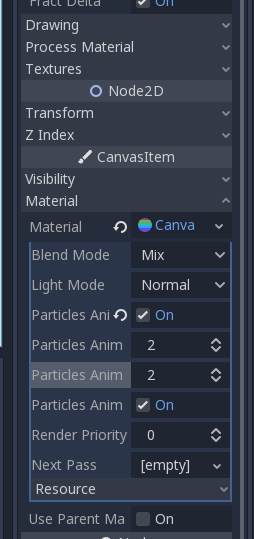
By default that toolbar is too small and the wording is a bit too long on it to properly see that is saying V and H frames.
 peteyycz
on 10 Dec 2019
peteyycz
on 10 Dec 2019
Related issues
 Gfurst
·
3Comments
Gfurst
·
3Comments
 tavurth
·
3Comments
tavurth
·
3Comments
 RiverMesa
·
4Comments
RiverMesa
·
4Comments
 gvekan
·
3Comments
gvekan
·
3Comments
 jcs224
·
3Comments
jcs224
·
3Comments
Most helpful comment
It took me quite some time searching around how to set up 2D Particles with textures that contain multiple frames of animation.
Posting this mini-guide here, in case some of the info gets used for the final documentation. It might not be the best place, in which case i'm sorry, and feel free to remove the comment.
As described by OP in https://github.com/godotengine/godot/issues/24387 , the H and V Frame properties were moved to the CanvasItemMaterial resource.
Using https://godotengine.org/qa/13551/animated-texture-particle2d-probably-but-checking-anyway and https://www.youtube.com/watch?v=lrLrbEVlUvY as reference the steps to setting up animated particles are: