Godmode9: [Research needed] Handling .cmd CMACs on SD card
CTRNAND transfer works by transfering the contents of 1:/title and 1:/dbs, then fixing the CMACs for all data in these dirs. On CTRNAND only, the .cmd file can be ignored and all other relevant CMACs have been figured out. This is the reason why a transfer works for CTRNAND, but not for SD installed contents.
To make transfers also work for SD installed contents, we need to figure out how the CMACs contained in the .cmd file are generated.
 d0k3
d0k3
All 68 comments
hmm...
when i get home ill find my 3ds charger and see if i can find anything about it
i was already looking at this but havent found anything yet
 eiiiiix
on 9 Apr 2018
eiiiiix
on 9 Apr 2018
Finally somebody noticed these .cmd files :D.
Once this got figured out, we are one step closer to UHS speed CIA installation (the other obstacle would be injecting title info into title.dband ideally ticket.db)
 dogtopus
on 14 Jun 2018
dogtopus
on 14 Jun 2018
It's for SD transfers between console rather than for CIA installation (doubt we'll ever fully figure out the title.db and ticket.db, too). And, it's really hard to reverse engineer. We need help.
d0k3
on 14 Jun 2018
I was finding a way to directly install CIA to sdcard from PC and got stuck at this ".cmd" file too. Not much information about this on 3dbrew or anywhere on Google.
 tranxuanthang
on 25 Jun 2018
tranxuanthang
on 25 Jun 2018
The next problem you'd be facing, @tranxuanthang, would be updating the title.db and ticket.db.
d0k3
on 26 Jun 2018
I'm interested in CIA installation from PC as well. Are there some docs about how installation is performed on 3DS devices that I can examine?
 Nemris
on 7 Jan 2019
Nemris
on 7 Jan 2019
How does one calculate the CMAC for an arbitrary block of hex? I have a theory those 0x10 bytes CMACs in the .cmd are derived over the entire 512 bytes, decrypted form of the ncch.bin headers found in the game and manual .app files.
How was this current conclusion arrived?
- Hex editing any of the (green) values causes the HOME Menu banner to disappear.
- Hex editing any of the (green) or (purple) values causes the 3DS to crash when launching either game or manual respectively.
- If not editing either (green) or (purple) section, hex editing any part of the game's
ncch.binor first 512 bytes in the.appalso causes the HOME Menu banner to disappear. Edits were done in GodMode9 on the spot at [A:] SYSNAND SD. - Within the game's
.app, hex editing only theextheader.binfound below thencch.bindoes not cause the banner to disappear. Launching the game with editedextheader.bindoes cause the game to crash due to mismatch in SHA-256 between this second file and thencch.bin.

Edit 1 - I might be wrong about taking the CMAC of the decrypted form of the ncch.bin. If you installed a decrypted .cia of a SD title and compare this against a GodMode9 encrypted version of the same .cia, their .cmd will have different CMACs for the same .app item. Also, their (red) CMACs differ as well. Nevermind, (red) CMACs stay the same.
Edit 2 - The ncch.bin changes ever so slightly if installing decrypted vs gm9 encrypted versions of the CIA. For my example of F-ZERO SNES VC, the change occurs at offset 0x18F. When viewed in [A:] SYSNAND SD and image mounting the game's app, the two versions ncch.bin have the same hash.
 TurdPooCharger
on 22 Mar 2019
TurdPooCharger
on 22 Mar 2019
I think the first cmac is of a hash of the data following it. I figured it out by guessing once. The others are not simply of the NCCH headers (though it is related, as changing anything outside of it raises a different error), I would guess it's similar to DISA/DIFF where the cmac is for a hash of a data block.
 ihaveamac
on 22 Mar 2019
ihaveamac
on 22 Mar 2019
Actually, the first cmac is of the first 0x10 of the file (no hash). The rest I still don't know.
ihaveamac
on 22 Mar 2019
I believe Content ID or Content Index influences the cmac. This is shown in the DLC for "Super Smash Bros. for Nintendo 3DS", where all content past the first is identical (same sha256), but cmacs for all the contents are different.
Also interesting to note are parts of the cmd file where the Content ID is FFFFFFFF. I would guess DLC content that is not installed. image
ihaveamac
on 22 Mar 2019
Maybe the CMACs are derived from the .tmd per content chunk records?
https://www.3dbrew.org/wiki/Title_metadata
Edit - Count me out until I catch up. Studying how these various AES-MAC work.
https://yifan.lu/2016/04/06/the-3ds-cryptosystem/
TurdPooCharger
on 22 Mar 2019
Okay, the .tmd doesn't appear to be part of those CMACs. With my example F-ZERO SNES VC, I took it's 00000001.tmd out of the content folder. The game appears and launches without issue with the .tmd gone.
In the .cmd as shown in row 0x00000020 from block 0x20-27, you get:
- 00 00 00 00 01 00 00 00
These are Content IDs in endian for:
00000000.app- game00000001.app- manual
If you edit the first four bytes (game), this will cause its HOME Menu banner to disappear. Let's say you try editing the name for block 0x20-23 along with the .app.
- 02 00 00 00 01 00 00 00
00000002.app- game, renamed
The banner will be missing, and launching the game will fail.
I also edited the mirror block 0x24-2F from:
- 00 00 00 00 01 00 00 00
to - FF FF FF FF FF FF FF FF
This does not affect banner appearance or the launching of either game or manual.
I tried injecting FBI in H&S system title. You can hex edit the first 512 bytes or ncch.bin, and it's banner still shows. I did the NCCH edit at an arbitrary offset around an area that had 00 values.
If you make similiar edits to the .cmd and its corresponding .app file name, the banner will still appear. In either scenario (NCCH or CMD+APP matching name edits), FBI will still launch.
I managed to rename injected FBI from:
- CMD:
04 00 00 00 07 00 00 00→05 00 00 00 07 00 00 00 - APP:
00000004.app→00000005.app
If the CMD and APP are not matched in the edits, FBI banner will not appear / will not launch.
With limited understanding of AES-MAC, OMAC1/CMAC, maybe the pieces to the formula:
- SD Key (or another AES Register Key) = Key No.1
- Content ID = Key No.2
ncch.bin(encrypted hex view or it's hash) = message
Late Edit - If you swap places for the Content IDs and CMACs in the .cmd, the game banner won't show / game + manual crashes at launch.

The Title ID of F-ZERO SNES VC is 000400000F701900. I used NSUI to custom inject Killer Instinct SNES VC with the same Title ID. I then swapped places for the games' 00000000.app, putting Killer Instinct in place of F-ZERO. This was done using [A:] SYSNAND SD. I edited the F-ZERO's .cmd with the CMAC of Killer Instinct (block 0x30-3F).
Killer Instinct's banner shows and game launches. F-ZERO manual launches. Pressing (HOME) button in the game will crash the 3DS.
TurdPooCharger
on 23 Mar 2019
@ihaveamac. I think I know how the Content ID relates to different CMACs for the Super Smash Bros DLC with identical .app files. They have the same SHA-256 hashes for their decrypted forms when viewed under [A:] SYSNAND SD. However, their hex values are different when seen in [0:] SDCARD ( )/Nintendo 3DS/ID0/ID1/title/0004008c/000edf00/content/00000000/*.app [USA version of that DLC]. The SD content encryption & decryption are dependent on the file names and locations.
I'm not sure if I can be of any further help as the biggest hurdle I'm facing is obtaining those 0x40 AES key slots and the secret constant C for the 3DS NormalKey generator formula... Second hurdle is playing catch-up watching YouTube examples and reading NIST publications in how AES & MAC stuff works like XOR, ROL, ROR, and other scrambling techniques.
TurdPooCharger
on 24 Mar 2019
@TurdPooCharger - you mean you're unsure which AES keyslot to use?
d0k3
on 25 Mar 2019
I'm posting these references here so those who aren't versed in this 3DS subject may get up to speed. I believe I'm now sufficiently knowledgeable enough to continue discussion.
- AES-MAC / CMAC
- [wiki] One-key MAC
- RFC 4493: The AES-CMAC Algorithm
- Math operations: [wiki] Exclusive_or (XOR) and [wiki] Circular shift (bitwise rotation left/right, ROL/ROR).
keyX, keyY, NormalY, AES keyslots
- 32C3 (32th Chaos Communication Congress) - BREAKING THE 3DS
- [GBAtemp] AES key scramber
- Secret (CTR) constant C = #XX#X#XXX#XX##########XX#X#####X, where {# = 0-9} and {X = A-F}.
- [3dbrew.org] [AES Registers](https://www.3dbrew.org/wiki/AES_Registers), DISA and DIFF, OTP Registers (??)
aeskeydb.bin(1.00 KB) at 3ds.hacks.guide (A9LH to B9S).aeskeydb.bin(256 bytes) at quantumcat1.github.io (Installing arm9loaderhax).- Additional keys found at _that paste site_ and when searching
aes_keys.txtfor Citra emulator. - Nintendo 3DS AES KeyScrambler API (online calculator)
@d0k3, would you happen to already know which specific key is responsible for the CMAC of the CMD header as shown in the below example? I'm aware there are separate, different keys that handle CMACs for the .sav files and title.db & import.db found in Nintendo 3DS folder.

Edit - The above picture was originally posted with'0x16 bytes'. Corrections made to denote '16 bytes'.
TurdPooCharger
on 26 Mar 2019
Small update. I figured out how the CMAC is calculated for the .cmd header [block 0x00-0F]
{ ie, teal colored message (m) }.
Slot 0x30 keyX: X##X#####X######X##XXX###X####X#
, which has a CRC-32 hash of 4032F4C0.
Slot 0x30 keyY: console or user unique
This is the 16 bytes from the movable.sed located in block 0x110-11F.
Calculate your 0x30 NormalKey using the AES Key Scrambler formula.
Use the provided goombi site.
From the above picture example, the 0x30 NormalKey is the key (k).
The rest follows as per AES-CMAC. Use the provided CryptoJS extension site where the message and key are both hex encoded.
Sadly to say, I haven't been able to determine if the 0x30 NormalKey works for the CMACs for the .app contents or on their theorized encrypted 512 bytes NCCH headers.
There might a different NormalKey slot at work. Grr.
TurdPooCharger
on 28 Mar 2019
How the heck did any of you OG devs figured out this s* in the first place? Did the idea of sticking it to Nintendo out of pure LoL spite was what fueled your ambitions? My mind can barely comprehend back tracing all of this let alone your average 3DS user.
Readers who would like to follow how the CMACs are derived for the .db files found on CTRNAND and Nintendo 3DS folder, take a look at this example diagram. This is provided so no one is lost (or is less lost) on what's going on.

Since I possess both a n3DS and n3DSXL, I made a dummy profile using the movable.sed keyY from my n3DS onto my n3DSXL. The movable.sed that the n3DSXL used was filled with FF null values throughout and was trimmed to 288 bytes. The only thing it borrowed was the keyY.
Installing a fresh copy of F-ZERO on the n3DSXL, it has matching .cmd CMACs as that of the separate F-ZERO found on the n3DS.
While not conclusive, this suggest the CMACs for the title contents (game, manual, dlc, etc.) share the same 0x30 NormalKey as that of the CMD header.
I have to revise my findings about the NCCH header. For SD version you can edit the ncch.bin in either encrypted (0 drive) or decrypted (A drive) forms, and it's applies just the same regarding the two block halves. For SD version of the FBI, as long as block 0x100-1FF is not tampered with, that banner will remain on HOME Menu.
However, if you try editing FBI injected in H&S blocked 0x000-0FF, the reverse happens where banner disappears and icon turns black. This means system titles are verified not by CMACs found in .cmd but through their RSA-2048 signature.
@ihaveamac's theory of DISA/DIFF-like CMAC with Content ID may very well be a possibility. Icould not determine a simple relation of the SHA-256 hash or 0x100-1FF block in either decrypted or encrypted forms to be the message (m). We are now hitting the brickwall in figuring out if there's a AES-CMAC (intermediate), how it's structured if it exists, and whether there's some sort of MAGIC header that goes with it.

TurdPooCharger
on 29 Mar 2019
System titles don't have any cmacs, except Download Play Child titles. Thanks for finding out the signature is probably not included, but I'm not sure how much farther we can go without someone finding the code that generates these cmacs.
ihaveamac
on 29 Mar 2019
I believe I found a missing piece to the AES-CMAC (intermediate) puzzle. Sorry, no color coding for the picture below.
There are some data fields that seem to correlate to either .app content id, .cmd content id, and install order? / content type? / number of contents? (01 00 00 00 vs 02 00 00 00 for block 0x18-1B).
There's also the mysterious block 0x28-2B == 0x5FC-5FF == 0x9FC-9FF. This continuously updates in value and appears to be involved with the on-the-fly formation or building of those .app files.
Another mystery block is 0x21C-21FF. My theory is that it's some sort of offset to keep track of where along in those .app files when they're being created. ¯\_(ツ)_/¯

The .ctx is a temporary file created when installing a .cia. From multiple attempts at reinstalling F-ZERO SNES VC and Super Smash Bros DLC, pressing remapped (SELECT) button to open Rosalina menu, rebooting to GodMode9 in the middle of installs, and checking the A:/ drive, I've noticed several observations.
The size of the
.ctxfile will be different depending on the title. The.ctxfor F-ZERO SNES VC, which has both game and manual, is 2.50 KB (0xA00 bytes). The custom injected Killer Instinct SNES VC with F-ZERO's Title ID, which has only game and no manual, is 1.50 KB (0x600 bytes). Super Smash Bros DLC is also 1.50 KB (0x600 bytes).For F-ZERO SNES VC, the program FBI (or is it NIM service?) will create _seemingly_ dummy versions for the
00000000.app(game) and00000001.app(manual). These.appfiles will have their CMACs calculated and added to the.cmd, but their values are just placeholders.Once those dummy
.appfiles are created and their placeholder holder CMACs are added to.cmd, FBI (or NIM service?) will partially build the decrypted form of00000000.app. Its real CMAC value will be calculated and added to the.cmd. The same happens to00000001.app.Once both game and manual have their final CMACs put onEdit 1: I may be wrong on the chronological order. Game.cmd, the program/process will switch back to building the complete decrypted forms of00000000.appand then00000001.app..appis (fully) worked on first before manual.appis worked on next.The
.ctxfile is deleted after completing content install.For Super Smash Bros DLC, there are differences compared to F-ZERO when it comes to the
.cmd. This file is updated and replaced for each.appthat is added. For this example, the 3DS creates00000002.cmdwith the expanded info before deleting the previous00000001.cmd(and so on and so forth).

My multiple Rosalina menu pauses and reboots to GodMode9 has not been able to "catch" the supposedly NCCH header placed in that .ctx because CIA install goes by much too quick.
I'm not sure if this is technically possible, but if only there's some way to probe, directly observe, or record how the .ctx changes in real time, this might reveal how the code message is produced in regards to content CMACs.
Edit 2 - Has anyone seen FF like this before in other AES-CMACs? Is this Nintendo's countermesasure at garbling the AES-CMAC message to keep it hidden?
Edit 3 - Forgot to add. The CMACs found on rows 0x200 and 0x600 are the SHA-256 hashes for their sections below as the message (m). NormalKey is slot 0x30.
TurdPooCharger
on 2 Apr 2019
I have a suspicion that block 0x200-5FF in the .ctx is the work space in creating the game content's CMAC and the same goes for block 0x600-9FF for the manual. Before being sanitized, those FF areas of interest might be similiar to the cardinfo.bin found in 3DS roms.
Ideas I've tried thus far ...
1. Reformat 256 MB, 4 GB, and 32 GB micro SD cards in FAT32 + 512 bytes cluster size.
By decreasing the cluster size, I was hoping to slow down the write speed enough that pulling the Rosalina menu and booting to GodMode9 might stop the .ctx mid-write before those blocks are filled with FF. The cards are still written to too fast for it to be humanly possible in stopping it.
2. Examine memory dumps from the Rosalina menu process list.
I don't know which process to look in and haven't any luck searching plaintext in a hex editor.
3. Countless variations of guessing in trying to recreate the CMAC message data field.
No. Just no. :'(
Another idea that hasn't been attempted.
4. Take an o3DS/o2DS system and downgrade to the lowest 3DS firmware version.
Install a .cia on old firmware in hopes that the supposed FF data clearing was not an original implementation.
Far fetch... :/
5. Refer or back track to the person who originally derived or obtained those DIFF & DISA AES-CMAC types.
Maybe he or she knows of way to observed how this CMAC field is made.
Late Edit - Maybe some good news?
6. Scan SD card with data recovery program.
Look for .ctx files that weren't fully erased and haven't had their data fields filled with FF.
TurdPooCharger
on 4 Apr 2019
It looks like memory dump approaches will not work.
I attempted installing F-ZERO, rebooting to GodMode9, and then extracting the fcram.mem found in the [M;] MEMORY VIRTUAL. While the dumps reveal an interesting observation that when installing a .cia, the ticket is installed first followed by .tmd and then game .app, there are no signs of .ctx or .cmd.
Searches in other GodMode9 .mem types and the various Luma3DS processes dumps came up short, too.
When hex searching the decrypted .firm of NATIVE_FIRM, one can find references of CMAC types CTR-EXT0, CTR-SYS0, CTR-NOR0, CTR-9DB0, CTR-SAV0, and CTR-SIGN in close proximity to cmd and ...ctx
From this subreddit thread and 3dbrew revision history,
@TuxSH is credited in figuring out how those previously mentioned CMACs are generated.
I have one simple question. TuxSH, did you use some sort of ARM disassembler like IDA Pro when you reverse engineered those CMAC message fields?
TurdPooCharger
on 7 Apr 2019
I may be a bit out of the loop here. Thanks to everyone putting in as much work as you do, especially @TurdPooCharger, @BpyH64 and @ihaveamac. Sorry it takes a bit long these days to get back, real life stuff is getting in the way.
If there's anything that needs my attention, please tag me. And, once that puzzle is solved it will get an implementation in GM9, of course.
@BpyH64 - I wish I could understand russian. Google Translate fails for that page. Does that page contain any info we're still missing?
d0k3
on 30 Apr 2019
For example, open the game file (f7541289.app) and extract the area (0x100-0x1FF) into a separate file. Next, you need to increase it by 8 bytes. The first 4 bytes (00 00 00 00 is the main game file) the next 4 bytes (89 12 54 F7 file name in reverse order).Take from all this SHA256 hash. Then we encrypt the received hash with our normalcmackey

Last lines 00000001.cmd = AES_CMAC(sha256(0x100-0x207),normalkey(keyY,keyX30))
 ghost
on 30 Apr 2019
ghost
on 30 Apr 2019
@BpyH64, you magnificent bastard.
Guys, what he stated is true! I'm getting CMACs matches for my F-ZERO SNES VC as per his instructions.
When you PMed me at GBAtemp, I didn't replied back because I've given up pursuing this research topic by then. Dejection set in after spending days failing to guess the CMACs message formula for the game and e-manual .app.
Dude, I'm in tears. Thank you so much for solving this mystery. 😅
The boxed green 0x100-103 portion is 01 00 00 00 for the e-manual.
We'll need more checking with DLC and update titles but yes! Nintendo 3DS folder "SDTransfer" is now a reality.
TurdPooCharger
on 30 Apr 2019
The main applying is to install a 3GB game in 5 second. Game install and encryption on a PC and then copy on SD card
ghost
on 30 Apr 2019
@TurdPooCharger I’m lost on your last sentence. We could transfer the Nintendo 3DS folder years ago without even dealing with crypto. Just a small edit of movable.sed was needed, and that was it.
 urherenow
on 30 Apr 2019
urherenow
on 30 Apr 2019
@urherenow. That edit done to the movable.sed where you match the 0x30 KeyY to the 32-char
Now that it's known how all those CMACs are derived in the .cmd, it is now possible to share with one anothers' Nintendo 3DS folder without having to change your movable.sed.
The 1st half of the 0x30 KeyY is directly related to the LocalFriendCodeSeed_B. I think there's an aspect where having an invalid 1st half of that KeyY restricts access to Nintendo online services like the eShop... Also, it would not be wise having multiple people sharing the exact same KeyY if they intend to connect online at the same time.
Changing the KeyY also means forfeiting your personal user info like the linked NNID. Other than using EmuNAND to set up another NAND profile, that also means giving up the Nintendo 3DS folder you're currently using when adopting someone else's.
With the CMAC hurdles solved and out of the way, we get to have our cake and eat it too!
TurdPooCharger
on 30 Apr 2019
Cool. The method I speak of involves no keys though. You zero out a certain spot, and the 3DS treats it like a system transfer (correcting everything on its own). I had written a tutorial on maxconsole back in the day, before we had decrypt9 and such.
Edit: found it. If your movable.sed size is 0x140, you trim it to 0x120, then you just zero out the 4 bytes next to SEED (the second 4 bytes of the file). My original goal was to get my Mii Plaza data back, but after the whole thing, it could also read the SD files (and I could, in fact, move the SD data back and forth between both consoles, iirc).
https://www.maxconsole.com/threads/manual-system-transfer-after-failed-transfer-nnid-already-transferred.37617/
urherenow
on 30 Apr 2019
@BpyH64 Thank you very much for figuring out how the cmacs are calculated. I just reproduced it for a title with two contents.
ihaveamac
on 30 Apr 2019
@BpyH64 - thanks a ton! I'll add that to GodMode9 soon. @urherenow - that method does sound interesting, too.
d0k3
on 1 May 2019
Simply doing what @urherenow said to movable.sed just removes the CMAC, making it simpler to edit the keyY. In itself, it doesn't change what set of SD data a system can read or do anything like a system transfer. To simulate the effect of a system transfer, you'd do the described operations to the movable.sed of the source system, then inject it to the target system.
 aspargas2
on 1 May 2019
aspargas2
on 1 May 2019
^yes. That’s it. When it’s done, though, both systems can read the same SD card data.
urherenow
on 1 May 2019
@urherenow and @aspargas2, the purpose of figuring out the CMACs in the .cmd files for all the SD titles within the Nintendo 3DS folder is so that modifying, editing, or swapping out the movable.sed is entirely avoided. For extra clarification, the CMAC in the lower portion of the movable.sed has nothing to do with the ones found in the .cmd files.
For example, you can find the .cmd for F-ZERO SNES VC at:
- sdmc:/Nintendo 3DS/< ID0 >/< ID1 >/title/00040000/000f701900/content/cmd/
00000001.cmd
We're not interested in sharing copies of games, dlcs, and updates that are encrypted using the same movable.sed, or specifically the exact 0x30 KeyY. To learn more about how 0x30 KeyY and 32-char < ID0 > subfolder relates to one another in Nintendo 3DS encryption, see this GBAtemp thread/post:
I hope we can clear up the distinction between "System Transfer" and "SDTransfer"; you'll have to excuse me on the latter term as I couldn't think of a better naming scheme. The influence was borrowed from "CTRTransfer" or "CTRNAND Transfer".
As @d0k3 has touched upon in his original post, content decryption & encryption, and deriving the CMACs for the other files such as 00000001.sav, import.db, title.db, and various 0000000# extdatas have been solved.
Only the CMACs found in the .cmd files (aka, content metadata) was the last hurdle in getting the 3DS firmware to formally recognize or acknowledge those SD titles as yours when launching them.
Although somewhat beyond the scope of the .cmd CMACs, @BpyH64's (and several others) have expressed interest in creating a desktop CIA installer program (think of a computer equivalent of FBI homebrew app), without the need of your 3DS system.
Figuring out how to edit or queue the SD versions of the import.db and title.db will be PITA. A short gap solution is to borrow donor copies of those two from an actual 3DS system that has installed nearly all the 3DS library of games (ie, pre-built "universal" database files) .
TurdPooCharger
on 1 May 2019
@TurdPooCharger I realize that, i was just making sure we had all the facts straight on the movable.sed swapping method.
Edit: the only issue I see with the universal title.db file solution to PC cia installation is that if someone injects that universal title.db to their SD, any title in it that wasn't actually installed on that SD but was in the db would then show up as a 0-block dummy listing in data managememt, and a dummy icon on the home screen if a ticket existed for it. I have a couple janky ideas for how to get around that and allow us to create a PC installer for CIAs with what we have now, but there's likely a much more proper solution I'm not thinking of, so I'll leave that to someone smarter than I.
@BpyH64 These days that works just the same, but I presume there was a time when that CMAC hadn't been figured out yet.
aspargas2
on 1 May 2019
@aspargas2, the guide that @urherenow posted is indeed the earliest homebrew form of System Transfer. This was before the time that the 3DS homebrew community knew how to calculate the 0x130-13F CMAC in the movable.sed. The technique of converting the movable.sed to its 288 bytes size, base state only works because that's how the very first o3DS models had the file come in. The appendage 0x120-13F would only get added when doing the official Nintendo sanctioned System Transfer. Because of that leeway, one could duplicate their movable.sed between multiple 3DS systems with the benefit of sharing the same Nintendo 3DS folder.
I'm not sure if all of us are on the same page knowing the significance of the solved .cmd CMACs where the Nintendo 3DS folder, once it has been decrypted, is independent of any particular movable.sed. This is kinda like how using CTRTransfer is like a cut down, universal version of restoring your SysNAND .bin image minus the TWLN(and) & TWLP(hoto) partitions.
The two sucky things about title.db and import.db is that:
- You can't have one without the other.
- They can't be mixed and matched between different sets.
However, if properly handing these were to be ever figured, not only would a CIA installer computer program be possible, GodMode9 as an CIA installer would as well too.
TurdPooCharger
on 1 May 2019
@TurdPooCharger
Programm install cia on PC already created. A video is being prepared for demonstation
ghost
on 1 May 2019
@BpyH64 I would be interested to see that - do you intend to make the program public at some point?
Also, as I now realize I never said this, major congrats on figuring out the .cmd CMACs!
aspargas2
on 1 May 2019
For example, open the game file (f7541289.app) and extract the area (0x100-0x1FF) into a separate file. Next, you need to increase it by 8 bytes. The first 4 bytes (00 00 00 00 is the main game file) the next 4 bytes (89 12 54 F7 file name in reverse order).Take from all this SHA256 hash. Then we encrypt the received hash with our normalcmackey
Last lines 00000001.cmd = AES_CMAC(sha256(0x100-0x207),normalkey(keyY,keyX30))
Okay, not entirely sure if I got everything right, and there may be some open questions. The red portion of this is the content id. What's the green one? Is that just the index of the content (0x00000000, 0x00000001, 0x00000002, 0x00000003, ...)?
CMD's contain one CMAC per content, and there's a also a (global?) CMAC at 0x10. Sorry if I missed that, but how is the global one calculated?
What about CMD's for TWL titles? These look very similar to the SD ones, but there got to be something special with them, right?
Also, @BpyH64, thanks a ton again! You solved that mystery. Will you release code for that CIA installer?
EDIT: And, one more. What's the order of CMACs at the end of the file? I'd assume this is ordered by content index (the same way as in the TMD file), but I guess I can't be sure.
d0k3
on 2 May 2019
While we're at it, an observation...
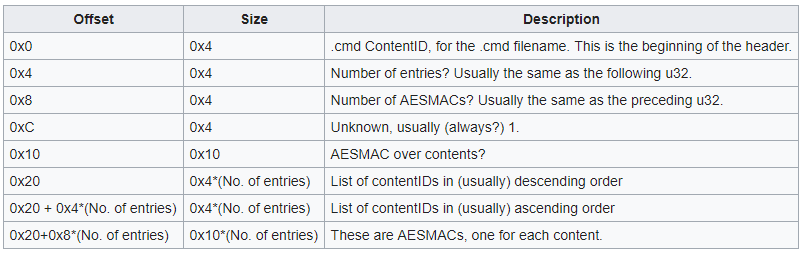
Actually, it looks like both offsets, 0x20 and 0x20+0x4*X are usually in ascending order (correct me if I'm wrong), but offset 0x20 contains available DLCs and 0xFFFFFFFF for unavailable DLCs, while 0x20+0x4*X contains only available DLCs.
d0k3
on 2 May 2019
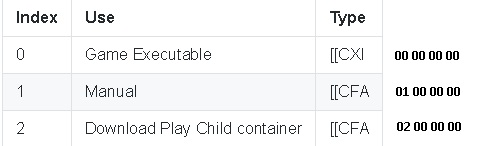
The first one (green) does look like content index to me, since I tried "01 00 00 00" on a content with index 1 and it worked.
CMD's contain one CMAC per content, and there's a also a (global?) CMAC at 0x10. Sorry if I missed that, but how is the global one calculated?
I mentioned this earlier: "Actually, the first cmac is of the first 0x10 of the file (no hash)."
ihaveamac
on 2 May 2019
Green content first 4 bytes
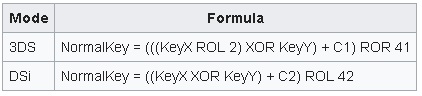
TWL titles differences in finding normalkey(not sure)
ghost
on 2 May 2019

Edit - This diagram has been updated for the subfield block 0x0C-0F. See the post below.
TurdPooCharger
on 2 May 2019
@BpyH64, thanks. I will make correction to the yellow subfield in that diagram.
There is an exception to that it being 00 00 00 00 when its NAND title. If you take a typical SD title, encrypt its .cia using GodMode9, and then install it on the NAND with sysUpdater, its .cmd will have block 0x0C-0F as 01 00 00 00.
TurdPooCharger
on 2 May 2019
New extra fast game installation method for 3DS
https://www.youtube.com/watch?v=xL8Lii8-flY
ghost
on 3 May 2019
@BpyH64, can you clarify what happened in the video?
This is what I'm getting...
- You ran a Windows batch program that installed the files of those two games:
.app,.sav,.tmd, and.cmd. They go into the Nintendo 3DS folder on the SD card. - The program encrypts those contents using the
movable.sedyou provided. - Lastly, the program reproduces stripped down versions of those
.ciafiles. - The SD card is reinserted into the n3DS and then FBI is launched.
- The subfolder title is temporarily renamed to title0.
- Those dummy
.ciafiles are installed. They go in the placeholder title subfolder. - The title subfolder is deleted, and title0 is renamed backed to title.
If I'm not mistaken, the reasons for those dummy .cia files are to:
- (1) install the tickets on the CTRNAND
ticket.db - (2) register those games on the SD versions
title.dbandimport.db
That's freakin' ingenious, man. :smiley:
TurdPooCharger
on 4 May 2019
That's pretty much the same thing that I would do for cia importing without reversing the dbs (Re-encrypt and copy the content over, then install the ticket and content IDs). Nevertheless this is awesome👍
dogtopus
on 4 May 2019
If you create empty files title.db and import.db by size 3269632 bytes.Through godmod9 copy in SYSNAND SD/dbs/.
Then enter System Settings -> Data Management -> Nintendo 3DS -> Programs ->Restore
After that extract title.db and import.db on SD card.They are the same except for line 0x00-0x0F(CMAC)
ghost
on 6 May 2019
Installing those dummy CIAs has a drawback. It records the wrong amount of blocks in Data Management and total size in FBI for each title. Everything else works fine as far as testing goes.
TurdPooCharger
on 10 May 2019
One more thing to figure out is how the CMACs are generated for DSiWare titles. It doesn't seem to be generated the same way as an NCCH content.
ihaveamac
on 7 Jun 2019
It seems CMACs for contents in twlnand are generated differently, since even NCCH contents there have different CMACs than expected.
ihaveamac
on 7 Jun 2019
The cmd format is now documented:
ihaveamac
on 7 Jun 2019
https://f.secretalgorithm.com/WzY2y/godmode9-v1.8.0-60-g87d4152d-20190610163307.zip
Here's a testbuild of GodMode9 with the ability to check (and fix, of course) CMD CMACs. Testing is appreciated, especially in batch mode (It's the menu of the A:/B:/2:/5: drives).
d0k3
on 10 Jun 2019
@d0k3 What do I risk in case the .cmd fixing goes awry? Titles vanishing from the Home Menu?
Nemris
on 15 Jun 2019
@DMSalesman The title's banner would stop showing up, and the title wouldn't launch. Copying back a clean backup of the .cmd file would fix that.
aspargas2
on 15 Jun 2019
@aspargas2 Good. I'll manually bork some .cmd files, and let you all know how the fixing goes in the next days.
Nemris
on 15 Jun 2019
I didn't test in batch mode, but I got some interesting results.
Detecting corruption and fixing the .cmd mostly works, if the corrupted bytes aren't in the range 0x00 to 0x0F. Most specifically:
• 0x00 to 0x01 and 0x03 and 0x0C to 0x0F: corruption detected, different checksum after fixing;
• 0x02: corruption not detected, game behaves as if .cmd was corrupted;
• 0x04 to 0x0B: cannot calculate CMAC.
Nemris
on 18 Jun 2019
Note that the some (all?) of the bytes in that range having incorrect values but a correct cmac will have the same symptoms as an incorrect cmac. Also note that the bytes in that range are the only bytes in the cmd file itself that influence any of the cmd file's cmacs, and only one cmac is influenced by them; the other cmacs in the cmd file are influenced only by the IDs, indexes, and NCCH headers of the contents.
aspargas2
on 18 Jun 2019
@DMSalesman - wait, you edited the offsets from @0x00 to @0x0F? Of course we can' recover from that, that's the CMD header. We only fix CMACs, we can't fix the whole file.
If you edit the byte @0x02, corruption is detected for me (of course, the CMAC @0x10 is based on that).
Bytes 0x04 to 0x0B contain two very important numbers. If they are incorrect, we can't understand the file, thus we cannot calculate the CMACs.
d0k3
on 18 Jun 2019
@d0k3 So, provided that I spare 0x00 to 0x0F, I can meddle with everything else, correct?
I'll whip up some script to do the testing for all the titles in the SD, then.
Nemris
on 18 Jun 2019
I'll join in testing later.
- Take my n3DSXL and o2DS and install the same set of games, DLCs, and updates.
- Pull the files out of the A drive. Keep their copies on computer.
- Take each of their collection and drop them in the A drive for the other system.
- Fix CMACs in drive.
- Pull the files out again. Make copies of the fixed set.
- Cross compare hashes between the [1st o2DS vs 2nd n3DXSL] & [1st n3DSXL vs 2nd o2DS] sets.
TurdPooCharger
on 18 Jun 2019
@DMSalesman - well, no. We can only fix CMACs, and there are still the title id lists starting @0x20.
There's a description of the CMD format here (use CTRL+F):
https://3dbrew.org/wiki/Titles
"0x02: corruption not detected , game behaves as if .cmd was corrupted;"
What did you mean by this?
@TurdPooCharger - looking forward to your results. Maybe also check if stuff still runs.
d0k3
on 18 Jun 2019
@d0k3 That's odd. From 0x20 onwards, GM9 was able to detect and fix the CMAC, and the checksum matched that of the original, working .cmd file.
Edit: my mistake, will skip those bytes.
When I changed the value at 0x02, GM9 said that the CMAC was valid. After rebooting into the Home Menu, though, the title's banner was missing and launching it resulted in a "card removed" exception.
Edit: disregard the bit about 0x02, I can't reproduce it anymore.
Nemris
on 18 Jun 2019
Tried to fix 55 CMACs belonging to titles, DLC and updates, worked perfectly. Every title's banner is displayed in the Home Menu, and they seem to launch fine.
Nemris
on 18 Jun 2019
@DMSalesman - thanks! Well, the bytes starting at 0x20 may be a little more complicated. Depends on where you introduce corruption. I'm pretty sure not everything can be fixed. For example, try to corrupt every byte starting from there.
d0k3
on 19 Jun 2019
@d0k3 I paid a look at the research you linked, so I just corrupted the actual CMACs (0x10 to 0x20, and places near the end of the .cmd). Seems interesting as a topic to research, but I don't quite go hand in hand with crypto, myself.
Nemris
on 19 Jun 2019
I picked a variety of CIAs including homebrew apps, eshop exclusives, 3DS roms converted to CIA in both 3dsconv & GodMode9, official Virtual Console (except SNES), and several titles with accompanying DLCs and updates.
Homebrew (as-is, no encryption)
- 3DShell v4.2.0
- Anemone3DS v2.1.0 Beta
- Checkpoint v3.6.0
- Cthulhu v1.3.4
- DSP1
- FBI v2.6.0
- GameYob 3DS v1.0.8
- Homebrew_Launcher_Wrapper v1.0
- mgba v0.7.1
- picodrive_3ds v0.94
- snes9x_3ds v1.30
- temperpce_3ds v1.02
- virtuanes_3ds v1.02
- WifiManager v1.1.2
To test if @d0k3 took the encrypted vs decrypted NCCH header to heart,
Decrypted List
- 80's OVERDRIVE (USA)
- Animal Crossing - New Leaf - Welcome Amiibo (USA)
- Fire Emblem Echoes Shadows of Valentia DLC (USA)
- Ironfall - Invasion Update v1.1 (USA)
- Mario Kart 7 (Rev 1) (USA)
- Metroid Fusion (USA) (GBA) (Virtual Console)
- Ninja Gaiden (USA) (NES) (Virtual Console)
- Shinobi (USA) (SGG) (Virtual Console)
- Super Mario Bros. - The Lost Levels (USA) (NES) (Virtual Console)
- Super Smash Bros. 3DS DLC (USA)
- Wario Land 3 (USA) (GBC) (Virtual Console)
Encrypted (Re-encrypted with GodMode9)
- Animal Crossing - New Leaf Update v1.5 (USA)
- DENPA MEN, The (USA)
- Fire Emblem Echoes - Shadows of Valentia Update v1.1 (USA)
- Fire Emblem Echoes - Shadows of Valentia (USA)
- Flipnote Studio 3D (USA)
- IRONFALL Invasion (USA)
- IRONFALL Invasion DLC (USA)
- KORG DSN-12 (USA)
- PixelMaker (USA)
- Pokemon Gold Version (USA, EUR) (GBC) (Virtual Console)
- Pushmo (USA)
- Sonic The Hedgehog (USA) (SGG) (Virtual Console)
- Sudoku Party (USA)
- Super Mario Bros. (USA) (NES) (Virtual Console)
- Super Smash Bros (USA)
- Super Smash Bros. Update v1.1.7 (USA)
- Wario Land 4 (USA) (GBA) (Virtual Console)
homebrew: 14
games: 21
updates: 4
dlcs: 3
Total: 42
Results
As stated in my previous post in how I would go about testing with both n3DSXL and o2DS, etc.,
The hashes ended up matching between the two sets of
.app,.tmd, and most importantly, the.cmd. :+1:Quick saves were made for the 21 games on the n3DSXL. When transferred over to the o2DS, these are the following that didn't make it:
- Super Smash Bros: The anti-cheat protection Secure Value kicked in and erased the save.
- Metroid Fusion: GBA Virtual Console, probably unmapped CMACs.
- Wario Land 4: GBA Virtual Console, same as above as Metroid.
- Flipnote Studio 3D: Dummy sketches didn't cross over. I think they're saved on the NAND??
Oddly enough, Animal Crossing - New Leaf Welcome Amiibo, is a known title with Secure Value where the save did successfully cross without auto-deleting. Reset assistance with FBI or Checkpoint was not performed. I chalked this incident as a one time thing since the o2DS did not have a user profile made.
- Yes, the e-manuals were launched check as well. They work.
Other Observation
Doing Calculate CMAC on .cmd files outputs a bunch of X's.
TurdPooCharger
on 20 Jun 2019
More info about the GBA VC save files.
TurdPooCharger
on 22 Jun 2019
Alright, closing this as solved. @TurdPooCharger - if you want to, open a seperate issue for those saves that didn't transfer properly.
Thanks everyone involved, especially @ihaveamac, @TurdPooCharger, @DMSalesman & @BpyH64 !
d0k3
on 25 Jun 2019
Related issues
 shane-tw
·
6Comments
shane-tw
·
6Comments
 zoogie
·
4Comments
TurdPooCharger
·
12Comments
ghost
·
6Comments
zoogie
·
4Comments
TurdPooCharger
·
12Comments
ghost
·
6Comments
 fox8091
·
5Comments
fox8091
·
5Comments
Most helpful comment
New extra fast game installation method for 3DS
https://www.youtube.com/watch?v=xL8Lii8-flY
https://github.com/BpyH64/QuickSetup_3DS/releases