Goaccess: Configure html output to hide specific table columns for given chart
Hi,
Is it possible to leverage the html-prefs configuration option some way to hide specific table columns by default in the generated report?
I was digging around a bit in the HTML and it looks like there's a hide attribute somewhere in the page's generated prefs structure. But I wasn't sure how to go about setting it via configuration or if it's possible.
Is this supported?
 clusin
All 9 comments
Great question, you can certainly do that. Easiest way to determine which flags you can set is to actually set them in the report and then looking at your inspector tools > application > localStorage e.g.,
{
    "autoHideTables": true,
    "layout": "horizontal",
    "perPage": 7,
    "theme": "darkPurple",
    "visitors": {
        "columns": {
            "bytes": {
                "hide": true
            }
        }
    },
    "requests": {
        "columns": {
            "bytes": {
                "hide": true
            },
            "avgts": {
                "hide": true
            },
            "visitors": {
                "hide": true
            }
        }
    }
}
 allinurl
on 7 Mar 2020
allinurl
on 7 Mar 2020
Awesome thank you Gerardo. It feels like I'm hitting some sort of line length limit for the config file. I tried configuring the panel to my liking and then copy-pasting the json blob from local storage to my configuration file and it displays error:
Fatal error has occurred
Error occured at: src/settings.c - parse_conf_file - 281
Malformed config key at line: 6
It seems to be failing between 400-500 character wide config line. I can reorder the json dictionary entries and they seem to parse fine, but there's a line length limit of
I'm already thinking about compiling from source for the MaxMind GeoIPV2 support. Could compiling with getline support be a potential workaround or is it separate functions for parsing of logging and config?
For reference my config looks like:
html-prefs {"theme":"bright","perPage":10,"layout":"horizontal","autoHideTables":true,"hosts":{"columns":{"avgts":{"hide":true},"cumts":{"hide":true},"maxts":{"hide":true},"data":{"hide":true}}},"visit_time":{"plot":{"chartType":"area-spline"}},"requests":{"columns":{"cumts":{"hide":true}}},"visitors":{"plot":{"chartType":"bar"},"columns":{"cumts":{"hide":true}}},"not_found":{"columns":{"cumts":{"hide":true}}},"static_requests":{"columns":{"cumts":{"hide":true}}},"os":{"columns":{"cumts":{"hide":true},"maxts":{"hide":true},"avgts":{"hide":true}}},"vhosts":{"columns":{"avgts":{"hide":true},"cumts":{"hide":true},"maxts":{"hide":true}}},"browsers":{"columns":{"avgts":{"hide":true},"cumts":{"hide":true},"maxts":{"hide":true}}},"referring_sites":{"columns":{"avgts":{"hide":true},"cumts":{"hide":true},"maxts":{"hide":true},"bytes":{"hide":true}}},"referrers":{"columns":{"maxts":{"hide":true},"cumts":{"hide":true},"avgts":{"hide":true},"bytes":{"hide":true}}},"keyphrases":{"columns":{"bytes":{"hide":true},"avgts":{"hide":true},"cumts":{"hide":true},"maxts":{"hide":true}}},"status_codes":{"columns":{"cumts":{"hide":true}}},"geolocation":{"columns":{"bytes":{"hide":true},"avgts":{"hide":true},"cumts":{"hide":true},"maxts":{"hide":true}}}}
Dan, thanks for reporting that, yes, I believe the limit is set to 512. I can increase that limit for the upcoming version. getline(3) works only when parsing the log entries. However, a workaround is to try passing it as a command line option. e.g.,
goaccess access.log -o rep.html --log-format=COMBINED --html-prefs='{"theme":"bright","perPage":10,"layout":"horizontal","autoHideTables":true,"hosts":{"columns":{"avgts":{"hide":true},"cumts":{"hide":true},"maxts":{"hide":true},"data":{"hide":true}}},"visit_time":{"plot":{"chartType":"area-spline"}},"requests":{"columns":{"cumts":{"hide":true}}},"visitors":{"plot":{"chartType":"bar"},"columns":{"cumts":{"hide":true}}},"not_found":{"columns":{"cumts":{"hide":true}}},"static_requests":{"columns":{"cumts":{"hide":true}}},"os":{"columns":{"cumts":{"hide":true},"maxts":{"hide":true},"avgts":{"hide":true}}},"vhosts":{"columns":{"avgts":{"hide":true},"cumts":{"hide":true},"maxts":{"hide":true}}},"browsers":{"columns":{"avgts":{"hide":true},"cumts":{"hide":true},"maxts":{"hide":true}}},"referring_sites":{"columns":{"avgts":{"hide":true},"cumts":{"hide":true},"maxts":{"hide":true},"bytes":{"hide":true}}},"referrers":{"columns":{"maxts":{"hide":true},"cumts":{"hide":true},"avgts":{"hide":true},"bytes":{"hide":true}}},"keyphrases":{"columns":{"bytes":{"hide":true},"avgts":{"hide":true},"cumts":{"hide":true},"maxts":{"hide":true}}},"status_codes":{"columns":{"cumts":{"hide":true}}},"geolocation":{"columns":{"bytes":{"hide":true},"avgts":{"hide":true},"cumts":{"hide":true},"maxts":{"hide":true}}}}'
@allinurl Is there any way to exclude metrics from charts? Or somehow customize them?
 MasterGroosha
on 15 May 2020
MasterGroosha
on 15 May 2020
This has been fixed and it's now available in v1.4. Thank you!
allinurl
on 18 May 2020
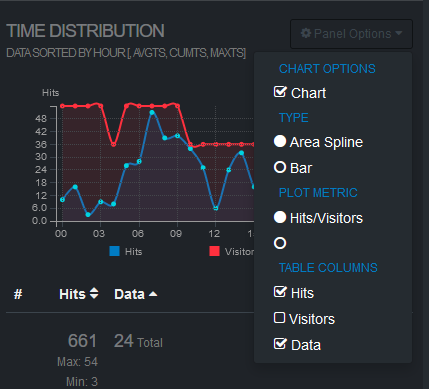
@allinurl then how to do it? I'm sorry, but there's no info in man goaccess, I can only hide tables with charts completely by adding ignore-panel option or by removing metrics from tables via dropdown menu on HTML webpage. There are no settings for graphs unfortunately.
For example, I can hide "Visitors" metrics from the table, but not from the graph (plot).
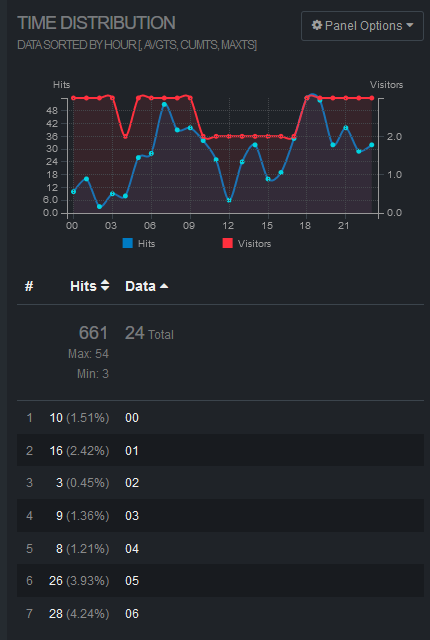
"Hits/visitors" metric is combined into one and there's also an empty option which does nothing.
Goaccess built manually after commit cab0218f3a731398ea919c31d835da23fa71e926
MasterGroosha
on 18 May 2020
@MasterGroosha I closed this issue as it was originally asking hot to hide specific table columns for given chart. Are you wanting to exclude metrics from charts or from the tables?
allinurl
on 18 May 2020
@allinurl
Sorry, English is not my primary language. I was asking about excluding metrics from charts (also called graphs and plots in UI).
I understand that it might not be possible, since I'm probably using the wrong application (web logs parser to parse just app logs), but just wanted to confirm my thoughts.
MasterGroosha
on 18 May 2020
@MasterGroosha Unfortunately there's no way to remove specific metrics from the chart. However, I think it's a valid point and a useful feature to be able to plot any of the available and relevant metrics, going forward I may be able to add this option. Feel free to open a new issue with this request so I don't forget. Thanks
allinurl
on 18 May 2020
Related issues
 ychunc
·
3Comments
ychunc
·
3Comments
 vivekkrish
·
3Comments
vivekkrish
·
3Comments
 Tassleh0ff
·
4Comments
Tassleh0ff
·
4Comments
 ArunDahiya1
·
3Comments
ArunDahiya1
·
3Comments
 domainoverflow
·
3Comments
domainoverflow
·
3Comments