Version info:
go-ipfs version: 0.6.0
Repo version: 10
System version: amd64/windows
Golang version: go1.14.4
Description:
After running the command to initialize the daemon to later configure to use the web plugin I got this error: Error: mkdir C:\Users\Andr├®\.ipfs: O sistema não pode encontrar o caminho especificado. (the last translates to: "The system cannot find o specified path").
I believe what caused this error was my user folder having a non-ASCII character(André). I've already tried to change the folder's name once, but it didn't work(windows 10 hehe). To reproduce the error one could probably just create a windows user with a non-ASCII character.
 SunkPlane29
All 10 comments
Thank you for submitting your first issue to this repository! A maintainer will be here shortly to triage and review.
In the meantime, please double-check that you have provided all the necessary information to make this process easy! Any information that can help save additional round trips is useful! We currently aim to give initial feedback within two business days. If this does not happen, feel free to leave a comment.
Please keep an eye on how this issue will be labeled, as labels give an overview of priorities, assignments and additional actions requested by the maintainers:
- "Priority" labels will show how urgent this is for the team.
- "Status" labels will show if this is ready to be worked on, blocked, or in progress.
- "Need" labels will indicate if additional input or analysis is required.
Finally, remember to use https://discuss.ipfs.io if you just need general support.
![welcome[bot] picture](https://avatars0.githubusercontent.com/in/4141?v=4&s=40) welcome[bot]
on 8 Oct 2020
welcome[bot]
on 8 Oct 2020
We should fix the path encoding. As a workaround you can set the IPFS_PATH environment variable to a different path on your system
 jacobheun
on 9 Oct 2020
jacobheun
on 9 Oct 2020
@SunkPlane29 I'm having trouble reproducing this on my machine
adin@ADIN-PC ~\Andr├® [03:20]
❯ $env:IPFS_PATH = "C:\Users\adin\Andr├®\.ipfs"
adin@ADIN-PC ~\Andr├® [03:21]
❯ ipfs-v0.6.0.exe init
initializing IPFS node at C:\Users\adin\Andr├®\.ipfs
generating 2048-bit RSA keypair...done
peer identity: Qme4RJjH5RbVxxeqUE9HsoeAdsVqxD6H42GtfqNZrrJnTg
to get started, enter:
ipfs cat /ipfs/QmQPeNsJPyVWPFDVHb77w8G42Fvo15z4bG2X8D2GhfbSXc/readme
Could you give a more precise step by step reproduction of the issue? Does it occur if you set IPFS_PATH to be your home directory instead of leaving it blank? Does it only occur in your home directory, or also if you use another directory with unicode encoding in the name?
 aschmahmann
on 20 Oct 2020
aschmahmann
on 20 Oct 2020
@aschmahmann My windows user has a special character (´). I think to reproduce the error you could set IPFS_PATH to a new directory with the name "André", with the path C:\Users\adin\André\.ipfs.
SunkPlane29
on 20 Oct 2020
@SunkPlane29 trying it locally on Windows 10 still worked (below is my powershell output)
adin@ADIN-PC ~\André [12:06]
❯ $env:IPFS_PATH="C:\Users\adin\André\.ipfs"
adin@ADIN-PC ~\André [12:07]
❯ ipfs-v0.6.0.exe init
initializing IPFS node at C:\Users\adin\André\.ipfs
generating 2048-bit RSA keypair...done
peer identity: QmTeWw3rG12RUC6W3KE94UnLKdygW41wQHFEGwzPu4wrHy
to get started, enter:
ipfs cat /ipfs/QmQPeNsJPyVWPFDVHb77w8G42Fvo15z4bG2X8D2GhfbSXc/readme
If you are able to answer some of my questions above that would be helpful in diagnosing what's going on. Additionally, if you could print out what your IPFS_PATH is when getting the error that may be helpful too.
aschmahmann
on 20 Oct 2020
@djdv have you recently run into any issues like this in go-ipfs?
aschmahmann
on 20 Oct 2020
This may have something to do with the locale setting on the machine, although I'm not familiar with how windows handles the character sets for various languages. The fact that C:\Users\André\.ipfs is the original path and the error is logging C:\Users\adin\Andr├®\.ipfs indicates to me that we're not properly locale encodings.
jacobheun
on 21 Oct 2020
@aschmahmann
I installed an Italian version of Windows 10 and set up an account with my name accented and couldn't reproduce this with the latest release.
This isn't exactly the case as described though so maybe there is something particular to that text codepage and/or perhaps that glyph/range specifically. Could also be something with combining rune and diacritic characters versus a single glyph with a visible diacritic ... fun text things.

I think @jacobheun is right here. The mojibake is usually an indicator of the text encoding being misinterpreted at some layer.
Without a repro I can't really investigate further though to find out which/where.
Go itself tends to handle this well by default though. I believe it tries to use utf8 encoding everywhere it can unless explicitly told otherwise. So it's kind of odd to see this.
@SunkPlane29
Can you tell me more about your version of Windows, and how you're starting ipfs?
If it's through cmd.exe can I get the output of chcp (looks like: Active code page: 437)
I can try to mimic your setup as close as I can to see if it happens for me.
Also if anything comes to mind about language or location settings that you can remember. Like installing an English version of Windows but later installing a language pack or anything like that, it'd be good to know.
MOST IMPORTANT
When you see this output, is it always the same?
For example, is it always Andr├®\.
If not, it could be memory corruption which has happened before due to use of the unsafe pkg within go-ipfs. Although this is unlikely since issues surrounding that were fixed already.
 djdv
on 22 Oct 2020
djdv
on 22 Oct 2020
Sorry for the late reply.
ENV INFO
My windows version is Windows 10 Home 2004.
The .ipfs is in the default ipfs desktop installation path: C:\Users\André\.ipfs.
WITH IPFS PATH
The environmental variable IPFS_PATH wasn't set before your replies. After setting IPFS_PATH to the path with special characters C:\Users\André\.ipfs the command still gives the same output:
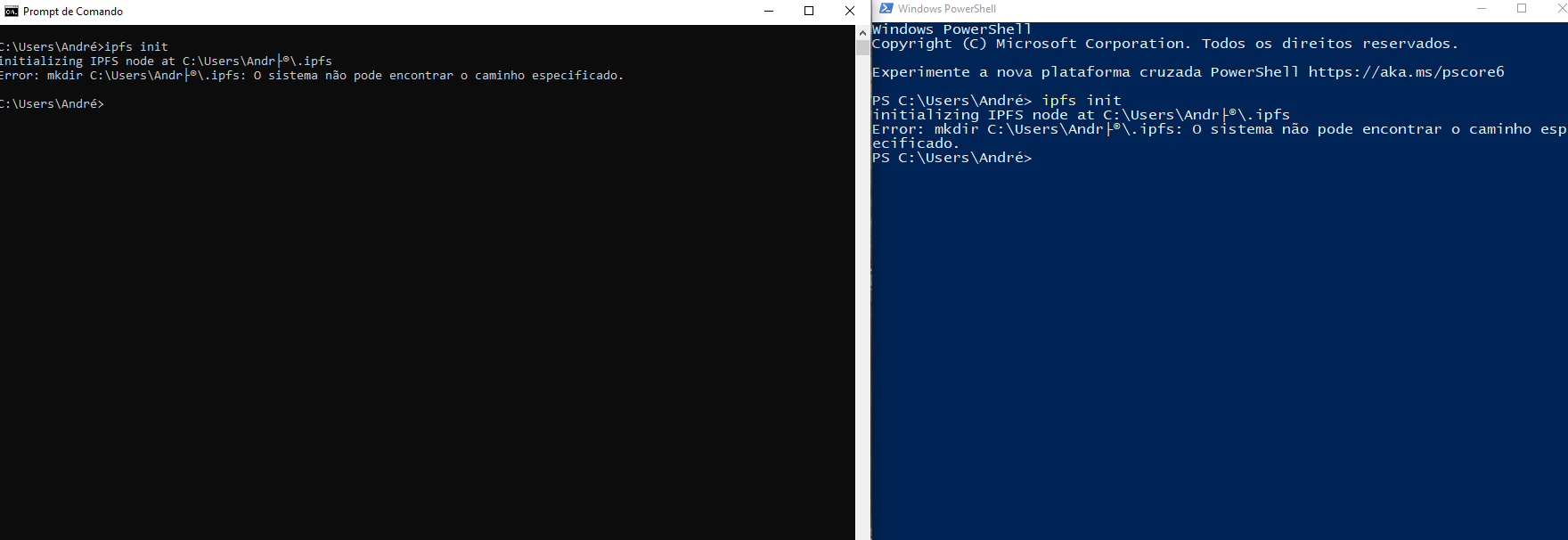
(tried using both cmd and powershell)
As for the output error, it's always the same path error:

It is possible that this issue is only happening on my machine, I will be trying runnning the command on another user on the same machine and on an other machine aswell.
SunkPlane29
on 22 Oct 2020
@SunkPlane29 what is your system locality? i.e. can you run Get-WinSystemLocale and give us the output.
My machine gives:
❯ Get-WinSystemLocale

LCID             Name             DisplayName
----             ----             -----------
1033             en-US            English (United States)
Since the André folder works on my machine it seems like we might have different locale's and related encodings. So being able to replicate your environment will help us debug.
aschmahmann
on 6 Nov 2020
Related issues
 lidel
·
3Comments
lidel
·
3Comments
 amiyatulu
·
3Comments
amiyatulu
·
3Comments
 daviddias
·
3Comments
daviddias
·
3Comments
 magik6k
·
3Comments
magik6k
·
3Comments
 jonchoi
·
3Comments
jonchoi
·
3Comments
Most helpful comment
We should fix the path encoding. As a workaround you can set the
IPFS_PATHenvironment variable to a different path on your system