Version information:
go-ipfs version: 0.4.14-dev-72714b6c8
Repo version: 6
System version: amd64/windows
Golang version: go1.9.2
Type:
Bug
Severity:
Medium
Description:
The current version of go-ipfs does not allow to browse the webui on Windows 10:
http://localhost:5001/webui leads to inifinite "Waiting for response from localhost..." on Edge browser (not tested on other browser)
When cancelling the daemon (Ctrl-C), this error message is displayed in the browser
ipfs resolve -r /ipfs/QmQLXHs7K98JNQdWrBB2cQLJahPhmupbDjRuH1b9ibmwVa/: Failed to get block for QmQLXHs7K98JNQdWrBB2cQLJahPhmupbDjRuH1b9ibmwVa: context canceled
Other API seems to work:
http://localhost:5001/api/v0/version returns
{"Version":"0.4.14-dev","Commit":"72714b6c8","Repo":"6","System":"amd64/windows","Golang":"go1.9.2"}
Prebuilt package (v0.4.13) does not have this problem.
I tried with a repository freshly created with this version and with another one created with version 0.4.13. Neither is working.
C:\Users\cedro\go\src\github.com\ipfs\go-ipfs\cmd\ipfs>ipfs daemon --init
Initializing daemon...
initializing IPFS node at C:\Users\cedro\.ipfs
generating 2048-bit RSA keypair...done
peer identity: QmfBeKj4asvZ5w7MrLs6Sqmu9iq5hWgA9Cpd72BpUgSd9P
to get started, enter:
ipfs cat /ipfs/QmS4ustL54uo8FzR9455qaxZwuMiUhyvMcX9Ba8nUH4uVv/readme
[0;37m18:09:51.821 [31mERROR [0;34mmetrics-pr: [0mRegistering prometheus collector, name: flatfs_datastore_put_total, error: duplicate metrics collector registration attempted
[0;37mbinding.go:74[0m
<....>
[0;37m18:09:52.147 [31mERROR [0;34mmetrics-pr: [0mRegistering prometheus collector, name: ipfs_bs_cache_arc_total, error: duplicate metrics collector registration attempted
[0;37mbinding.go:74[0m
Swarm listening on /ip4/127.0.0.1/tcp/4001
Swarm listening on /ip4/169.254.11.38/tcp/4001
Swarm listening on /ip4/172.16.0.100/tcp/4001
Swarm listening on /ip6/2001:0:9d38:6abd:c37:24ac:ad1e:6739/tcp/4001
Swarm listening on /ip6/::1/tcp/4001
Swarm listening on /p2p-circuit/ipfs/QmfBeKj4asvZ5w7MrLs6Sqmu9iq5hWgA9Cpd72BpUgSd9P
Swarm announcing /ip4/127.0.0.1/tcp/4001
Swarm announcing /ip4/169.254.11.38/tcp/4001
Swarm announcing /ip4/172.16.0.100/tcp/4001
Swarm announcing /ip6/2001:0:9d38:6abd:c37:24ac:ad1e:6739/tcp/4001
Swarm announcing /ip6/::1/tcp/4001
API server listening on /ip4/127.0.0.1/tcp/5001
Gateway (readonly) server listening on /ip4/127.0.0.1/tcp/8080
Daemon is ready
 cedrou
All 20 comments
Please post the output of ipfs swarm peers. This looks related to #4507 and #4512.
 Stebalien
on 21 Dec 2017
Stebalien
on 21 Dec 2017
Note: We fetch the webui on demand using IPFS, that's why not being able to dial peers can cause the webui to not work.
Stebalien
on 21 Dec 2017
The output of ipfs swarm peers is empty.
cedrou
on 22 Dec 2017
@cedrou could you try running:
ipfs swarm connect /ip4/104.131.131.82/tcp/4001/ipfs/QmaCpDMGvV2BGHeYERUEnRQAwe3N8SzbUtfsmvsqQLuvuJ
Error: connect QmaCpDMGvV2BGHeYERUEnRQAwe3N8SzbUtfsmvsqQLuvuJ failure: dial attempt failed:
<peer.ID fCxWjE> --> <peer.ID aCpDMG> dial attempt failed: dial tcp4
0.0.0.0:4001->104.131.131.82:4001: bind: Only one usage of each socket address (protocol/network
address/port) is normally permitted.
Looks like the same issue:
Can't access /webui with prebuilt package v0.4.13 on macOS 10.12
127.0.0.1:5001/webui infinite loading
127.0.0.1:5001/ returns 404 page not found
http://localhost:5001/api/v0/version returns {"Version":"0.4.13","Commit":"","Repo":"6","System":"amd64/darwin","Golang":"go1.9.2"}
go-ipfs version: 0.4.13-
Repo version: 6
System version: amd64/darwin
Golang version: go1.9.2
➜  ~ ipfs daemon --init
Initializing daemon...
Swarm listening on /ip4/127.0.0.1/tcp/4001
Swarm listening on /ip4/192.168.10.101/tcp/4001
Swarm listening on /ip6/::1/tcp/4001
Swarm listening on /p2p-circuit/ipfs/QmLongActualAddress
Swarm announcing /ip4/10.38.19.38/tcp/30312
Swarm announcing /ip4/127.0.0.1/tcp/4001
Swarm announcing /ip4/192.168.10.101/tcp/4001
Swarm announcing /ip6/::1/tcp/4001
API server listening on /ip4/127.0.0.1/tcp/5001
Gateway (readonly) server listening on /ip4/127.0.0.1/tcp/8080
Daemon is ready
ipfs swarm peers empty
➜  ~ ipfs swarm connect /ip4/104.131.131.82/tcp/4001/ipfs/QmaCpDMGvV2BGHeYERUEnRQAwe3N8SzbUtfsmvsqQLuvuJ
Error: connect QmaCpDMGvV2BGHeYERUEnRQAwe3N8SzbUtfsmvsqQLuvuJ failure: dial attempt failed: context deadline exceeded
Probably related to #3933 and maybe to #4512
 qezz
on 11 Jan 2018
qezz
on 11 Jan 2018
This is definitely #4512 (which should finally have a fix as soon as #4610 is merged).
@qezz your issue looks like #3933 but is unrelated to this issue. Could you go to that issue and follow the advice from https://github.com/ipfs/go-ipfs/issues/3933#issuecomment-340594290?
Stebalien
on 28 Jan 2018
It is affecting my Ubuntu as well
 pSnehanshu
on 18 Apr 2018
pSnehanshu
on 18 Apr 2018
@pSnehanshu please make sure you're using 0.4.14 and file a new report with all the relevant details.
Stebalien
on 19 Apr 2018
It suddenly started working today. But still has some problems. Even when I add files to ipfs, my local ipfs-http gateway is not able to fetch that file, wheres ipfs.io is able to fetch it.
pSnehanshu
on 22 Apr 2018
I am having the same problem as pSnehanshu:
"my local ipfs-http gateway is not able to fetch that file, wheres ipfs.io is able to fetch it."
Hopefully we will have the solution soon.
 5ong
on 23 Apr 2018
5ong
on 23 Apr 2018
@pSnehanshu, @5ong please open a new issue.
Stebalien
on 23 Apr 2018
Sorry this is stale - but I have the same issue on ubuntu trying to run ipfs out of docker. Any ideas on a path forward?
starting up the image from here: https://hub.docker.com/r/ipfs/go-ipfs/#docker-usage
ipfs version 0.4.18
initializing IPFS node at /data/ipfs
generating 2048-bit RSA keypair...done
peer identity: xxxxxxxxxxx
to get started, enter:

    ipfs cat /ipfs/QmS4ustL54uo8FzR9455qaxZwuMiUhyvMcX9Ba8nUH4uVv/readme

Initializing daemon...
go-ipfs version: 0.4.18-6f19dd5
Repo version: 7
System version: amd64/linux
Golang version: go1.11.1
Swarm listening on /ip4/127.0.0.1/tcp/4001
Swarm listening on /ip4/172.17.0.3/tcp/4001
Swarm listening on /p2p-circuit
Swarm announcing /ip4/127.0.0.1/tcp/4001
Swarm announcing /ip4/172.17.0.3/tcp/4001
API server listening on /ip4/0.0.0.0/tcp/5001
Gateway (readonly) server listening on /ip4/0.0.0.0/tcp/8080
Daemon is ready
 NukeManDan
on 1 Dec 2018
NukeManDan
on 1 Dec 2018
This is also happening for any version of IPFS I try on my ubuntu machine natively
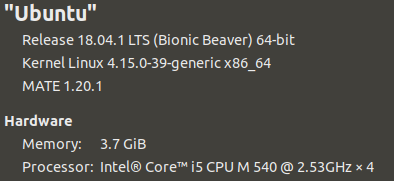
Any ideas @Stebalien ?
NukeManDan
on 1 Dec 2018
Strange:
$ curl http://localhost:5001/webui
<a href="/webui/">Moved Permanently</a>.
This is not expected behavior is it?
I have no peers from ipfs swarm peers
NukeManDan
on 1 Dec 2018
This is not expected behavior is it?
That's expected, it's a redirect. curl -L ... will follow the redirect.
I have no peers from ipfs swarm peers
This is the issue. We download the webui code over IPFS so if you can't connect to the IPFS network, you can't view the webui.
Stebalien
on 3 Dec 2018
:man_facepalming: I was at a hackathon experienceing this issue on WiFi and think the ports were being blocked silently by the venue... Found some peers now on another network. Thanks for the help anyway!
NukeManDan
on 3 Dec 2018
(really, we need to start bundling an "initial repo" that includes the webui)
Stebalien
on 3 Dec 2018
well, it's 2020 and i've been hit by this. i think this issue should be reopened.
on a really poor connection, it takes ages for the webui to load - making the process of trying to find out "what's wrong with ipfs" even harder. on a blocked connection... ...i can't even imagine.
a default pre-packed version of the webui should be provided with the package and switching to newer versions should only be enabled when it has been sucessfully pinned.
 rpodgorny
on 8 May 2020
rpodgorny
on 8 May 2020
You need permission to turn on HTTP methods:
ipfs config --json API.HTTPHeaders.Access-Control-Allow-Methods '["PUT", "GET", "POST", "OPTIONS"]'
 ancjf
on 20 Oct 2020
ancjf
on 20 Oct 2020
Related issues
 whyrusleeping
·
4Comments
whyrusleeping
·
4Comments
 lidel
·
3Comments
lidel
·
3Comments
 JesseWeinstein
·
4Comments
JesseWeinstein
·
4Comments
 magik6k
·
3Comments
magik6k
·
3Comments
 Kubuxu
·
3Comments
Kubuxu
·
3Comments
Most helpful comment
(really, we need to start bundling an "initial repo" that includes the webui)