Go-ipfs: The minimum requirements for the server are configured
Version information:
ipfs version --all
go-ipfs version: 0.4.10-
Repo version: 5
System version: amd64/linux
Golang version: go1.8.3
Type:
Etc
Severity:
Critical
Description:
My server configuration is 1 core, 512M memory
But when i execute ipfs daemon
The server becomes very crowded
So, what kind of configuration should I upgrade to make the service run smoothly?
 coderfix-lab
All 18 comments
This is quite annoying btw, since using so many memory for only about 500 connections is definitely a problem.
 zinid
on 22 Aug 2017
zinid
on 22 Aug 2017
Having the same problem on a VPS with 512MB of RAM.
 paulogr
on 22 Nov 2017
paulogr
on 22 Nov 2017
- Upgrade to the latest IPFS. We've made a lot of improvements concerning memory/CPU usage.
- We've also introduced a connection closing feature. If the default settings in go-ipfs 0.4.13 don't reduce the memory usage enough, try the connection closing limits (https://github.com/ipfs/go-ipfs/blob/master/docs/config.md#connmgr) and restart.
 Stebalien
on 22 Nov 2017
Stebalien
on 22 Nov 2017
Hi @Stebalien, thank you for your answer.
Is this a better option than --routing=dhtclient ??
What means running the daemon as dhtclient?
I saw on another issue the option to ipfs config Reprovider.Strategy pinned
"pinned" causes your nodes to only reprovide objects that youve pinned, as opposed to the default of every local block. "roots" only provides the pins themselves, and not and of their child blocks. "roots" has a much lower bandwidth cost, but may harm the reachability of content stored by your node.
Are those good options? Or those options does not contribute to keep a functional IPFS network?
paulogr
on 22 Nov 2017
What means running the daemon as dhtclient?
By default, your node will act as a DHT (distributed hash table) server. This means it will store and serve small bits of data to the network. This is how we distribute: IPNS records, content provider records (who has what content), peer address records (to map peer IDs to IP addresses, etc. This usually doesn't actually take up that much memory. However, constantly answering DHT queries can significantly increase CPU usage.
Is this a better option than --routing=dhtclient ??
I assume you mean lowering the connection limit. If so, yes for memory usage (but less so for CPU usage).
I saw on another issue the option to
ipfs config Reprovider.Strategy pinned
This will cause your node to advertise only pinned content, not random content that you happen to have cached. Basically, your node will occasionally (1m after starting and every 12h thereafter) will submit provider records to the DHT for every piece of data you're storing. This will help other nodes find data on your machine.
Impact:
- You won't see a spike in CPU/memory usage once every 12h.
- Your memory usage will grow less overtime (we have some memory leaks in our address book system so we rarely actually delete any Peer ID -> IP mappings we know about).
- Peers will only connect to you to retrieve content you've explicitly pinned. Note: they'll still be able to download other content from you, they just won't seek you out for it.
So, it's up to you. However, I kind of doubt this will have much impact. You're probably better off just lowering the connection limits.
Stebalien
on 22 Nov 2017
Now I cannot even compile it due to OOM killer :rofl:
go build -i -ldflags="-X "github.com/ipfs/go-ipfs/repo/config".CurrentCommit=e1f433e3"  -o "cmd/ipfs/ipfs" "github.com/ipfs/go-ipfs/cmd/ipfs"
go build github.com/ipfs/go-ipfs/cmd/ipfs: /usr/lib/go-1.9/pkg/tool/linux_amd64/link: signal: killed
make: *** [cmd/ipfs/ipfs] Error 1
This is on DigitalOcean VPS:
$ free -m
             total       used       free     shared    buffers     cached
Mem:           496        118        378          0          2         14
-/+ buffers/cache:        102        394
Swap:            0          0          0
@Stebalien, thank you for the long answer. It helps me to understand a little bit more about IPFS.
I've just set the new ConnMgr values and hope its make my daemon stop get killed by out of memory errors.
Really appreciate.
paulogr
on 22 Nov 2017
@Stebalien so I finally updated go-ipfs to 0.4.13, but it still consumes all memory and gets killed. Then I changed the config to (not sure what all these means):
...
  "Swarm": {
    "AddrFilters": null,
    "ConnMgr": {
      "GracePeriod": "",
      "HighWater": 100,
      "LowWater": 0,
      "Type": "none"
    },
    "DisableBandwidthMetrics": false,
    "DisableNatPortMap": false,
    "DisableRelay": false,
    "EnableRelayHop": false
  },
...
and ipfs daemon indeed consumes less memory. Let's see if it survives the day :)
zinid
on 22 Nov 2017
@zignig using LowWater: 0 is very bad idea. It will drop all connections and you need some connections to search the network.
 Kubuxu
on 22 Nov 2017
Kubuxu
on 22 Nov 2017
@Kubuxu I didn't touch this parameter.
Whatever, it got destroyed by OOM killer again.
zinid
on 22 Nov 2017
Ahh, right, LowWater will default to 600, you might want to set it to let's say 50. Otherwise ConnMgr might not close any connections.
Kubuxu
on 22 Nov 2017
@Kubuxu setting LowWater to 50 didn't help, still crashing.
zinid
on 22 Nov 2017
After change the HighWater and LowWater parameters I'm running the daemon for 5h+, my personal record :)
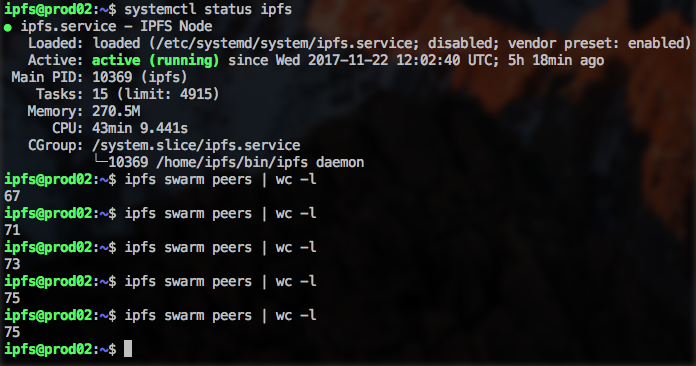
HighWater is set to 100.
LowWater to 50.
paulogr
on 22 Nov 2017
This is odd, I still have a lot of connections:
$ ipfs swarm peers | wc -l
365
and it's growing. I double checked the config again:
  "Swarm": {
    "AddrFilters": null,
    "ConnMgr": {
      "GracePeriod": "",
      "HighWater": 100,
      "LowWater": 50,
      "Type": "none"
    },
@zinid try to keep the GracePeriod as "20s" and Type as "basic" and restart the daemon after changes.
paulogr
on 22 Nov 2017
@paulogr thanks a lot, now much better. However, memory is still growing (albeit much slower).
zinid
on 22 Nov 2017
Great!
I see the memory comsuption still growing too, let's see how it happens.
paulogr
on 22 Nov 2017
Closing due to age. Memory usage has improved significantly and we've fixed most known memory leaks.
If you're still having this issue, please open a new issue.
Stebalien
on 30 Jul 2019
Related issues
 magik6k
·
3Comments
magik6k
·
3Comments
 whyrusleeping
·
4Comments
whyrusleeping
·
4Comments
 zignig
·
3Comments
zignig
·
3Comments
 Jorropo
·
3Comments
Jorropo
·
3Comments
 kallisti5
·
3Comments
kallisti5
·
3Comments
Most helpful comment
@zinid try to keep the GracePeriod as "20s" and Type as "basic" and restart the daemon after changes.