As part of our resouce consumption reduction milestore, Lets make an effort to get the idle memory usage of an ipfs node down below 100MB.
Things that could help here are:
- peerstore written to disk
- providers garbage collection smarter
- fewer goroutines per peer connection
- bitswap wantlists to disk
READ BEFORE COMMENTING
Please make sure to upgrade to the latest version of go-ipfs before chiming in. Memory usage still needs to be reduced but this gets better every release.
 whyrusleeping
All 74 comments
Yes please! On a small instance, it looks like this:

Guess who is the big one taking all the room ? :)
 chevdor
on 4 Nov 2016
chevdor
on 4 Nov 2016
A nice test for this would be running IPFS on a 512MB VPS. I ran it, using Ubuntu 14.04, running the deamon in the background, and "ipfs get" an 83MB file, the daemon was OOM killed. Testing that the get completes successfully would be nice.
I also got this, which I think is already noted as a bug:
15:19:13.466 ERROR flatfs: too many open files, retrying in 600ms flatfs.go:121
 matthewrobertbell
on 24 Nov 2016
matthewrobertbell
on 24 Nov 2016
@mattseh the chart I included above is a VPS with 512 MB running pretty much only ipfs and nginx with no swap. IPFS takes way too much, enabling swap is then sadly required.
chevdor
on 24 Nov 2016
Agreed, I only tried running it on the tiny VPS to see what the simplest thing was that would kill the deamon.
matthewrobertbell
on 24 Nov 2016
Node js implementation is separate, please report that on js-ipfs repo.
This repo is about go-ipfs implementation.
 Kubuxu
on 10 Mar 2017
Kubuxu
on 10 Mar 2017
I'm seeing 700 MB RAM usage on my VPS instance as well, it would be great if this could be lowered.
 skorokithakis
on 16 Jul 2017
skorokithakis
on 16 Jul 2017
I get OOM killed even on a system with 4 gigs of free memory.
root@hobbs:/var/log# dmesg | egrep -i 'killed process'
[764907.341661] Out of memory in UB 2046: OOM killed process 31956 (ipfs) score 0 vm:6157228kB, rss:3875436kB, swap:0kB
[2499620.020001] Out of memory in UB 2046: OOM killed process 25440 (ipfs) score 0 vm:4503708kB, rss:3905584kB, swap:0kB
root@hobbs:/var/log# ipfs version
ipfs version 0.4.10
root@hobbs:/var/log#
Is there any limitation to how much ipfs uses? How does the ipfs.io gateway stay alive? Do you just restart it every time it dies?
 timthelion
on 30 Jul 2017
timthelion
on 30 Jul 2017
Our gateways are mostly stable. As a note we are working on connection closing which should solve most of this issue.
Kubuxu
on 30 Jul 2017
I have exactly the same issue on a VPS of the same size. I have swapping on and that is what is happening. My VPS provider is complaining :)
@Kubuxu is there an ETA? I'm happy to help test an early version.
 pors
on 11 Aug 2017
pors
on 11 Aug 2017
The only way I have been able to more-or-less stably run ipfs in production was inside a memory-constrained container (systemd cgroup), restarting it everytime it crashed because not having 'enough' memory. This was about half a year ago.
Perhaps this should be considered higher priority as some newer features as it does, fundamentally, affect stability and performance of IPFS in a very bad way.
 dokterbob
on 13 Sep 2017
dokterbob
on 13 Sep 2017
I agree, this and the overall performance of downloading (which is not
great) are the only things I care about from the IPFS project. Sure,
there are new features that would be nice, but I can implement those
easilly myself by using IPLD, its no show stopper to be missing a new
feature when IPLD is as powerfull as it is. But this IS a bit of a show
stopper.
On 09/13/2017 09:58 AM, Mathijs de Bruin wrote:
>
The only way I have been able to more-or-less stably run ipfs in
production was inside a memory-constrained container (systemd cgroup),
restarting it everytime it crashed because not having 'enough' memory.
This was about half a year ago.Perhaps this should be considered higher priority as some newer
features as it does, fundamentally, affect stability and performance
of IPFS in a very bad way.—
You are receiving this because you commented.
Reply to this email directly, view it on GitHub
https://github.com/ipfs/go-ipfs/issues/3318#issuecomment-329089387,
or mute the thread
https://github.com/notifications/unsubscribe-auth/ABU7-BbKwMhirxCN8fD1IxgPjd81nG6_ks5sh4s5gaJpZM4KaIx6.
timthelion
on 13 Sep 2017
I'd love to see some improvements as well, I'm currently running high memory instances for ipfs. :)
My memory usage is around 1G and 2G.
 kpcyrd
on 13 Sep 2017
kpcyrd
on 13 Sep 2017
Hey @dokterbob, we meet again :)
pors
on 14 Sep 2017
Don't I get any love, @pors?
skorokithakis
on 14 Sep 2017
@skorokithakis huh? Scary shit :)
pors
on 14 Sep 2017
Hey everyone, we identified and resolved a pretty gnarly memory leak in the dht code. The fix was merged into master here: https://github.com/ipfs/go-ipfs/pull/4251
If youre having issues with memory usage, please try out latest master (and the soon to be tagged 0.4.11-rc2) and let us know how things go.
whyrusleeping
on 20 Sep 2017
Can we get a build uploaded somewhere, for us plebs? Also, how confident are you that this doesn't contain any show-stopping bugs? We're really really wanting to put a less leaky version to production, but we obviously don't love crashes either :/
skorokithakis
on 20 Sep 2017
Yeah, builds will be uploaded once I cut the next release candidate. We are quite confident there are no show-stopping bugs (otherwise we wouldnt have merged it), but to err on the safe side its best to wait for the final release of 0.4.11
whyrusleeping
on 20 Sep 2017
Once dns finishes propogating, the 0.4.11-rc2 builds will be here: https://dist.ipfs.io/go-ipfs/v0.4.11-rc2
The non-dns url is: https://ipfs.io/ipfs/QmXYxv8gK4SE3n1imq1YAyMGVoUDiCPgaSynMqNQXbAEzm/go-ipfs/v0.4.11-rc2
whyrusleeping
on 20 Sep 2017
@pors Nice to run into you again! Still would like to have a proper look at hackpad. How may I contact you? IRC or something?
@whyrusleeping Thanks for another rc. Let's see how this runs. ^^
dokterbob
on 20 Sep 2017
@dokterbob you can email me at mark at pors dot net. And we can change to Dutch :)
pors
on 20 Sep 2017
Can we please keep this on topic?
kpcyrd
on 20 Sep 2017
I've been running rc2 all day, and memory usage seems much better than before. It's at 16% now whereas it was at 35% before the upgrade, but, given the nature of leaks, we won't know until after a week or so.
skorokithakis
on 20 Sep 2017
@skorokithakis Thanks! Please let us know if you notice any perf regressions, fixing this properly meant putting a bit more logic in a synchronous hot path and we arent yet sure if it will be an issue in real world scenarios.
whyrusleeping
on 20 Sep 2017
More than 4 GB RAM usage here with 0.4.11, according to top:
  PID USER      PR  NI    VIRT    RES    SHR S  %CPU %MEM     TIME+ COMMAND
15384 calmari+  20   0 4797260 2,487g    188 S   3,3 86,2  25:54.47 ipfs
   33 root      20   0       0      0      0 S   0,3  0,0   0:10.12 kswapd0
 1114 mysql     20   0 1246948  12356      0 S   0,3  0,4   0:09.18 mysqld
    1 root      20   0  119780   1304    580 S   0,0  0,0   0:01.96 systemd
    2 root      20   0       0      0      0 S   0,0  0,0   0:00.00 kthreadd
    3 root      20   0       0      0      0 S   0,0  0,0   0:00.64 ksoftirqd/0
    5 root       0 -20       0      0      0 S   0,0  0,0   0:00.00 kworker/0:0H
    7 root      20   0       0      0      0 S   0,0  0,0   0:05.87 rcu_sched
    8 root      20   0       0      0      0 S   0,0  0,0   0:00.00 rcu_bh
    9 root      rt   0       0      0      0 S   0,0  0,0   0:00.01 migration/0
   10 root      rt   0       0      0      0 S   0,0  0,0   0:00.07 watchdog/0
   11 root      rt   0       0      0      0 S   0,0  0,0   0:00.07 watchdog/1
   12 root      rt   0       0      0      0 S   0,0  0,0   0:00.01 migration/1
   13 root      20   0       0      0      0 S   0,0  0,0   0:01.08 ksoftirqd/1
SSH session became unresponsive, needed to kill the daemon to get my control back.
It should be noted that my node is pinning a few popular JS frameworks, like jQuery and Mathjax. It might be the cause, but I'm not sure.
I cannot run the node all the time this way.
 Calmarius
on 9 Oct 2017
Calmarius
on 9 Oct 2017
htop reports IPFS taking up 26% of my 4 GB RAM here, which is maybe slightly better than before. I don't think 26% is warranted, especially since IPFS takes up 1% of RAM after a restart.
skorokithakis
on 9 Oct 2017
@skorokithakis ipfs network grew a lot in last few weeks. We are finally close to implementing feature we call "connection closing" which should allow you to limit number of connections and thus significantly reduce number of connected peers.
Kubuxu
on 9 Oct 2017
@Kubuxu Ah, that'd be fantastic. Will that lead to a corresponding memory usage reduction? I imagine network routing will be largely unaffected with the smaller number of peers, correct?
skorokithakis
on 9 Oct 2017
Our primiary connection muxer reserves memory buffer per stream (which usually would be like ~3x #peers). So yes, it will reduce memory usage.
Kubuxu
on 9 Oct 2017
Yeah, we fixed one memory issue (my previous comment) and then in the following couple weeks, the network increased from 1k nodes, to over 6.5k nodes. Since memory usage is mostly linear with the number of peers you have that is causing problems...
whyrusleeping
on 11 Oct 2017
Wow, what caused the sudden increase in nodes?
dokterbob
on 11 Oct 2017
I guess it was the Catalan referendum's website. The Spanish government shut down their websites so as a last resort they hosted it on IPFS.
http://la3.org/~kilburn/blog/catalan-government-bypass-ipfs/
This gave enough publicity to the project which caused the rapid growth.
Calmarius
on 11 Oct 2017
@Kubuxu Do you know when this will be released? My server is getting killed by the IPFS node taking up 30% of all memory.
skorokithakis
on 30 Oct 2017
@skorokithakis I'd try the RC: https://github.com/ipfs/go-ipfs/releases/tag/v0.4.12-rc1.
 Stebalien
on 30 Oct 2017
Stebalien
on 30 Oct 2017
@Stebalien Fantastic news, thank you.
skorokithakis
on 30 Oct 2017
I've been having memory issues with 0.4.11 (being killed around 2GB of RAM) - going to update to 0.4.12-rc1 and post here if I have issues. (Also have a cron job running every 24 hours to collect up a debug package)
That said, is there a binary for 0.4.12-rc1 or do we need to compile from source?
 XertroV
on 31 Oct 2017
XertroV
on 31 Oct 2017
Make sure you enable the connection manager as described in the pull request, it's not enabled by default.
skorokithakis
on 31 Oct 2017
@skorokithakis it is since: https://github.com/ipfs/go-ipfs/commit/c0d6224f0ecf6d301da4931deb3c12838ea3dcce
Kubuxu
on 31 Oct 2017
Sweeto - so I should be good to compile from the v0.4.12-rc1 tag?
Compiling now - few hiccups with $GOPATH but following the README and checking out v0.4.12-rc1 seems to be working now. 👍
XertroV
on 31 Oct 2017
We also put RC versions on the dist.ipfs.io: https://dist.ipfs.io/go-ipfs/v0.4.12-rc1
Kubuxu
on 31 Oct 2017
Using 0.4.13-rc1 on FreeBSD and with 900 open connections it uses about 288MB of RAM.
This version seems to fix the lavish amount of RAM it used to occupy before.
Only remark I have is that after it reaches its' connections highmark (900) it will drop all connections till it is back at the lowmark (600).
Wouldn't it be more logical to not accept any new connections after the highmark is reached instead of dropping down to the lowmark?

 mgamsjager
on 16 Nov 2017
mgamsjager
on 16 Nov 2017
I hope it works, 0.4.12 uses 1 GB of RAM and that's only because I used cgroups to limit it to that.
skorokithakis
on 16 Nov 2017
Wouldn't it be more logical to not accept any new connections after the highmark is reached instead of dropping down to the lowmark?
No, because forming new connections is very important for the proper functioning of the network.
0.4.13 shouldnt impact memory usage at all. Its simply a hotfix for a couple bugs we discovered. The next memory usage drop should come when we fix the address storage issues: https://github.com/libp2p/go-libp2p-peerstore/issues/15
whyrusleeping
on 16 Nov 2017
IPFS used 8.8 GB RAM before i rebootet the system. Has connection to 1125 peers right now.
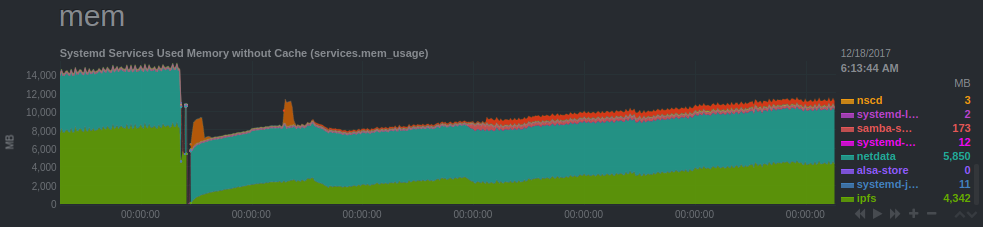
I'm running version 0.4.10.
 davidak
on 18 Dec 2017
davidak
on 18 Dec 2017
@davidak update to 0.4.13, you should see a pretty significant improvement.
whyrusleeping
on 18 Dec 2017
Just FYI - if you somehow built IPFS code (I know the official releases don't) with -race flag, the memory consumption can be 20x times larger. See https://golang.org/doc/articles/race_detector.html#Runtime_Overheads
 joesis
on 26 Dec 2017
joesis
on 26 Dec 2017
https://github.com/ipfs/go-ipfs/pull/4509 reduces memory consumption during large ipfs add operations.
whyrusleeping
on 3 Jan 2018
https://github.com/ipfs/go-ipfs/pull/4525 reduces memory consumption for gateways that are serving large files.
whyrusleeping
on 3 Jan 2018
0.4.17, 300 MB on a new ipfs init. That's not going to work and the reason is not the tiny VPSes, but Android and iOS phones that usually have 1 GB of RAM with much less available at runtime.
 klueq
on 22 Sep 2018
klueq
on 22 Sep 2018
As it usually happens, we write software in assumption that a typical user has a 24 CPUs, 32 GB RAM Linux station :)
klueq
on 23 Sep 2018
Here is another datapoint. On a machine with 1.7 GB of RAM and 3G of swap, running only IPFS daemon in server mode and nginx, after 4 days we see 1.6 GB of RAM used and 550 MB of swap space used.
             total       used       free     shared    buffers     cached
Mem:       1730344    1654536      75808         36      15120      54728
-/+ buffers/cache:    1584688     145656
Swap:      3014648     616008    2398640
Version is docker image jbenet/go-ipfs:latest, 0.4.17.

 burdakovd
on 25 Sep 2018
burdakovd
on 25 Sep 2018
Can we have a flag to limit the number of peers and some smart logic to discard bad peers and get good ones? That seems to be the unavoidable reason for high memory footprint.
klueq
on 26 Sep 2018
@klueq Check out the connection manager. https://github.com/ipfs/go-ipfs/blob/419bfdc20fc68d70ba0ea5dc9d0bed8db16c1c11/docs/config.md#connmgr
dokterbob
on 26 Sep 2018
Cool. Looks like it's already there.
Another suggestion is why not to use UDP? From my limited understanding, all those 800 TCP connections with peers are idle 99% of the time, but they have real memory buffers and other overhead on both sides. Instead, we could send a UDP ping from time to time to check if the peer is online and if we need to transfer some data reliably, we send another UDP message, the peer acks it and we create a temporary TCP channel.
klueq
on 26 Sep 2018
There is experimental QUIC transport that uses UDP.
Should roll out wider soon-ish.
https://github.com/ipfs/go-ipfs/blob/master/docs/experimental-features.md#quic
Kubuxu
on 26 Sep 2018
The TCP buffers arent the dominating consumer of memory here. Plus, re-establishing a new connection is very much non-trivial.
whyrusleeping
on 26 Sep 2018
The memory issue comes from our internal buffers/state. We're constantly working on improving this but it'll take time. (semi related: https://github.com/libp2p/go-libp2p/issues/438)
Stebalien
on 26 Sep 2018
This is something I've been interested in recently (see #5530) and a reality that we have to contend with is that Go is memory hoggish, and is getting moreso (golang/go#23687).
[note: I edited this post a lot as I got closer to the heart of the issue, apologies!]
Go is very reluctant to give any memory back to the OS unless the OS very much needs it.
I think that something that could be considered for go-ipfs is: What does it mean when we say 'idle memory less than 100MB'?
This is an important question because it determines how much work should be done on _how_ go-ipfs uses memory, not just _how much_ memory go-ipfs uses.
Some examples are:
- Steady-state memory usage is less than 100MB.
E.g. loaded binary = 20MB, stacks = 20MB, heap = 60MB
But the Go runtime will wait until the heap doubles before running the GC. So maybe... - Allocated memory is less than 100MB.
E.g. loaded binary = 20MB, stacks = 20MB, heap = 30MB, garbage = 30MB.
But the Go runtime will hold on to some memory after cleaning garbage, to make future alloc's quicker... - Allocated plus alloc'd cache memory is less than 100MB.
E.g. loaded binary = 20MB, stacks = 20MB, heap = 24MB, garbage = 24MB, alloc'd cache = 12MB.
But the Go runtime doesn't truly give any memory back to the OS. It just marks it MADV_FREE which the OS doesn't act upon straight away.... - Resident memory is less than 100MB.
E.g. loaded binary = 20MB, stacks = 20MB, heap = 15MB, garbage = 15MB, alloc'd cache = 10MB, MADV_FREE cache = 20MB.
Or, in table form:
| Limit on | Binary | Stacks | Heap | Garbage | Alloc'd Cache | MADV_FREE cache | Total |
| ---: | ---: | ---: | ---: | ---: | ---: | ---: | ---: |
| Steady-state | 20 | 20 | 60 | 60 | 30 | 60 | 250 |
| Allocated | 20 | 20 | 30 | 30 | 15 | 30 | 145 |
| Allocated+ | 20 | 20 | 24 | 24 | 12 | 24 | 124 |
| Resident | 20 | 20 | 15 | 15 | 10 | 20 | 100 |
 rob-deutsch
on 4 Oct 2018
rob-deutsch
on 4 Oct 2018
I'm running IPFS 0.4.17 on my Raspberry PI (using the low power profile if I remember correctly). When it starts it has low memory usage, But that memory usage slowly climbs up as the hours pass. Within 1-2 days the OOM killer usually kills it. The number of connections are low the "ipfs swarm peers" don't fill the terminal window.
So I think something is leaking there. Or in the Go runtime.
Calmarius
on 25 Nov 2018
@Calmarius Try 0.4.18. There has been significant work towards reducing memory usage. Likely not fully resolved, but should be noticeably better.
whyrusleeping
on 27 Nov 2018
Maybe put a reference to 0.4.18 in the description so we won't have to tell them about it all the time.
(By the way kudo's on the good work, resource usage is indeed much more stable - although not nearly there yet!)
Whyrusleeping notifications@github.com schreef op 27 november 2018 18:49:01 GMT+00:00:
@Calmarius Try 0.4.18. There has been significant work towards reducing
memory usage. Likely not fully resolved, but should be noticeably
better.
--
Verstuurd vanaf mijn Android apparaat met K-9 Mail. Excuseer mijn beknoptheid.
dokterbob
on 27 Nov 2018
Yes! Updated to 0.4.18 and it's running without problems for 2 weeks on my rpi. Great progress indeed!
Calmarius
on 15 Dec 2018
0.4.20, using more than 3GB Ram, problem still
 voxsoftware
on 27 May 2019
voxsoftware
on 27 May 2019
0.4.20, using more than 3GB Ram, problem still
Under what load, and after running for how long? Does it cap at 3GB for you, or continue to grow?
 lordcirth
on 27 May 2019
lordcirth
on 27 May 2019
I am running about 2 days, but really i still not use too much. Continue growring, now is 3.7GB Ram. Under Ubuntu 18.04 package: go-ipfs. I am on a machine with 9.5 GB Ram, and getting killed processed due to go-ipfs
voxsoftware
on 27 May 2019
I really wonder whats causing this. mars (our first bootstrapper node, and arguably the most connected to ipfs node) peaks at just over 4GB, but every time I check, that much memory is not actually in use, its just the go runtime refusing to return the memory to the OS.
@Stebalien can we try running that memory profile dumper thing on some machines? https://gist.github.com/whyrusleeping/b0431561b23a5c1d8b2dfce5526751aa
whyrusleeping
on 27 May 2019
Just now was killed the daemon. This makes go-ipfs unusable. Have js-ipfs the same problem?
voxsoftware
on 27 May 2019
@voxsoftware try disabling the DHT by running the daemon with ipfs daemon --routing=dhtclient. Also, I'd consider upgrading to the latest RC (go-ipfs 0.4.21-rc3) or just wait for the release (likely tonight or tomorrow).
Stebalien
on 27 May 2019
I started with --routing=dhtclient. In about 1 hour, now is 850MB memory. I evaluated using ipfs on desktop app, but with this, I see really still unusable for that purpose
voxsoftware
on 28 May 2019
Same here. I'm thinking of having systemd restart the daemon once a day, which is, unfortunately, the last thing I'm going to try before giving up on IPFS altogether...
skorokithakis
on 28 May 2019
Same here. I'm thinking of having systemd restart the daemon once a day, which is, unfortunately, the last thing I'm going to try before giving up on IPFS altogether...
I set a memory cap in systemd. The memory pressure keeps it's usage down, and if it still goes over, it gets automatically killed and restarted. Works well enough.
lordcirth
on 28 May 2019
Same here. I'm thinking of having systemd restart the daemon once a day, which is, unfortunately, the last thing I'm going to try before giving up on IPFS altogether...
I set a memory cap in systemd. The memory pressure keeps it's usage down, and if it still goes over, it gets automatically killed and restarted. Works well enough.
Can you give an example please? An this works ok for Linux backend, but, how about using in a desktop app for example in Windows?
voxsoftware
on 28 May 2019
Same here. I'm thinking of having systemd restart the daemon once a day, which is, unfortunately, the last thing I'm going to try before giving up on IPFS altogether...
I set a memory cap in systemd. The memory pressure keeps it's usage down, and if it still goes over, it gets automatically killed and restarted. Works well enough.
Can you give an example please? An this works ok for Linux backend, but, how about using in a desktop app for example in Windows?
Like so:
https://gist.github.com/lordcirth/378ae7c3a8d2786874d00867098cbad1
As for Windows, dunno. Haven't used it much in a long time.
lordcirth
on 28 May 2019
@lordcirth this is extremely helpful, thank you.
skorokithakis
on 28 May 2019
Related issues
 magik6k
·
3Comments
whyrusleeping
·
4Comments
magik6k
·
3Comments
whyrusleeping
·
4Comments
 Jorropo
·
3Comments
Jorropo
·
3Comments
 emelleme
·
3Comments
emelleme
·
3Comments
 jonchoi
·
3Comments
jonchoi
·
3Comments
Most helpful comment
I guess it was the Catalan referendum's website. The Spanish government shut down their websites so as a last resort they hosted it on IPFS.
http://la3.org/~kilburn/blog/catalan-government-bypass-ipfs/
This gave enough publicity to the project which caused the rapid growth.