Go-ipfs: Disk space usage of old Files API nodes
Version information: Official 0.4.3 64 bit Linux binary
Type: Files API
Priority: P3
Description:
I've been adding a large amount of small files, using the files API, and on a cronjob using "ipfs name publish $(ipfs files stat / | head -n 1)" to publish to IPNS.
The disk is now full. The disk IPFS is using is 250GB of Digital Ocean Block storage:
root@ipfs:~# df -h | grep ipfs
Filesystem Size Used Avail Use% Mounted on
/dev/sda 246G 246G 0 100% /root/.ipfs
I tried to run "ipfs files stat /", but it failed due to no disk space being available (is this a bug?), so I instead did this to get the root object's stats:
root@ipfs:~# ipfs resolve /ipns/QmekbrSJGBAJy6Yzbj5e2pJh61nxWsTwpx88FraUVHwq8x
/ipfs/QmTgJ1ZWcGDhyyAnvMn3ggrQntrR6eVrhMmuVxjcT7Ct3D
root@ipfs:~# ipfs object stat /ipfs/QmTgJ1ZWcGDhyyAnvMn3ggrQntrR6eVrhMmuVxjcT7Ct3D
NumLinks: 1
BlockSize: 55
LinksSize: 53
DataSize: 2
CumulativeSize: 124228002182
The useful data is ~124GB, so almost twice the amount of storage is being used as there is added data. Is this because of old root objects hanging around?
Over 99% of disk usage is in .ipfs/blocks
 matthewrobertbell
All 14 comments
Possibly, also you might have old files, or not longer reachable files lying around.
You might want to make sure that all of your important files are pinned or reachable by Files API root and run ipfs repo gc to remove old roots, unneeded files and so on.
 Kubuxu
on 24 Sep 2016
Kubuxu
on 24 Sep 2016
The script only adds files, it doesn't delete them, so there shouldn't be any old files.
With that being the case, is a gc safe, as all files are reachable from root?
Thanks
matthewrobertbell
on 24 Sep 2016
It should be on 0.4.3.
Kubuxu
on 24 Sep 2016
root@ipfs:~# ipfs repo gc
Error: write /root/.ipfs/blocks/CIQJC/put-441273290: no space left on device
All data on the device is from IPFS, is there a way to get around this?
matthewrobertbell
on 24 Sep 2016
@lgierth, @whyrusleeping: I think you in the past recovered from situation like that so I think you might be more of a help.
Kubuxu
on 24 Sep 2016
You'll have to free up a few kilobytes somehow, go-ipfs is currently not able to start if there's no space left. You could also move some subdirectory of the repo to a ramdisk or similar.
 ghost
on 24 Sep 2016
ghost
on 24 Sep 2016
Moving the datastore folder worked and gc ran successfully. Is it suggested to run gc regularly on cron with my usecase? The problem I see is that it requires an exclusive lock so the daemon can't run.
Ideally old roots would be automatically cleaned up by the files API, is this planned?
Thanks
matthewrobertbell
on 24 Sep 2016
You can have the daemon itself trigger a gc automatically by starting it like this ipfs daemon --enable-gc and then editing your ipfs config. You can set things like the interval, max storage, etc.
https://github.com/ipfs/go-ipfs/blob/master/docs/config.md#datastore
I believe there will be more ways to trigger a gc and constrain resources automatically in the future: https://github.com/ipfs/go-ipfs/issues/1482
Edit:
it requires an exclusive lock so the daemon can't run.
You should be able to initiate a gc while the daemon is running or not so long as it's not already locked. I tend to do mine manually while it is up. You can also prune specific hashes with the ipfs block rm <hash> if you just want to just remove old roots specifically.
 djdv
on 24 Sep 2016
djdv
on 24 Sep 2016
Possible duplicate of #3621. Also, the tracking of how the repo size grows has been incorporated into the benchmark.
Edit: s/Duplicate/Possible duplicate/
Edit: one more disease strand is confirmed
 rht
on 31 Jan 2017
rht
on 31 Jan 2017
@rht it isn't duplicate of #3621. #3621 references directly the pin sharding creating a lot of intermediate nodes, this is is about files api.
Kubuxu
on 31 Jan 2017
I know the files are being added with files api, but additionally they are pinned, and the extra store is likely due to the same reason as #3621 regardless of how the files are being added (the almost twice size of storage increase might be a coincidence). This can be quickly tested though.
rht
on 31 Jan 2017
They don't have to be pinned and files API doesn't use pinset for pinning.
Kubuxu
on 31 Jan 2017
Confirmed there is an additional storage explosion coming from ipfs files cp (after being pinned):
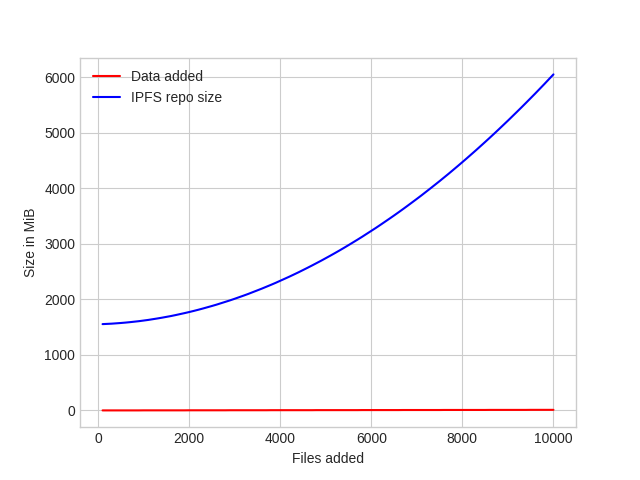
Tested on https://github.com/ipfs/go-ipfs/pull/3640 (even after deterministic pin sharding).
rht
on 1 Feb 2017
The trick is to use --flush false and once you are done (after the 10k files cp) to do a ipfs files flush on the root path.
 mguentner
on 2 Feb 2017
mguentner
on 2 Feb 2017
Related issues
 funkyfuture
·
3Comments
funkyfuture
·
3Comments
 jonchoi
·
3Comments
jonchoi
·
3Comments
 ArcticLampyrid
·
3Comments
ArcticLampyrid
·
3Comments
 magik6k
·
3Comments
magik6k
·
3Comments
 whyrusleeping
·
4Comments
whyrusleeping
·
4Comments
Most helpful comment
The trick is to use
--flush falseand once you are done (after the 10kfiles cp) to do aipfs files flushon the root path.