Go-flutter: hover cannot get hover / assets / app / directory
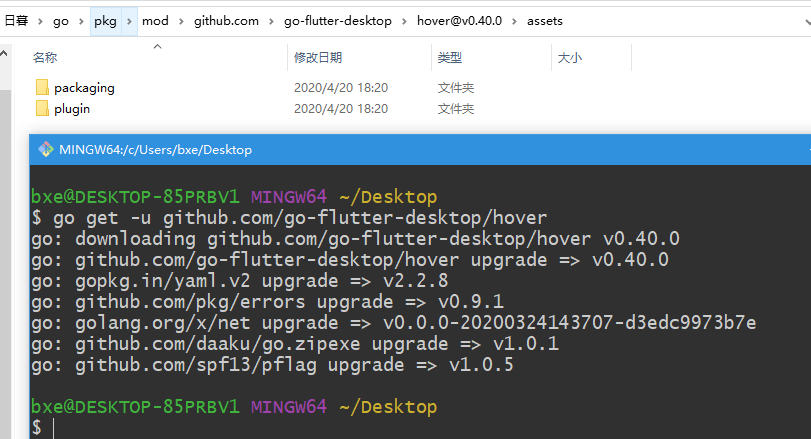
Can't get “app ” directory
$ go get -u github.com/go-flutter-desktop/hover
The hover init command will cause the main.go file not to be found
Screenshot

 qianniancn
All 7 comments
What is the output of go env ?
 pchampio
on 20 Apr 2020
pchampio
on 20 Apr 2020
输出是
go env什么?
$ go version
go version go1.14.2 windows/amd64
$ go env
set GO111MODULE=on
set GOARCH=amd64
set GOBIN=
set GOCACHE=C:\Users\bxe\AppData\Local\go-build
set GOENV=C:\Users\bxe\AppData\Roaming\go\env
set GOEXE=.exe
set GOFLAGS=
set GOHOSTARCH=amd64
set GOHOSTOS=windows
set GOINSECURE=
set GONOPROXY=
set GONOSUMDB=
set GOOS=windows
set GOPATH=C:\Users\bxe\go
set GOPRIVATE=
set GOPROXY=https://goproxy.cn,direct
set GOROOT=D:\Go
set GOSUMDB=sum.golang.org
set GOTMPDIR=
set GOTOOLDIR=D:\Go\pkg\tool\windows_amd64
set GCCGO=gccgo
set AR=ar
set CC=gcc
set CXX=g++
set CGO_ENABLED=1
set GOMOD=NUL
set CGO_CFLAGS=-g -O2
set CGO_CPPFLAGS=
set CGO_CXXFLAGS=-g -O2
set CGO_FFLAGS=-g -O2
set CGO_LDFLAGS=-g -O2
set PKG_CONFIG=pkg-config
set GOGCCFLAGS=-m64 -mthreads -fmessage-length=0 -fdebug-prefix-map=C:\Users\bxe\AppData\Local\Temp\go-build775257918=/tmp/go-build -gno-record-gcc-switches
qianniancn
on 20 Apr 2020
Can't it be set to GO111MODULE=on ?
qianniancn
on 20 Apr 2020
It should be on, yes. We depend on Go-module based building in new features. But I forgot it would break our assets embedding. Working on a fix right now at go-flutter-desktop/hover#101.
 GeertJohan
on 20 Apr 2020
GeertJohan
on 20 Apr 2020
duplicate of: https://github.com/go-flutter-desktop/go-flutter/issues/306 we are working on a fix: https://github.com/go-flutter-desktop/hover/pull/101
Can't it be set to GO111MODULE=on
It seems that only auto works.
pchampio
on 20 Apr 2020
@qianniancn Can you please try with the latest version of hover?
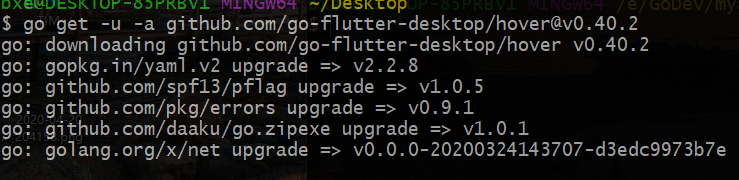
GO111MODULE=on go get -u -a github.com/go-flutter-desktop/[email protected]
It should work (it may error on the folder go already existing in your flutter project, if you have not done any work to the go folder you can remove it from the project and let hover init create it again.
GeertJohan
on 20 Apr 2020
@qianniancn Can you please try with the latest version of hover?
GO111MODULE=on go get -u -a github.com/go-flutter-desktop/[email protected]It should work (it may error on the folder
goalready existing in your flutter project, if you have not done any work to thegofolder you can remove it from the project and lethover initcreate it again.
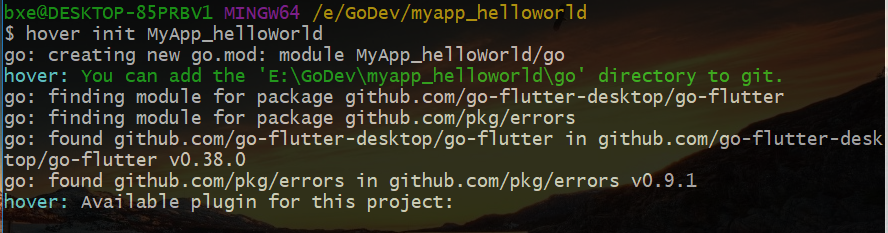
can use GO111MODULE=on, which is a perfect solution, thank you!
qianniancn
on 20 Apr 2020
Related issues
 bashery
·
3Comments
bashery
·
3Comments
 ohsory1324
·
4Comments
ohsory1324
·
4Comments
 Fireprufe15
·
6Comments
pchampio
·
8Comments
Fireprufe15
·
6Comments
pchampio
·
8Comments
 monkeyWie
·
7Comments
monkeyWie
·
7Comments
Most helpful comment
@qianniancn Can you please try with the latest version of hover?
It should work (it may error on the folder
goalready existing in your flutter project, if you have not done any work to thegofolder you can remove it from the project and lethover initcreate it again.